TopPodcast.com
Menu
  • Home
  • Top Charts
  • Top Networks
  • Top Apps
  • Top Independents
  • Top Podfluencers
  • Top Picks
    • Top Business Podcasts
    • Top True Crime Podcasts
    • Top Finance Podcasts
    • Top Comedy Podcasts
    • Top Music Podcasts
    • Top Womens Podcasts
    • Top Kids Podcasts
    • Top Sports Podcasts
    • Top News Podcasts
    • Top Tech Podcasts
    • Top Crypto Podcasts
    • Top Entrepreneurial Podcasts
    • Top Fantasy Sports Podcasts
    • Top Political Podcasts
    • Top Science Podcasts
    • Top Self Help Podcasts
    • Top Sports Betting Podcasts
    • Top Stocks Podcasts
  • Podcast News
  • About Us
  • Podcast Advertising
  • Contact
Not in our directory?
Add Show Here
Podcast Equipment
Center

toppodcastlogoOur TOPPODCAST Picks

  • Comedy
  • Crypto
  • Sports
  • News
  • Politics
  • True Crime
  • Business
  • Finance

Follow Us

toppodcastlogoStay Connected

    View Top 200 Chart
    Back to Rankings Page
    Technology

    StorageReview.com

    StorageReview.com is a leading provider of news and reviews throughout the entire IT stack – from the datacenter to the edge, and all points in between.

    Advertise
    • Apple Podcasts
    • Google Play
    • Spotify

    Latest Episodes:
    Seagate Exos M HAMR SMR Drives Join Broadcom’s eHBA 9600 Approved Vendor List After Azure Qualification Oct 28, 2026
    Show notes

    Seagate announced that its Mozaic hard drives built on heat-assisted magnetic recording (HAMR) and configured for shingled magnetic recording (SMR) have been added to Broadcom’s approved vendor list for its host bus adapters, which Seagate calls the first and only SMR drives on the list. Microsoft Azure Storage has qualified the Broadcom HBA with Seagate HAMR plus SMR drives for its fleet, which gives the pairing a hyperscale proof point. The practical effect is that a buyer can order the highest-capacity Seagate drives and a Broadcom controller as a supported combination without doing the interoperability work themselves.

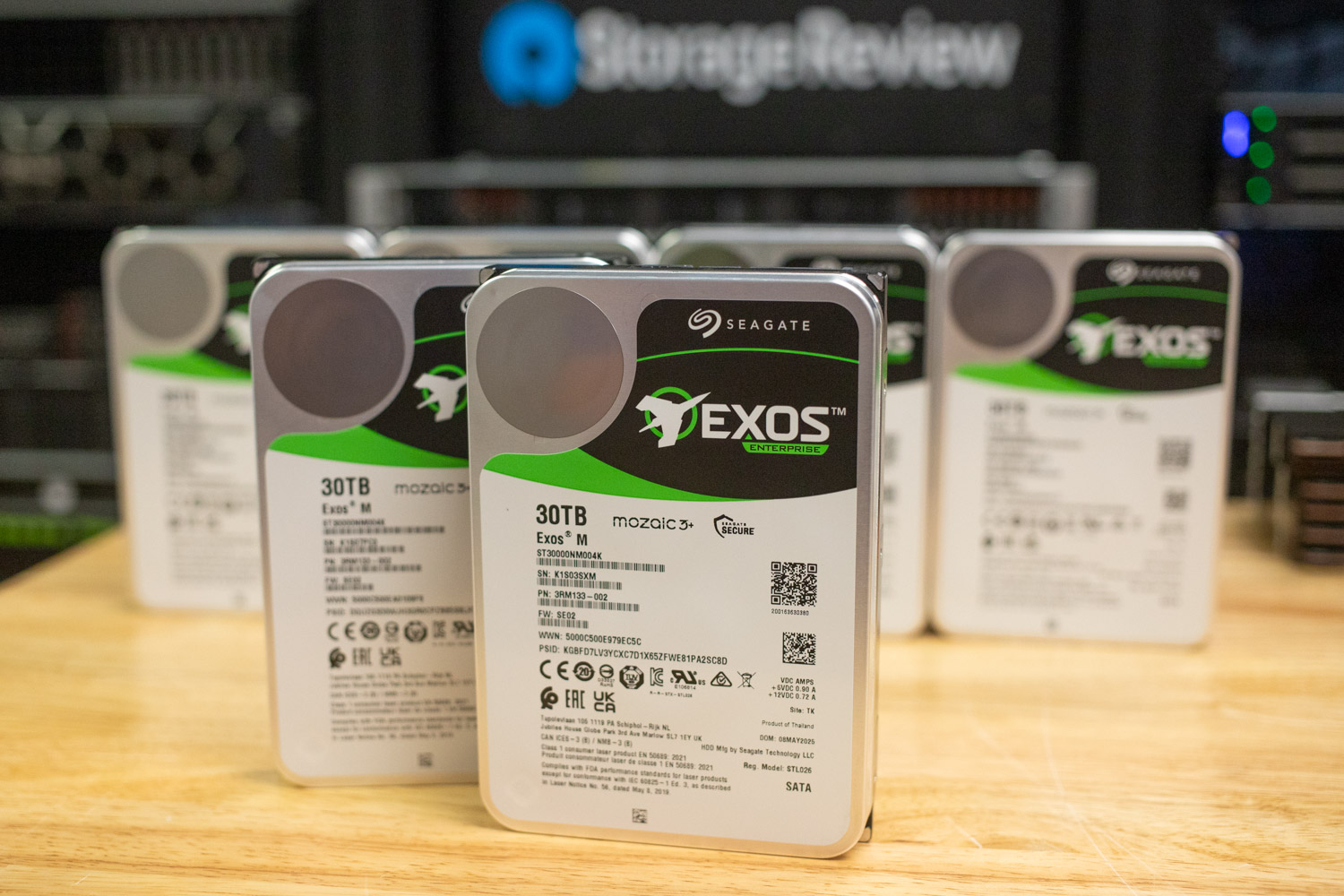
    Seagate Exos M Mozaic 3+ hard drives standing on a bench in the StorageReview lab

    Which Drives and Which HBAs

    Seagate’s announcement names no part numbers, but Broadcom’s compatibility report for the eHBA 96xx family does. The new SMR section lists two Seagate SATA 6Gb/s models, the 32TB ST32000NM001F on firmware SR05 and the 36TB ST36000NM001M on firmware SR01, both qualified at Broadcom firmware phase MR8.17 with 512-byte logical sectors, against the eHBA 9620-16i, 9600-24i, and 9600-16i Tri-Mode adapters. Those are the SMR versions of the Exos M line on the Mozaic 3+ platform, the 3TB-per-platter HAMR design that Seagate took to 36TB with SMR.

    The same report, updated the same day, also carries an SMR page for Western Digital, listing 17 Ultrastar DC HC690 models at Broadcom firmware phase MR8.18. Seagate’s drives sit one firmware phase earlier, which supports the “first” in Seagate’s claim, but Broadcom’s list no longer supports “only,” and buyers comparing the two SMR camps can now do it on the same adapter. Both lists are SATA only; no SAS SMR models appear for either vendor.

    Why SMR Needed a Qualification

    SMR overlaps adjacent tracks to raise capacity, which turns the drive into a zoned device: data is written sequentially inside zones, and the host or the drive has to manage the rewrites. Host-managed SMR drives in particular do not behave like conventional disks at the SCSI and ATA command level, and an HBA or RAID stack that does not pass the zone commands through cleanly will refuse the drive or corrupt it.

    That is why SMR has lived almost entirely inside hyperscalers that write the host software themselves. When we tested the host-managed Exos X26z, Windows did not see the drive at all, a Supermicro server’s SAS bays did not detect it under Ubuntu, and it only appeared on a direct SATA cable with a zoned btrfs file system on top.

    An AVL entry means Broadcom has run the drive through its interoperability suite on the named adapters and firmware, and will support the combination. Broadcom describes the HBA’s role as the communication path that lets large numbers of drives be connected, addressed, and managed by the host, and frames the SMR qualification as a path for more customers to integrate and manage high-capacity drive fleets. For an enterprise or a second-tier cloud that wants Azure-class density on a standard server, that support ticket is the difference between an SMR tier being a project and being a purchase.

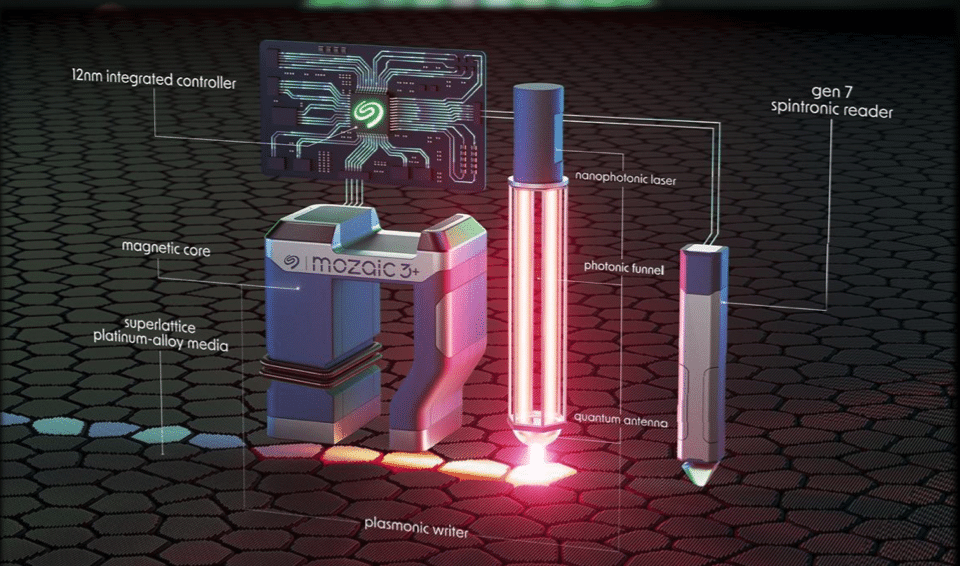
    Seagate Mozaic 3+ platform graphic showing the HAMR recording stack and platter

    Azure as the Reference Customer

    Microsoft’s Azure Memory and Storage Center of Excellence completed the qualification of the Broadcom HBA with Seagate’s HAMR plus SMR drives. “At hyperscale, storage infrastructure has to meet demanding requirements for interoperability, manageability and infrastructure efficiency at scale,” said Pablo Ziperovich, general manager, Azure Memory and Storage Center of Excellence at Microsoft. “Microsoft Azure’s joint validation and qualification of Seagate and Broadcom’s SMR configuration demonstrates how these technologies can work together across large data center deployments, enabling greater storage density at a similar cost and power envelope.”

    The cost and power clause is the business case, because the 36TB SMR drive fits the same 3.5-inch bay as the 30TB and 32TB CMR Exos M, so a rack of them adds capacity without adding slots or controllers, and Microsoft’s statement puts the cost and power envelope as similar. Seagate has not published pricing for the SMR models.

    “High-capacity storage innovation delivers the greatest value when customers put that capacity to work efficiently,” said Jason Feist, Senior Vice President, Cloud Business at Seagate. “By pairing Seagate HAMR + SMR storage technology with Broadcom’s connectivity infrastructure, we’re helping make high-capacity SMR storage more accessible and easier to deploy as AI and cloud data demands grow.”

    Seagate Exos

    The post Seagate Exos M HAMR SMR Drives Join Broadcom’s eHBA 9600 Approved Vendor List After Azure Qualification appeared first on StorageReview.com.


    Ollama 0.40.11 Hands-On: Running Local LLMs on Windows Oct 28, 2026
    Show notes

    Ollama 0.40.11 gives Windows users a desktop chat application and a local model runtime for other software. Ollama has also moved beyond its original command-line interface, adding a searchable model selector, image attachments, and links to coding tools. Some controls we needed for testing still live in PowerShell and model configuration files. We installed Ollama on our HP Z4 Rack G5 running Windows 11 Pro for Workstations, with 128GB of RAM and an NVIDIA RTX 5000 Ada Generation GPU. Using our existing Jan V3.5 4B and Jan V2 VL High GGUFs, we tested generation speed, chat, images, online search, and the local API. Ollama ran our local models well, though importing the GGUFs and collecting performance data took us out of the desktop chat. It is the third application in our local LLM series, after Jan and Open WebUI, and the results feed our Best Local LLM Tools page. Test System Component Configuration Operating System Windows 11 Pro for Workstations CPU Intel Xeon w5-2465X, 16 cores Memory 128GB GPU NVIDIA RTX 5000 Ada Generation VRAM 32GB (32,760 MiB reported) NVIDIA Driver 597.06 CUDA Compatibility 13.2 (reported by nvidia-smi) Ollama 0.40.11 Inference Runtime Ollama llama.cpp runner (build number not recorded) Installing Ollama and Getting Started Installing Ollama on our Windows workstation was a welcome change from some of the setup headaches we encountered with other applications in this series. We downloaded the standard Windows installer, launched the application, and didn’t have to install a separate inference runtime or track down CUDA packages. A quick PowerShell check confirmed that Ollama 0.40.11 was running and that its local service was already responding at http://127.0.0.1:11434. Ollama’s welcome screen introduces its local AI features and connections to coding tools before opening the main interface. After we got past the welcome screen, Ollama opened to a familiar chat interface with recent conversations, Apps, and Settings in the left sidebar. The message field keeps the attachment button, Web Search, and model selector together. We could start chatting with our imported local models without creating an account, although Ollama asked us to sign in when we later tried enabling Web Search during testing. Browsing and Adding Models Ollama keeps model selection fairly simple, with a dropdown that shows both installed models and others available to download. We could see our imported Jan models and Qwen3-VL alongside several cloud-based options, which were identified by a small cloud icon. There’s also a search field for finding other models, although we would have liked to see more information here, such as model sizes, quantization, and hardware requirements. Jan provides those details through its model hub, while Ollama keeps most of that information out of the main chat interface. The model selector brings downloadable and cloud models together with the installed local models. Getting our two benchmark models into Ollama took more work because we wanted to use the exact same GGUF files from our previous reviews, keeping the performance tests as comparable as possible. While Ollama lets you download models directly through its desktop interface, we couldn’t find an option to import GGUF files already stored on the workstation. We had to use PowerShell instead, creating a Modelfile for each model that pointed to its existing GGUF and included the sampling parameters used in our earlier tests. We then used the ollama create command to add them to Ollama’s model library. Both imports worked without any issues, with Jan V3.5 appearing as jan-v35-sr and Jan V2 VL High as jan-v2-sr. We also downloaded Qwen3-VL 4B directly through Ollama for a separate image-analysis test. After importing the models, we checked how Ollama identified them and whether their settings had carried over properly. Jan V2 VL High was recognized as an 8.2-billion-parameter Qwen3-VL model using Q4_K_M quantization, which matched our original file. Jan V3.5 was the exception, as the GGUF we imported was named Jan-v3.5-4B-Q4_K_XL.gguf, but Ollama reported its quantization as Q4_K_M. We left the original file unchanged; the likely reason is that Q4_K_XL is Unsloth’s dynamic quantization, built mostly from Q4_K_M layers, and the file’s metadata records that base type. Model Settings and GPU Use Ollama’s Settings page includes cloud access, automatic updates, network access, a model-storage path, and a context-length slider, which showed 32K when we first inspected it. Our performance tests explicitly requested 8,192 tokens through the API, so the benchmark results below used that context, not the desktop default. The Settings page offers cloud, update, network, model-storage, and context-length options. The initial context setting shown here was 32K. Because Ollama doesn’t offer the same level of model configuration through its desktop interface as Jan, we made most adjustments through Modelfiles and API requests. To keep our benchmarks comparable, we used the same settings as our previous tests: temperature 0.8, Top K 40, Top P 0.95, Min P 0.05, and a repeat penalty of 1.0. We also requested a batch size of 2,048, though we couldn’t independently verify whether Ollama applied it during generation. GPU configuration was different as well, since there was no desktop setting equivalent to the 100 GPU layers we used in Jan. Ollama handled GPU offloading automatically, and a quick check using ollama ps confirmed that both imported models were running entirely on the RTX 5000 Ada. We verified that report against NVIDIA’s own readings. Jan V3.5 increased VRAM allocation by several gigabytes after loading, and a live reading reached 93 percent GPU utilization during generation. Jan V2 also reported full GPU residency and showed 96 percent utilization in our diagnostic run. At least on this workstation, we didn’t have to work through a separate CUDA variant or GPU-layer setup to get accelerated generation. Local Generation Performance For generation testing, we used the same prompt from our published Jan hands-on: “Explain RAID 5 and RAID 6 to someone building their first NAS. Include the main advantages and disadvantages of each, in about 400 words.” We disabled Web Search, set the context to 8,192 tokens, and included only that single user message in each API request. We discarded one warm-up response per model and then collected three measured runs. Both models completed all three measured runs without generation failures, and GPU utilization stayed high throughout testing. Ollama required no additional CUDA configuration or manual GPU-layer adjustments to get both models running with full GPU acceleration, which was not the case in Open WebUI, where we added CUDA runtime DLLs by hand. Model Quantization Output Tokens Decode Speed GPU Memory Jan V3.5 4B Q4_K_XL file* 529 145.48 tok/s 5,082 MiB Jan V2 VL High Q4_K_M 1,696 92.87 tok/s 7,124 MiB Note: Output-token counts, decode speeds, and GPU memory figures are medians of three measured runs after one discarded warm-up run. GPU memory is the median of the peak GPU-wide memory use recorded during each measured run. *The Jan V3.5 GGUF filename identifies Q4_K_XL, while Ollama’s model information reports Q4_K_M; see the import notes above. Jan V3.5 recorded 145.48, 145.73, and 145.44 tokens/sec across its measured runs, while Jan V2 recorded 92.87, 92.22, and 92.97 tokens/sec. Both sets stayed close from run to run, and the measured GPU memory peaks were unchanged within each set. Jan V2 produced considerably more reported output tokens, apparently including reasoning activity, so those totals are not a direct comparison of visible answer length. On the same workstation and model files, those are the fastest results in this series so far. Jan V3.5 decoded 18 percent faster than in Jan itself (123 tokens/sec) and 26 percent faster than in Open WebUI Desktop (115.32), and Jan V2 was 13 percent ahead of Jan (82) and 24 percent ahead of Open WebUI (75.06). Each application runs its own llama.cpp build and manages GPU offload its own way, so the comparison reflects the complete package each one ships, not the model alone. We did not publish prompt-processing medians because repeated requests produced very short timings that caching may have affected. Nor can runtime settings be identical in every respect: Jan exposed GPU layers directly, while Ollama managed offload automatically. Using Ollama for Local Chat With the models installed, we selected Jan V3.5 or Jan V2 from the dropdown and entered the RAID prompt. Answers appeared with headings and lists, while recent conversations stayed in the sidebar. Ollama didn’t display generation rate or token count beneath responses, so we collected those figures via its API. Jan V3.5 answers the RAID 5 versus RAID 6 prompt in Ollama’s desktop chat, with no token-rate display beneath the response. Managing conversations in Ollama was easy enough, since right-clicking an earlier conversation brought up options to rename or delete it, with a Share option available under More tools. We could also go back and edit prompts we’d already sent, although there weren’t as many options for the model’s responses. The only button we found was Copy, which stays visible below each answer even when you’re not hovering over it. We couldn’t find a way to regenerate a response or view its generation statistics from the chat window, at least in the version we tested. Ollama also has an Apps section with coding assistants, including Codex CLI, Claude Code, OpenCode, and Cline. We wanted to see how these integrations worked, so we clicked Codex CLI to see what setup involved. Ollama did not open a configuration screen; it copied a launch command to the clipboard and told us to paste it into a terminal. We didn’t complete the full installation or run Codex, but it gave us a better idea of how Ollama connects local models to external applications. Selecting Codex CLI on the Apps page copied a launch command for the terminal; we didn’t run the integration itself. Web Search Ollama places a globe button alongside the attachment control in Chat, but selecting it showed a message that Web Search requires an Ollama account. After signing up for a free account and enabling the feature, we used our existing test question asking for the latest stable Open WebUI release as of October 15, 2026, with a source citation. We ran into another issue when testing Ollama’s Web Search feature: the application tried to retrieve results but returned a “search API error (status 402)” message instead. HTTP 402 is the Payment Required code, which suggests the search service needs a paid plan, though Ollama did not say so. The model suggested the problem might be related to account pricing or usage limits, but we couldn’t determine the exact cause. Since our local models were working normally, we decided not to spend more time troubleshooting the search service. It was still disappointing that we couldn’t complete the same Web Search test we’d attempted with the other applications in this series. Ollama attempted our online version query but returned an HTTP 402 error from the search API. Multimodal Input Our first image test used the same Jan V2 VL High GGUF that worked with a separate vision projector in Jan. Ollama accepted the language-model file, but our import procedure did not associate the accompanying mmproj file. When we tried to attach the NVIDIA screenshot to a Jan V2 conversation, the desktop application displayed “This model does not support images” before we could send the prompt. Our imported Jan V2 VL High model rejected the NVIDIA screenshot, reporting that it did not support images in this configuration. We then tried Qwen3-VL 4B, downloaded through Ollama, using the same prompt asking for the GPU model, driver version, VRAM, utilization, temperature, and power. That model accepted the screenshot and finished with the correct six values: RTX 5000 Ada Generation, driver 597.06, 32,760 MiB, 0 percent utilization, 39C, and 40W. Its response was not perfect throughout, since it briefly gave an incorrect 8 percent utilization reading before correcting that value in the final summary. Ollama’s Qwen3-VL 4B processed the attached NVIDIA screenshot and identified the hardware details; its final summary gave all six readings correctly. In Ollama, we couldn’t paste an image directly from the Windows Snipping Tool into the chat window like we could with the other applications. Instead, we had to save the screenshot first, then upload it using the + button next to the message field. That worked without issues, and Ollama’s Qwen3-VL model analyzed the image successfully. Our imported Jan V2 model could not accept the same attachment, which limited our ability to repeat the original multimodal test. Local API Server Ollama’s local API was available as soon as its Windows service started, without launching a separate server from the desktop interface. A request to http://127.0.0.1:11434/v1/models returned our installed Jan V3.5 and Qwen3-VL models, and a request to /v1/chat/completions using Jan V3.5 generated a one-sentence explanation of RAID 6. The OpenAI-compatible local API returned Ollama’s installed model list and a RAID 6 chat response through PowerShell. The response used slightly imprecise RAID 6 parity wording, which was a model-output issue, not an API failure. The working endpoint allowed us to query local models directly from PowerShell without using desktop chat. What Went Wrong The most frustrating issue we encountered was getting our imported Jan V2 VL High model to work with images. We had no problems importing the GGUF or running text prompts with full GPU acceleration, but things changed when we tried attaching our NVIDIA screenshot. Ollama told us the model didn’t support images because our import didn’t include the separate vision projector that Jan V2 requires. We could still complete the image-analysis test using Ollama’s Qwen3-VL download, which worked without issues. This showed that Ollama could process images, but getting our existing Jan V2 model to do the same wasn’t as simple as importing its GGUF file. To use the Web Search feature, we had to create an Ollama account before we could enable it. Once we signed in and submitted our test question, the service returned an HTTP 402 error and no search results. We couldn’t determine what caused the error, and there wasn’t much reason to keep changing account settings or trying different plans without knowing whether that would help. We also noticed how often we had to return to PowerShell for tasks like importing our existing models, adjusting their settings, and collecting performance measurements. The desktop application was easy to use for everyday chatting, but it didn’t offer the same level of control we had through Jan’s interface. Aside from these issues, Ollama gave us very little trouble during testing: both models imported successfully, all six measured benchmark runs completed, and the local API worked as expected. Conclusion Our testing with Ollama 0.40.11 generally went well, especially getting local models running on the RTX 5000 Ada. Both of our imported GGUFs worked with full GPU acceleration without requiring any additional CUDA setup, and performance led the series, with Jan V3.5 reaching a median of 145.48 tokens/sec and Jan V2 VL High reaching 92.87 tokens/sec, the fastest results in this series and 13 to 18 percent ahead of Jan on the same workstation. Once everything was configured, we had no problems moving between the desktop chat interface and the local API, and all measured benchmark runs completed without issues. While we liked how simple Ollama was for everyday chatting, we would have preferred more control over individual models in the desktop application. Having to use PowerShell and create Modelfiles to import our existing GGUFs added a few extra steps, especially compared w…

    Full show notes at the publisher

    Samsung Portable SSD P9 Review: 4,000MB/s USB4 Reads in a Metal Shell That Peaks at 40C Oct 28, 2026
    Show notes

    The Samsung Portable SSD P9 is the company’s first USB4 portable drive, rated at 4,000MB/s read and 3,800MB/s write. That’s double the T9 it sits above. It ships in 1TB, 2TB, 4TB, and 8TB capacities; the 8TB is Samsung’s first USB4 portable SSD at that size, and the 2TB unit we tested sells for $649.99 on Amazon (affiliate link), matching Samsung’s list price. The P9 arrives with portable SSDs split into two camps: 20Gbps USB 3.2 Gen 2×2 drives that have topped out near 2,000MB/s for three years, and a USB4 class that runs near internal NVMe speeds when the host has the port. We ran the P9 through the first full outing of our new external storage test, alongside the SanDisk Extreme Pro USB4 2TB, the LaCie Rugged SSD4 4TB, the Samsung T9 4TB, and the Lexar ES5 2TB. In short, the P9 delivers on its headline numbers. At low queue depth, only the SanDisk reads faster. The P9 also runs cooler under load than every other drive here. Long writes are the trade-off and where the LaCie pulls ahead. Samsung Portable SSD P9 Specifications Specification Samsung Portable SSD P9 Platform Overview Interface USB4 Gen 3×2 (40Gbps) Capacities 1TB2TB (tested)4TB8TB Dimensions 90 x 65 x 8.3mm Weight 96g Performance (Samsung rated) Sequential Read Up to 4,000MB/s Sequential Write Up to 3,800MB/s (2TB, 4TB, 8TB)Up to 3,700MB/s (1TB) Sustained Write (Samsung internal testing) 2,000MB/s after Intelligent TurboWrite (2TB, 4TB, 8TB)1,000MB/s (1TB) Durability and Security Drop Resistance Up to 2m Shock / Vibration (non-operating) 1,500G, 0.5ms, 3 axis20 to 2,000Hz, 20G Encryption AES 256-bit hardware encryption Software Samsung Magician (Windows 10+, macOS 10.15+, Android 7.0+) Operating Temperature 0 to 60C (case) Warranty 5 years limited MSRP $339.99 (1TB)$649.99 (2TB)$1,349.99 (4TB)$2,699.99 (8TB) Design and Build The P9 is a compact, slim slab at 90 x 65 x 8.3mm and 96g, noticeably thinner and lighter than the T9 at 88 x 60 x 14mm and 122g, and the bigger change is the shell. The T9 wrapped its drive in a thick rubberized cover; the P9 moves to a metal enclosure that gives up some drop forgiveness for a case that pulls heat out of the NVMe controller and NAND inside. Samsung rates the P9 for a 2-meter drop against 3 meters for the T9, a step down on paper, though 2 meters still clears a desk or a shoulder bag. That design change is likely thermal, because a USB4 drive moving 4GB/s dissipates more power than a 20Gbps drive, and rubber is an insulator. Our temperature logs back it up: the P9 peaked at 40C across the whole suite and sat at 36 to 38C through a 30-minute sustained write, while the SanDisk Extreme Pro USB4 reached 62C, the LaCie 60C, and the Lexar 70C on the same tests. The drive is well built, and for anyone who will put it to work, a few scratches on a metal case are a fair price for the headroom. The connector is USB-C, the drive supports hardware AES-256 encryption managed through Samsung Magician, and Samsung’s warranty footnote covers even the LED for five years, with typical use defined as four hours a day at 40C or below. The 8TB model shares the same dimensions as the 1TB, which puts a lot of capacity potential in a device that slips into a pocket. How We Tested This is the first review on our external storage test, a Windows suite built from the same sr-client tooling we use for client systems and pointed at one external drive. It runs nine tests against the drive in order, with a five-minute rest between each (longer if the drive is still warm), using direct I/O and incompressible data throughout. Every drive in this review was formatted exFAT and left on Windows’ Quick removal policy, which disables the device write cache, how most buyers run a portable drive. The tests are a spec-sheet check that replicates CrystalDiskMark 8’s four default rows in fio; our standard four corners at 5GiB and 25GiB footprints; a queue-depth sweep of 4K random and 128K sequential I/O from QD1 to QD32 with latency; real file copies with robocopy (a 53.7GB file, a 1,000-file camera card, and 50,000 small files, each way). The suite closes with a fixed-rate capture ladder at 25 to 1,000MB/s for 10 minutes per step; a sustained write of half the drive’s capacity (capped at 30 minutes) followed by write bursts after 5, 15, and 30 minutes idle; and a fill test that repeats the corners and a 100GB write at 0, 50, and 90 percent full. We ran the P9, SanDisk, LaCie, and Lexar on a Dell Pro Max 14 Premium (Core Ultra 9 285H, 64GB LPDDR5-8400) via its Thunderbolt 5 port. The T9 would not stay attached to that machine, so it ran on our consumer SSD test bench, a Ryzen 7 9850X3D desktop, on an ASMedia USB 3.2 Gen 2×2 port; its results are included for the generational comparison with that caveat, and it reset once during the 25GiB random write test before the suite resumed. One more note on the Lexar ES5: its exFAT volume ended up with a 512-byte cluster size, compared with 512KB to 1MB on the other drives, and the suite flagged at the start of the run that its copy and fill results would measure the format more than the drive. We have left the Lexar out of the file copy charts and treat its small-block write numbers with that in mind; its sequential and read results are unaffected. Spec-Sheet Check The spec-sheet test replicates CrystalDiskMark’s defaults (1GiB file, five 5-second passes) in fio, reporting the median pass. The P9 hit 4,048MB/s sequential read at QD8 and 3,769MB/s write, 1.01x and 0.99x of Samsung’s ratings, and 2x the T9’s 2,027MB/s read, which is the comparison Samsung makes on the box. The LaCie matched the P9 on reads at 4,048MB/s and trailed by 61MB/s on writes; the SanDisk came in at 3,811 and 3,665MB/s. At queue depth 1, where a single file copy lives, the P9 read at 2,551MB/s and wrote at 1,748MB/s. The SanDisk led reads at 2,830MB/s, and the LaCie led writes by a wide margin at 2,517MB/s, the first hint that the two USB4 competitors are tuned differently from the P9. The 4K random rows tell the same story: the P9 posted 94,933 IOPS at QD32 read and 13,674 at QD1, both ahead of the LaCie and behind the SanDisk, but its QD1 random write of 4,547 IOPS at 219us is a third of the T9’s figure and a seventh of the LaCie’s 32,387. Queue-Depth Sweep The queue-depth sweep is where a bridge chip or a slow controller shows up, because every request at QD1 pays the full round trip. On 4K random reads, the P9 averaged 97us at QD1, 101us at QD4, and 233us at QD32, matching the LaCie within a few microseconds at every step and finishing at 94,135 IOPS. The SanDisk was quicker still at 66us and 107,371 IOPS. The T9 sat at 196us at QD1, and the Lexar at 114us; both topped out below 70,000 IOPS, which is the 20Gbps generation showing its age. Random writes are the P9’s weak spot, and at QD1 it managed 4,575 IOPS at 218us, versus 31,141 IOPS at 31us for the LaCie and 13,545 at 74us for the T9, with the SanDisk close behind at 4,811 IOPS. The gap closes with depth: at QD32, the P9 reached 65,022 IOPS at 431us mean latency, 16 percent behind the LaCie’s 77,363, and its 99.99th percentile write latency was under half the T9’s 16.9ms. For a drive that will mostly see large sequential files, this matters less than it looks, but it is the first of several write-side areas where the T9 holds its own. File Copies The copy test uses robocopy with the Windows file cache flushed first and the clock running until the data is on the drive. Copying a 53.7GB file to the P9 ran at 1,992MB/s (27 seconds), compared with 3,128MB/s for the LaCie, 1,929MB/s for the SanDisk, and 1,493MB/s for the T9 on its 20Gbps host. The 1,000-file camera card hit 1,549MB/s, and the 50,000 small files hit 84MB/s, where the exFAT allocator and the P9’s QD1 write latency compound; the T9 handled the same set at 180MB/s and the LaCie at 150MB/s. Reading back is the P9’s better direction, with the large file coming off at 1,898MB/s and the camera card at 1,909MB/s, the fastest in the group on both, with the LaCie a few percent behind. The small-file read ran at 350MB/s, matching the LaCie and SanDisk and trailing the T9’s 662MB/s on its desktop host. The SanDisk’s large-file and camera-card reads landed at 405 and 416MB/s in this run, a fifth of its write speed in the same test; nothing else in its results is that slow, so we are reporting it as measured without a conclusion. Fixed-Rate Capture Cameras and recorders write at a fixed rate and drop frames when the drive falls behind, so this test writes at 25, 50, 100, 220, 500, and 1,000MB/s for 10 minutes each and passes a rate only if the average reaches 99 percent of it, no second drops below 90 percent, and no single write takes longer than half a second. Every drive held 500MB/s, which covers ProRes 422 HQ 4K60 at about 220MB/s with room to spare. At 1,000MB/s, 600GB in 10 minutes, only the LaCie matched the rate, averaging 999.6MB/s. The P9 averaged 561MB/s over the 1,000MB/s step, the lowest in the group, with the SanDisk at 709MB/s, the Lexar at 611MB/s, and the T9 at 946MB/s on its desktop host. The P9 held 500MB/s cleanly, with a slowest second of 231MB/s and a longest single write of 137ms, so a camera with a buffer of a second or so would never notice. Samsung’s materials list 12K video recording among the P9’s supported workflows; based on our numbers, that’s a safe 500MB/s recording target, and anything at or above 1,000MB/s sustained is LaCie’s territory in this group. Sustained Write and Cache Recovery The sustained test writes half the drive’s capacity in one pass, logged every second. The P9 opened at about 1,950MB/s and held it for 149GB, then dropped to a 540MB/s plateau; from minute 19, it fell into a sawtooth between roughly 240 and 500MB/s, averaging 366MB/s through the end of the 30-minute window. The drive stayed at 36 to 38C the entire time, so this is the controller flushing data from its cache, not thermal throttling. The SanDisk followed the same shape at a slightly higher level, 1,830MB/s burst to a 533MB/s plateau, and ran 24 degrees hotter doing it. The LaCie is the outlier in the other direction, writing its full 2TB test at 1,740 to 1,820MB/s with a 54GB cache and no visible steady-state penalty. The T9 wrote 1.7TB at a flat 945MB/s on its host. Samsung’s figure for the P9 is 2,000MB/s after Intelligent TurboWrite, based on internal testing, and our test measures something different: a continuous half-capacity write on an exFAT volume that Windows would not retrim between tests, after the capture ladder had already put about 870GB through the drive. The two numbers aren’t like-for-like; the useful comparison is between drives on the same test, where the P9 and SanDisk share a profile, and the LaCie doesn’t. Recovery is where the P9 pulls ahead of the SanDisk. Five minutes after the sustained write ended, the P9 pulled a full 50GB burst at 1,283MB/s on the second camera card after a coffee break; the SanDisk managed under 1GB at burst speed in the same window and 650MB/s overall. After 15 and 30 minutes, the P9’s burst settled to 27GB at 742 and 843MB/s, while the LaCie and T9 took the whole 50GB at every interval. The bursts run in that order, so each later burst follows another 50GB of writes, and we don’t have a clear explanation for why the longer idle periods performed worse. Performance as the Drive Fills The fill test repeats the corners and a 100GB write at 0, 50, and 90 percent full. Sequential reads didn’t move: the P9 read 3,990MB/s empty and 3,903MB/s at 90 percent, and QD1 random reads dropped from 10,360 to 8,553 IOPS. Sequential writes also dropped, from 3,487MB/s empty to 1,528MB/s at half full and 1,281MB/s at 90 percent, as the cache shrinks with less free space. The SanDisk held about 3,600MB/s at every level, the LaCie dropped from 3,687 to about 2,100MB/s, and the T9 halved to 948MB/s. The outlier in the fill test is the P9’s 4K random write at QD32, which came in at about 650 IOPS at every fill level with a mean latency near 195ms, against 65,022 IOPS in the queue-depth sweep earlier in the same run. The fill test is the last of the nine, after the capture ladder, the sustained write, and the fill writes themselves, and Windows could not issue a retrim to the exFAT volume between any of them. Read it as what the drive looks like after about three terabytes of writes with no idle time and no TRIM, which a heavy week of shooting and offloading could approach; a format is the reliable remedy; idle time alone did not restore it in our recovery test, and we would like to see the drive recover on its own. Conclusion The Samsung Portable SSD P9 does what the box says. It reads at 4,000MB/s and writes at 3,770MB/s on a USB4 port, doubles the T9 on sequential throughput, keeps low-queue-depth read latency under 100us, and does all of it while staying cooler than any other drive in this group, which is the benefit of the move from a rubber jacket to a metal shell. For a photographer or editor pulling camera cards and working off the drive, the read-side numbers and the 500MB/s capture result matter most, and the P9 is as good as anything in its class on both. The reservations are all on long writes: the P9’s cache runs out after about 150GB, and the drive settles to 540MB/s and then drops; it can’t sustain 1,000MB/s, and its small random writes are the slowest in the group at queue depth 1. The LaCie Rugged SSD4 is the drive to buy if sustained write speed is the job, at the cost of a bulkier, heavier package, and the SanDisk Extreme Pro USB4 matches the P9’s write profile while leading at low queue depth and running a lot hotter. At $649.99 for 2TB, the P9 looks expensive against our review-time prices for its rivals, $279 for the SanDisk Extreme Pro USB4 2TB and $479.99 for the LaCie Rugged SSD4 4TB, but both have moved with everything else in tech: the SanDisk is out of Amazon’s own stock and starts at $519 from other sellers, and the LaCie 4TB is $1,169.99 at B&H as this is written. Against those, and the T9 2TB at $436.96, the P9 sits at the top of a class that has moved up with it, and what you are paying for is the thermal design, Samsung’s software and warranty, and the fastest file-copy reads in the field. Leaderboard: The Samsung Portable SSD P9 holds Coolest-Running USB4 SSD on our Best Portable SSDs leaderboard, the first drive ranked there on our new external storage test. Samsung Portable SSD P9 at Amazon (affiliate link) Samsung Portable SSD P9 The post Samsung Portable SSD P9 Review: 4,000MB/s USB4 Reads in a Metal Shell That Peaks at 40C appeared first on StorageReview.com.

    Full show notes at the publisher

    Vertiv SmartIT Ships Factory-Validated MGX and ORV3 Racks for GB300 and Rubin: 120 to 142kW per Rack, 242kW N+1 Liquid Cooling Oct 28, 2026
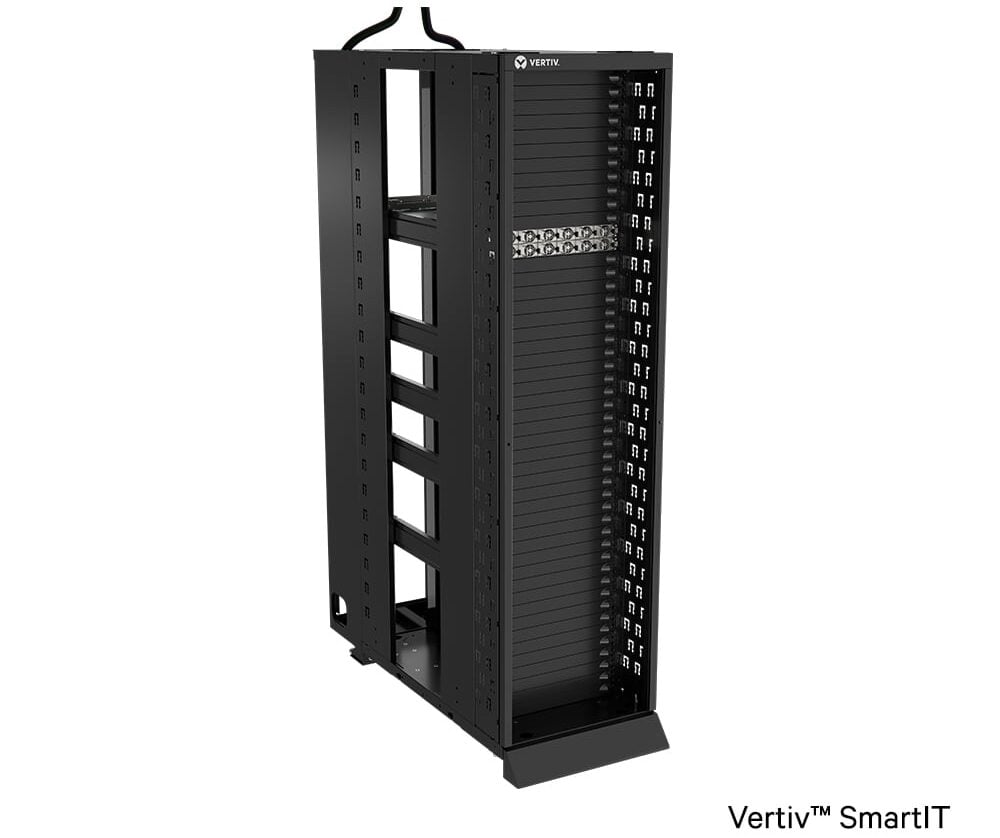
    Show notes Vertiv SmartIT rack render with the side panel removed showing the open frame, rear cable entry, and a single power shelf Vertiv SmartIT rack render with the side panel removed showing the open frame, rear cable entry, and a single power shelf

    Vertiv announced SmartIT, a pre-engineered rack architecture that packages the rack, DC power conversion and distribution, direct-to-chip liquid cooling, in-rack coolant distribution, and monitoring into a factory-validated unit for NVIDIA MGX and OCP ORV3 systems. The supported list is NVIDIA GB300 NVL72, Vera Rubin NVL72, DGX Rubin NVL8, and HGX Rubin NVL8, and the product is available now worldwide. Vertiv’s enterprise configuration puts the envelope at 120 to 142kW per compute rack with 242kW of N+1 direct-to-chip cooling in the support rack beside it.

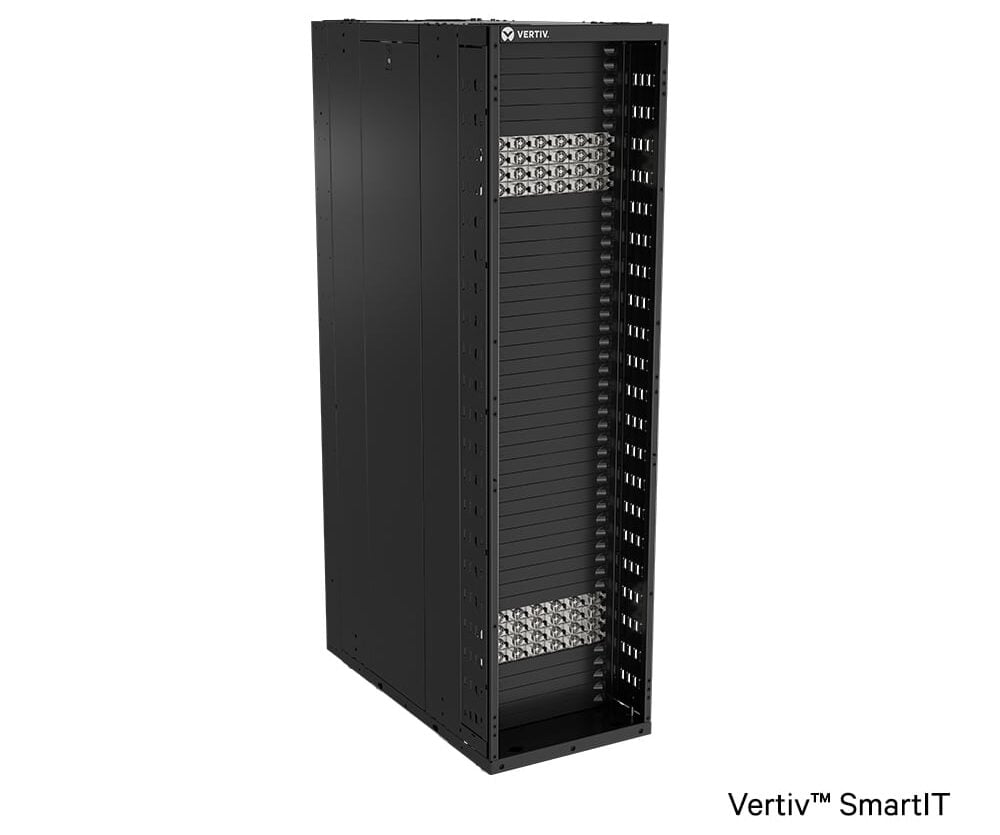
    Vertiv SmartIT MGX rack render with two banks of PowerDirect 50VDC power shelves installed at the top and bottom

    The solutions are aimed at enterprises, research institutions, and colocation providers that want NVL72-class systems in buildings that were not designed for them. Vertiv says SmartIT was previously deployed with NVIDIA to support the DGX GB300, scales from one rack to multi-rack deployments inside the same architecture, and arrives integrated and tested so on-site work is limited to facility power and water connections and commissioning. Site preparation, upstream power distribution, chilled or building water, and structural work stay outside the SmartIT scope.

    What Is in the Racks

    The compute rack is the Vertiv Open Rack for NVIDIA MGX, with the NVL72 system itself supplied by NVIDIA. Vertiv lists it at 2,291.8mm tall including castors, 600mm wide, 1,068mm deep or 1,200mm with the extension, and 189kg empty. Power arrives as 50VDC from PowerDirect 33kW shelves over a DC busbar rated to 1,400A, and the in-rack manifolds carry coolant to the cold plates. The power shelves and CDU carry built-in monitoring with leak detection and an automated shunt-trip, and the platform speaks Redfish, SNMP, and Modbus northbound.

    Enterprise deployments start with one compute rack and grow into one of two three-rack configurations. The support rack, SKU IRM692-362-VQE0M-N00 at 66kW, holds three CoolChip CDU 121 units at 121kW each, which is where the 242kW N+1 figure comes from, plus two PowerDirect shelves, the network switches, facility water loop isolation valves and actuators, an Avocent ACS 804 as the leak detection and response gateway, two Avocent RM1048P rack managers, and two PowerIT rack transfer switches. The storage rack, SKU IRM692-362-00E00-N00, swaps DC power for two 60A three-phase switched rPDUs with outlet-level monitoring at 69kVA total.

    Vertiv SmartIT rack render with the side panel removed showing the open frame, rear cable entry, and a single power shelf

    Each of the three racks gets a Liebert DCD47 rear door heat exchanger rated at 47kW room-neutral, so the configuration carries 141kW of supplemental air cooling on top of the liquid loop. A Liebert APM2 modular UPS with battery cabinet is optional, at up to 97.5 percent double-conversion efficiency. Installation, commissioning including flush and fill, and project management are included in the package, and Vertiv Global Services handles lifecycle support afterward.

    Specification Vertiv SmartIT for Enterprise
    Platform
    Rack standard Vertiv Open Rack for NVIDIA MGX, OCP ORV3 compliant
    Supported NVIDIA systems GB300 NVL72
    Vera Rubin NVL72
    DGX Rubin NVL8
    HGX Rubin NVL8
    Rack dimensions 2,291.8mm H (with castors) x 600mm W x 1,068mm D (1,200mm with extension), 189kg
    Power
    Capacity per compute rack 120 to 142kW
    DC power train PowerDirect 33kW 50VDC shelves
    DC busbar distribution up to 1,400A
    Two PowerIT rack transfer switches per rack
    Support rack electrical 66kW (SKU IRM692-362-VQE0M-N00)
    Storage rack electrical Two 60A three-phase switched rPDUs, 69kVA (SKU IRM692-362-00E00-N00)
    UPS Optional Liebert APM2 with battery cabinet, up to 97.5% efficiency
    Cooling and Monitoring
    Direct-to-chip cooling Three CoolChip CDU 121 in the support rack, 242kW N+1
    Supplemental air cooling Liebert DCD47 rear door heat exchanger per rack, 47kW each, 141kW across three racks
    Monitoring Avocent ACS 804 leak detection gateway
    Two Avocent RM1048P rack managers
    Redfish, SNMP, Modbus
    Automated shunt-trip
    Services Installation, commissioning with flush and fill, project management included

    GB300 Is Specified, Rubin Is Named

    The published numbers belong to the Blackwell configuration. Vertiv’s published enterprise configuration is built around a Blackwell-based NVL72 in the MGX rack, and the catalog lists two models, SmartIT for NVIDIA GB300 NVL72 and SmartIT for OCP ORV3, with identical rack dimensions. The Rubin systems appear on the supported list and in the HGX Rubin NVL8 demo unit Vertiv showed at NVIDIA GTC Berlin, but Vertiv has not published a power or cooling envelope for a Vera Rubin NVL72 build.

    SmartIT is the rack-level piece of a stack Vertiv has been assembling around NVIDIA’s reference designs. Its CoolChip CDUs were among the first NVIDIA DSX Ready qualified components, its PowerDirect 33kW shelves are the 50VDC in-rack power stage it built for the GB300 NVL72 platform, with a GB200 NVL72 configuration also offered, and the company positions SmartRun for row-level integration and Unify for monitoring, analytics, and coordinated response across power and thermal gear once a site grows past a few racks.

    “AI is fundamentally changing the demands placed on data center infrastructure, requiring closer coordination across power, cooling and IT systems to support increasingly complex workloads,” said Scott Armul, Chief Product and Technology Officer at Vertiv. “Vertiv SmartIT reflects our approach to solving that challenge by bringing these disciplines together in a factory-validated architecture. By combining Vertiv’s expertise across critical infrastructure, we’re helping customers simplify deployment, build greater consistency into their AI environments and establish a foundation that can evolve alongside their computing needs.”

    Vertiv SmartIT

    The post Vertiv SmartIT Ships Factory-Validated MGX and ORV3 Racks for GB300 and Rubin: 120 to 142kW per Rack, 242kW N+1 Liquid Cooling appeared first on StorageReview.com.


    Oracle Acceleron Adds Front-End RDMA, an NCCL and RCCL Plugin for Multiplanar Failover, and 3x NVMe Block Storage Performance on OCI Oct 28, 2026
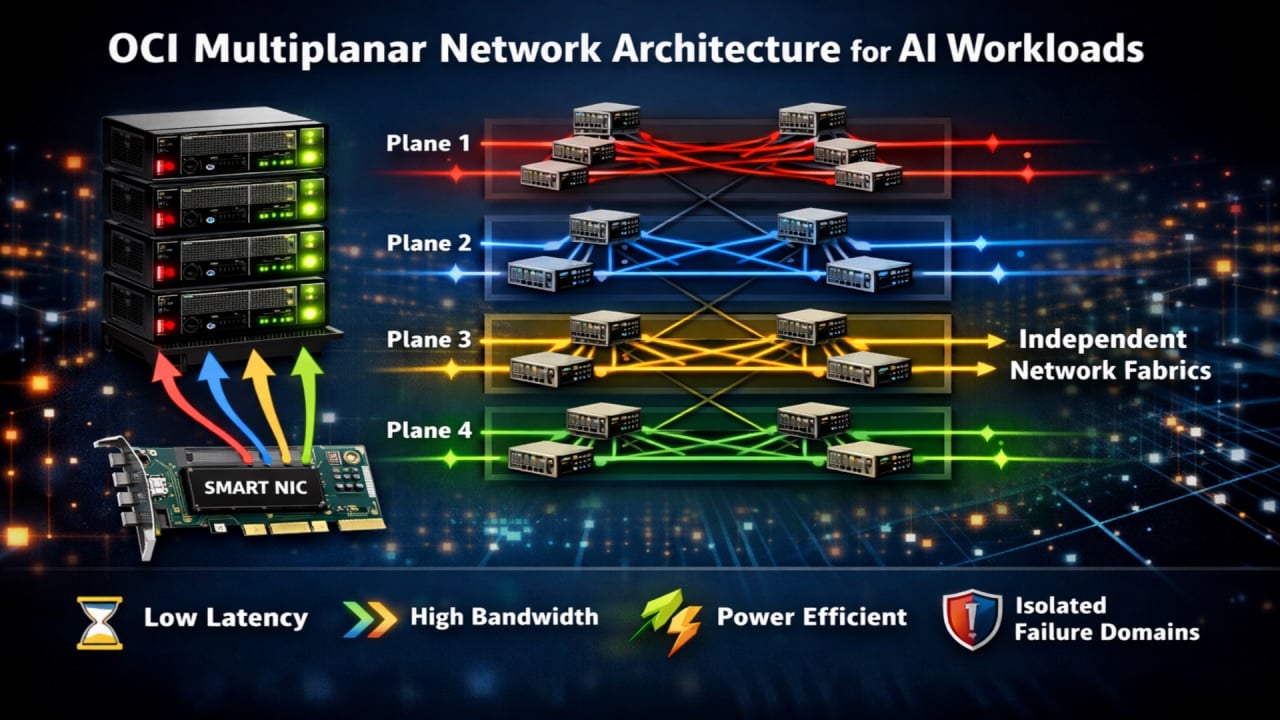
    Show notes Diagram of the OCI multiplanar network architecture with a SmartNIC connecting a server to four independent network fabric planes Diagram of the OCI multiplanar network architecture with a SmartNIC connecting a server to four independent network fabric planes

    Oracle announced a second round of Oracle Acceleron capabilities at Oracle AI World in Las Vegas, a year after the networking suite first bundled dedicated fabrics, multiplanar networking, SmartNICs, and direct data paths for Oracle Cloud Infrastructure. The new pieces are RDMA on OCI’s shared front-end network, NVMe block storage attachments across Acceleron bare metal and VM shapes that Oracle rates at up to 3x the block performance, a collective communications plugin that moves failover and load balancing into the NCCL and RCCL layer, and multiplanar networking extended to front-end traffic.

    Diagram of the OCI multiplanar network architecture with a SmartNIC connecting a server to four independent network fabric planes

    “AI infrastructure can be unforgiving when it comes to network friction,” said Pradeep Vincent, executive vice president, Compute and AI Infrastructure, Oracle Cloud Infrastructure. “When thousands of accelerators are working together, one congested or failed path can have consequences far beyond a single connection. With Oracle Acceleron, we are building a network that can respond by rerouting traffic, recovering from failures, and helping customers scale securely.”

    Front-End RDMA and the 3x NVMe Block Storage Claim

    OCI’s front-end network carries Oracle Database, customer compute, block and object storage, SaaS and OCI services, backbone links, internet access, and on-premises connectivity on the same fabric, which is why RDMA has historically stayed on dedicated back-end cluster networks. The Oracle Acceleron High-Performance Fabric puts RDMA on that shared front end for inference, storage, and HPC traffic, and Oracle says it supports every queue pair type and verb, so existing RDMA applications run without changes. The company also uses the front-end links to connect separate GPU clusters while the back-end fabrics handle training inside each cluster.

    The storage half is the expanded NVMe block storage attachment options across the new Acceleron bare metal and VM shapes, which Oracle says improve NVMe block storage performance by up to 3x for AI, database, and other data-intensive workloads. Oracle has not published the baseline configuration, the workload, or whether the figure is throughput, IOPS, or latency, and we did not run or audit it. The release carries Oracle’s standard future product disclaimer and gives no availability dates for any of the new capabilities.

    Sharing a front end between RDMA and TCP is a congestion-control problem, since RDMA transports typically use rate-based control and TCP uses window-based control, and one loop can starve the other. Oracle’s answer lives in the Acceleron SmartNIC. Hierarchical token buckets track bandwidth for RDMA and non-RDMA classes under a shared parent bucket, and as tokens run low the NIC probabilistically marks ECN-capable packets or drops the rest, which produces a gradual congestion signal and also heads off incast at the top-of-rack link. Either class can borrow unused bandwidth from the other.

    For congestion inside the fabric, the SmartNIC runs One-Way-Delay Congestion Control, measuring forward-path delay so that a congested reverse path does not trigger a false signal. When it sees elevated delay on a flow, it probes three alternate paths and moves the flow if one is better; if none is, it falls back to ECN marking or drops. Oracle describes the design as needing minimal QoS support from the switches while keeping standard kernel and CPU bypass on the hosts.

    Capability What Oracle Says It Does
    Oracle Acceleron High-Performance Fabric RDMA on OCI front-end compute for inference, storage, and HPC workloads, with all queue pair types and verbs supported
    Expanded NVMe block storage attachments NVMe block storage across Acceleron bare metal and VM shapes, up to 3x block storage performance (vendor figure)
    Oracle Collective Communications Library plugin NCCL and RCCL network plugin that spreads collective traffic across the back-end Multiplanar Network, load balances by congestion, and fails over around dead ports and NICs
    Transparent Front-End Multiplanar Networking Path selection, failover, and congestion control for front-end RDMA traffic, handled in the SmartNIC

    OCCL Moves Failover Into the Collective Layer

    OCI’s back-end Multiplanar Network connects multi-port NICs to several disjoint fabrics so a training job has n-way redundancy, but using those planes has required NIC-level functionality that is not always available. The Oracle Collective Communications Library plugin removes that dependency. It is a CCL network plugin that natively supports the NVIDIA NCCL and AMD RCCL plugin interfaces, the layer frameworks use to turn collective operations into NIC transfers, and it carries failover, recovery, and congestion-aware load balancing inside the plugin, independent of NIC firmware and topology.

    In operation, OCCL distributes collective traffic across multiple standard Reliable Connection queue pairs, sends more over the pairs showing higher throughput, and moves traffic off congested paths at the message and chunk level. When a port or a whole NIC fails, it steers the collective to another port or NIC so the job continues without a restart. Oracle’s framing is that this is simpler than routing controllers that pick fabric paths and watch for changes, and it works on single-plane and multi-plane networks alike. The same multiplanar path selection and failover now reaches front-end RDMA traffic through what Oracle calls Transparent Front-End Multiplanar Networking.

    The same networking update covered two items outside Acceleron. OCI Global CDN Connect provides direct connections between OCI Object Storage and Cloudflare, Fastly, Netskrt, and Mainstreaming, with zero OCI egress charges on eligible cache fetches in supported regions, and Oracle has signed a non-binding memorandum of understanding with F5 for a planned OCI App Defense web application and API protection service.

    Oracle Cloud Infrastructure Networking

    The post Oracle Acceleron Adds Front-End RDMA, an NCCL and RCCL Plugin for Multiplanar Failover, and 3x NVMe Block Storage Performance on OCI appeared first on StorageReview.com.


    Sparxity, Formerly SpiNNcloud, Deploys JUBIS Sparse-Native Rack at Jülich Supercomputing Centre With 10x Solver and 18x Energy Claims Oct 28, 2026
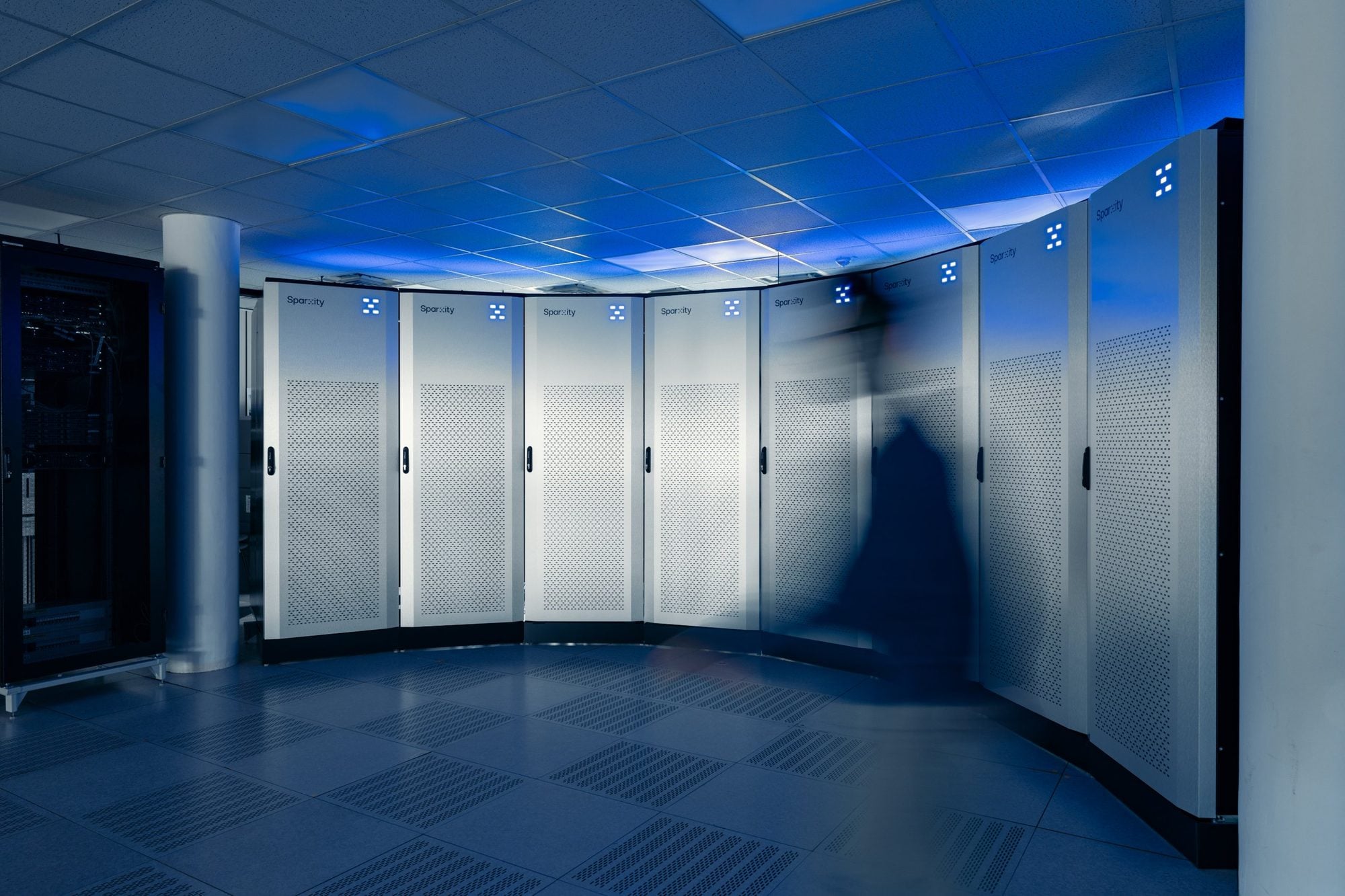
    Show notes Sparxity sparse-native computing racks in a curved row with illuminated logo panels in a data center Sparxity sparse-native computing racks in a curved row with illuminated logo panels in a data center

    Sparxity, the Dresden company that until today was SpiNNcloud, announced the deployment of a sparse-native computing rack system at the Jülich Supercomputing Centre (JSC), an institute of Forschungszentrum Jülich and home of JUPITER, Europe’s first exascale machine. The system is named JUBIS, the installation is described as multi-million-dollar, and JSC will use it to run sparse machine learning models and large-scale HPC simulations next to its conventional CPU and GPU systems. The announcement doubles as the launch of the new company name.

    Sparxity sparse-native computing racks in a curved row with illuminated logo panels in a data center

    Event-Based Execution and the Numbers Sparxity Puts on It

    The hardware is event-based: execution units run only when an input changes, so idle parts of a model consume no cycles and move no data. Sparxity frames that as sparsity in practice. The company says JUBIS is designed to deliver 10x faster sparse solver execution, 18x lower energy consumption for event-based machine learning workloads, and 20x shorter time to an acceptable solution in optimization problems. Those are vendor figures with no published baseline system, workload, batch size, or precision, and we did not run or audit them.

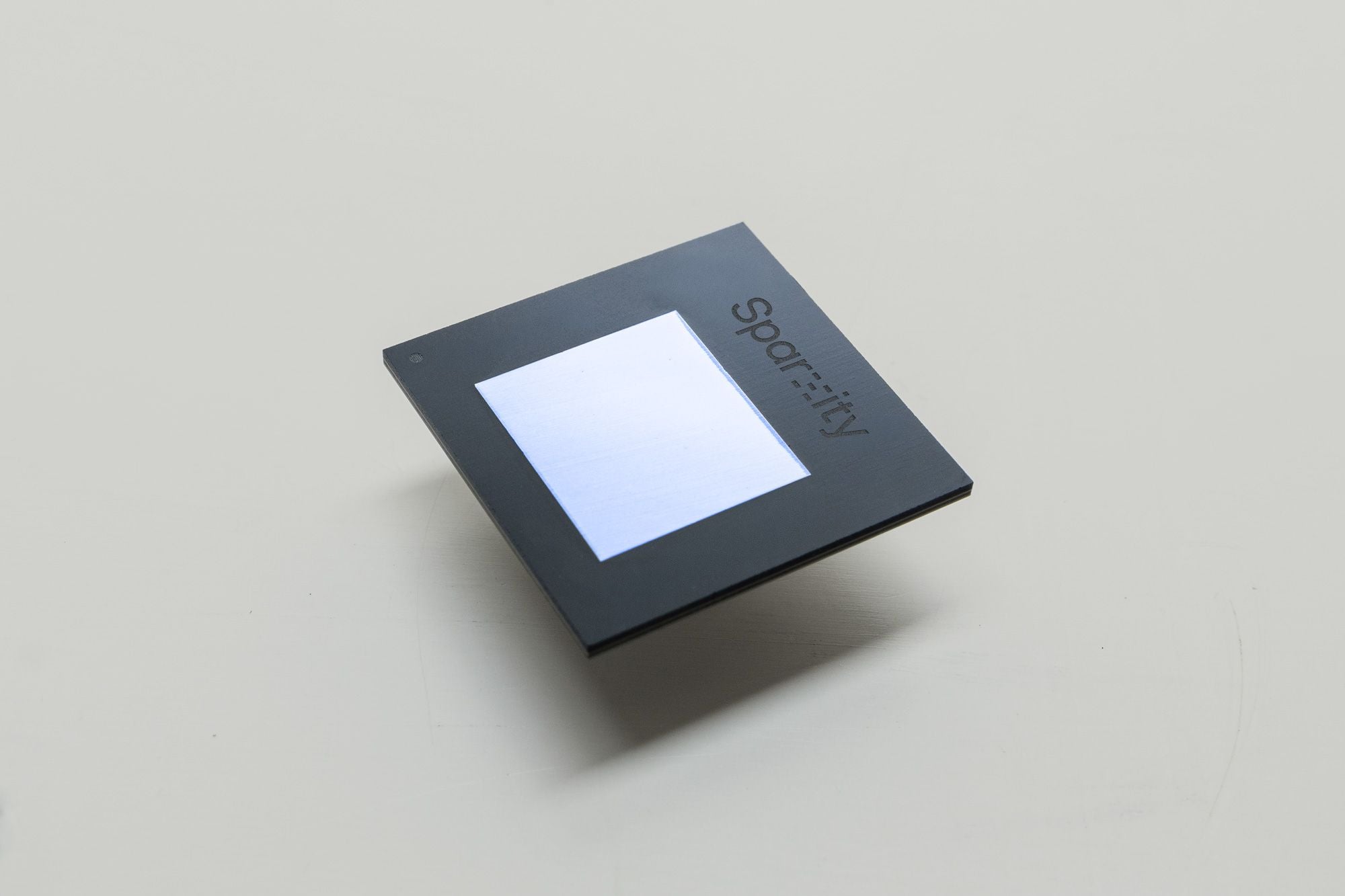
    The silicon is SpiNNaker2, the Arm-based chip descended from the SpiNNaker research line started by Steve Furber, designer of the original Arm architecture. The company describes its server board as 48 SpiNNaker2 chips, each with 152 Arm cores and dedicated accelerators, and the same board family went into the system Sandia National Laboratories brought up in 2025, which it rated at 150 million to 180 million simulated neurons. Sparxity has not said how many boards are in the Jülich rack. Across its installed base, it counts three tape-outs, more than 70,000 chips produced, more than 12 racks deployed, and more than 30 customers.

    Sparxity SpiNNaker2 processor package with the Sparxity wordmark on the lid

    “Sparse machine learning represents one of the biggest opportunities to fundamentally improve the efficiency of AI,” said Dr. Guido Trensch, Simulation and Data Lab Neuroscience, Jülich Supercomputing Centre. “By adopting Sparxity, we’re able to complement our globally unique HPC infrastructure with a fundamentally new approach, opening up new research opportunities so that we can further develop advancements in neuroscience.”

    Where JUBIS Fits at Jülich

    JSC describes the project behind the purchase, ESAB (Event-based Supercomputer for AI and Beyond), as a three-year infrastructure effort that started in 2026 to add an energy-efficient, event-based SpiNNaker2 compute module to its Modular Supercomputing Architecture, the same framework that pairs a CPU cluster with a GPU booster in JUPITER. The targets JSC lists are AI workloads, real-time neuroscience simulation, and other fields for a broad scientific community, building on its Simulation and Data Lab Neuroscience, the Human Brain Project, and its earlier Advanced Computing Architectures pilot. Funding comes from the European Regional Development Fund and the State of North Rhine-Westphalia under the EFRE/JTF-Programm NRW 2021-2027.

    JSC also operates the JUPITER AI Factory, which Sparxity notes is one of 19 AI factories in Europe and the only one built around an exascale system, so JUBIS lands in a facility that already runs dense GPU inference at scale, which is the comparison the company is inviting. Its position is that models are getting sparser faster than dense hardware can exploit, with mixture-of-experts routing, memory layers, and block-sparse attention as the examples, and that an event-based machine turns that sparsity into speed where a GPU adds routing overhead.

    The rebrand draws the line between the two product generations. Sparxity says its current systems serve both HPC and AI, while the next generation commits fully to sparsity for AI inference, aimed at model builders who want finer, more dynamic sparsity and at data centers and neoclouds that want more tokens per second at lower cost. CEO and co-founder Hector Gonzalez said the Jülich collaboration shows the value of that approach at supercomputer scale. SpiNNcloud’s site lists the successor chip, SpiNNext, at 78x the energy efficiency of GPUs against 18x for SpiNNaker2, with availability marked as coming soon.

    Sparxity

    The post Sparxity, Formerly SpiNNcloud, Deploys JUBIS Sparse-Native Rack at Jülich Supercomputing Centre With 10x Solver and 18x Energy Claims appeared first on StorageReview.com.


    Micron’s Next NAND Is G11, Not G10: 400-Plus Layers, 2x Density, and a 512TB SSD Ceiling on a 2H 2027 Ramp Oct 27, 2026
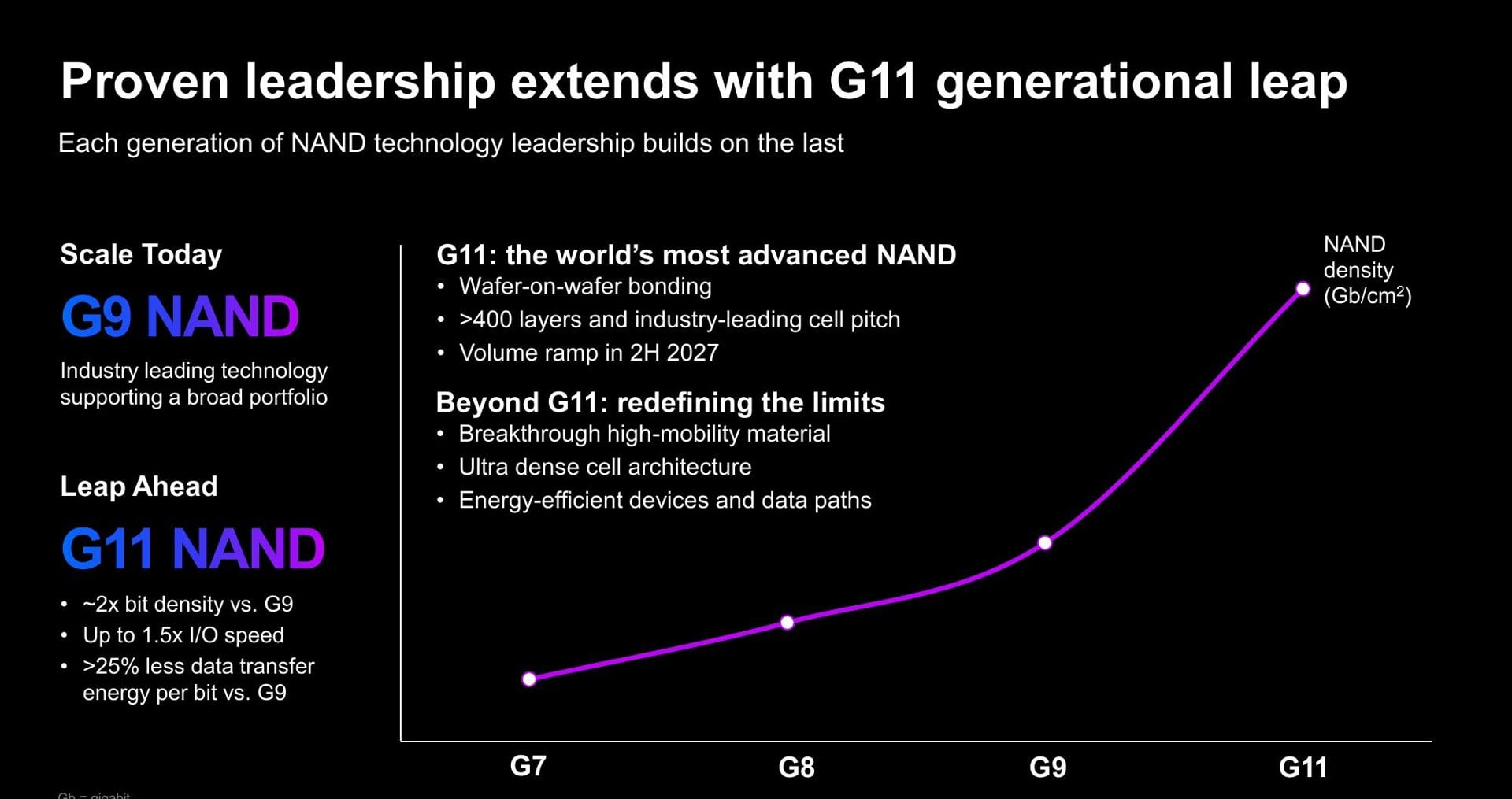
    Show notes Micron webinar slide showing the NAND density roadmap from G7 to G11, with G11 listed as wafer-on-wafer bonding, more than 400 layers, 2x bit density, 1.5x I/O speed, and a 2H 2027 volume ramp Micron webinar slide showing the NAND density roadmap from G7 to G11, with G11 listed as wafer-on-wafer bonding, more than 400 layers, 2x bit density, 1.5x I/O speed, and a 2H 2027 volume ramp

    Micron’s next NAND node is G11, with no G10 between it and the G9 flash in its SSDs today. The density chart in the deck for Micron’s October 21 technology webinar runs G7, G8, G9, G11, and Scott DeBoer, the company’s president and chief technology and products officer, framed the skipped number as a statement about the size of the step. What the jump offers is significant: wafer-on-wafer bonding, more than 400 layers, roughly twice the bit density of G9, up to 1.5x the I/O speed, and more than 25 percent less data-transfer energy per bit, with a volume ramp in the second half of 2027.

    Micron webinar slide showing the NAND density roadmap from G7 to G11, with G11 listed as wafer-on-wafer bonding, more than 400 layers, 2x bit density, 1.5x I/O speed, and a 2H 2027 volume ramp

    “We’ve actually gone back and ensured that this memory is optimized for the AI products of the future, and intentionally, which is why it goes from Gen 9 to Gen 11,” DeBoer said. “We’ve made substantial improvements that this node really brings relative to any prior NAND.” The slide labels G9 as “Scale Today” and G11 as “Leap Ahead,” with a “Beyond G11” list of a high-mobility channel material, an ultra-dense cell architecture, and energy-efficient data paths. On layers, DeBoer said, “We’ll be at more than 400 layers, and we’ll give more specifics on that next year, closer to the launch dates.”

    What Wafer-on-Wafer Bonding Changes

    DeBoer said Micron had held the technique back on purpose: “We’ll bring in wafer-on-wafer bonding technology at the right time when it’s cost effective and it brings in capability that’s important for the product specs at the time. And this is the right timing for that technology.”

    He did not describe the mechanism, so this is our interpretation. Current 3D NAND builds the peripheral CMOS and the memory array on one wafer, either beside the array or underneath it, and every added layer in the array stack makes the etch through it harder and the yield lower. Bonding a separately processed array wafer to a separately processed logic wafer breaks that coupling: each wafer gets its own process, and the stack height stops being limited by what the periphery can tolerate.

    That is the path to 400-plus layers without the yield penalty of a taller monolithic stack, and it is the same direction the deck shows for DRAM, where wafer bonding sits on the 1-epsilon node after the 1-delta ramp in the second half of 2027. For NAND, the 2x density claim is per unit area, charted in gigabits per square centimeter, so it is a wafer-cost statement as much as a capacity one. The 1.5x I/O figure is against G9, which Micron rated at 3.6GB/s when it launched the node in the 2650 client SSD in July 2024.

    A 512TB Number From Micron

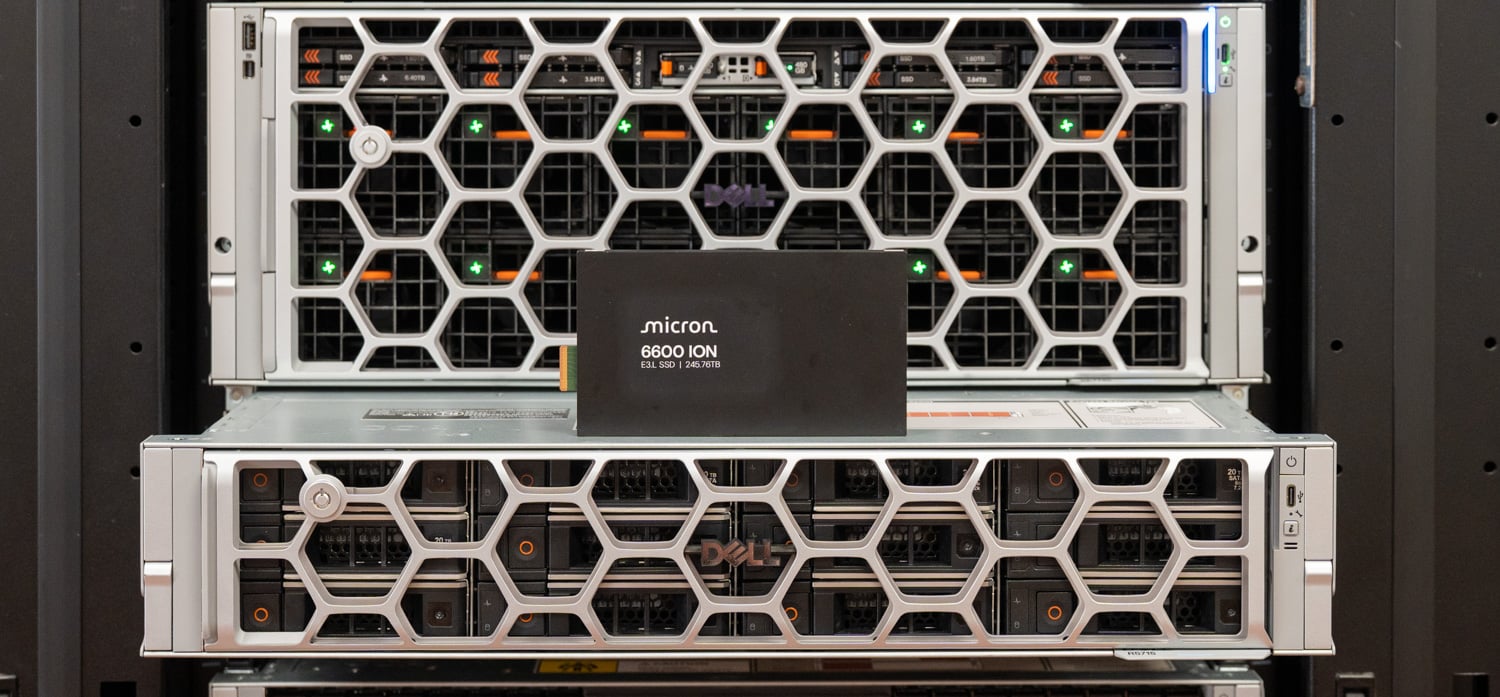
    Two slides later, Micron puts a figure on where the density goes. Its future AI-optimized storage slide lists next-generation data center SSDs as “high-performance, high-capacity (up to 512TB),” alongside a high-IOPS class rated at 25 million to 100 million IOPS for small-block access. The 245TB Micron 6600 ION we reviewed in June, and priced against hard drives in September, is built on G9 QLC; doubling the bits per wafer is how the next capacity step fits in the same E3.L envelope.

    Micron 6600 ION 245TB E3.L SSD standing in front of a Dell PowerEdge flash server and a 2U hard drive server in the StorageReview lab

    The timing fits what Micron’s Bill Bollengier told us on the podcast the same day: the company is lining up E1.S, E3.S, E3.L, and E2 for the density PCIe Gen6 and Gen7 platforms will want, with a 16K indirection unit to hold DRAM requirements down as capacities climb. The 512TB figure is a roadmap label, not a product, and Micron attached no date, interface, or cell type to it. DapuStor showed a 512TB QLC drive at FMS in August, so the number is already on the show floor; the G11 ramp is what makes it a volume part.

    Two Kinds of AI-Class NAND

    The deck splits a new category Micron calls AI-class NAND into two designs. The first is high-IOPS NAND, which DeBoer described as “SLC-based designs implemented in small blocks to design ultra-fast memory storage products” and called “a major focus for Micron in terms of getting these products out to market over the next couple years”; the targets are GPU-initiated small-block access for vector search, graph analytics, and AI context, and the deck’s 25M to 100M IOPS tier. The second is high-bandwidth NAND: TSV-stacked dies on a logic base die, forming a high-capacity tier close to the accelerator for model weights, long context, and KV cache.

    The second design is a flash stack with an HBM-style base die, and DeBoer was specific about where it doesn’t fit: along the shoreline of the GPU, where HBM sits, because “we don’t think that has merit.” It belongs, in his words, “along closer positioning points to the compute itself.” He also said these parts “are more costly and have to be implemented in partnership with customers” to hit the cost point that makes them worth building. Micron has not named a product, a bandwidth figure, or a customer for either design.

    Why the Ramp Date Matters

    The second half of 2027 is also the window Micron has told investors to watch for supply. On its fiscal fourth quarter call on September 30, CEO Sanjay Mehrotra said, “We expect memory and storage supply-demand conditions to be much tighter in calendar 2027 and 2028 than they were in 2026,” and that the company does “not have line of sight to when supply and demand will return to balance.” He put industry NAND bit growth in the low-20s percent range this year and the mid-20s next year, with the industry supply constrained in both.

    Asked on the webinar about rack-scale compute, DeBoer repeated the point: “We don’t see a period of time where memory is not going to be in short supply in the next two years, as Sanjay said, and we actually don’t see a time when it comes into balance.”

    Micron’s own NAND supply grows more slowly than the industry’s this calendar year, and G9 is, with 1-gamma DRAM, its largest production node. Data center SSD revenue in the quarter was nearly $10 billion, more than ten times the year-ago figure and two-thirds of Micron’s NAND business. Against that backdrop, a node that doubles bits per wafer in 2H 2027 is the first new density lever inside the shortage Micron describes, and it arrives in the same half as the 1-delta DRAM ramp and the 512GB DDR5 RDIMM volume production the company announced in September.

    Micron Technology and Products Webinar Deck

    The post Micron’s Next NAND Is G11, Not G10: 400-Plus Layers, 2x Density, and a 512TB SSD Ceiling on a 2H 2027 Ramp appeared first on StorageReview.com.


    Inside Mercedes F1’s COTA 2026 Race Weekend With HPE: The Car Is Never Finished Oct 27, 2026
    Show notes

    Kimi Antonelli won the United States Grand Prix from pole on a one-stop, beating Charles Leclerc by 13.078 seconds with Max Verstappen third; the pit wall held against Verstappen’s two-stop undercut. Ferrari had owned the timing sheets until then, Leclerc fastest in Friday’s second practice and Lewis Hamilton in Saturday’s final session, so the Mercedes that turned up for qualifying caught the paddock, and the fans, off guard. Antonelli still left Austin without the title, because George Russell’s eighth place and Hamilton’s fourth each kept the arithmetic alive. I watched Sunday from home; what I want to write about is the two days before it, when HPE put a group of news media and analysts inside the Mercedes-AMG PETRONAS F1 program at Circuit of the Americas, because the car that won on Sunday was not the car that rolled out of the garage on Friday morning, and the gap between those two cars is where HPE’s work happens. The short version: HPE has been Mercedes’ IT partner since 2018, and supplies compute, storage, and networking from the Brackley factory to the garage at the track. The longer version included a Thursday evening panel with Antonio Neri, Toto Wolff, and team CIO Michael Taylor; a Friday in the Silver Arrows Lounge above the pit wall; and a garage tour where, sadly, photos weren’t allowed. The Car Is Never Finished The moment that organized my weekend came between the two Friday practice sessions. Mercedes pipes a garage briefing into the lounge, a presenter walks the cameras through what the mechanics are doing, and the numbers he opened with were two and a half hours to turn both cars around and remove all the bodywork within minutes of the FP1 checkered flag. The engineers had not sent the setup changes yet. The mechanics had the cars open anyway, waiting for tuning direction from the factory. The changes arrived for Russell’s car first. More negative camber on the rear tires, the test steering rack from FP1 swapped back to the original, and a new rear anti-roll bar to shift the mechanical balance. All three targeted the same complaint, what the team calls three-wheeling, where the inside rear lifts through a corner. Russell radioed “Check front wing, something has happened” in FP1, locked up into Turn 1, and his side of the garage was the busy side. Antonelli’s car, the presenter said, needed far less. The FP2 run plan was new mediums and new softs for both drivers, then a long run on the used mediums for Antonelli, because the team had not run the medium at all in FP1. After FP2, the cars would come fully apart for system checks, and no further setup work would happen at the track that night. The next setup decisions would come from the simulator in Brackley, running through the Texas night on UK time, while the trackside mechanics hit the FIA curfew. FP2 ended with Leclerc on 1:35.291, Antonelli 0.042 seconds back, Verstappen third, and Russell fifth at 0.744. Antonelli’s seat had come loose early in the session and cost him several minutes in the garage; he called it “a good step forward” afterward. I am not going to pretend the anti-roll bar explains the gap between the two Mercedes, but the Friday I watched was a car being rebuilt twice in a day to answer two drivers who were telling the engineers different things. What the Upgrade Is and Why Austin Mercedes declared nothing new to the FIA for Austin, after a bit of back-and-forth from prior races. The package it ran on both cars is the floor and rear end it introduced in Malaysia plus the front wing and endplate it filed in Singapore under “Performance, Flow Conditioning,” together on both cars for the first time. Singapore was a split test: Antonelli ran the new package and Russell the old one, and the new front wing ran for a single hour of practice because, as deputy team principal Bradley Lord put it, “we only had one there, so we’d rushed it through production.” The garage presenter called the new wing a “double drop,” and that phrase is worth breaking down. The 2026 rules make the front wing active: it is 100mm narrower than last year’s and carries a two-element flap that opens in X-mode on any straight longer than about three seconds, with Z-mode as the cornering default. The previous Mercedes wing dropped one element on the straights; the new one drops two. The mechanics also suggested the new package is easier to build. Wolff gave the panel a version of this story that underscores how, for all the technology deployed, racing is as much magic as science. Two races earlier, the team put an upgrade on the car that the simulations indicated was worth 3.5 tenths, and the car came out 3.5 tenths slower. The car’s sensors said the aerodynamic load was there. The drivers said the car was unpredictable, locked the inside wheel on the brakes, and understeered on turn-in. “The engineer says it’s all there,” Wolff said, “and the driver says the car is unpredictable.” Translator, or Therapist Wolff’s answer to who you believe in that situation was humorous. “I trust the most expensive sensor,” he said, “and that’s definitely the one that sits in the car.” He described his job as “a little bit a translator between what the data say and the engineering team says, and then what the driver needs in order to drive a car fast.” He then told the story of Russell reporting that the car “feels like a three-legged chair,” and of engineers spending months chasing a lifting wheel before someone asked Russell to describe the feeling and learned it was an oscillation, the wheel coming up and down, which was a different problem with a different fix. Having now watched his garage respond to a driver complaint with a steering rack and an anti-roll bar inside two and a half hours, I think translator undersells it. What Wolff described, and what the Friday turnaround looked like, is a therapist’s job: two sides, each telling the truth, and needing someone in the middle to get them to a car both can trust. “Data don’t take decisions,” he said. “Whoever human is in charge needs to take that decision.” What HPE Runs at the Track Max Walker, the HPE chief technologist who has worked the Mercedes account since 2018, opened Thursday with the origin story. When HPE arrived, the trackside compute was, in his words, a personal computer. HPE replaced it with an Edgeline system for density and consistency, laid an Aruba wired and wireless network across the garage, and later did the same across the Brackley campus and data center. The team runs Wi-Fi 7 now. At the start, the HPE team on the account was three people: a data scientist, a software engineer, and a program manager. The data path Wolff and Taylor described runs from the car to the garage by Wi-Fi during the session and by umbilical when the car is on the stands, gets filtered at the track for what matters in the moment, and goes to the Race Support Room in Brackley, sometimes immediately and sometimes overnight; there’s a tremendous amount of data that comes from the telemetry on both cars and their supporting systems. The FIA caps how many people a team can bring to the circuit, so the headcount that is not at the track still works the session from the factory. Taylor’s trackside priority was unambiguous: reliability first, performance second, because the engineers need the data from the previous run to be there when they go to analyze it. I didn’t get to peek inside the racks to see the HPE gear deployed trackside, but I did find them. Behind the Mercedes pit wall, between the tires and tool chests, sit two sealed racks with louvered vent panels at the back, built for the sand, dust, and heat the circuit calendar throws at them, along with air filters and extra fans to move air over the racks. HPE’s people suggested they hold Edgeline systems, which fits Walker’s account. The Aruba access points in the garage were easier to spot on the ceiling, and the HPE logo sits on the monitors and systems in and around the garage. The Factory and the Cost Cap Taylor describes his department as a small IT team in an organization where everyone is an engineer, and he uses HPE as an extension of that team for three-month projects his staff cannot absorb, with the 2018 software-defined data center as an example. He framed performance as coming from the factory. Aerodynamic ideas start in CFD, the best go to a 60 percent scale model in the wind tunnel, and over a season that pipeline adds more than a second to the car’s lap time. By HPE’s count, the team generates up to 50TB of CFD data a week, and HPE claims the current AMD-based ProLiant HPC refresh cuts a three-day simulation cycle to one, so results come back to the aerodynamicists the same day. We did not audit either figure. The cost cap sits over all of it. Wolff was candid that the cap equalized spending among Mercedes, Ferrari, and Red Bull and now limits what the team can buy, including AI. Neri’s answer, and Taylor’s, was consumption: HPE GreenLake, with HPE Financial Services, structures infrastructure spend so the team has room to maneuver inside the cap, whether a purchase lands as capital or operating expense. The next step in that pipeline is already on its way to Brackley. Walker said Mercedes will be the first UK customer to receive a ProLiant Gen13 engineering unit, which it will test for performance, sustainability, and workload density ahead of general availability. The unit is the HPE ProLiant DL525 Gen13, the 1U single-socket server we covered at the Gen13 launch, built on AMD’s 6th Gen EPYC, the Venice parts, and the first of the four Gen13 systems to ship. CFD is a memory bandwidth problem, and that is where Venice changes what’s possible for a team under a spending cap. One DL525 socket carries up to 256 cores and 16 memory channels, which AMD rates at 1.6TB/s, with up to 4TB of DDR5-8000 or 2TB of MRDIMM-12800, PCIe Gen6, and a 600W envelope, in a chassis that fits 20 E3.S drives and optional direct liquid cooling into one rack unit. For a team that pays for every watt and every rack unit out of the same budget that buys wind tunnel time, the whole point of the test is more simulation cycles per rack and per kilowatt, and the sustainability line is the same measurement we keep hearing about in large-scale data centers. The Mercedes stack also includes HPE Morpheus Enterprise. Walker said the team uses it to run an IT-as-a-service model, carrying automation workflows from the software-defined data center into a catalog where engineers request infrastructure, and using it as a lower-cost virtualization platform under the cap. Last year, we spent time with the hypervisor side of that family in our SimpliVity and VM Essentials review, where the KVM-based VM Essentials layer delivered two-node high availability, live migration, and policy-based placement without a separate hypervisor license. Walker didn’t say which Morpheus components Mercedes runs beyond Enterprise, but the economics he described match what the review found. AI Under the Cap and the Rules Neri used a question about agentic AI to describe how HPE itself uses it. The company has 1,500 internal AI use cases, and its AI spending run rate has quadrupled in three quarters, from a baseline he called one dollar to four. He said he is fine with that because it lowers his overall cost structure. He noted that Mercedes AI adoption is constrained less by the cap than by regulation, since FIA rules specify where AI can and cannot be used in car development. Taylor’s examples came from the last month or so of work. In that window, the team has started self-hosting open-weight models on HPE infrastructure, which he called the most cost-effective way to put models in front of more than 200 developers across the organization without the spend showing up where the cap bites. He described the near future as a lead developer with a swarm of agentic developers, prompting as a skill his placement students already have, and less spending on commercial off-the-shelf tools because the team can build what it needs. He was equally clear that the deterministic problem of setting up a race car is still years away from an AI solution. Wolff took the skill-set question first, with a joke at his engineers’ expense. His nirvana, he said, would be no engineers at all, just “blinking stacks and GPUs,” because then “I don’t need to cope with the complexity of the nerds.” He added, “They don’t complain, they don’t sleep,” and handed the question to Taylor. When he returned to it, a number was attached. He has given the team’s support functions, legal, marketing, communications, compliance, and sponsorship, what he called “irrational targets”: 30 percent more efficient within six months, with agentic tools making the difference. “The reaction that I get is it’s impossible,” he said. Legal warned the results would get worse, and his response has been to keep sending the departments AI-generated content until they concede, which, in his telling, they already know is a lost case. Neri also walked the room through where HPE’s internal AI tooling is headed next, which isn’t yet for public consumption, but sounds compelling. The Ad HPE played its “self-driving network” spot before the panel. If you haven’t seen it, which seems impossible at this point given the airtime, Russell hears the “self-driving” pitch in the garage, texts Antonelli “You hear that?”, and Antonelli spends the rest of the spot forlorn: at a press conference, at lunch over a plate of pasta he’s too sad to eat, and in bed, texting Russell “What about US?” with three crying emojis. Neri said the spot has been in airports, the New York subway, and NFL and college football broadcasts for months. It lands because the partnership’s real product is invisible. Nobody in the Paddock Club sees a CFD cycle finish a day early or a Race Support Room get a telemetry file before the car is back on the stands. The joke in the ad is that the network runs itself; Taylor’s version is that a network nobody has to babysit frees someone to fix something that makes the car faster. Saturday Saturday answered the question Friday left open, with Hamilton topping final practice at 1:34.893, Verstappen 0.168 seconds back, and Leclerc third, and the two Mercedes sat fourth and fifth, Antonelli 0.303 off and Russell 0.488, with Antonelli losing a lap to track limits at Turn 9, a somewhat comical theme for him this season. Two hours later, though, he put the car on pole at 1:34.035, 0.179 seconds clear of Verstappen, with Isack Hadjar, Leclerc, and Hamilton covered by 0.276 and Russell sixth at 0.441. It was his seventh pole of the season. Wolff said in the garage before the session to expect third to fifth, and afterward called the lap beyond expectations. His explanation was the thread of the whole weekend: “What is clear with our updates is that the car now has a narrower window of operation,” and on the other side of the garage, “if you are not hitting that peak completely, that you fall out of it, and then you’re having three to four tenths deficit.” Russell’s account was two bad laps in Q3, with a Q2 time two and a half tenths quicker than anything he managed in the final session. Antonelli’s version was the Friday process paying off. “We have been working really hard with this update to get it into a good window,” he said, and “we have focused on building up to the limit, getting the car in a good place.” He credited the factory, “they’ve done a tremendous job on this package, and we are now seeing results,” and named one detail that decided it: “one of the keys was not doing any track limits,” after his deleted FP3 lap had drawn a “you were doing so well” from his engineer. Wolff was not entertaining a Sunday coronation, and said so: “I don’t think we are quickest in the race, so it’s about scoring points,” he said, and called a clinch in Austin “not realistic.” Sunday Sunday was the data’s day, and it began on the medium tire: Antonelli started with Verstapp…

    Full show notes at the publisher

    Spectra Logic Storage Reclaim Packages Tape, BlackPearl, and Data Movers Into Six Configurations From 1PB to 24PB to Free Flash Oct 27, 2026
    Show notes

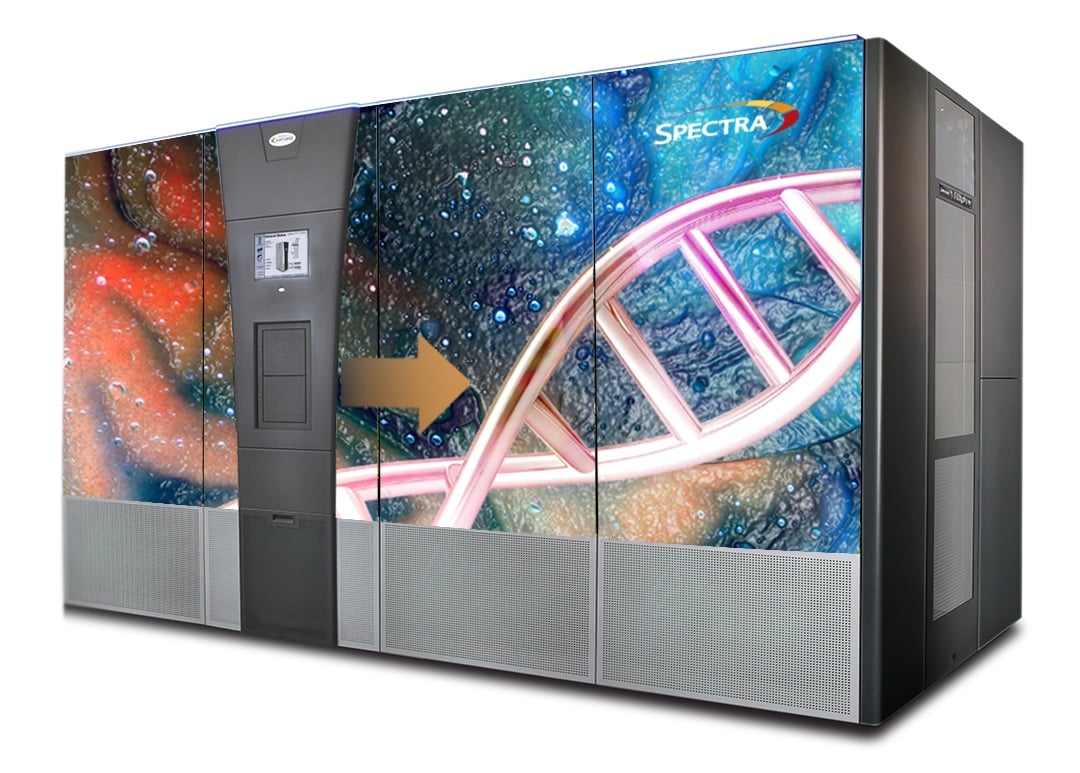
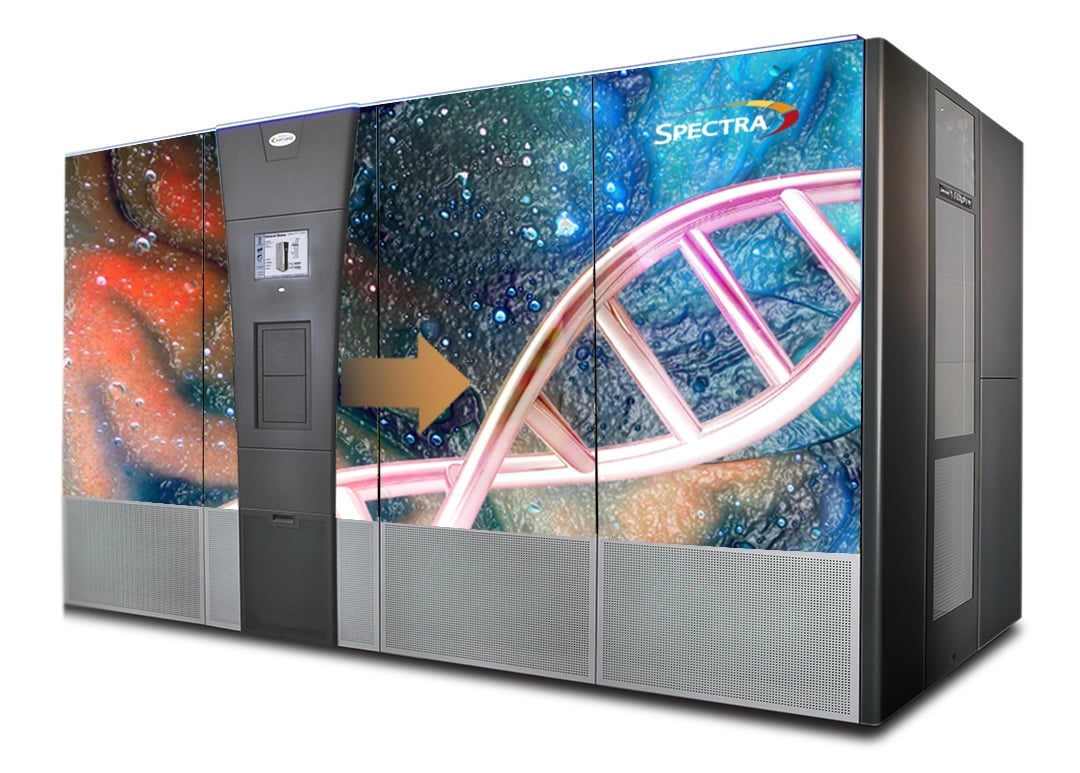
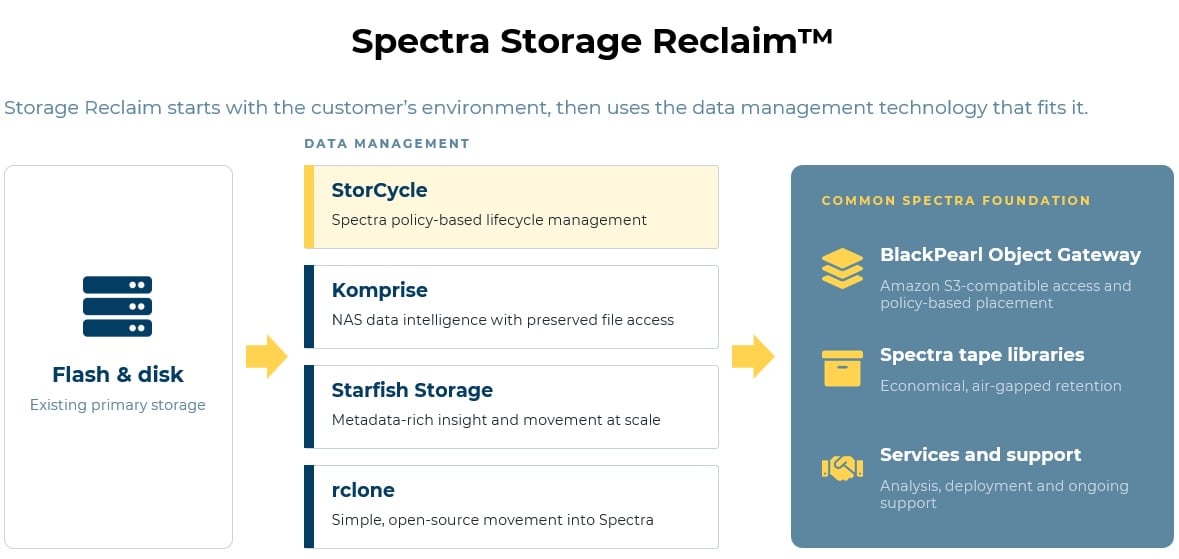
    Spectra Logic today announced availability of Spectra Storage Reclaim, a packaged combination of analysis software, data movers, BlackPearl object storage, tape, and services that finds inactive unstructured data on flash and disk arrays and moves it to tape so the primary capacity can go back to active workloads. The pitch is timed to the flash market: Spectra cites contract prices up 55 to 60 percent in the first quarter of 2026 and another 70 to 75 percent in the second, with Gartner expecting a rise of almost 250 percent year over year in the second half.

    Spectra Logic BlackPearl object storage gateway system

    Four Steps From Analysis to Reclaimed Capacity

    Storage Reclaim runs in four steps. Analyze is a read-only pass over the file systems that measures how much data is inactive or infrequently accessed by age and access pattern, using what Spectra calls the Storage Analyzer. Identify applies policies, built on access, retention, and business rules, to decide which files qualify to leave flash and disk. Move and Manage moves that data to the protected tier while keeping it visible, accessible, and recallable from the original environment. Reclaim returns the freed flash and disk capacity to active workloads, AI, and future growth.

    Spectra Storage Reclaim four-step workflow graphic: Analyze, Identify, Move and Manage, Reclaim

    The data mover is a choice. Spectra’s own StorCycle handles policy-based movement, and the Storage Reclaim ecosystem also approves Komprise, Starfish Storage, and rclone, so a shop already running one of those keeps its tooling. The destination is a Spectra BlackPearl Object Gateway, which presents S3-compatible access and places data across flash, disk, and tape by policy, in front of Spectra tape storage for long-term retention with a physical air gap and no power draw for media at rest.

    Six Turnkey Configurations From 1PB to 24PB

    Spectra sells Storage Reclaim as six pre-sized configurations that bundle software, hardware, implementation, and support. The entry point is 1.05PB in a single Spectra Stack library with two half-height LTO-9 drives, and the range runs through 2.1PB and 3.0PB Stack configurations to 5.1PB, 8.1PB, and 24.3PB builds on a Spectra Cube with six to sixteen full-height drives. Spectra notes that configuration selection should be validated for the environment.

    Configuration Capacity Tape Library LTO-9 Drives Max Throughput
    Entry 1.05PB 1 Spectra Stack 2 half-height 600MB/s
    Medium 2.1PB 2 Spectra Stacks 2 half-height 600MB/s
    Large 3.0PB 3 Spectra Stacks 4 half-height 1,200MB/s
    XL 5.1PB 1 Spectra Cube 6 full-height 2,400MB/s
    XXL 8.1PB 1 Spectra Cube 8 full-height 3,200MB/s
    Ultimate Scale 24.3PB 1 Spectra Cube 16 full-height 6,400MB/s

    Each configuration includes a storage assessment with a written analysis report, solution planning, installation, and three years of 5×9 next-business-day support. Spectra also offers a Storage Reclaim calculator to estimate reclaimable capacity before an assessment, and its solution brief cites research putting as much as 83 percent of primary capacity in inactive data that would qualify to move, a figure Spectra attributes to a September Ctera report.

    The Flash Argument

    “Organizations have traditionally responded to growing storage requirements by buying more capacity. But the cheapest flash you’ll ever buy is the flash you already own,” said Nathan Thompson, CEO of Spectra Logic. “Storage Reclaim shows organizations what is consuming their existing storage capacity and moves data that no longer requires premium performance. With an ecosystem that includes Komprise, Starfish Storage, and rclone, customers can reclaim that capacity using the approach that best fits their environment.”

    The product is aimed at infrastructure teams with a capacity, refresh, or budget decision in front of them, as a step before designing or buying more primary storage. That is a reasonable place to be in a year when flash allocation has become a procurement problem for AI clouds and enterprises alike, and tape media is not riding the NAND price curve. Whether a given environment has 83 percent or 20 percent of its flash holding cold files is what the read-only analysis step is there to answer.

    Spectra Storage Reclaim

    The post Spectra Logic Storage Reclaim Packages Tape, BlackPearl, and Data Movers Into Six Configurations From 1PB to 24PB to Free Flash appeared first on StorageReview.com.


    Dell Ships Quantum-Safe Fibre Channel Encryption on PowerStore in November, Adds Identity Recovery and AI Factory Hardening to PowerProtect Oct 27, 2026
    Show notes Rear of a Dell PowerStore 9500 in the StorageReview lab, the array family CloudCasa DR now drives for Kubernetes replication Rear of a Dell PowerStore 9500 in the StorageReview lab, the array family CloudCasa DR now drives for Kubernetes replication

    Dell Technologies today expanded its cyber resilience portfolio across AI environments, identity systems, and storage infrastructure. The piece that matters most for storage buyers is now a date: the next Dell PowerStore software release, due in November, adds quantum-safe encryption of data in flight over Fibre Channel when paired with supported PowerEdge servers. Around it sit PowerProtect snapshot orchestration for PowerScale with SmartSync to ObjectScale in December, identity platform recovery for Active Directory, Microsoft Entra ID, and Okta available now, a managed identity threat service, and two Dell AI Factory services.

    Dell PowerStore 9500 Gen 3 array in the StorageReview lab

    Quantum-Safe Fibre Channel Encryption Arrives in November

    Dell describes the PowerStore feature as protection against harvest-now, decrypt-later attacks on SAN traffic, and the hardware behind it is the Emulex SecureHBA. Every PowerStore Gen 3 can be ordered with EDIF-capable Fibre Channel OCP cards, which Dell told us at the PowerStoreOS 5.0 launch would light up through a non-disruptive update this fall. Broadcom’s account of the Elite launch puts Emulex SecureHBAs at 64G and 32G in the array, and the same adapters have shipped in PowerEdge since March 2025, with more than 80,000 ports in the field by May.

    Dell PowerStore Gen 3 quad-port Fibre Channel OCP card held in front of the array rear I/O slots in the StorageReview lab

    The encryption is session-based and negotiated between adapters, with AES-GCM-256 on the wire, ML-KEM-1024 key exchange, and ML-DSA-87 signed certificates for mutual authentication, the CNSA 2.0 algorithm set that FC-SP-3 standardized this year. Because the traffic is decrypted in the array’s adapter, PowerStore still sees plaintext for deduplication, compression, and Cyber Detect, which is the distinction Dell’s own storage leadership has drawn between fabric encryption and application-layer encryption. Alongside it, the Dell Post-Quantum Readiness Assessment, also due in November, inventories cryptographic exposure across IT infrastructure and devices, ranks risks by criticality, and prioritizes migration actions.

    PowerProtect Reaches Into PowerScale and Identity Platforms

    A deeper PowerProtect and PowerScale integration, available in December, automatically initiates, schedules, and manages retention-locked local snapshots on PowerScale for rapid recovery. PowerScale SmartSync support then synchronizes those snapshots to Dell ObjectScale for an additional recovery copy and long-term retention, which gives file customers a second copy on object storage without a separate backup job.

    New PowerProtect identity resilience capabilities, available now, restore a clean, trusted copy of Active Directory, Microsoft Entra ID, and Okta so an organization is not rebuilding access controls by hand after an incident. Dell Managed Detection and Response for Identity, also available now, adds 24×7 monitoring and response for suspicious authentication activity, compromised accounts, and privilege misuse; when the service detects defined attack patterns, Dell’s team can initiate automated response actions to contain the threat.

    AI Factory Services and the PowerProtect AI Assistant

    Two services target the Dell AI Factory. Security Hardening for Dell AI Factory, available in October, has Dell experts assess the physical, virtual, and application layers of a deployment, identify configuration risks that could affect AI workloads, and deliver prioritized recommendations. Resilience Operations for AI, available now, starts by identifying the AI capabilities the business cannot run without, then builds the recovery policies and procedures around them and delivers a prioritized plan for what to protect and how to recover it.

    The PowerProtect AI Assistant gains an expanded conversational interface for assets, tasks, restores, and reporting. Proactive daily briefs surface potential risks before they escalate, and a human-in-the-loop approval workflow lets teams review and approve actions before they are taken. Those expanded capabilities are available now.

    “Organizations are trying to protect their AI environments, identity systems and infrastructure with tools and strategies that were designed for yesterday’s threats,” said Simon Jelley, vice president, Cyber Resilience, Dell Technologies. “Dell has the portfolio, the services and the operational expertise to help organizations strengthen cyber resilience and close the gaps between where threats are headed and where most strategies stand today.”

    Dell PowerStore

    The post Dell Ships Quantum-Safe Fibre Channel Encryption on PowerStore in November, Adds Identity Recovery and AI Factory Hardening to PowerProtect appeared first on StorageReview.com.


    Previous 1 4 5 6 7 8 15 Next

    Related Podcasts

    Reply All

    1

    Reply All Games & Hobbies
    Inside VR & AR

    2

    Inside VR & AR Gadgets
    Note to Self

    3

    Note to Self News
    BrainStuff

    4

    BrainStuff Natural Sciences
    This Week in Tech (Audio)

    5

    This Week in Tech (Audio) News
    Hands-On Tech (Audio)

    6

    Hands-On Tech (Audio) Technology
    footer-logo

    Contact Us

    Toll Free: 844-670-7747

    Links

    • Home
    • Top Charts
    • Networks
    • Apps
    • Independents Podcasts
    • Podcast Advertising
    • Podcast News
    • Contact Us
    • About Us
    • Analytics & Insights

    Stay Connected

      Privacy, Terms of Use & Our Code of Ethics Protecting Content Creators Copyrights