TopPodcast.com
Menu
  • Home
  • Top Charts
  • Top Networks
  • Top Apps
  • Top Independents
  • Top Podfluencers
  • Top Picks
    • Top Business Podcasts
    • Top True Crime Podcasts
    • Top Finance Podcasts
    • Top Comedy Podcasts
    • Top Music Podcasts
    • Top Womens Podcasts
    • Top Kids Podcasts
    • Top Sports Podcasts
    • Top News Podcasts
    • Top Tech Podcasts
    • Top Crypto Podcasts
    • Top Entrepreneurial Podcasts
    • Top Fantasy Sports Podcasts
    • Top Political Podcasts
    • Top Science Podcasts
    • Top Self Help Podcasts
    • Top Sports Betting Podcasts
    • Top Stocks Podcasts
  • Podcast News
  • About Us
  • Podcast Advertising
  • Contact
Not in our directory?
Add Show Here
Podcast Equipment
Center

toppodcastlogoOur TOPPODCAST Picks

  • Comedy
  • Crypto
  • Sports
  • News
  • Politics
  • True Crime
  • Business
  • Finance

Follow Us

toppodcastlogoStay Connected

    View Top 200 Chart
    Back to Rankings Page
    Technology

    StorageReview.com

    StorageReview.com is a leading provider of news and reviews throughout the entire IT stack – from the datacenter to the edge, and all points in between.

    Advertise
    • Apple Podcasts
    • Google Play
    • Spotify

    Latest Episodes:
    BLUETTI Elite 400 Review: 3,840Wh, 2,600W, and a 6ms UPS Switchover on Wheels Nov 02, 2026
    Show notes

    The BLUETTI Elite 400 is a 3.84 kWh portable power station intended for home backup, remote work, camping, and other applications where dependable power may not be nearby. Its 3,840Wh LiFePO₄ battery provides enough stored energy to do more than charge phones and laptops, with capacity to run equipment such as refrigerators, networking equipment, desktop computers, televisions, and other essential devices. Key Takeaways 3,840Wh on wheels: the Elite 400 is the first BLUETTI we have tested with integrated wheels and a telescoping handle, at 85.98 pounds (39kg) and 17 x 11.34 x 19.29 inches with the handle retracted, 41.02 inches with it extended. 6ms to battery under a 740W load: with a Dell workstation on the output, the Quarch capture showed a 6ms transfer from utility to battery and 14.8ms back, both inside BLUETTI’s 15ms rating, with no disruption to the workstation across two cycles. 3.07kWh delivered, 3.96kWh to refill: the blower-fan discharge pulled 3.07kWh from the AC outlets before shutdown, 80 percent of the rated capacity, and a 0 to 100 percent recharge drew 3.96kWh from the wall. 2,600W continuous, 1,800W from the wall: four AC outlets share the inverter’s 2,600W limit, AC input tops out at 1,800W, which is also the most the grid can feed through the unit to connected loads, and solar adds up to 1,000W for a 2,800W combined input ceiling. Fewer ports than the Elite 300: the TT-30 RV outlet and 12V/30A DC output are gone, leaving two 100W USB-C ports, two 15W USB-A ports, and a 120W cigarette-lighter socket beside the four AC outlets, at $1,399 with a five-year warranty. The larger battery also suits users who need equipment to stay operational during an outage, not just long enough for a controlled shutdown. Actual runtime will depend on the connected load, inverter losses, operating temperature, and cell health. The inverter delivers up to 2,600W of continuous AC output at 120V, allowing the Elite 400 to support a mix of smaller devices or individual high-draw appliances, as long as the total connected load stays within its output limit. Networking equipment, lighting, and chargers leave considerably more headroom than a microwave, electric kettle, space heater, or other resistive loads. BLUETTI lists a separate 5,200W surge rating and a 3,900W Power Lifting rating. These figures serve different purposes that are important to understand; the surge rating applies to brief load demands. Check BLUETTI’s guidance on supported loads and operating restrictions before use. Neither figure increases the unit’s continuous 2,600W rating. The connection layout includes four NEMA 5-20R AC outlets, two 100W USB-C ports, two 15W USB-A ports, and a 120W cigarette-lighter socket. This provides nine outputs for household equipment and smaller electronics. The USB-C connections support compatible laptops and tablets, letting you charge them without using an AC outlet or their wall adapters, and eliminating an extra AC-to-DC conversion. Solar charging supports up to 1,000W, with an input range of 12 to 60V and a maximum current of 20A. Combined AC and solar charging increases the advertised input ceiling to 2,800W. That gives the Elite 400 several ways to replenish its larger battery, although actual solar input depends on the panel configuration, sunlight, temperature, and other conditions. Wi-Fi and Bluetooth connectivity let you access the unit through the BLUETTI app. The pass-through charging feature lets connected equipment run while the unit receives external power. The advertised 15ms UPS transfer time adds another potential use for home-office and networking backup, but compatibility is best confirmed with the equipment you plan to connect. BLUETTI Elite 400 Pricing and Warranty The Elite 400 includes a five-year warranty and sells for $1,399 USD at the time of review. Consider available bundles and charging accessories separately when evaluating the total cost of a solar- or vehicle-based setup. For buyers comparing models within the Elite lineup, the important question is how much additional runtime they need. The Elite 400’s larger battery may justify its size and weight for longer outages, while users with shorter backup requirements may find a smaller unit easier to store and transport. BLUETTI Elite 400 Specifications The figures below come from BLUETTI’s US product page for the Elite 400 as of October 31, 2026, and the comparisons later in the review use the same page for the Elite 300. The printed manual lists the chassis at 427 x 286 x 490mm and omits the surge and storage temperature figures, so where the two differ, we use the product page throughout. Specification BLUETTI Elite 400 Battery Model Elite 400 Battery Capacity 3,840Wh Battery Chemistry LiFePO₄ (Lithium Iron Phosphate) Power Output Continuous AC Output 2,600W Max (120V, 50/60Hz) Surge Power 5,200W Lifting Power 3,900W Output Ports AC Outlets 4x AC outlets, 2,600W Max. combined (NEMA 5-20R receptacles on our unit) USB-A 2x 15W Max Each, 30W Total USB-C 2x 100W Max Each 12V Output 1x Cigarette Lighter 120W Max Charging AC Input 1,800W Max., 120V (IEC C14 inlet) Solar Input 1,000W Max., 12 to 60V, 20A Max. Combined AC + Solar Input Up to 2,800W General Dimensions Without Handle 17 × 11.34 × 19.29 in (432 × 288 × 490 mm) With Handle 17 × 11.34 × 41.02 in (432 × 288 × 1,042 mm) Weight 85.98 lbs / 39 kg Storage Temperature 14℉ to 104℉ / -10℃ to 40℃ Discharging Temperature -4 °F to 104 °F / -20 °C to 40 °C UPS Switching Time 15ms App Connectivity Wi-Fi and Bluetooth Warranty 5 Years Build and Design The BLUETTI Elite 400 takes a taller, rolling approach to portability compared with other units, and it’s the first BLUETTI unit we have seen with integrated wheels for transport. Its enclosure measures 17 × 11.34 × 19.29 inches (432 × 288 × 490 mm), with the handle retracted. Extending the handle increases the overall height to 41.02 inches (1,042 mm). The Elite 400 also features rubber pads on the rear to let it lay flat for storage or transport without risking a tip-over. Compared to the Elite 300’s 14.41 × 12.01 × 11.71 in (366 × 305 × 297.5 mm), the Elite 400 chassis is about 2.5 inches wider, 3/4 inch shallower, and 7.6 inches taller while still carrying an extra 800Wh of capacity. Another noticeable difference is that the Elite 300 features vents on the front and rear, while the Elite 400 has moved to left- and right-side vents that are also removable for cleaning. At shy of 90 pounds, the Elite 400 is a fairly hefty piece of battery kit. The wheels and extending handle are therefore a significant part of its design, particularly for moving it between storage and the equipment it powers, or from site to site. One consideration, though, is the surface this unit will roll on, as the wheels aren’t very wide or tall, so surfaces like gravel or soft ground may be less than ideal, especially given the weight. Rolling mobility helps around a home, garage, or our lab, but lifting remains a factor. Although this unit is hefty, it’s lighter than some of its competition for its capabilities and capacity, with BLUETTI claiming up to 35% lighter than others. The four NEMA 5-20R outlets provide connections for standard household equipment and compatible 20A plugs. Their combined output remains subject to the inverter’s 2,600W limit; the receptacle type does not provide that amount of power independently at each outlet. BLUETTI’s documentation does not say how the four outlets are wired, so we checked, and they are tied together behind the panel on a shared line and neutral, with the inverter’s 2,600W limit as the only ceiling on their combined draw. A NEMA 5-20R receptacle is rated for 20A, which is 2,400W at 120V or 1,920W under the 80 percent rule for continuous loads, and we found no per-outlet protection, so a single outlet could, in principle, be asked for more than its rating. Few plug-in devices draw that much, but keep any one heavy load under 1,920W continuous and spread the rest across the other outlets. The smaller connections include two USB-C ports rated for up to 100W each and two USB-A ports rated for up to 15W each. The 120W cigarette-lighter socket provides a DC connection for compatible automotive accessories and portable equipment. Compared with the Elite 300’s connection selection, the supplied Elite 400 specifications omit the dedicated TT-30 RV outlet and high-current 12V/30A connection. That makes connection requirements worth a close look, especially for users choosing between the two models for an RV or DC-powered installation. We detail the earlier model’s connections in our Elite 300 review. Though BLUETTI hasn’t given a reason for leaving these ports out of the Elite 400 selection, they aren’t positioning this unit with “RV Ready” marketing as they did with the Elite 300. Between the two units, it is a little surprising to see those ports on only one unit in the same product family, but we’ll try not to get too hung up on that. AC charging uses an IEC C14 inlet and can draw up to 1,800W from the wall. BLUETTI’s product page lists no separate bypass rating, so that 1,800W input is the figure to plan around for what the grid can feed through the unit while it is plugged in; the inverter’s 2,600W applies to what the battery can deliver. On either side of the inlet, we can also see the grounding screw and 20 amp resettable circuit breaker. Usability and Interface The Elite 400 supports Wi-Fi and Bluetooth connectivity through the BLUETTI app. This lets you manage the unit from a phone, which is useful when the power station is under a desk, beside appliances, or away from the equipment you’re monitoring. The app also supports managing Wi-Fi power stations from anywhere and integrates severe-weather alerts to prioritize recharging the battery before a potential outage. For everyday backup use, the most useful information is the battery’s state of charge, incoming power, connected load, and estimated runtime. These readings help users understand how changes in equipment consumption affect the available backup window. When using solar/PV input, the app can also show estimated monthly power savings. The working and charging modes are also easy to access in the unit settings. The main differences in charging modes are heat and noise: silent charging is slower and doesn’t ramp the fans, turbo ramps up the fans to stay cool, and standard sits in the middle. You can also set a custom option to lower the max grid charging current if you are on a high-load circuit or an unstable source. Power lifting is also available in this same menu. If you have used or owned another BLUETTI unit, this will probably look familiar, as the Elite 400 doesn’t seem to have any new app functionality we haven’t seen before. Power Testing The Elite 400’s 3,840Wh rating describes its nominal battery capacity. Delivered energy at the AC outlets will be lower because of inverter losses and the power required to operate the unit itself. Measuring that delivered energy provides a more useful basis for estimating runtime. For discharge testing, we use a sizable blower fan to provide a consistent inductive load and place our power meter in the middle to measure output power before the unit powers down. We saw 3.07kWh on discharge before the battery completely depleted. This is quite a bit lower than the rated 3,840Wh. On a recharge cycle from 0% to 100%, we saw a total draw of 3.96kWh from the wall to completely recharge the battery. For backup testing, we connected a Dell T2 workstation through our Quarch power analyzer, ran a benchmark that pulled roughly 740 W, and interrupted incoming AC power. The measured transition to battery operation was 6ms, well inside BLUETTI’s advertised 15ms rating and 2ms quicker than the Elite 300’s 8ms. Restoring incoming power produced a 14.8ms transition back to utility operation, with a noisier waveform for a few cycles as the unit resynchronized to the line, which the capture below shows. Across two interruption cycles, the connected workstation was unaffected under load. BLUETTI’s user manual says the UPS function is not intended for devices such as data servers or workstations that require a high-performance UPS. Our workstation rode through both transfers without a problem, but for a system where an interrupted shutdown would be costly, a dedicated online UPS remains the more conservative choice. Specification / Test BLUETTI Elite 400 BLUETTI Elite 300 BLUETTI Elite 200 V2 Rated Battery Capacity 3,840Wh 3,014.4Wh 2,073.6Wh Measured AC Energy Delivered 3.07kWh 2.67kWh 1.91kWh Measured Recharge Energy 3.96kWh 3.49kWh 2.44kWh Measured Transfer to Battery 6ms 8ms Not measured Measured Transfer to Utility 14.8ms 8.25ms Not measured The extra capacity shows up in delivered energy: 3.07kWh against 2.67kWh for the Elite 300 and 1.91kWh for the Elite 200 V2, about 15 percent more usable energy than the Elite 300 for 27 percent more rated capacity. At the 740W workstation load from the backup test, 3.07kWh works out to a little over four hours against about 3.6 hours for the Elite 300, and at a 100W networking load the gap is roughly 30 hours against 27. The Elite 400 also returns less of its rating than the smaller units: 80 percent of 3,840Wh against 89 percent on the Elite 300 and 92 percent on the Elite 200 V2, and with 3.96kWh drawn to refill it, round-trip efficiency lands near 78 percent. Against that runtime, the Elite 400 asks for 28 more pounds (85.98 against 57.98) with wheels to carry them, a chassis that stands 7.6 inches taller on the same footprint class, two fewer connections (the TT-30 and 12V/30A outputs are gone, and the Elite 300’s 140W USB-C port becomes a second 100W port), 1,000W of solar input against 1,200W, and $1,399 against the $1,199 the Elite 300 listed at when we reviewed it in August. AC input is the same: 1,800W on both. BLUETTI Elite 300, Apex 300, and Elite 400 Conclusion The BLUETTI Elite 400 brings a larger battery and a different approach to mobility to the Elite lineup. Its 3,840Wh capacity, 2,600W continuous AC output, and integrated wheels make it a practical option for keeping household essentials, networking equipment, or a workstation running through an outage. The telescoping handle makes it easy to move the unit between storage and its operating location without carrying its full weight. Backup testing went cleanly. With a Dell workstation drawing roughly 740W under load, we measured a 6ms transition to battery power and a 14.8ms transition back to utility power, both inside BLUETTI’s advertised 15ms. We observed no disruption to the workstation during either transition across the two cycles tested. The switch to battery was quicker than the Elite 300’s 8ms, while the return to utility was slower than its 8.25ms and noisier on the waveform; for the workstation used in this review, that difference did not cause an issue. The physical design comes with its own considerations. At approximately 86 pounds (39 kg), the Elite 400 remains heavy when stairs, vehicle loading, or raised storage areas are involved. Its wheels make movement across solid surfaces easier, but their size and width are less suited to soft ground or gravel. The rolling enclosure is most useful around a home, garage, or workspace where a clear path is available. The Elite 400 also makes some connection trade-offs compared with the Elite 300. It retains four household AC outlets and two 100W USB-C ports, but omits the TT-30 RV outlet and dedicated 12V/30A DC output. Buyers using those connections may find the Elite 300 better suited to their equipment despite its smaller battery. Also consider the 1,800W AC input ceiling when planning an always-connected installation, since that is what the wall can supply through the unit, and keep any single heavy load under the 1,920W continuous rating of one 20A outlet, because the four outlets share the 2,600W inverter without per-outlet protection. At $1,399, the Elite 40…

    Full show notes at the publisher

    Intel to Buy Quantum Software Firm Classiq, Pairing Its Synthesis Platform With Silicon Spin Qubits Nov 02, 2026
    Show notes Intel and Classiq announcement graphic with both logos over a circuit pattern, marking Intel's agreement to acquire the quantum software company Intel and Classiq announcement graphic with both logos over a circuit pattern, marking Intel's agreement to acquire the quantum software company

    Intel has signed a definitive agreement to acquire Classiq, a quantum computing software company based in Tel Aviv, and plans to pair Classiq’s algorithm synthesis platform with its silicon spin-qubit hardware to sell a full quantum stack. Intel did not disclose the price. The deal needs regulatory approval and is expected to close in the first half of 2027, and the two companies operate independently until then.

    Intel and Classiq announcement graphic with both logos over a circuit pattern, marking Intel's agreement to acquire the quantum software company

    Automated Algorithm Synthesis and Modality Abstraction

    Classiq’s platform combines AI agents, a high-level quantum modeling language, and design automation to turn a problem description into optimized, hardware-ready quantum circuits, and it runs those circuits across quantum hardware from multiple vendors. Intel compares the role to what electronic design automation (EDA) and computer-aided design (CAD) tools did for chip design: a common software layer that hides the hardware underneath so developers do not hand-build gate-level circuits. Classiq says dozens of global enterprises use the platform, which also handles hardware benchmarking and cost and performance optimization.

    Intel says it will keep supporting Classiq’s existing integrations with other vendors’ quantum hardware after the deal closes, and that the software will stay agnostic to qubit modality and hardware. That matters because Classiq’s customers run on other vendors’ quantum hardware today, none of it built on Intel’s silicon.

    Silicon Spin-Qubit Manufacturing and Full-Stack Integration

    Intel has worked on quantum computing since 2015 and builds spin qubits in silicon on the same kind of equipment and processes it uses for conventional chips. The company says it is the only one able to produce qubit chips and the cryogenic control electronics that go with them at scale that way. Adding Classiq’s software would make Intel a full-stack quantum provider and put quantum processing units (QPUs) next to the CPUs, GPUs, and ASICs it already sells.

    “For more than a decade, Intel has made remarkable progress in quantum computing by applying its semiconductor innovation, advanced manufacturing prowess and systems engineering expertise to the development of scalable silicon spin-qubit technology,” said Lip-Bu Tan, chief executive officer, Intel. “Joining forces with Classiq transforms Intel’s Quantum Computing Group into a full-stack quantum computing business.”

    Nir Minerbi, Classiq’s co-founder and chief executive officer, said the company has focused since its founding on letting developers, researchers, and enterprises build scalable quantum applications without deep expertise in circuit design. The move puts Intel on a different path from IBM, which builds its stack around superconducting qubits, and from the trapped-ion and neutral-atom vendors.

    Intel Quantum Computing

    The post Intel to Buy Quantum Software Firm Classiq, Pairing Its Synthesis Platform With Silicon Spin Qubits appeared first on StorageReview.com.


    Cadence Maestro AI Models Claim Up to 5X Token Efficiency for Chip Design Super Agents Nov 02, 2026
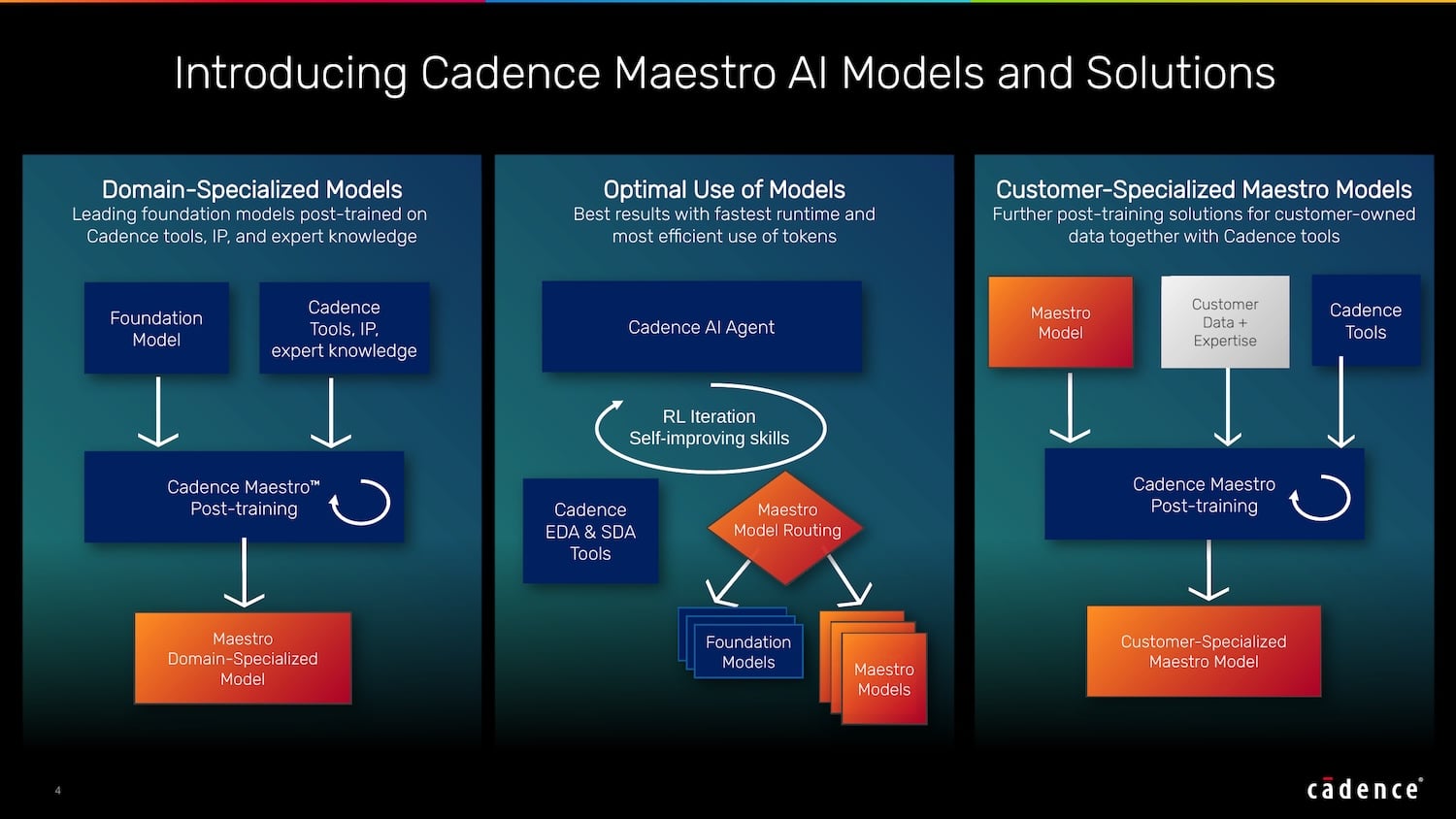
    Show notes Cadence Maestro AI models slide showing domain-specialized models post-trained on Cadence tools, model routing between Maestro and foundation models, and customer-specialized post-training Cadence Maestro AI models slide showing domain-specialized models post-trained on Cadence tools, model routing between Maestro and foundation models, and customer-specialized post-training

    Cadence has introduced the Maestro AI Model Portfolio, a set of domain-specialized models that power its AI Super Agents across chip and system design. Maestro combines post-trained large language models, trained decision models, and self-improving agent skills, and Cadence says initial design-workflow results show up to 30 percent higher quality of results and up to 5X better token efficiency than a general-purpose foundation model. These are vendor results, and we did not run or audit them.

    Cadence Maestro AI models slide showing domain-specialized models post-trained on Cadence tools, model routing between Maestro and foundation models, and customer-specialized post-training

    Reinforcement Learning Loops and Deterministic EDA Solvers

    Cadence credits those gains to a vertically integrated learning environment that ties the Maestro models to its AI Super Agents, its electronic design automation (EDA) and system design automation (SDA) tools, curated engineering datasets, and evaluation harnesses. Cadence’s deterministic solvers score agent output against engineering objectives, constraints, and ground truth, which gives reinforcement learning a closed, verified feedback loop. Cadence has not published the workloads or baselines behind the 30 percent and 5X figures.

    Super Agents use Maestro alongside general models: given a high-level objective, a Super Agent interprets the design intent, breaks it into tasks, routes work among Maestro, frontier, and open-weight models, and drives the EDA and SDA tools. Cadence says balancing tool calls against model invocations is what reduces token use. Customers can also post-train Maestro models, including NVIDIA Nemotron variants, on proprietary data, designs, and workflows.

    NVIDIA contributes Nemotron models, OpenShell, and engineering expertise, and the two companies are integrating Cadence’s agents with the NVIDIA OpenShell Reference Architecture for agent security. “By grounding reinforcement learning in feedback from EDA tools and deterministic solvers, we can teach agents to make better design decisions based on how well their work meets engineering objectives and constraints,” said Tim Costa, vice president and general manager of industrial and computational engineering at NVIDIA.

    AI Super Agent Workload Orchestration

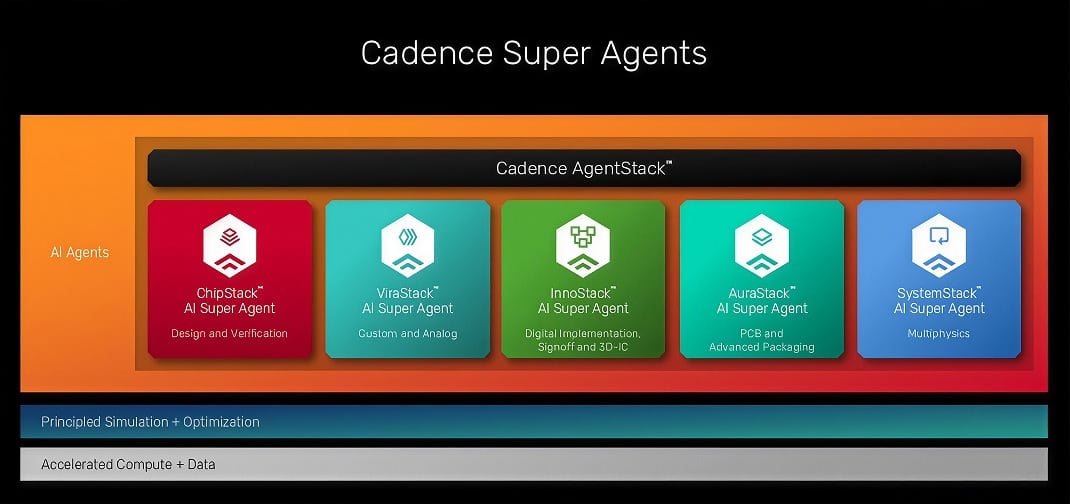
    Maestro serves four Super Agents named in the announcement, each mapped to a stage of the design flow. ChipStack handles front-end digital design and verification, from RTL generation and testbench creation through regression and debug. ViraStack covers custom and analog design, InnoStack takes digital implementation, signoff, and 3D-IC, and AuraStack targets PCB and advanced packaging. Cadence’s AgentStack head agent sits above them and orchestrates the set.

    Cadence AI Super Agents that Maestro models power: AgentStack above ChipStack, ViraStack, InnoStack, AuraStack, and SystemStack

    Two customers are already running the agents: Socionext is deploying InnoStack in its production design environment, and Hisato Yoshida, COO of Socionext, said, “By combining agentic AI with advanced EDA tools for physical design, we expect up to 5X overall productivity gains while maintaining design quality.” At Silicon Labs, engineering teams using Cadence Verisium Debug as part of ChipStack sped up root-cause analysis and end-to-end debug during pre-silicon low-power verification, according to Garima Sharda, the company’s vice president of engineering.

    Deployment Status and Early Access

    The full agentic environment, including the Super Agents, Maestro models, and EDA tools, can run on Cadence’s secure cloud platform, on secure public clouds, or in customer-controlled on-premises environments to meet data privacy and security requirements. The first Maestro models are available to select early access customers in the fourth quarter of 2026, and Cadence has not announced general availability or pricing.

    Cadence AI Super Agents

    The post Cadence Maestro AI Models Claim Up to 5X Token Efficiency for Chip Design Super Agents appeared first on StorageReview.com.


    CloudCasa DR Adds Dell PowerStore Failover for Kubernetes and a Read-Only MCP Server Nov 02, 2026
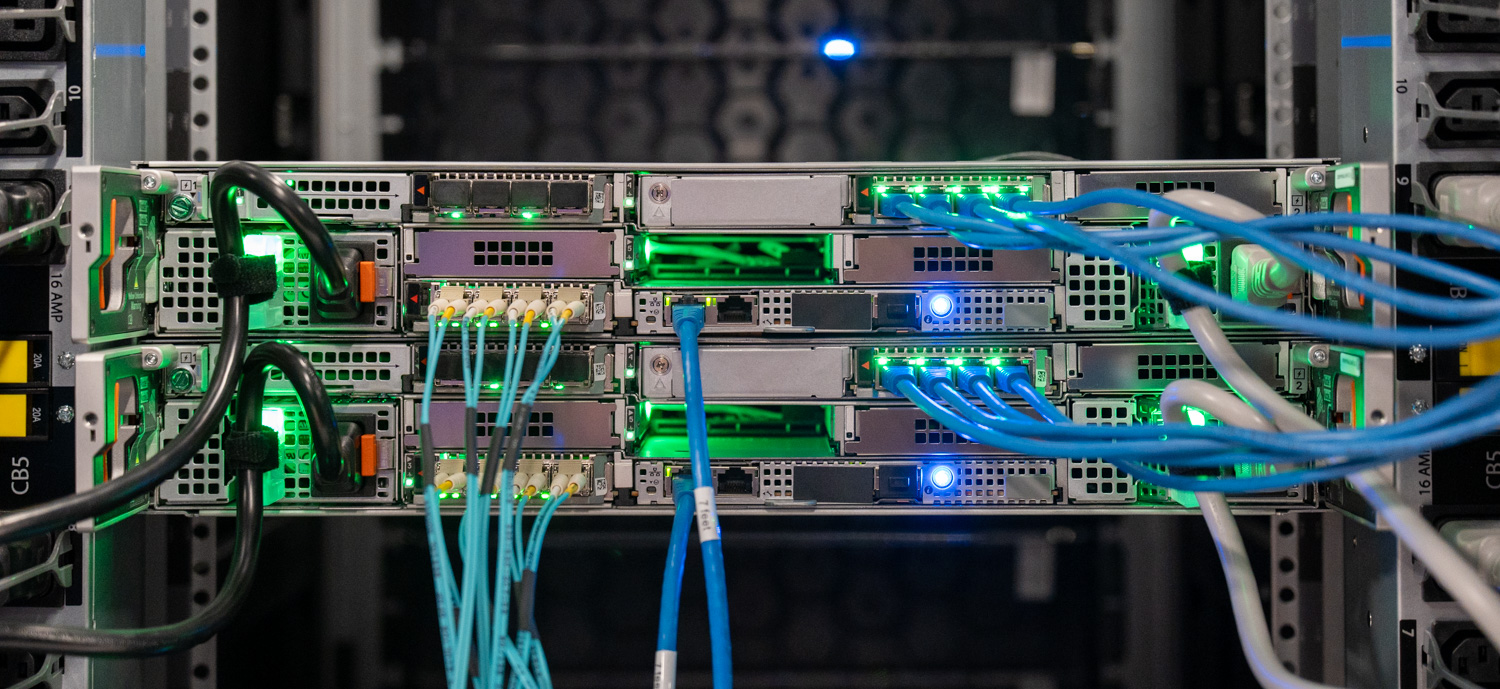
    Show notes Rear of a Dell PowerStore 9500 in the StorageReview lab, the array family CloudCasa DR now drives for Kubernetes replication Rear of a Dell PowerStore 9500 in the StorageReview lab, the array family CloudCasa DR now drives for Kubernetes replication

    CloudCasa by Catalogic has added Dell PowerStore to the storage arrays CloudCasa Disaster Recovery can drive for Kubernetes failover, alongside HPE Alletra and SUSE Storage. The same feature update adds a read-only Model Context Protocol (MCP) server that lets AI assistants check backup and DR status, and a preview of Changed Block Tracking (CBT) for KubeVirt virtual machine backups, which copies only the blocks that changed since the last run.

    Rear of a Dell PowerStore 9500 in the StorageReview lab, the array family CloudCasa DR now drives for Kubernetes replication

    Storage-Integrated Disaster Recovery Expands to Dell PowerStore

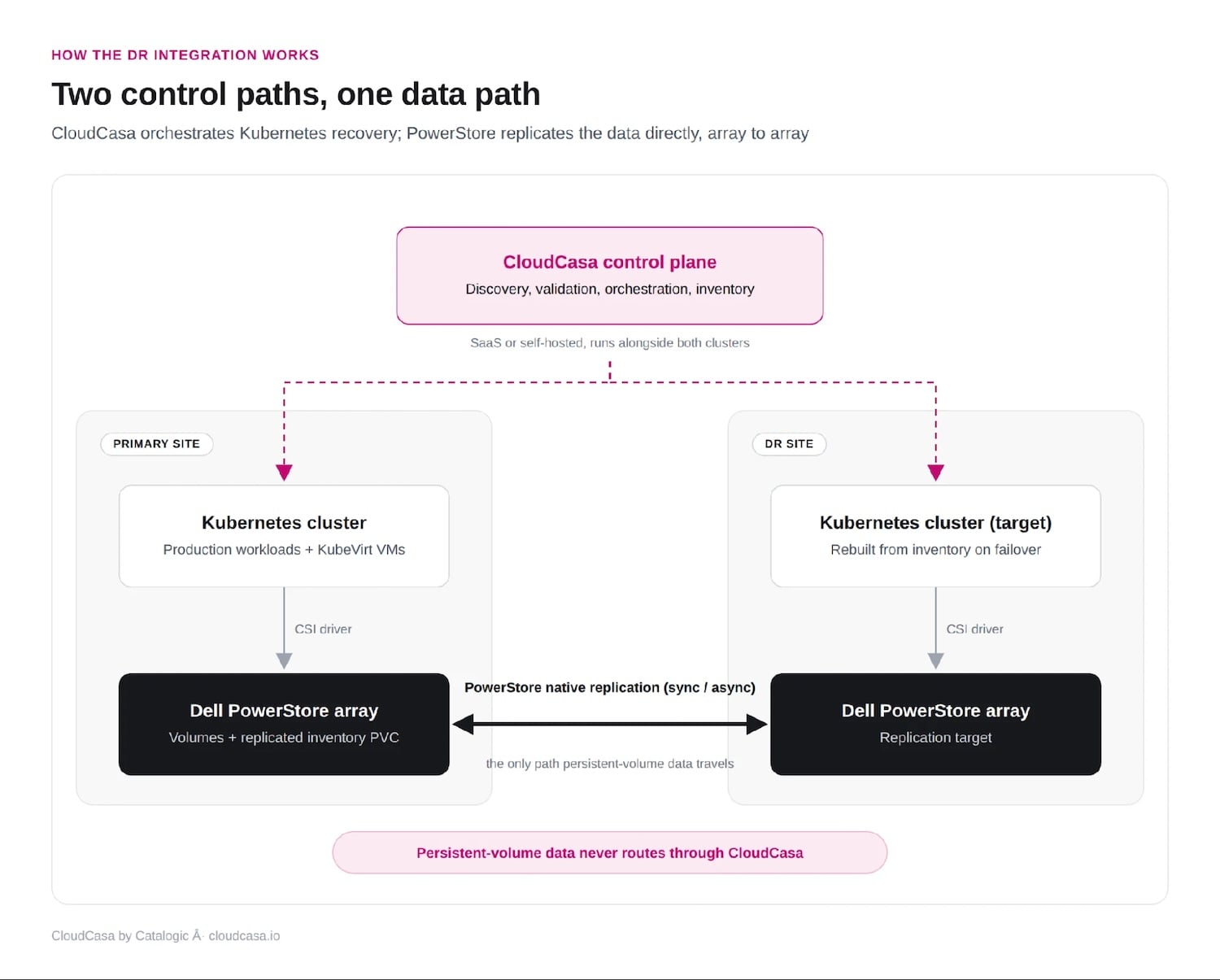
    PowerStore joins the HPE Alletra Storage MP B10000, HPE Alletra 9000, and SUSE Storage as replication providers for CloudCasa DR. The division of labor is the same on each platform: the array replicates persistent volume data to the recovery site, synchronously or asynchronously in PowerStore’s case, and CloudCasa handles the Kubernetes side of failover and failback for containerized applications and KubeVirt VMs. Volume data moves array to array and never passes through CloudCasa.

    CloudCasa records the configuration of each protected workload in a replicated inventory volume and talks to the array through the PowerStore REST API. On failover, it brings up that inventory volume first, starts a recovery agent on the target cluster, then fails over the remaining PowerStore volume groups and rebuilds the Deployments, StatefulSets, persistent volume claims, and KubeVirt VMs against the replicated volumes. Because PowerStore fails over complete volume groups, CloudCasa advises placing workloads with different recovery requirements in separate groups.

    CloudCasa DR architecture for Dell PowerStore: the CloudCasa control plane orchestrates primary and DR Kubernetes clusters while PowerStore replicates volumes array to array

    Failback waits for operator confirmation, after which CloudCasa reverses replication on the affected volume groups so PowerStore resynchronizes only the changes made since the failover, scales down the workloads still running at the DR site, and then fails the volume groups back to the primary array and rebuilds the workloads there. CloudCasa says the approach targets recovery times measured in minutes and near-zero RPO when PowerStore replicates synchronously, with results depending on replication mode, workload size, and distance between sites.

    The integration covers block (SCSI) persistent volumes provisioned through the PowerStore CSI driver; NFS and SMB volume DR is on CloudCasa’s roadmap. Supported platforms include Red Hat OpenShift and OpenShift Virtualization, SUSE Rancher/RKE2 and SUSE Virtualization, VMware vSphere Kubernetes Service, and upstream Kubernetes 1.20 and later. CloudCasa DR is licensed per worker node on an annual subscription, separately from CloudCasa’s backup product, in both the SaaS and self-hosted editions.

    Model Context Protocol Server for AI Agent Integration

    The MCP server lets any AI assistant that supports remote MCP servers over HTTP query CloudCasa in plain language, with questions such as which backup jobs failed in the last 24 hours or which recovery points exist for a namespace. It calls the CloudCasa APIs on the user’s behalf, authenticates with a CloudCasa API key passed in an HTTP header, and can do only what that key’s role allows. For now it is read-only: assistants can list clusters, backup policies, jobs, recovery points, restores, alerts, and backup targets, but cannot run, create, edit, or delete anything.

    “Platform teams do more of their day-to-day work using AI assistants, and they want backup status available alongside the rest of their tooling,” said Ryan Kaw, Global VP of Sales and Alliances at CloudCasa. “The MCP server makes that possible today.”

    Changed Block Tracking Preview and Availability

    The CBT preview builds on the incremental backup support KubeVirt added in version 1.8, which uses QEMU and libvirt backup capabilities and works regardless of the underlying storage. CBT records which disk blocks changed since the previous backup, so CloudCasa copies only those blocks, which the company says shortens VM backup times. On Red Hat OpenShift, that KubeVirt version arrives with OpenShift 4.22, and the feature has to be enabled explicitly.

    The PowerStore DR integration and the MCP server are available now, and CBT backups remain in preview. The update also adds a dedicated VMs page that lists virtual machines across all registered clusters with their running state and guest agent status, where admins can define backups and restores for each VM.

    CloudCasa DR for Storage

    The post CloudCasa DR Adds Dell PowerStore Failover for Kubernetes and a Read-Only MCP Server appeared first on StorageReview.com.


    Cigent Software Full Drive Encryption Clears Intel vPro Power and CPU Targets, Earns Certified App Status Oct 30, 2026
    Show notes Cigent management console dashboard showing connected endpoints, BitLocker compliance, endpoint locations, and recent policy activity Cigent management console dashboard showing connected endpoints, BitLocker compliance, endpoint locations, and recent policy activity

    Cigent Software Full Drive Encryption and its command line interface have received Intel vPro Certified App status, Intel’s validation that a background application meets its power and performance targets on vPro business PCs. Cigent’s software is a CSfC-listed encryption component used in NSA Commercial Solutions for Classified data-at-rest architectures, so the certification speaks to a specific buyer: defense and government IT teams running encrypted laptops and field systems where battery life and processor headroom are part of the mission.

    Cigent management console dashboard showing connected endpoints, BitLocker compliance, endpoint locations, and recent policy activity

    Hardware-Validated Efficiency and CSfC Data-at-Rest Architecture

    Intel’s program evaluates software that runs continuously in the background, such as security, telemetry, and observability agents, for CPU utilization, power efficiency, coordination of background threads, use of the hybrid core architecture, and the number of CPU interruptions it generates. Intel says Cigent’s software met or exceeded those targets in its testing with minimal impact on device performance and battery life, though neither company has published the measured figures. Cigent joins a certified list that includes CrowdStrike Falcon, Microsoft Defender for Endpoint, Citrix Workspace, and Absolute Secure Endpoint.

    Cigent Software Full Drive Encryption is the independent inner encryption layer in the NSA CSfC Data at Rest Capability Package v5.1.0 architecture. It runs once the outer hardware encryption layer has authenticated, with separate credentials and key management and optional smart card authentication that requires both the card and its PIN. Cigent uses AES-256 and positions the software for National Security Systems spanning endpoints, servers, tactical edge systems, vehicles, and autonomous platforms, with Dell, Getac, and Panasonic PCs, mobile workstations, and servers among the supported hardware.

    “For defense teams operating mobile platforms in the field, every hour of battery life counts, and so does every ounce of performance. Earning Intel vPro Certified App status for Cigent Software Full Drive Encryption and CLI reflects our commitment to minimizing our software’s power use and processor demands. That efficiency supports CSfC Data-at-Rest deployments on the Intel vPro devices those teams depend on,” said Juan Mojica, Chief Technology Officer at Cigent.

    “Cigent’s Intel vPro Certified App status reflects a critical priority on efficiency and optimization that can help customers confidently deploy security technologies across their PC fleets,” said Dennis Luo, Senior Director and General Manager, Worldwide AI PC Developer Relations at Intel.

    Fleet Automation and Management via CLI

    The CLI covers deployment and management for organizations running the software at scale, and the certification applies to it as well as to the encryption software. Cigent says the encryption can be rolled out across large fleets with standard enterprise software-distribution tools, using MSI installation flags to preconfigure passwords, define authorized users, and enable self-enrollment without a separate management console. Neither company has published the test configurations, the vPro generations covered, or the CPU and power figures behind the certification, and Cigent has not tied pricing or availability changes to it.

    Attribute Detail
    Software Cigent Software Full Drive Encryption and Cigent CLI
    Certification Intel vPro Certified App
    Certification criteria CPU utilization, power efficiency, background thread coordination, hybrid core use, CPU interruptions
    Compliance listing NSA CSfC Data-at-Rest Components List
    Inner encryption layer, CSfC DAR Capability Package v5.1.0
    Encryption Software-based full drive encryption, AES-256
    Separate credentials and key management from the hardware layer
    Optional smart card authentication
    Deployment Standard enterprise software-distribution tools
    MSI installation flags for passwords, authorized users, and self-enrollment
    CLI for deployment and management at scale
    Target systems Intel vPro endpoints, servers, tactical edge systems, vehicles, and autonomous platforms

    Cigent Software Full Drive Encryption Product Page

    The post Cigent Software Full Drive Encryption Clears Intel vPro Power and CPU Targets, Earns Certified App Status appeared first on StorageReview.com.


    Dell XPS 16 Creator Edition Review: RTX Spark N1X Holds Full Speed in a 17.8mm Chassis Oct 29, 2026
    Show notes

    The Dell XPS 16 Creator Edition is the first XPS built on NVIDIA’s RTX Spark N1X. Dell houses the chip in what it calls its thinnest high-performance XPS yet: a 17.8mm CNC aluminum chassis with a 3.2K Tandem OLED touch panel, a 99Wh battery, three USB4 ports, HDMI 2.1b, and a full-size SD reader. Our review unit is the $4,799.99 build with the 20-core N1X, 64GB of LPDDR5X-9400 split evenly between CPU and GPU, and a 1TB Gen4 SSD. It is the fifth RTX Spark notebook through the lab after the Microsoft Surface Laptop Ultra, the HP OmniBook Ultra 16, the Lenovo Yoga 9n 2-in-1 16, and the Lenovo Pro 9n 15. The N1X inside is the same 20-core, 6,144-core-GPU part HP ships in the OmniBook. However, while Dell’s chassis is a uniform 17.8mm slab, HP’s tapers from 15.7mm to 11.6mm, so the comparison is between cooling designs and build decisions around the same silicon. The result is about 5 percent less multi-threaded CPU performance than the OmniBook, with no throttling: the cooling lets the N1X run at its full rated clocks and stay there for as long as the work lasts. The XPS scored 6,631 in Cinebench 2026 multi-core against 7,001 on the OmniBook, then held 6,550 through a 30-minute loop. Its single-core score of 564.5 is the highest we have recorded on an RTX Spark notebook, and its STREAM Triad bandwidth of 122,872MB/s leads this comparison. On the GPU, the XPS runs within 2 to 8 percent of the OmniBook on every local AI test that fits in its memory and is level with it on MLPerf and the small-model serving runs, generates FLUX.2 klein Q4_0 images faster than any other N1X notebook in this comparison at 11.17 per minute, and posts the best SuperTuxKart steady frame rate of the group at 148 fps. Under our memory rules, the 64GB configuration is a tier S machine: it can run gpt-oss:20b and the 27B serving tier, but not the 35B coding-agent tier, placing it in the same class as the 64GB Yoga. Key Takeaways Same silicon, thinner shell, small performance drift: 6,631 in Cinebench 2026 multi-core is 5 percent behind the 128GB HP OmniBook Ultra 16 with the same 20-core N1X, 147.0 GIPS in 7-Zip against 150.6, and an LLVM build of 232.4 seconds against 218.1; Blender runs 6 to 7 percent behind across three scenes. Best single-thread and memory numbers of the RTX Spark group: Cinebench single-core 564.5, STREAM Triad 122,872MB/s and Copy 130,689MB/s, memory latency 140.5 ns, and Speedometer 36.5, each the top result among the five N1X notebooks in this comparison. Local AI runs within 2 to 8 percent of the OmniBook up to its memory line: MLPerf Client generates Llama 3.1 8B at 55.7 tokens per second and Phi-4-mini at 96.2, the Codex coding agent runs gpt-oss:20b at 58.5 tokens per second, llama-server pushes Qwen3.8 27B to 31.9 aggregate tokens per second at eight concurrent users, and FLUX.2 klein renders at 11.17 images per minute; the 30.5GB GPU-usable budget keeps the 35B agent tier out. Full performance for as long as the job runs: ten Cinebench multi-core passes over 30 minutes stayed between 6,519 and 6,562 with the last pass the highest, at a 3,083MHz mean clock, and no sustained test in the suite showed a throttling step; the chip runs at the same 98C target the OmniBook uses, and HP’s 3,239MHz at that temperature is where the 5 percent goes. The Gen4 SSD is the one spec that holds it back: the 1TB SK hynix PVC10 reads 6,502MB/s and writes 5,670MB/s sequentially with 300.1K IOPS on 4K random reads, against 13,598MB/s and 449.0K IOPS from the OmniBook’s Gen5 drive; cold model loads from disk take 7.73 seconds against 6.70. Dell’s configurator puts a Gen5 drive only in the $6,999.99 128GB build. Where the Creator Edition Sits Dell displayed the XPS 16 Creator Edition at Computex in June and opened orders on Dell.com in October, with Best Buy, Micro Center, and B&H also carrying it. It sits beside the Intel XPS 16 (DA16260), which starts at $2,399.99 with Core Ultra Series 3 processors and Arc graphics in a 14.6mm chassis, and Dell positions the Creator Edition as the XPS for buyers who have been asking for discrete-class GPU performance without leaving the family. Dell lists four fixed configurations, all with the 3.2K OLED touch panel and Windows 11 Home. The $3,799.99 base pairs the 18-core N1X with the 5,120-core GPU, 32GB, and a 512GB SSD; $3,999.99 moves to the 20-core, 6,144-core part with 1TB; our $4,799.99 unit adds 64GB; and $6,999.99 brings 128GB and a 2TB Gen5 self-encrypting drive, the only Gen5 SSD in the lineup; the three lower configurations ship Gen4 drives. Dell says a 4TB option is planned. Our unit arrived with Windows 11 Pro. The memory configuration matters most on an RTX Spark system because the N1X splits its unified LPDDR5X between CPU and GPU via a firmware setting, and the GPU share determines which local models fit. Our 64GB review unit is configured with 32GB for the GPU and reports 30.5GB usable. It runs gpt-oss:20b, the 27B serving tier, and 20B image models, but doesn’t qualify for the 35B coding-agent tier that the 128GB OmniBook and Surface Laptop Ultra run. The 32GB configurations allocate 12GB to the GPU and don’t support any of our model-load or agent tiers. Compared with the other N1X notebooks, the Creator Edition stands out for its display and port selection: a 3200×2000 Tandem OLED with a variable 20 to 120Hz refresh rate, plus a full-size SD card reader, HDMI 2.1b, and three USB4 ports. At 17.8mm and 4.45 pounds, it’s thicker than the OmniBook, which tapers to 11.6mm at the front but weighs 4.89 pounds. It’s thicker and heavier than the 4.28-pound Yoga 9n. The 1TB configuration ships with a Gen4 SSD, whereas the OmniBook’s drive we tested is Gen5. Build and Design The Creator Edition is a CNC-machined aluminum clamshell at 352.58 x 237.97 x 17.81mm and a listed 2.02kg (4.45 lb) minimum, in a single Graphite finish. Dell calls it the thinnest high-performance XPS it has built, and the thinness is an engineering accomplishment: Dell fitted what it describes as its largest and thinnest fans to date and an 8mm heat pipe, wider than its previous XPS designs, to carry the N1X in a chassis that is 0.7 inches at its thickest point. In hand, the system feels as dense and rigid as a MacBook Pro/ It includes a glass touchpad set into the palm rest and a backlit keyboard with a Copilot key. One detail stood out in the lab: the palm rest is not a single piece of metal. The flat keyboard deck and the front edge piece meet with a visible seam and a slight lip, and when you rest your hands on the deck, the lower palm finds it. It is a small thing on a machine this well finished, and it is the only build complaint we have. The 16-inch 3200×2000 Tandem OLED touch display has a variable 20 to 120Hz refresh rate and a density of 142 PPI. It is VESA DisplayHDR True Black 600 certified, reaches 400 nits typically and 1,000 nits at peak, covers 100 percent of DCI-P3, and is factory-calibrated to a Delta E below 2 with Pantone validation. It is the same class of panel Dell uses on the Intel XPS 16, and at this resolution Windows defaults to 200 percent scaling. Dell quotes a 1,000,000:1 contrast ratio for it. Ports run along both sides and largely cover what a creator needs without a dock. There are three USB4 Type-C ports at 40Gbps with DisplayPort 2.1 and Power Delivery, an HDMI 2.1b port, a full-size SDXC v7.1 card reader, and a headset jack. Dell’s patented lock slot lets a Kensington lock secure the machine through any Type-C port. Wireless includes a MediaTek Wi-Fi 7 module and Bluetooth 6.0, and the battery is a 99Wh pack, the largest airlines allow. Service access and repairability are the best we’ve seen in this class. The Creator Edition opens from the top: four screws release the top cover, and the keyboard and touchpad are screwed to that cover, so you can remove either without touching the battery or the motherboard. The I/O sits on two daughterboards separate from the motherboard, and each USB-C port is a separate module held by two screws, so a worn port is a two-screw part that’s simple to swap. The HDMI port and the rest of the I/O are fixed to their daughterboards, which still keeps a port failure off the mainboard. With the cover removed, the internal layout is clear: Dell’s largest and thinnest fans sit in the rear corners, connected by a heat pipe that runs over the N1X. The 99Wh battery fills the front half of the chassis beneath the palm rest. Because the unified memory is integrated into the N1X package, it cannot be upgraded; the SSD is the only component a buyer can replace later. Dell XPS 16 Creator Edition Specifications Specification Dell XPS 16 Creator Edition (DX16263 as tested) Platform Processor NVIDIA RTX Spark N1X, 20-core NVIDIA Grace CPU (Arm), 20 threads, 24MB L3Base configuration: 18-core N1X Graphics NVIDIA Blackwell RTX GPU, 6,144 CUDA cores, integrated into the N1X, unified memoryBase configuration: 5,120-core GPU Memory 64GB LPDDR5X-9400 unified, soldered; shipped at 32GB GPU / 32GB system, 30.5GB GPU-usable as measuredOptions: 32GB, 64GB, 128GB Storage 1TB SK hynix PVC10, M.2 PCIe 4.0 x4 TLCOptions: 512GB and 1TB on PCIe 4.0 x4; 2TB on PCIe 5.0 x4 with DRAM, self-encrypting, in the 128GB configuration only; 4TB planned Display Panel 16-inch 3.2K (3200×2000) Tandem OLED touch, 142 PPI, 20 to 120Hz VRR, 400 nits typical / 1,000 nits peak, VESA DisplayHDR True Black 600, 100% DCI-P3, Delta E under 2, Pantone Validated, 1,000,000:1 contrast Connectivity Ports 3 x USB4 Type-C, 40Gbps, DisplayPort 2.1, Power Delivery, Kensington lock support1 x HDMI 2.1b1 x full-size SDXC v7.1 card reader1 x headset jack Wireless MediaTek Wi-Fi 7 (802.11be) with Bluetooth 6.0 Physical Battery 99Wh Dimensions 352.58 x 237.97 x 17.81mm (13.88 x 9.37 x 0.70 in) Weight From 2.02kg (4.45 lb) Chassis CNC-machined aluminum, Graphite; glass touchpad; backlit keyboard Operating system Windows 11 Home as sold (Copilot+ PC); Windows 11 Pro on our review unit Price $4,799.99 as tested on Dell.com; $3,799.99 (18-core, 32GB, 512GB), $3,999.99 (20-core, 32GB, 1TB), $6,999.99 (20-core, 128GB, 2TB) Test Setup and Methodology Our review unit pairs the 20-core RTX Spark N1X with 64GB of LPDDR5X-9400 configured in a 32/32 split and a 1TB Gen4 SSD. We ran the benchmarks while plugged in, using Windows 11 Pro 26H1, the Best performance power mode, and Dell’s default thermal mode. Battery life will follow in a later update. Results come from sr-client 1.11, our scripted Windows client benchmark suite, run to completion on the Peak profile, on each system’s factory Windows image with the OEM’s drivers and utilities. The suite applies the same settings: Windows power mode at Best performance, display at 50 percent brightness, all sleep and display timers off, Windows Firewall and UAC prompts off, and VBS and Memory Integrity left on as shipped. Each result is the median of repeated passes, and the suite reruns a test whose spread exceeds 2 percent before accepting it. The comparison set includes several RTX Spark notebooks we ran on this suite version, plus two x86 references. The HP OmniBook Ultra 16 appears twice: as the 128GB unit with 64GB for the GPU and as the 32GB unit with 12GB; the Lenovo Yoga 9n 2-in-1 16 directly matches our configuration at 64GB with a 32GB GPU share. The Lenovo Pro 9n 15 carries the 18-core, 5,120-core-GPU bin that Dell uses in its $3,799.99 base configuration. The Dell Pro Precision 5 16S with the Core Ultra X9 388H and Arc Pro B390 and the Dell Pro 7 14 with the Ryzen AI 9 HX PRO 470 are Dell’s 64GB x86 machines, and both can hand their integrated GPUs more than 47GB. Configuration CPU Memory GPU Boot drive OS and power mode Dell XPS 16 Creator Edition (DX16263) NVIDIA RTX Spark N1X, 20C / 20T (Arm), 6,144-core GPU 64GB LPDDR5X-9400, 32GB GPU / 32GB system split, 30.5GB GPU-usable Integrated Blackwell RTX, 6,144 cores SK hynix PVC10 1TB, Gen4 x4 Windows 11 Pro 26H1 (Arm64), Best performance, Dell default shipped mode HP OmniBook Ultra 16 (16-bk0xxx), 128GB NVIDIA RTX Spark N1X, 20C / 20T (Arm), 6,144-core GPU 128GB LPDDR5X-9400, 64GB / 64GB split, 62.5GB GPU-usable Integrated Blackwell RTX, 6,144 cores Sandisk PC SN8050S 2TB, Gen5 x4 Windows 11 Pro 26H1 (Arm64), Best performance Lenovo Yoga 9n 2-in-1 16 (83N7) NVIDIA RTX Spark N1X, 20C / 20T (Arm), 6,144-core GPU 64GB LPDDR5X-9400, 32GB / 32GB split, 32GB GPU-usable Integrated Blackwell RTX, 6,144 cores Sandisk PC SN5100S 1TB, Gen4 x4 Windows 11 Home 26H1 (Arm64), Best performance HP OmniBook Ultra 16 (16-bk0xxx), 32GB NVIDIA RTX Spark N1X, 20C / 20T (Arm), 6,144-core GPU 32GB LPDDR5X-9400, 12GB GPU / 20GB system, 12GB GPU-usable Integrated Blackwell RTX, 6,144 cores KIOXIA KBG80ZNV 1TB, Gen5 x4 Windows 11 Home 26H1 (Arm64), HP Performance Lenovo Pro 9n 15 (83SS) NVIDIA RTX Spark N1X, 18C / 18T (Arm), 5,120-core GPU 32GB LPDDR5X-9400, 12GB GPU / 20GB system, 12GB GPU-usable Integrated Blackwell RTX, 5,120 cores Samsung MZAL81T0 1TB, Gen4 x4 Windows 11 Pro 26H1 (Arm64), Lenovo Performance Dell Pro Precision 5 16S (PW516260) Intel Core Ultra X9 388H, 16C / 16T (4P + 8E + 4LPE) 64GB LPDDR5X-8533 LPCAMM2, 47.6GB GPU-usable Intel Arc Pro B390 (integrated, 12 Xe cores) SK hynix PCB01 1TB, Gen5 x4 Windows 11 Pro 26H2 (x64), Dell Performance Dell Pro 7 14 (P714265) AMD Ryzen AI 9 HX PRO 470, 12C / 24T 64GB LPDDR5X-8000, 32GB VGM, 47.8GB GPU-usable AMD Radeon 890M (integrated) Samsung BM9C1a 1TB, Gen4 x4 Windows 11 Pro 25H2 (x64), Dell Performance Three labels recur in the tables. N/A means a test does not apply to the hardware. Not run means the suite declined to start a test because the hardware does not qualify: our model-load, coding-agent, 27B serving, and 20B image tiers need at least 16GB of GPU-usable memory, and the two 12GB systems clear none of them. Partial marks a result the suite accepted with a note. The Dell Pro Precision 5 16S did not expose CPU temperatures to the suite, so the suite omits it from the thermal table. Two tests are new to this suite version and appear here for the first time against the full RTX Spark group: llama-server throughput at one to eight concurrent users on three models, and image generation through stable-diffusion.cpp on FLUX.2 klein 4B, Z-Image Turbo 6B, and Qwen-Image 20B. The HP 32GB and Lenovo Pro 9n results in this review are fresh runs on 1.11, so their numbers differ slightly from the October 16 reviews. Local AI Performance The frame around this section is the 30.5GB the GPU can address. Within it, the XPS runs within 2 to 8 percent of the 128GB OmniBook on every test and matches it on MLPerf and small-model serving runs because the GPU, memory bus, and drivers are the same. Above it, the 128GB systems run a 35B coding-agent tier the XPS cannot start. For a buyer deciding between the $4,799.99 and $6,999.99 configurations, the extra $2,200 buys that line and the Gen5 SSD that comes with the 2TB drive. MLPerf Client v2.0 MLPerf Client runs Llama 3.1 8B and Phi-4-mini through five prompt categories and reports time to first token and the token rate after it as a geometric mean across the categories, with agentic scenarios that run Llama 3.1 8B as a data analyst agent and a software engineering agent calling tools over multiple turns. The engine is llama.cpp on CUDA on the N1X systems, Intel’s native OpenVINO path on the Arc Pro B390, and WindowsML on the Radeon 890M, so the two x86 columns are different runtimes on different silicon. MLPerf Client v2.0 Dell XPS 16 Creator Edition (N1X 20C, 64GB) HP OmniBook Ultra 16 (N1X 20C, 128GB) Lenovo Yoga 9n 2-in-1 16 (N1X 20C, 64GB) HP OmniBook Ultra 16 (N1X 20C, 32GB) Lenovo Pro 9n 15 (N1X 18C, 32GB) Dell Pro Precision 5 16S (X9 388H, B390) Dell Pro 7 14 (Ryzen AI 9 HX PRO 470) Llama 3.1 8B, time to first token, geomean (s, lower is better) 0.313 0.275 0.348 0.277 0.303 0.214 3.146 Llama 3.1 8B, token rate, geomean (tok/s) 55.7 56.5 54.4 56.1 55.0 26.9 18.0 Phi-4-mini, time to first token, geomean (s, lower is better) 0…

    Full show notes at the publisher

    One Array for AI: Inside the IBM FlashSystem and Broadcom Fibre Channel Architecture Behind Oracle AI Database 26ai Oct 29, 2026
    Show notes

    The biggest AI infrastructure decision many enterprises make in the next year won’t be a GPU investment; it will be a database upgrade. Oracle AI Database 26ai is the long-term support release Oracle is steering its 19c installed base toward. 26ai puts vector search in the same engine that holds transactions. When the vector index lives in the database, the block array and the SAN fabric behind it become AI infrastructure, carrying retrieval traffic alongside the transactions they already serve. Key Takeaways OLTP and vector search share one array: with a 45,000 IOPS throttle on each vector volume, FlashSystem held 870,000 IOPS at 377 microseconds and 6.9GB/s on 25 percent CPU while Swingbench sustained about 19,500 TPS flat for the length of the run; without the cap, the vector workload took 37 percent off OLTP. 64G Fibre Channel nearly doubles vector search throughput: the same host, array, and Emulex LPe38102 SecureHBAs delivered 85.0 queries per second at 64G against 43.7 at 32G, 95 percent more, with p99 latency at 80 threads falling from 4.08 seconds to 1.14 and the IVF_FLAT index build finishing 28.8 percent sooner. Ransomware aimed at the RMAN backup target was caught in under 60 seconds: FlashSystem flagged all 31 volumes in the group, took an immutable Safeguarded Copy snapshot on its own, and extended retention on the last known good copy, with no host agent in the path. Vector capacity is a day-one budget item: one million 1,024-dimension embeddings turned 0.90GB of source text into 16.24GB on the SAN, 18 times the source, with 15 to 23GB of TEMP needed during the index build and a multiplier that ranges from 4.8x to 32.5x depending on the embedding model. Day-two operations stay on the array: AutoZoning with Brocade target-driven zoning adds a host without a zoning ticket, storage partitions give the DBA and AI teams separate tenants on one system, and Emulex SecureHBAs encrypt host-to-array traffic in flight across a Brocade Gen 8 fabric with post-quantum cryptography. The Database Changed Underneath AI Oracle built 26ai around that idea: a native VECTOR data type, SQL vector search functions, in-database model execution through ONNX, and SELECT AI for natural language queries, all in an LTS release the company enumerates at more than 300 new features. In practice, a DBA can generate embeddings, store them next to the rows they describe, and run a similarity search within the same transaction scope as an order lookup. There’s no separate vector store to run, no synchronization pipeline to maintain, and no second copy of regulated data living outside the audit trail. IBM cites IDC on the trend: “Integrated vector databases are the clear platform of choice for storing and querying vector embeddings, as organizations favor unified, governed environments for agentic AI.” IBM and Broadcom’s customers want to extend the database they already trust before standing up a new one alongside it.Oracle is not alone in this direction. DB-Engines’ October 2026 popularity ranking lists the top four relational and multi-model engines: Oracle, MySQL, Microsoft SQL Server, and PostgreSQL, and all four have added vector types or vector search, natively or through extensions such as pgvector. IBM chose to start its validation work with Oracle primarily because of its market leadership, though the storage argument in this piece applies to the others as well. The arguments for keeping block storage on-prem haven’t changed with AI in the picture: the data that makes an AI deployment useful, such as patient records, claims, orders, and trades, can’t leave. Copying it to a dedicated AI platform means paying for storage twice, accepting that the copy drifts from the production cluster, and losing the governance controls that made the original legally defensible. Keeping retrieval inside the database avoids all three. The array that serves a sub-millisecond row lookup now also serves a vector similarity scan for a clinician and a backup stream at the same time. IBM Storage and Broadcom’s Fibre Channel (FC) group set out to validate that mixed-workload case, and built an environment around Oracle AI Database 26ai on IBM FlashSystem with Broadcom’s Brocade Gen 8 SAN fabric and Emulex 64G SecureHBAs. They then worked through the questions an infrastructure team had been asking: what is the impact on transactional latency when a vector workload starts next to it, the effect of fabric speed on vector search throughput, the capacity consumed by embeddings, the effectiveness of ransomware detection when targeting an RMAN backup volume, and what are the requirements for adding a host to the SAN without a zoning ticket? The Data Already Lives on Block Storage, and Now the AI Comes to It None of this says AI workloads in general belong on block storage. Enterprises will keep file and object arrays for the unstructured estate: documents, images, video, training sets, and model checkpoints that never lived in a database and likely never will. In the healthcare demonstration that follows, IBM keeps the raw X-ray images in object storage while storing only the embeddings and case metadata in Oracle. What changes is the burden on the array, which now carries several workloads with very different I/O profiles at the same time. The relational tier is the most familiar one: millions of random 4KB to 16KB I/Os per second, row lookups and commits that need to land in microseconds, heavy write concurrency from redo, undo, and checkpoint traffic, and a tail latency that stays predictable because a user-facing application is waiting on it. RMAN, Oracle’s backup utility, is the opposite: a sequential stream that needs headroom to finish inside its window without disturbing the first workload. Both are well understood, and IBM’s arrays are tuned for them. The vector tier is harder to characterize because large tables of vector embeddings can make vector search look like a bandwidth-intensive workload: a large sequential scan. IBM’s characterization of the Oracle 26ai vector path is closer to OLTP. Each hop through the index is a roughly 4KB random read; the query path is IOPS-bound and latency-sensitive, and reads dominate because writes live in a separate ingest and index-build phase. Bandwidth matters in bursts, when an index is built or a corpus is re-embedded, and those bursts tend to be quite large. That split is the core of the mixed-I/O problem: on the query path, the vector workload competes with transactions for the same queues, making isolation a quality-of-service concern. And the bursty phases are where fabric bandwidth becomes the ceiling, as the 32G versus 64G results later in this piece show. The Validated Architecture IBM and Broadcom built one environment for this validation in Broadcom’s Colorado AI lab. The storage is an IBM FlashSystem 9000 series array running IBM Storage Virtualize 9.1.3 with 24 FlashCore Modules, presenting 64G Fibre Channel ports to a pair of Brocade Gen 8 G820 SAN switches. The database host is a dual-socket Intel Xeon 6767P server with two 2-port Emulex LPe38102 64G SecureHBAs, running Oracle AI Database 26ai on ASM with no GPU in the storage path; IBM Storage Insights watches the array. We ran the fabric and capacity results, the 32G versus 64G vector search comparison, and the footprint measurements using VectorDBBench against the BioASQ 1M dataset on that host alone. The same configuration also supports the application workload. A Supermicro 821GE-TNHR with two Xeon Platinum 8470 processors and eight NVIDIA H100 80GB GPUs hosts the healthcare application and its language model. The software stack includes Oracle’s in-database ONNX embedding, Ollama serving Llama 3, and NVIDIA cuVS. A Broadcom Tomahawk 5 switch and Thor 2 400GbE NICs connect the two servers. The I/O QoS, multi-tenancy, ransomware detection, and healthcare demonstrations ran in this environment. According to IBM, the FlashSystem family (the 5300 and 5600, 7300 and 7600, and 9500 and 9600) runs the same Storage Virtualize software, and the functions demonstrated here, including I/O throttling, AutoZoning, ransomware detection, Policy-Based HA, and storage partition migration, work the same way with Oracle AI Database 26ai on any of those arrays at the same code level. Performance and density vary by model and FlashCore Module generation, so every figure in this piece belongs to the system it was measured on. Ensuring Optimum OLTP and Vector Workload Performance With I/O QoS The first question IBM and Broadcom set out to answer is the one every DBA asks when a vector workload is proposed for the production array: what happens to the core transactions? IBM ran it as two demonstrations on the FlashSystem 9000 series array using volume-level I/O throttles, the mechanism behind what IBM calls I/O QoS. The database was laid out across 30 volumes: 15 for the OLTP tablespaces (ORCL16 through ORCL30) under Swingbench Order Entry at 192 users, and 15 for the vector tables (ORCL31 through ORCL45) under a 200-thread synthetic generator running top-k 500 similarity queries, with Storage Insights charting each volume group. With OLTP running alone, each OLTP volume held a flat 20,500 ops/s. When the vector generator started, the vector volumes climbed to about 73,000 ops/s each within a minute, and the OLTP volumes fell to about 13,000, a 37 percent drop with nothing changed on the transactional side. The vector search path is 4KB random reads at the same block size as the transactions, so it hits the same queues and takes whatever the array will give it. A 45,000 IOPS cap on each vector volume, one line of mkthrottle at the CLI, pulled the vector volumes to the limit and lifted OLTP back to about 17,000 ops/s. Removing the cap reversed it, and when the vector run ended, OLTP returned to 20,500. The dashboard tracked the same thing in aggregate: 1.28 million IOPS unthrottled and roughly 950,000 under the cap, which, within a few percent, is the per-volume rate times 30 volumes. The second demo is the configuration IBM expects would deploy in production: caps set first, 45,000 IOPS per vector volume and 20,000 per OLTP volume, then both workloads launched together. The vector volumes ran at their ceiling, the OLTP volumes settled at about 12,200 ops/s and stayed flat for the length of the run, and the array held 870,000 IOPS (800,000 read, 70,000 write) at 377 microseconds and 6.9GB/s on 25% CPU. The OLTP cap sat above the workload’s demand and never engaged; it’s there so a runaway on either side can’t starve the other. Swingbench held its 192 users at about 1.19 million transactions per minute, roughly 19,500 TPS, for the length of the run. The generator was tuned to saturate its volumes, so its per-query latency isn’t an application benchmark. Over the 30-minute run, it completed 35,672 queries at 19.8 per second, with a median latency of about 10 seconds and a p99 of 14.3 seconds against a 15-second application timeout; 99 queries (0.28 percent) hit that timeout, and the transactions never noticed any of it. A FlashSystem throttle is a volume ceiling enforced at the array regardless of host or path, with an optional bandwidth limit alongside the IOPS limit; it caps the neighbor and reserves nothing. The cap is a sizing exercise: 15 vector volumes at 45,000 IOPS is 675,000 IOPS of vector headroom, which left this array’s OLTP volumes what they needed. A different array or mix moves the number around some. Set the vector cap where the transactions hold their latency, and the vector workload gets everything above it. Ransomware Detection on Live Oracle Volumes Sophos’s 2024 survey of 2,974 organizations hit by ransomware found that 94 percent saw the attackers go after their backups, that the attempt succeeded 57 percent of the time, and that median recovery costs ran eight times higher when it did. IBM built the test on the same premise, backups first and production second, and aimed the attack at the RMAN backup target while leaving the database volumes alone. RMAN wrote its backup sets to FlashSystem volumes, a ransomware simulator was run against them, and the array was left to notice on its own, with no host agent in the path. Detection happens inside the drives: FCM4 and FCM5 FlashCore Modules compute entropy and compressibility on every write as it lands, along with block size, address, and rewrite patterns, and every two seconds pass a per-volume summary to an inference engine inside Storage Virtualize (8.6.3 or later with FCM firmware 4.1 or later). The model raises alerts in the FlashSystem GUI and IBM Storage Insights Pro, forwards them to Storage Defender or a SIEM, and is patchable on its own, so a retrained model ships as a small security update with no firmware upgrade. Because the analysis runs on the module, it keeps working even when the host is what’s compromised. Encrypted output is high-entropy and stops compressing, and that shows up in the statistics whether the attacker changes file extensions, encrypts only every other block, or slows the rate to hide from an endpoint agent. During validation, RMAN wrote the backup over 16 parallel channels, with each backup set capped at 150GB, and the database sat on 15 x 200GB disks per ASM disk group for OLTP and vector data. IBM ran the attack against that backup target, and the alert reached Storage Insights in under 60 seconds, which is within the detection window IBM publishes for the feature. Storage Insights flagged all 31 volumes in the volume group, since an alert on one volume marks the whole group as a threat.The response is Safeguarded Copy, and the array handled it without an operator: the FlashSystem took an immutable snapshot of the affected volume group the moment the threat was raised and extended the retention of the last-known good snapshot at the same time. The lsanomalydetection output from the array shows the configuration behind that: inference engine 8.0 with model 0.3.42.0, anomaly_snapshot on, 30 days of retention on the new snapshot, and 30 days added to the last good one. Storage Virtualize also marks the suspect snapshot so nobody restores from it, leaving a clean restore point from before the encryption began. The fabric also carries a security layer. Broadcom builds post-quantum cryptography into Brocade Gen 8 platforms, the Emulex SecureHBAs encrypt data in flight from host to storage array across that fabric, and FCIA’s new FC-SP-3 standard sets the quantum-ready security baseline for Fibre Channel as a whole. SAN Growth Without Zoning Tickets: IBM FlashSystem AutoZoning Using Broadcom Target-Driven Zoning Adding a host to a Fibre Channel SAN usually takes a ticket and two teams: the server admin collects the HBA WWPNs, the SAN admin builds zones on both fabrics by hand, and the storage admin maps the host to the right target ports. One mistyped WWPN leaves a new Oracle RAC node without its paths. AutoZoning moves that work to the array: FlashSystem talks to the fabric directly, identifies the initiator WWPNs, selects target ports, and creates the zones itself, with no one logging into a switch. The feature is built on Brocade Target Driven Zoning (TDZ) and arrived in FlashSystem software 9.1.2. It requires Brocade switches running Fabric OS 9.1.1 or later, with TDZ enabled by the fabric administrator on the switch ports facing FlashSystem target ports. That enablement is the one step that stays with the SAN team, and AutoZoning takes no action on a port until it’s done. From there, FlashSystem builds peer zones, allowing host initiators to reach the target port but not each other, under a predictable IBM_SV_ name that marks them as array-managed. Setup starts in the Fibre Channel port view, which now shows the switch each port connects to, whether the port is AutoZone capable, and whether its connectivity is symmetric, meaning the same port ID on every node lands on the same fabric. A topology view maps that in color, and only green ports t…

    Full show notes at the publisher

    AMD Helios Racks Are Running at Meta, With a Custom Instinct GPU and a $1 Billion Stake to Follow Oct 29, 2026
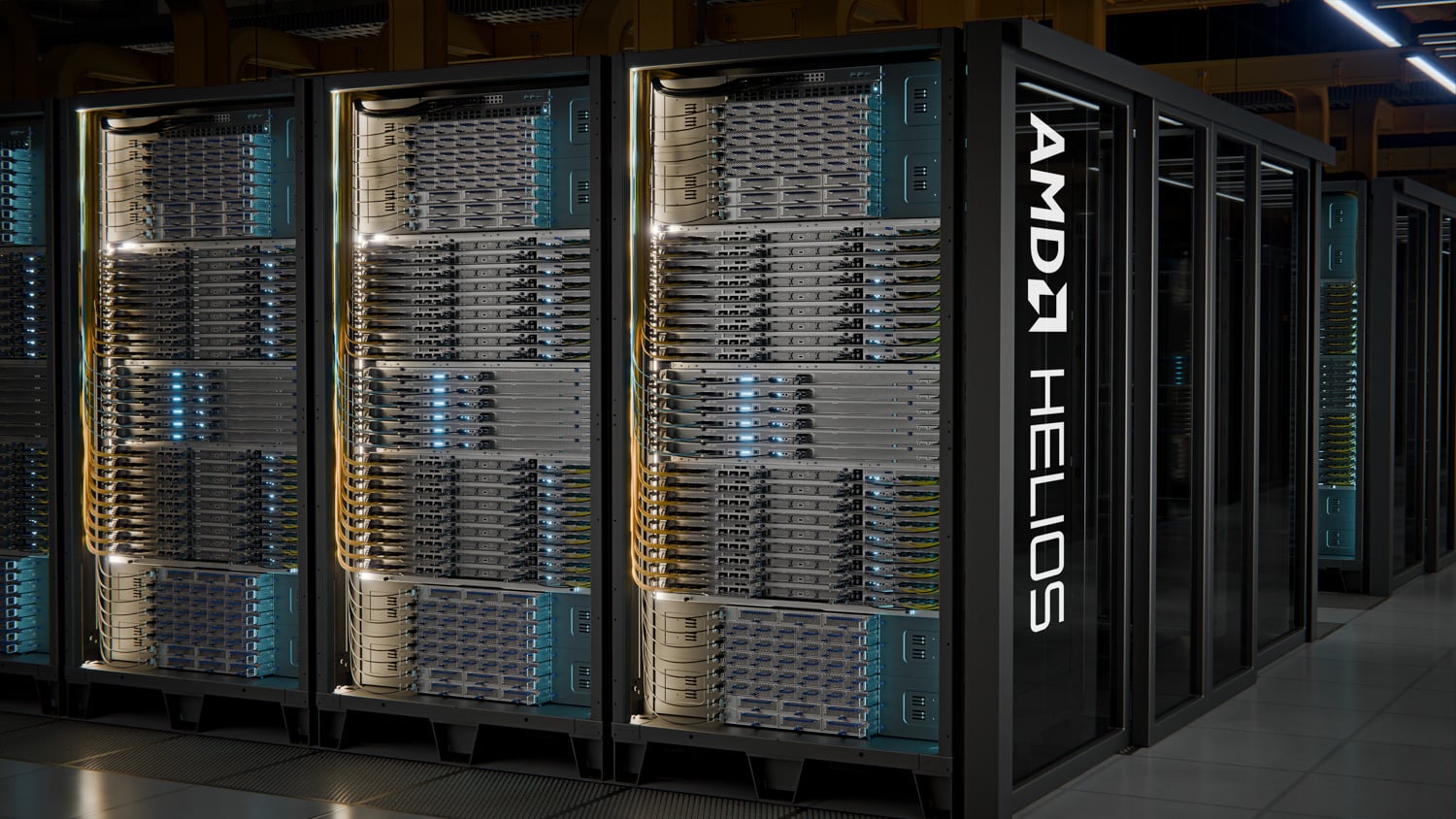
    Show notes AMD Helios AI rack render showing a row of 72-GPU racks with the AMD Helios badge on the end cabinet AMD Helios AI rack render showing a row of 72-GPU racks with the AMD Helios badge on the end cabinet

    AMD says the first AMD Helios rackscale systems are installed and under test at Meta, with a broader deployment to follow, and that the two companies have aligned product roadmaps around Meta’s workloads across EPYC CPUs, Instinct GPUs, Pensando networking, and ROCm. The same announcement puts EPYC behind Meta’s Muse personal AI agent, adds Day-0 AMD support for the Muse Spark Open and Muse Glimmer models, and commits AMD to a $1 billion investment in Meta’s equity offering.

    AMD Helios AI rack render showing a row of Helios racks with the AMD Helios badge on the end door

    “AMD has been a key partner in building out the compute that’s running our frontier models,” said Mark Zuckerberg, founder and CEO, Meta. “We’re making big investments in the computing power that will enable us to bring personal superintelligence to everyone, and AMD plays an important role in that.” Lisa Su, Chair and CEO, AMD, said: “With Helios now running at Meta, we are taking that partnership to a new scale in the superintelligence era.”

    Rackscale Helios Architecture and Enterprise CPU Rollout

    AMD gives no rack count or site for the Helios installation and no date for the broader deployment beyond “the near future.” On the CPU side, Meta has deployed millions of EPYC processors across multiple generations and is a lead customer for 6th Gen EPYC, which supports the dedicated computing environments behind Muse. The companies are also collaborating on future EPYC generations, including the part AMD calls “Verano.”

    Custom Instinct Accelerators and Software Optimization

    Meta runs AMD Instinct GPUs in production for training, ranking, and recommendation engines. The custom silicon is what separates this from a volume purchase: Meta was an early definition customer for the Instinct MI450 architecture and will deploy a custom Instinct GPU optimized for its workloads. AMD says the collaboration is informing future platforms, including the Instinct MI500 series and next-generation rack-scale systems.

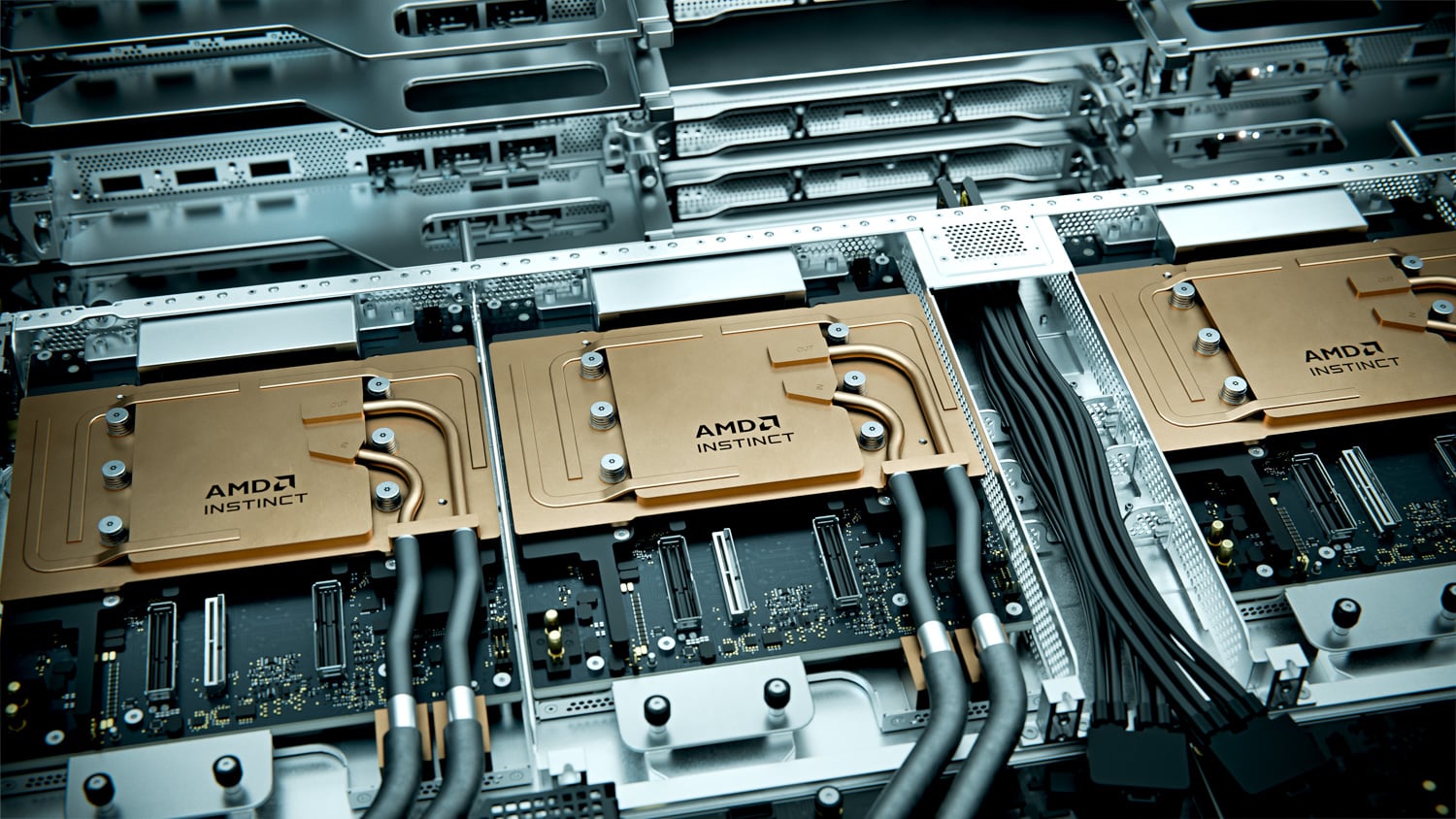
    AMD Instinct GPU compute tray render from the AMD Helios rack with liquid cooling lines across the accelerator cold plates

    The software work runs through PyTorch so that ROCm support is in place when a developer pulls the framework. AMD and Meta have optimized recommendation model training on Instinct MI350X GPUs and are contributing the improvements back to PyTorch, Triton, and ROCm. On the model side, AMD delivered Day-0 support for Muse Spark Open on Instinct GPUs, and for Muse Glimmer on Ryzen AI PCs and Radeon GPUs, which puts that model on client hardware from the start.

    AMD Helios

    The post AMD Helios Racks Are Running at Meta, With a Custom Instinct GPU and a $1 Billion Stake to Follow appeared first on StorageReview.com.


    72-GPU NVIDIA Vera Rubin NVL72 Racks Anchor OCI’s Planned Multi-Gigawatt Expansion Oct 29, 2026
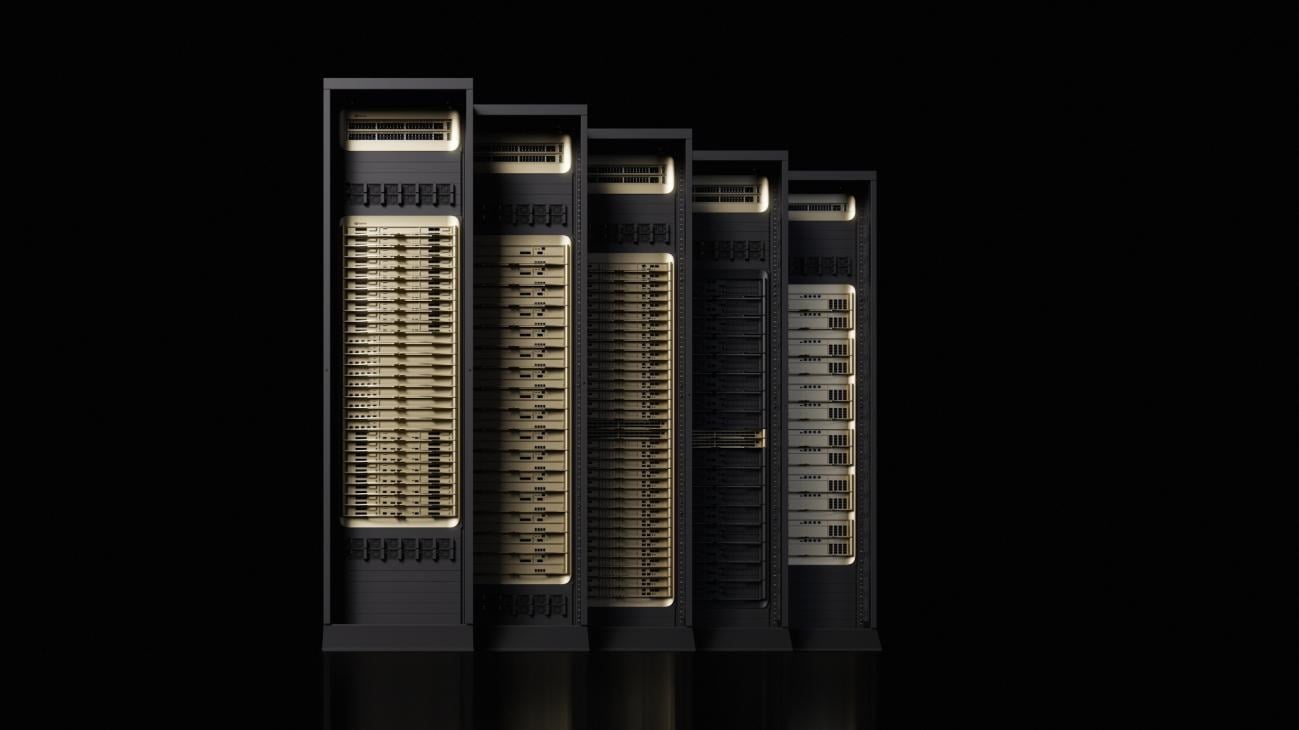
    Show notes NVIDIA Vera Rubin rack family render showing the five purpose-built rack configurations in the AI factory platform NVIDIA Vera Rubin rack family render showing the five purpose-built rack configurations in the AI factory platform

    NVIDIA and Oracle plan to expand Oracle Cloud Infrastructure (OCI) Superclusters with NVIDIA Vera Rubin NVL72 systems to multi-gigawatt scale, and both Vera Rubin NVL72 and NVIDIA Vera CPUs are now generally available on OCI. The companies announced the pair at Oracle AI World. The expansion is a plan; the general availability is the part customers can buy now, aimed at the GPU-heavy work of training and serving frontier models and the CPU-heavy work agents do between model calls, with CPU and GPU capacity scaled independently.

    NVIDIA Vera Rubin rack family render with the Vera Rubin NVL72 rack and four companion rack configurations on a black background

    The proof point the companies offer is OpenAI, which has trained and served GPT-6 Astra in Abilene on an OCI Supercluster with more than 100,000 NVIDIA Blackwell GPUs. “As our frontier models advance, we need infrastructure that can keep pace,” said Sreekanth Pothanis, engineering leader, compute infra at OpenAI. “NVIDIA Vera Rubin on OCI gives us the computing performance and scale to accelerate model training and serve increasingly demanding AI workloads.”

    NVL72 Racks and Supercluster Networking

    Each Vera Rubin NVL72 rack connects 72 GPUs through NVLink scale-up networking. OCI Superclusters combine those racks with Oracle Acceleron networking, NVIDIA Spectrum-X Ethernet with Spectrum-6 switches and BlueField-4 DPUs, and gigawatt-class power and cooling. Oracle says the multiplanar network scales across hundreds of thousands of GPUs. The Vera Rubin build-out extends the GB200 and GB300 NVL72 systems already on OCI, and the companies point to the common CUDA foundation as the reason models and workloads carry across generations.

    HGX Rubin NVL8 Brings Eight GPUs to x86 Servers

    OCI also plans to add NVIDIA HGX Rubin NVL8, an x86 server with eight Rubin GPUs connected through NVLink. The planned configuration carries two 64-core Intel Xeon 6 CPUs, 4TB of DDR5 memory, and 6.4 Tbps of RDMA networking, and Oracle positions it for training, fine-tuning, and inference where a customer wants Rubin GPUs in a smaller footprint without giving up x86 application compatibility. Neither company gave a date for it.

    Vera CPUs Support Agent Tool Execution

    The Vera CPU offering targets the work an agent does between model calls: tool calls, code execution, and data retrieval. Those steps run on CPUs, and when they run slowly the GPUs sit waiting. NVIDIA and Oracle say Vera’s single-thread performance speeds up individual tool calls and code execution while its memory bandwidth keeps cores fed as agents run concurrent tasks, which together cut GPU idle time. Neither company gives performance figures or test conditions for the claim.

    OCI Kubernetes Engine lets customers scale CPU and GPU pools independently, and Oracle Acceleron provides hardware-based isolation for workloads running untrusted, AI-generated code. OpenAI is among the early-access customers. “NVIDIA Vera CPUs on OCI deliver the world-class loaded performance needed to execute code and run tools across our rapidly growing agentic sandbox workloads,” said Uday Ruddarraju, chief technology officer of compute at OpenAI. “We are bringing Vera into production on OCI to support these workloads at scale.” The scale of that deployment was not given.

    “AI factories must be productive, durable and fungible,” said Ian Buck, vice president of hyperscale and high-performance computing at NVIDIA, describing the goal as infrastructure that stays useful through software advances and serves different models and workloads as demand changes. Mahesh Thiagarajan, president of Oracle Cloud Infrastructure, framed the pairing of Vera Rubin GPUs and Vera CPUs with Acceleron networking as a way to keep GPUs productive and secure as customer needs grow.

    Oracle Cloud Infrastructure AI Infrastructure

    NVIDIA Vera Rubin NVL72

    The post 72-GPU NVIDIA Vera Rubin NVL72 Racks Anchor OCI’s Planned Multi-Gigawatt Expansion appeared first on StorageReview.com.


    IBM FlashSystem Flags Data Theft in the Drive Before Ransomware Encrypts, Under 1% False Positives Oct 29, 2026
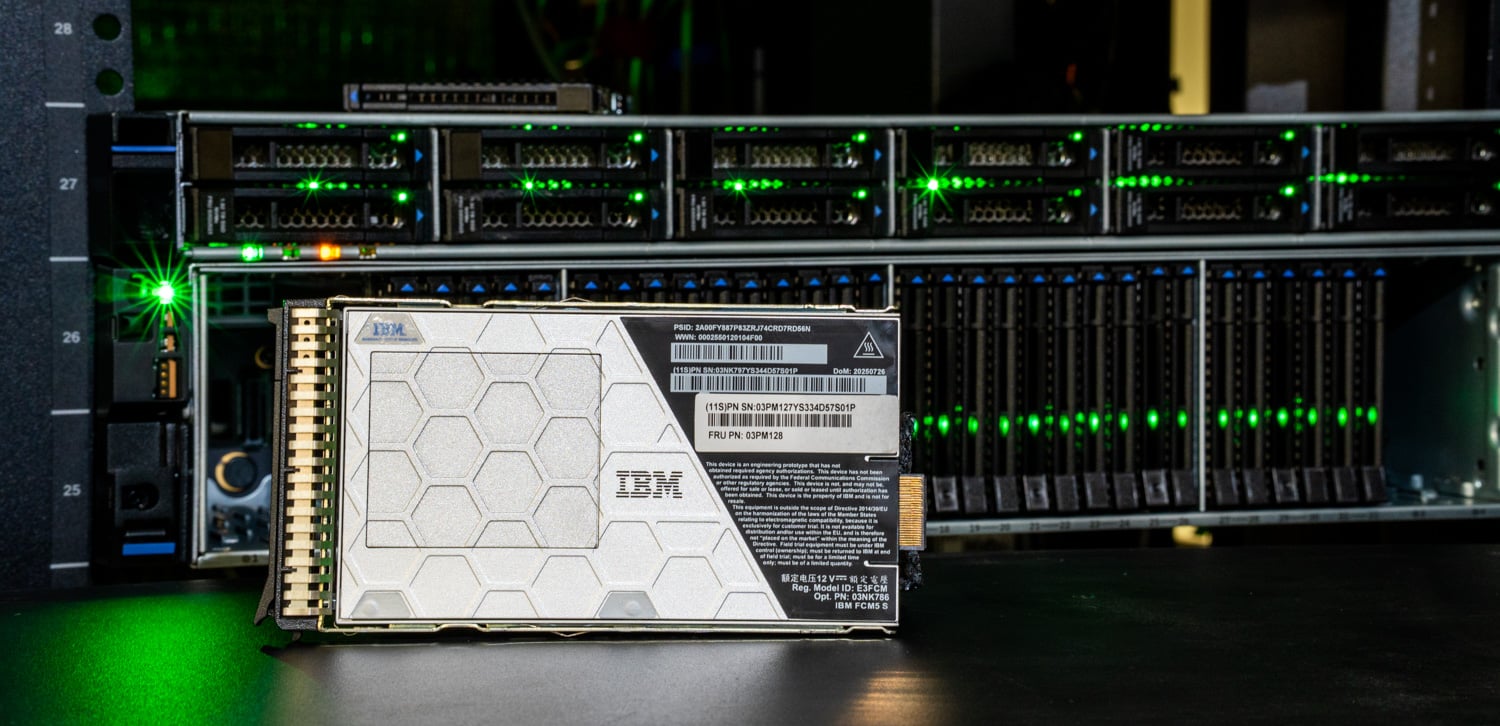
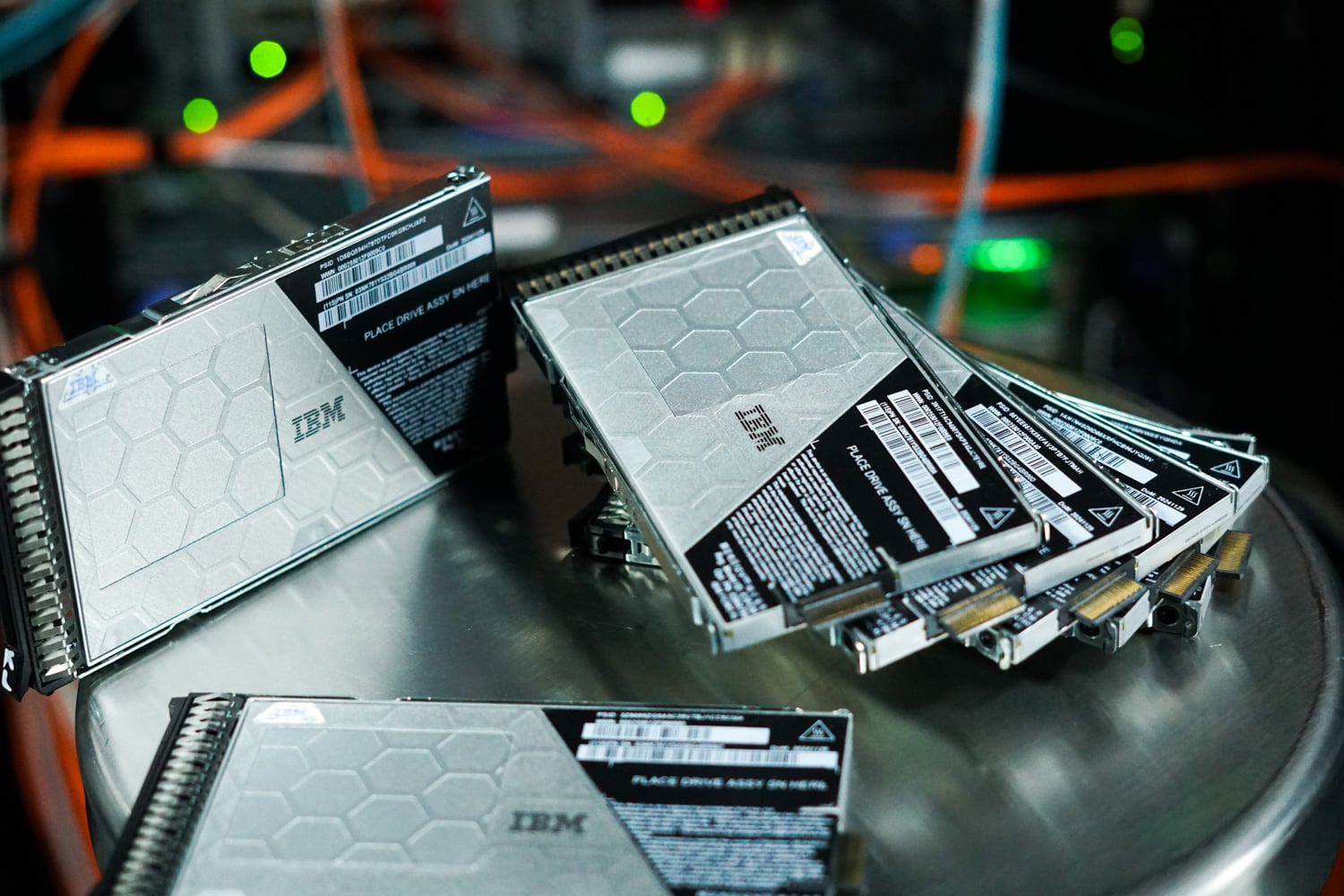
    Show notes IBM FlashCore Module 5 drive standing in front of an IBM FlashSystem array in a lab rack IBM FlashCore Module 5 drive standing in front of an IBM FlashSystem array in a lab rack

    IBM FlashSystem 5600, 7600, and 9600 arrays built on the fifth-generation IBM FlashCore Module now detect data exfiltration inside the drive, next to the ransomware encryption detection the modules already run. IBM says the module learns each volume’s normal read pattern, flags reads that break from it, and confirms a suspected event over a 30-minute confidence window with a validated false-positive rate below 1%. The capability is available starting in October 2026 on eligible configurations running firmware 9.1.2 or later.

    IBM FlashCore Module 5 drive standing in front of an IBM FlashSystem array in a lab rack

    The case IBM makes is that recovery answers the wrong question when data has already left. Recovery brings the volumes back, but it cannot tell an operator what was read out before the encryption started or how large the exposure is. IBM cites Google Cloud’s M-Trends 2026 for attackers typically spending 11 to 14 days inside a network before deploying ransomware, and its Cost of a Data Breach 2026 report for an average of 247 days to identify a breach.

    Inline FlashCore Module Telemetry and Threat Detection

    Exfiltration is harder to catch than encryption because it is meant to look like ordinary reads. The FlashCore Module analyzes every I/O at the drive, builds a baseline for each volume, and recognizes routine backup passes and analytics scans so a scheduled full read does not trip an alert. Because the analysis runs in the module, it does not depend on endpoint agents or host logs an attacker may control, requires no application changes, and IBM says it adds no measurable performance impact.

    Stack of IBM FlashCore Module 5 drives from an IBM FlashSystem array on a lab bench

    “The future of cyber resilience is not simply recovering after an attack,” said Sam Werner, General Manager, IBM Storage. He framed the goal as identifying risk before damage occurs, with earlier insight into potential data theft and a faster response. Laurence Horrocks-Barlow, Technical Director at OCF Limited, described storage-layer detection as another stage of defense: “The sooner you know something is wrong, the sooner you can act.”

    FIPS Post-Quantum Cryptography and Secure Fibre Channel HBAs

    The second change targets harvest-now, decrypt-later attacks, where encrypted data stolen today is held until quantum hardware can break the key. FlashSystem keeps AES-256 for data at rest, and the fifth-generation FlashCore Module adds ML-KEM under FIPS 203 and ML-DSA under FIPS 204, two algorithms developed with IBM researchers. ML-KEM runs in hybrid mode to transport the unlock PIN to the module, and hybrid ML-DSA signatures verify firmware authenticity.

    IBM says Secure HBAs will carry the post-quantum protections into the Fibre Channel data path and enable quantum-safe, session-level encryption on the fabric, without affecting efficiency, performance, or the ransomware detection running in the modules. IBM has not given a date for the HBA piece, and the session-level encryption is described as a future capability.

    FlashSystem.ai Operational Governance

    FlashSystem.ai, introduced with the 5600, 7600, and 9600 launch, picks up advisory capabilities in this update: contextual recommendations, task context that carries across management sessions, and suggested next-best actions. Administrators work in natural language, can see the reasoning behind a recommendation, and keep approval authority through policy-based governance. IBM puts the effort reduction for routine provisioning at up to 90%, a figure from lab-controlled evaluations of multi-volume provisioning with Safeguarded Copy and disaster recovery policies.

    Specification IBM FlashSystem October 2026 Update
    Data Exfiltration Detection
    Applicable Systems IBM FlashSystem 5600, 7600, 9600
    Detection Engine Fifth-generation IBM FlashCore Module, in-drive analysis of every I/O
    Method Per-volume read baseline with recognition of routine backups and analytics scans
    Confirmation Window 30 minutes
    False-Positive Rate Below 1% (IBM field telemetry, firmware 9.1.2 or later)
    Availability Starting October 2026 on eligible configurations
    Cryptography
    Data at Rest AES-256
    Post-Quantum Algorithms ML-KEM (FIPS 203), hybrid, unlock PIN transport to FCM5
    ML-DSA (FIPS 204), hybrid signatures, firmware authenticity
    Fabric Extension Secure HBAs for the Fibre Channel data path, future session-level encryption
    Management
    FlashSystem.ai Contextual recommendations
    Task context across sessions
    Suggested next-best actions
    Policy-based governance
    Claimed Effort Reduction Up to 90% for routine provisioning (IBM lab evaluation)

    IBM FlashSystem

    The post IBM FlashSystem Flags Data Theft in the Drive Before Ransomware Encrypts, Under 1% False Positives appeared first on StorageReview.com.


    Previous 1 3 4 5 6 7 15 Next

    Related Podcasts

    Reply All

    1

    Reply All Games & Hobbies
    Inside VR & AR

    2

    Inside VR & AR Gadgets
    Note to Self

    3

    Note to Self News
    BrainStuff

    4

    BrainStuff Natural Sciences
    This Week in Tech (Audio)

    5

    This Week in Tech (Audio) News
    Hands-On Tech (Audio)

    6

    Hands-On Tech (Audio) Technology
    footer-logo

    Contact Us

    Toll Free: 844-670-7747

    Links

    • Home
    • Top Charts
    • Networks
    • Apps
    • Independents Podcasts
    • Podcast Advertising
    • Podcast News
    • Contact Us
    • About Us
    • Analytics & Insights

    Stay Connected

      Privacy, Terms of Use & Our Code of Ethics Protecting Content Creators Copyrights