TopPodcast.com
Menu
  • Home
  • Top Charts
  • Top Networks
  • Top Apps
  • Top Independents
  • Top Podfluencers
  • Top Picks
    • Top Business Podcasts
    • Top True Crime Podcasts
    • Top Finance Podcasts
    • Top Comedy Podcasts
    • Top Music Podcasts
    • Top Womens Podcasts
    • Top Kids Podcasts
    • Top Sports Podcasts
    • Top News Podcasts
    • Top Tech Podcasts
    • Top Crypto Podcasts
    • Top Entrepreneurial Podcasts
    • Top Fantasy Sports Podcasts
    • Top Political Podcasts
    • Top Science Podcasts
    • Top Self Help Podcasts
    • Top Sports Betting Podcasts
    • Top Stocks Podcasts
  • Podcast News
  • About Us
  • Podcast Advertising
  • Contact
Not in our directory?
Add Show Here
Podcast Equipment
Center

toppodcastlogoOur TOPPODCAST Picks

  • Comedy
  • Crypto
  • Sports
  • News
  • Politics
  • True Crime
  • Business
  • Finance

Follow Us

toppodcastlogoStay Connected

    View Top 200 Chart
    Back to Rankings Page
    Technology

    StorageReview.com

    StorageReview.com is a leading provider of news and reviews throughout the entire IT stack – from the datacenter to the edge, and all points in between.

    Advertise
    • Apple Podcasts
    • Google Play
    • Spotify

    Latest Episodes:
    EUC World Amplify 2026 Day One: Manchester on Cloud Desktops as an Operating Model, Nerdio Manager 8.2, Kasm on Nutanix, and Local Inference Oct 01, 2026
    Show notes

    EUC World Amplify 2026 brought the end-user computing community together September 29 through October 1 at the Baird Center in Milwaukee. This is our day-one report; we previewed the show in August and profiled five of its sponsors two weeks ago. Figure 1: Milwaukee, lit up for the week of EUC World Amplify 2026. What makes the event compelling to us is its strictly vendor-neutral posture. The agenda spans the modern workspace continuum, from Azure Virtual Desktop (AVD) and Windows 365 to Omnissa Horizon, containerized application delivery, endpoint security, and orchestration. Amplify’s organizers set it up to show what enterprise IT architects are deploying, tuning, and troubleshooting in production, with no single ecosystem to pitch. Tuesday, September 29, was the conference’s first full technical day. With multiple concurrent tracks, choosing where to go wasn’t easy, but one theme ran through every session we attended: enterprise infrastructure teams are modernizing workspace delivery while reining in cloud costs. Before diving into Tuesday’s technical sessions, we have to highlight the community events kicking things off on Monday evening, September 28. Attendees gathered at the Hilton Milwaukee for an opening reception hosted by World of EUC, followed by a wine tasting sponsored by Tassient and Kasm Technologies. It set a collaborative, community-driven tone before the keynotes even began. Figure 2: World of EUC community gathering and wine tasting sponsored by Tassient and Kasm. Welcome and Opening Remarks The day officially got underway in the Grand Ballroom with opening remarks from the World of EUC Board of Directors. The board laid out the community mandate behind Amplify: an open, practitioner-led forum where architects, sysadmins, and vendors can exchange field patterns without the scripted veneer of single-vendor user conferences. Figure 3: World of EUC Board of Directors opening Amplify 2026 in the Grand Ballroom. Keynote: The Great Cloud Migration Presenter: Scott Manchester, Chief Product and Technology Officer, Nerdio Scott Manchester opened the conference with a keynote titled “The Great Cloud Migration: Why Modernizing Digital Workspaces Is an Operating Model, Not a Milestone,” and the title carried the argument. Cloud desktop onboarding, in his telling, has no fixed finish line; modernization is a continuous operating model that brings Cloud PCs, virtual desktops, physical endpoints, hybrid infrastructure, and local AI capabilities into one evolving delivery pipeline. We also sat down with Manchester between sessions; that conversation is covered separately. Figure 4: Scott Manchester (Nerdio) delivering the opening Amplify keynote. Manchester brought substantial operational credibility to the stage. Over a 25-year tenure at Microsoft, he led engineering teams behind Remote Desktop Services (RDS), Azure Virtual Desktop (AVD), and Windows 365, before stepping into his role at Nerdio in January. That history gave his perspective depth, tracing the evolution from monolithic on-premises VDI clusters to hybrid cloud workspaces. Key Takeaways from the Keynote Manchester’s presentation resonated because it confronted the reality enterprise admins face once initial cloud migration pilots end. While task-worker pools and call-center seats are relatively simple to migrate, enterprise knowledge-worker fleets are messier. Today’s workspace realities span physical laptops, hybrid on-premises hypervisors, Cloud PCs, specialized GPU tiers, and local AI workloads. Treating these environments as static lift-and-shift deployments is a fast track to configuration drift and administrative fatigue. To stay ahead of technical debt, Manchester emphasized consolidating workspace paradigms under unified management planes like Microsoft Intune. He urged teams to retire bloated golden-master images that depend on manual Sysprep curation and recomposition cycles in favor of automated image-as-code pipelines built on tools like Azure Image Builder and HashiCorp Packer. Pairing that automation with Entra ID Conditional Access, RDP Shortpath, and peer-to-peer media offloading lets performance and zero-trust security scale without creating WAN bottlenecks. The broader takeaway was architectural: the isolated, GUI-managed VDI silo is effectively obsolete. Modern EUC engineering requires fluency in infrastructure-as-code, identity federation, and automated software pipelines. Moving to the cloud is an ongoing discipline of performance tuning, capacity governance, and security validation, with no point where administrators declare victory. The audience clearly appreciated Manchester broadening the conversation to industry-wide operational pain points. The Next Wave of AVD and Windows 365 Adoption Presenter: Jason Smith, VP of Product Marketing, Liquidware This session explored the expanding footprint of Azure Virtual Desktop and Windows 365 as organizations shift beyond pilots into complex, full-scale knowledge worker fleets. Jason Smith, a long-time EUC industry voice with deep expertise in application delivery and workspace management at Liquidware, broke down the operational hurdles teams hit during this phase. Key Takeaways on Application Decoupling and DEX The session highlighted an ongoing industry pivot: enterprise teams are migrating legacy on-prem VDI and multi-session deployments to AVD and Windows 365, often catalyzed by steep licensing spikes and compressed contract renewal timelines. Moving complex user groups into native cloud infrastructure brings two immediate headaches: image sprawl and ballooning Azure compute bills. Smith’s case was that controlling these costs without degrading logon performance hinges on decoupling applications from the base OS. Using Liquidware FlexApp to attach containerized VHDX or CIM packages on demand at logon, he said, administrators can reduce base image footprints by up to 75% while holding sub-20-second logon times, even with demanding workloads like Epic Hyperdrive in healthcare environments; those are Liquidware’s figures from the session. Tying that delivery model to Digital Employee Experience (DEX) analytics in Stratusphere UX gives administrators the visibility to right-size host density safely, which makes granular application layering the lever for agile cloud workspace delivery. Breakout: Secure Browser as a Service on Nutanix Kubernetes-Native Workspace Access for AI and Enterprise Applications Presenter: Jaymes Davis, Chief Evangelist, Kasm Technologies We chose this breakout session because it directly bridged EUC with modern container orchestration and AI infrastructure. Jaymes Davis demonstrated how Kasm Workspaces deploys natively on the Nutanix Kubernetes Platform (NKP) to stream secure, disposable browsers and containerized desktops alongside enterprise AI and local LLM workloads. Key Takeaways on Ephemeral Workspaces and Threat Isolation Davis focused on one of the most persistent attack vectors facing enterprise IT: the physical endpoint browser. Between zero-day web vulnerabilities and client-side memory exploits, legacy secure web gateways and monthly endpoint patching cycles struggle against adversaries weaponizing flaws before signatures exist. Figure 5: Jaymes Davis presenting containerized workspace delivery on Nutanix. Davis demonstrated how containerized remote browser isolation (RBI) shifts this security dynamic. Kasm spins up lightweight, containerized sessions on demand within Nutanix Kubernetes Platform, so untrusted code never executes on the local laptop and no persistent Windows virtual machine is dedicated to web browsing. The browser session streams only encrypted pixels back to the user via open-source web technologies. Because execution is isolated from the endpoint, malware, malicious scripts, and rogue downloads stay trapped inside an ephemeral container that is destroyed when the session terminates. Running this on NKP simplifies Day-2 cluster operations across on-prem and hybrid clouds, and it gives sandboxed development environments and private CPU-based LLM inference a secure, low-overhead foundation that doesn’t require a large GPU investment. Nerdio Premier Sponsor Session: Enterprise Cloud Desktop Operations Following a rather good lunch, the afternoon kicked off with Nerdio’s premier sponsor technical session, “From Migration to Operations: Automating the Digital Workspace with Nerdio,” presented by Yangzhi Zhao, examining the operational machinery required to manage, automate, and cost-optimize cloud desktop estates at scale. Key Takeaways on Hybrid VM Lifecycle and Global Pools Virtualization engineers migrating enterprise VDI environments have long navigated the friction between public cloud flexibility and private cloud economics. While Microsoft manages the control-plane mechanics for Azure Virtual Desktop Hybrid, automated session host provisioning, power scheduling, and ongoing lifecycle updates still demand substantial administrative overhead. Figure 6: Nerdio presentation detailing cloud migration metrics and hybrid EUC enterprise shifts. Nerdio’s slide put numbers on the shift: by its survey, 46% of EUC environments are hybrid today, falling to 23% within 24 months, while primarily-cloud estates grow from 24% to 33% and fully-cloud from 11% to 23%. In Nerdio Manager for Enterprise 8.2, released the same day, Nerdio extends VM lifecycle automation to private cloud hypervisors, with AVD Hybrid on Nutanix now generally available and VMware vSphere in preview. Paired with the Nerdio Compass assessment tool, IT architects can evaluate existing Citrix delivery groups, map user consumption profiles to Windows 365 Cloud PC SKUs, and plan staged migration phases into Azure without re-architecting golden images from scratch. To solve multi-region operational sprawl, Nerdio’s Global Pools, now in public preview, add an abstraction layer above native AVD objects structured like an airline hub-and-spoke system. Users receive a single entitlement via Microsoft Entra ID, while Nerdio organizes underlying host pools into regional clusters and routes user traffic via Entra attribute- or percentage-based policies. This architecture streamlines disaster recovery failover, enables progressive canary image testing, and allows on-demand hybrid bursting into Azure compute when local infrastructure hits peak capacity. We covered the first appearance of both features at NerdioCon in May. Amplify UnConference: AI, the Good, the Bad, and the Ugly of Enterprise AI Presenters: Patrick Coble, VoiSec, and Jaymes Davis, Kasm Technologies The day concluded with the Amplify UnConference track. Unlike formal theater presentations, the unconference format puts attendees in control of the agenda. It provided an open forum for architects and administrators to talk frankly about real-world deployments away from polished vendor slide decks. Figure 7: Patrick Coble and Jaymes Davis leading the Amplify UnConference discussion on AI. Key Takeaways: Pragmatic Local Inference vs. Cloud AI Overhead While generative AI offers legitimate efficiencies in writing boilerplate code, automating administrative scripts, and speeding up troubleshooting, the room’s discussion cut straight to the financial and governance headwinds confronting IT leaders. The “bad” focuses squarely on subscription economics: per-user add-on licensing fees running $200 to $400 annually quickly turn into bottomless cost centers when telemetry shows workers primarily using the tool for basic email summarization. Figure 8: UnConference session slide analyzing the business KPIs and cost-benefit realities of enterprise AI. The “ugly” centers on compliance, data sovereignty, and accuracy risks. From unvetted agentic tools making unauthorized external calls to automated meeting summarizers introducing critical factual errors, public cloud LLMs lack deterministic guardrails. Those governance gaps are driving a noticeable shift toward private, on-premises inference. By running local models via runtimes like Ollama or LM Studio on enterprise hardware, organizations keep sensitive data behind internal firewalls, eliminate recurring cloud API charges, and maintain complete auditability over prompt payloads. Networking on the Milwaukee River: Harbor Cruise and Local Flavor Tuesday evening moved off the show floor for a Milwaukee Harbor Cruise aboard the Miss Wisconsin, sponsored by EDCi, Parallels, 10ZiG, and Liquidware. The walk over took attendees through Milwaukee’s historic Old World Third Street district, past local landmarks like the Wisconsin Cheese Mart and the Hofbräu München beer hall. Figure 9: Sights along the Milwaukee Riverwalk, German district, and evening stop at Mr. Dye’s Pies. The boat cruise offered a great setting to talk shop with engineers and industry colleagues in an informal atmosphere. We wrapped up Tuesday night in true Milwaukee fashion with a stop at Mr. Dye’s Pies for fresh, warm savory pasties, a memorable local highlight. Closing Thoughts from Day 1 Tuesday’s sessions offered a clear snapshot of where modern workspace engineering stands. Virtual desktops are no longer treated as standalone islands; the focus has shifted to the supporting infrastructure: dynamic application containerization, identity-first zero trust, hybrid lifecycle automation, disciplined cloud economics, and on-premises AI inference. Day two and three coverage follows. Figure 10: Tom Fenton’s attendee badge representing StorageReview at EUC World Amplify 2026. The post EUC World Amplify 2026 Day One: Manchester on Cloud Desktops as an Operating Model, Nerdio Manager 8.2, Kasm on Nutanix, and Local Inference appeared first on StorageReview.com.

    Full show notes at the publisher

    Nerdio CPTO Scott Manchester on the Legacy VDI Migration Deadlock and Treating AI Agents as Entra Identities Oct 01, 2026
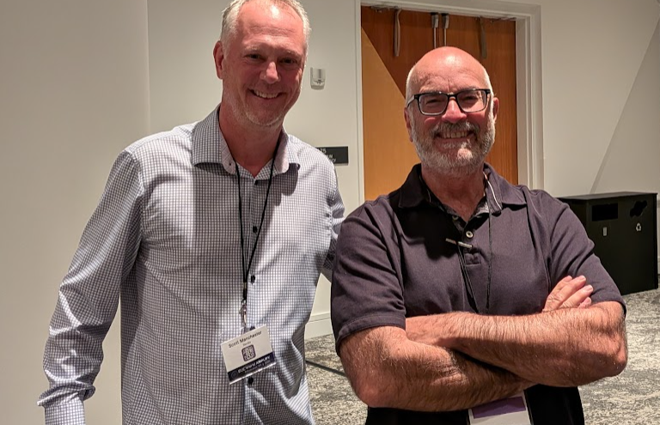
    Show notes Scott Manchester, Chief Product and Technology Officer at Nerdio, standing with StorageReview's Tom Fenton in a conference hallway at EUC World Amplify 2026 in Milwaukee Scott Manchester, Chief Product and Technology Officer at Nerdio, standing with StorageReview's Tom Fenton in a conference hallway at EUC World Amplify 2026 in Milwaukee

    Between sessions at EUC World Amplify in Milwaukee, we sat down for an extended conversation with an industry veteran whose fingerprints are all over the modern enterprise desktop: Scott Manchester. Many in our community know Manchester from his 25-year run at Microsoft, where he led Azure Virtual Desktop (AVD) and later Windows 365 Cloud PC. In January he took on the role of Chief Product and Technology Officer at Nerdio, one of the five sponsors we profiled ahead of the show.

    Scott Manchester, Chief Product and Technology Officer at Nerdio, standing with StorageReview's Tom Fenton in a conference hallway at EUC World Amplify 2026 in Milwaukee

    Scott Manchester (left), CPTO of Nerdio, with Tom Fenton (right) at EUC World Amplify in Milwaukee.

    After comparing notes on the joys and soggy realities of Pacific Northwest skiing, we dove into two immediate challenges facing sysadmins today: untangling the multi-million-seat on-premises desktop migration deadlock, and the looming operational headaches of governing autonomous AI agents in enterprise workspaces.

    Unpacking the 60-Million-Seat Migration Deadlock

    Despite all the talk about public cloud migration over the past six years, most enterprise data centers remain stubbornly on-premises. Roughly 60 million virtual desktop seats, by Manchester’s count, remain anchored to legacy infrastructure. Many of these estates run on legacy Citrix or Omnissa Horizon deployments that have accumulated years of bespoke configurations, institutional debt, and shadow administrative tweaks.

    When we asked Manchester what keeps IT leadership from modernizing these deployments, he pointed directly to operational opacity. In many shops, the current director or principal architect is the third or fourth person to inherit the environment. The original blueprint from half a decade ago rarely reflects how internal business units consume resources today. Because ripping and replacing an infrastructure stack without understanding daily workloads invites business disruption, organizations repeatedly take the path of least resistance by rubber-stamping legacy maintenance contracts during renewal cycles.

    Bridging this gap starts with telemetry-driven rationalization. Nerdio’s own discovery tool, Nerdio Compass, is free during its public preview and runs without agents; it reads a Citrix, AVD, or Intune estate and reports environment structure, workload profiles, policy configuration, and cost, with Omnissa Horizon support on the roadmap.

    With that picture in hand, administrative teams can parse workloads into native Azure Virtual Desktop multi-session pools, persistent personal desktops, or fixed-cost Windows 365 Cloud PCs. A blind migration provisions a static 1:1 desktop for every legacy user.

    From an engineering perspective, this phased approach takes the high-wire act out of platform migrations. Organizations can stage user migrations department by department, run pilot cohorts in parallel, validate burdened cost models, and decommission legacy hardware only after establishing operational parity.

    Dogfooding the Stack: Customer Zero

    One of Manchester’s immediate priorities as CPTO has been establishing a strict internal baseline: running Nerdio entirely on Nerdio.

    While “eating your own dog food” is a familiar phrase across Redmond and Palo Alto, enforcing it across a globally distributed workforce of several hundred remote employees provides critical architectural telemetry. In this environment, internal IT operates as Customer Zero. Every internal employee onboarding workflow, from provisioning Microsoft Entra ID objects and assigning conditional access policies to delivering localized Cloud PCs or hybrid AVD session hosts, executes directly through Nerdio Manager.

    Subjecting product engineering teams to the operational quirks, interface friction, and edge cases of their own automation engine creates a crucial feedback loop. When engineering teams live inside the operational guardrails they build for customers, product roadmaps align far more closely with the day-to-day realities of enterprise administrators.

    Taming Agentic Workflows: From Copilots to Autonomous Actors

    Our conversation turned toward the broader structural transformation sweeping enterprise workspaces: the rapid deployment of agentic AI.

    We shared an observation from our hands-on lab testing with Tassient’s Aipex AI-assisted management platform, where we used natural language prompts to diagnose driver faults, parse crash dumps, remediate kernel panics, and stand up tiered infrastructure services. While the productivity gains of natural language infrastructure management are undeniable, the operational questions remain substantial: Who holds accountability when an automated agent misconfigures a production subnet or exfiltrates corporate data?

    Manchester outlined a clear operational framework for evaluating agentic maturity in the enterprise, delineating three distinct stages:

    • Stage 1, Human in the Loop: The agent evaluates telemetry, models solutions, and presents recommendations, but cannot execute administrative changes without explicit human authorization.
    • Stage 2, Human on the Loop: The agent possesses sufficient verified accuracy to execute bounded tasks independently, keeping the administrator informed via telemetry dashboards and real-time execution logs.
    • Stage 3, Fully Autonomous Execution: The agent continuously remediates issues, manages capacity, and applies security baselines independently within strict policy constraints, escalating only when an exception occurs outside its operational boundaries.

    The primary headache for IT is keeping autonomous models from running wild across corporate endpoints. Manchester’s answer is to treat machine actors like any standard user, under the policy frameworks already in place.

    By treating an AI agent as a discrete identity object within Microsoft Entra, administrators can apply the same compliance architectures that already govern human staff: role-based access control (RBAC), Microsoft Intune device compliance, and Microsoft Purview data loss prevention (DLP) filters. If an agent working on behalf of an engineer attempts an outbound data transfer that violates corporate policy, established DLP rules block the exfiltration just as they would for a standard endpoint.

    The Looming Challenge of Tokenomic Shock

    Beyond security policies, the explosive sprawl of AI tooling is introducing an unexpected operational headache: tokenomic shock.

    Enterprise organizations are finding themselves balancing concurrent subscriptions across OpenAI, Anthropic, and Microsoft Copilot. Much like the early days of unmonitored cloud computing, where runaway egress fees surprised finance teams at the end of the quarter, unmetered multi-agent consumption models are driving unpredictable operational expenditure.

    As Manchester noted, the immediate challenge for systems architects is consolidating this fragmented sprawl. IT departments cannot manage three distinct administrative consoles, three proprietary token allocation schemes, and three incompatible security schemas without increasing human overhead.

    The industry is already shifting toward centralized abstraction layers that sit above disparate foundation models. Enterprise administrative consoles will need to enforce unified governance: translating a single set of corporate compliance and budgetary rules across multiple underlying engines, controlling invocation costs, and ensuring that automation enhances administrative productivity without breaking the IT budget.

    For IT professionals responsible for enterprise workspaces, the mandate over the next twelve months is clear. Whether you are modernizing legacy on-premises desktop estates or establishing the initial identity boundaries for autonomous software agents, success hinges on disciplined governance, granular workload visibility, and architectural pragmatism.

    For a closer look at where Nerdio’s platform is heading, our NerdioCon 2026 coverage walks through Nerdio Manager for Enterprise 8.0, including AVD hybrid on Nutanix and global pools, and our preview of EUC World Amplify 2026 explains why we made the trip to Milwaukee.

    Many Thanks

    We need to offer a heartfelt thanks to Scott for being so generous with his time, as what was originally set to be a high-level 30-minute discussion became an hour-plus, in-depth conversation spanning everything from VDI migrations to AI accountability.

    The post Nerdio CPTO Scott Manchester on the Legacy VDI Migration Deadlock and Treating AI Agents as Entra Identities appeared first on StorageReview.com.


    NetApp Novus Splits pNFS Metadata From AFF A90 Data Nodes for a 100 TB/s AI Factory Target, Orderable Now Oct 01, 2026
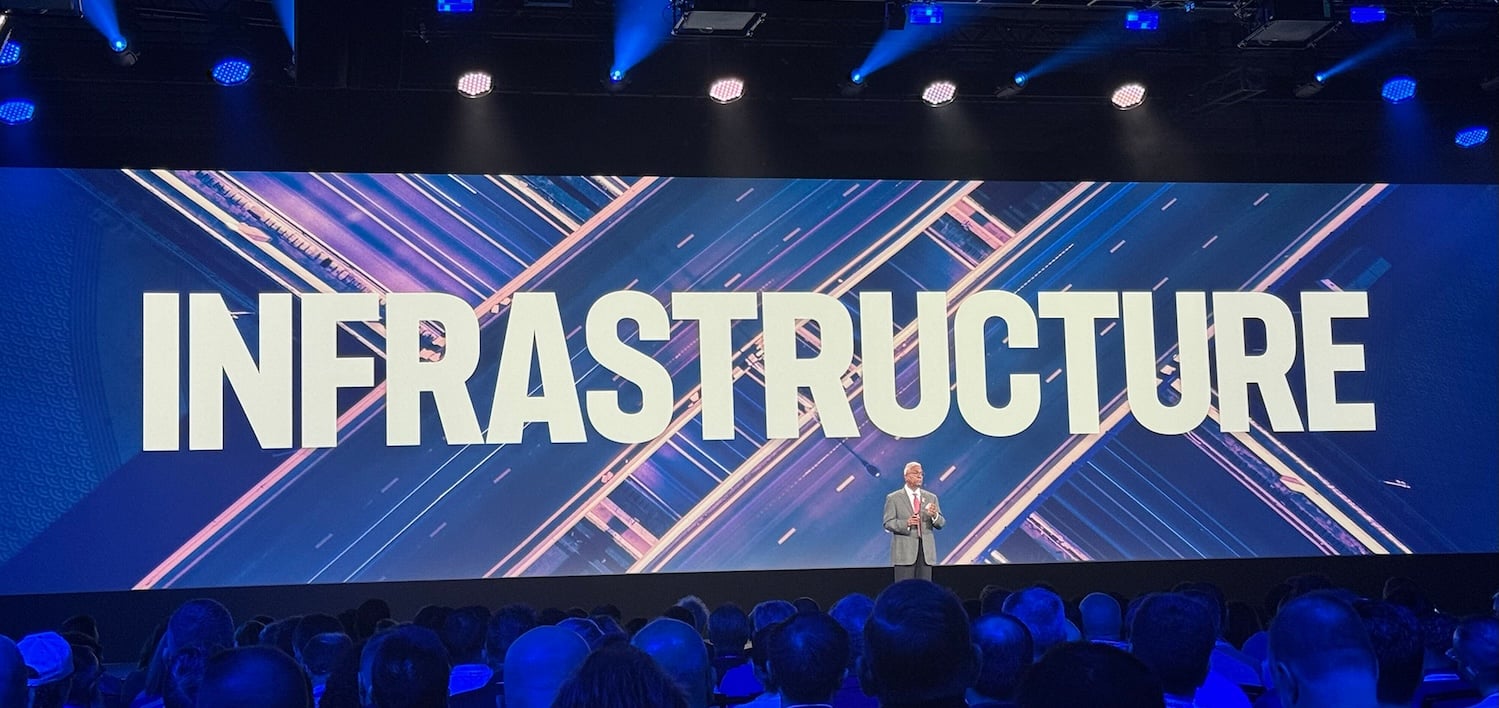
    Show notes NetApp INSIGHT 2026 keynote stage in Las Vegas with a presenter in front of a wall-sized Infrastructure graphic, where NetApp Novus was announced NetApp INSIGHT 2026 keynote stage in Las Vegas with a presenter in front of a wall-sized Infrastructure graphic, where NetApp Novus was announced

    NetApp used its INSIGHT 2026 conference in Las Vegas to announce NetApp Novus, a disaggregated storage architecture for AI factories that separates metadata from the data path and that the company says is designed to exceed 100 TB/s of aggregate throughput, keep hundreds of thousands of GPUs fed, and grow toward a zettabyte-scale file system. The first configuration pairs NetApp Novus Data Director, the metadata software, running on qualified Supermicro servers with NetApp AFF A90 systems running ONTAP as the data layer, and NetApp says it is orderable today. The announcement comes a week after NetApp agreed to acquire PEAK:AIO for its scale-out pNFS metadata work.

    NetApp INSIGHT 2026 keynote stage in Las Vegas with a presenter in front of a wall-sized Infrastructure graphic, where NetApp Novus was announced

    NetApp Novus Separates Metadata and Data Scaling

    Novus keeps a single, standards-based NFS namespace while moving metadata services into their own tier. Data Director runs on standard x86 compute and handles the namespace and layout work (NetApp’s architecture diagram lists OPEN, LAYOUTGET, and LAYOUTCOMMIT on the Data Director path), while AFF A90 HA pairs serve as Novus data nodes that carry capacity and bandwidth. Clients are stock Linux pNFS clients on the GPU servers’ front-end NICs, using NFSv4.2 with pNFS Flex Files, nconnect, and GPUDirect Storage per NetApp’s product page, so there’s no proprietary client to install.

    The pNFS data path rides a lossless Ethernet client fabric that is separate from the GPU backend fabric used for collectives, and NetApp’s diagram makes a point of saying Novus is not in that backend path. Hosts mount once and data nodes can be added without remounting, which lets performance, capacity, and metadata concurrency scale independently. NetApp positions that for multi-tenant AI factories run by neocloud and GPU-as-a-Service providers.

    In a pre-briefing ahead of INSIGHT, Jeff Baxter, NetApp’s VP of Technical Marketing, described the Data Director as answering lookups and layout requests out of band and in memory, so every GPU client can address every data node directly without being proxied through a cluster interconnect, which is the parallel file system behavior NetApp is after without a Lustre-style agent on the client.

    He also said the first data nodes are a specific variant of the AFF A90 tuned for sequential bandwidth with additional NVRAM, with a software-defined ONTAP build for a select group of x86 servers to follow, and that Novus slots in above the AFX disaggregated platform in NetApp’s lineup for the point where a disaggregated cluster’s networking becomes the limit.

    NetApp frames the problem in utilization terms: “Under traditional architectures, GPU utilization can drop below 30 percent when AI factories cannot feed enough data to their GPUs,” the release says. NetApp is also billing Novus as “the fastest storage on the planet,” a claim that rests on the projections below.
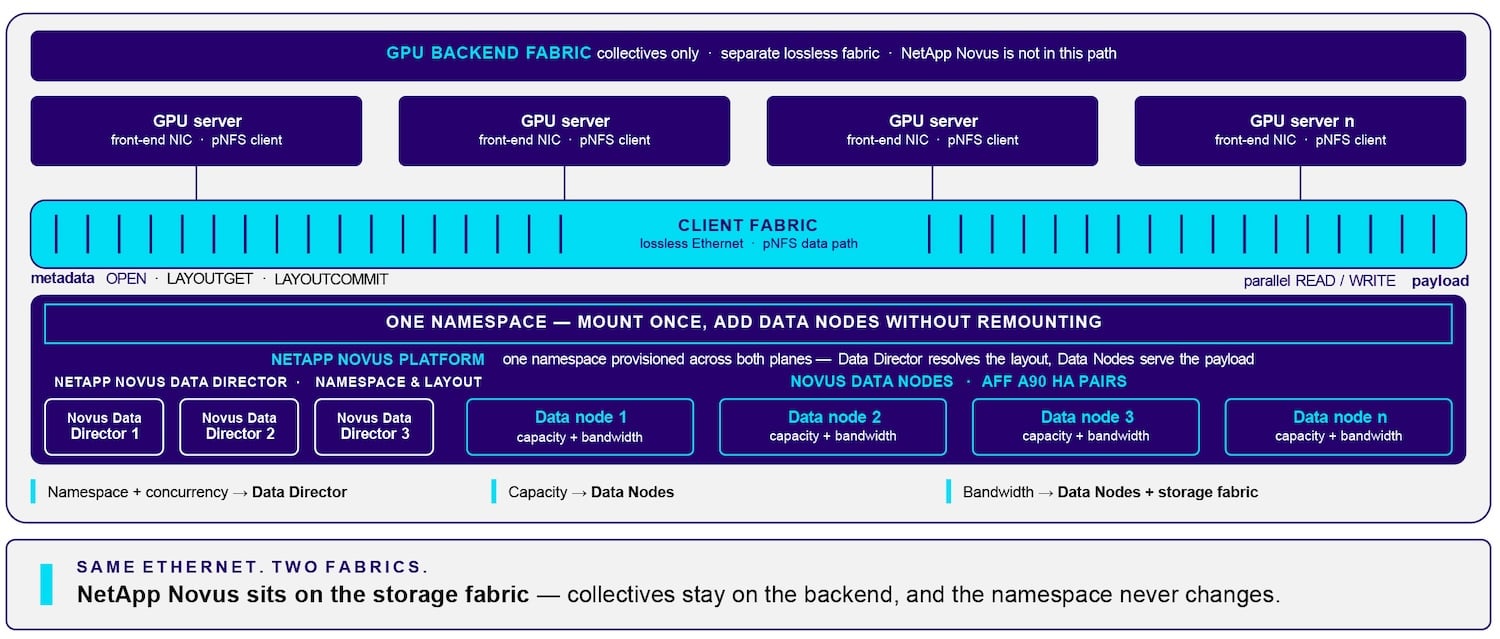
    NetApp Novus architecture diagram showing GPU servers with pNFS clients on a lossless Ethernet client fabric, Novus Data Director nodes handling namespace and layout, and AFF A90 HA pairs as data nodes, with the GPU backend fabric kept separate

    The scaling figures are projections built on a smaller audited test. NetApp says tests audited by Omdia showed near-linear performance scaling as ONTAP clusters were added to a single global namespace, and that Omdia’s modeling projects the architecture can scale to 100 TB/s of sequential read throughput with dozens of exabytes of effective capacity. “We are confident in our projections that the solution can scale to the needs of zettascale deployments,” said Tony Palmer, Chief Analyst, Omdia.

    NetApp’s own sizing on the Novus page works out to more than 50,000 GPUs at about 2GB/s each for the 100 TB/s figure, and the company says the design preserves ONTAP’s data services, security, quality-of-service, and multi-tenancy while supporting billions of files across thousands of storage nodes. NetApp also says the initial hardware-bound configuration “provides a path to software-defined deployments over time.”

    On timing, Baxter said the intent is to have Novus in the hands of lighthouse customers within a month or two of INSIGHT and to roll it out to other AI factory customers in the months after.

    He put the target population on the order of a hundred companies running tens of thousands to hundreds of thousands of GPUs, which told NetApp they need exabyte-class single namespaces that can grow toward zettabytes, tens to hundreds of TB/s of cumulative bandwidth, density per rack unit, multi-tenancy, and provisioning through their own control planes over APIs and SDKs. “Probably the most expensive asset in any data center in the world is an unused GPU in an AI factory,” he said.

    “AI factories struggle and GPU economics collapse when data can’t keep up,” said Syam Nair, Chief Product Officer at NetApp.

    Supermicro’s role goes beyond hosting Data Director on qualified servers alongside AFF A90 data nodes: the two companies are pairing Supermicro’s rack-scale compute, networking, power, and liquid-cooling work with NetApp’s data management and cyber-resilience software for AI factory builds. They are also jointly supporting NetApp AIPod with Supermicro, a NetApp-validated converged infrastructure architecture based on NVIDIA Reference Architecture guidance for training, inference, and agentic workloads at the dozens-to-hundreds-of-GPUs scale, sold through NetApp’s channel partners.

    AI Data Engine Expands Metadata Discovery

    NetApp AI Data Engine, or AIDE, now extends metadata discovery across ONTAP, StorageGRID, and non-NetApp storage. NetApp says AIDE can discover and analyze data across NFS, SMB, and S3 repositories in place, so IT teams can find AI-ready datasets, storage optimization opportunities, migration candidates, and security risks without first copying data into a separate AI pipeline.
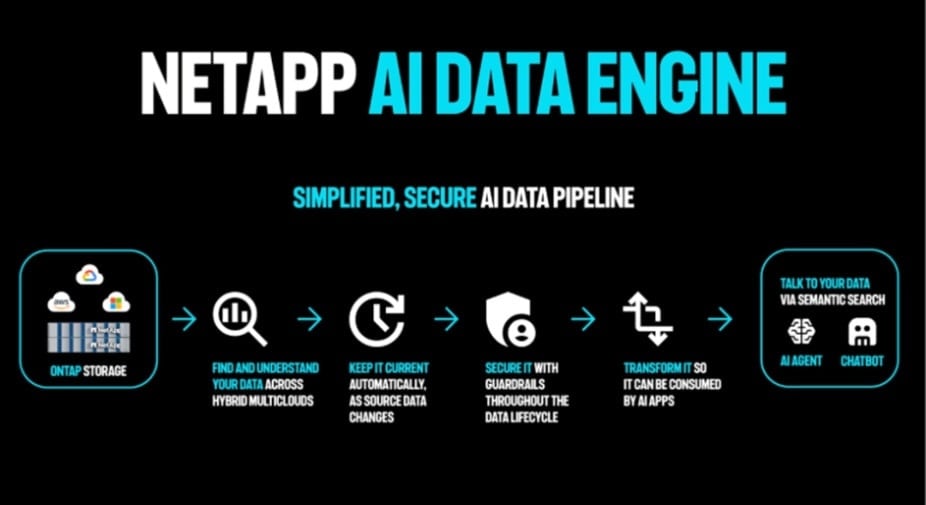
    NetApp AI Data Engine pipeline graphic: ONTAP storage feeding find and understand, keep current, secure with guardrails, and transform stages, ending in an AI agent and chatbot

    The company is also previewing AI-powered data understanding, deeper governance intelligence, open analytics integrations with Starburst and Onehouse.AI, and agentic services that turn data into AI context at scale. Those remain in preview, and NetApp hasn’t given a general-availability date.

    NetApp has expanded its Commvault integration so that autonomous ransomware protection signals from primary storage feed directly into Commvault recovery workflows. According to NetApp, the joint solution provides near-real-time threat detection, deeper scans for evasive threats, cleanroom validation with AI-based threat detection in an isolated environment, and clean recovery from the Commvault console, which the companies say cuts recovery to minutes, from days or weeks, without reintroducing the infection.

    In the pre-briefing, Baxter said the integration also lets Commvault use ONTAP’s native mechanisms where they apply: Snapshot copies in place of streaming backups, SnapMirror for replication, SnapLock for an immutable vault on the storage side, and SnapRestore for recovery when a primary snapshot still exists.

    Hybrid Multi-Cloud Operations and Sovereignty Controls

    NetApp Console Autonomous Operations replaces manual approval loops with outcome-based automation under human oversight for large hybrid fleets, and NetApp says it runs in air-gapped environments. The company describes an API-first design and agentic orchestration behind predictive analytics, capacity optimization, incident remediation, and policy-driven operations.

    NetApp Console Fleet Management adds a second Console delivery model, installed in the customer’s own environment, for management, observability, and AI across the whole storage estate. Baxter said the local install can run fully disconnected for dark sites and is meant to bring the customers who stayed on ActiveIQ Unified Manager for on-premises fleet management onto the same Console as the hosted service.
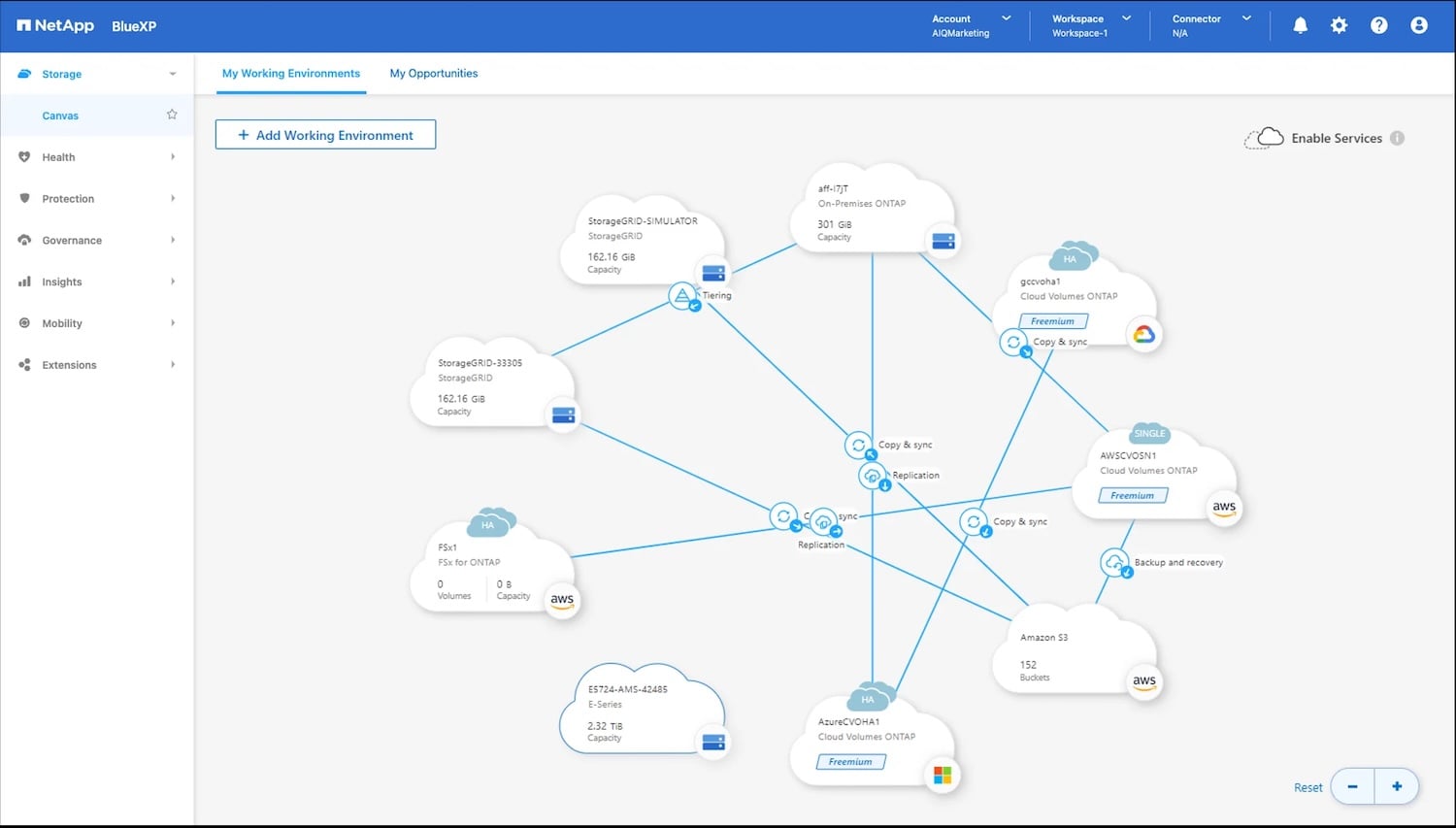
    NetApp Console canvas screenshot showing on-premises ONTAP, StorageGRID, Cloud Volumes ONTAP, FSx for ONTAP, and Amazon S3 environments linked by replication, tiering, and backup relationships

    The new NetApp Console AI ChatOps Interface brings conversational storage operations to ONTAP systems, covering intent-based provisioning, automated remediation, policy guardrails, reporting, and predictive analytics. It runs through an open LLM gateway, so customers can plug in their own model, with every action constrained to defined storage classes, policies, and governance boundaries. Baxter described the chat interface as a front end to an MCP server built into the platform, so the same provisioning and operations can be driven by a customer’s own agents, with the REST API, Terraform, and Ansible paths staying in place.

    NetApp Keystone Sovereign extends the storage-as-a-service offering with regional controls for qualified European Economic Area customers. The service keeps applicable customer data, logs, backups, and telemetry, along with support and escalation processes and access and management workflows, within defined European boundaries, and documents the telemetry, monitoring, and data flows involved.

    Pilots start in Germany and France, with more countries planned; Baxter put the start in November and said support and escalation will be handled in region by passport holders of that region, the same model NetApp uses for its U.S. public sector offering.

    NetApp and Nutanix also plan an integrated offering that combines NetApp ONTAP with Nutanix Cloud Infrastructure for virtualized workloads. NetApp says general availability is scheduled for this fall.

    SAP and OCI Storage Integrations Remain Forward-Looking

    NetApp and SAP announced an intent to explore deeper cloud-native integration of NetApp capabilities into SAP Cloud Infrastructure, SAP’s IaaS platform. The NetApp Platform already provides file and block storage, data protection, and replication there; the new work covers joint go-to-market programs for migrating and operating SAP and non-SAP workloads and a technical validation of NetApp object storage on SAP Cloud Infrastructure. It is an intended expansion of the partnership with no timeline, and NetApp’s release carries its usual caution that unreleased offerings should not be relied on for purchasing decisions.
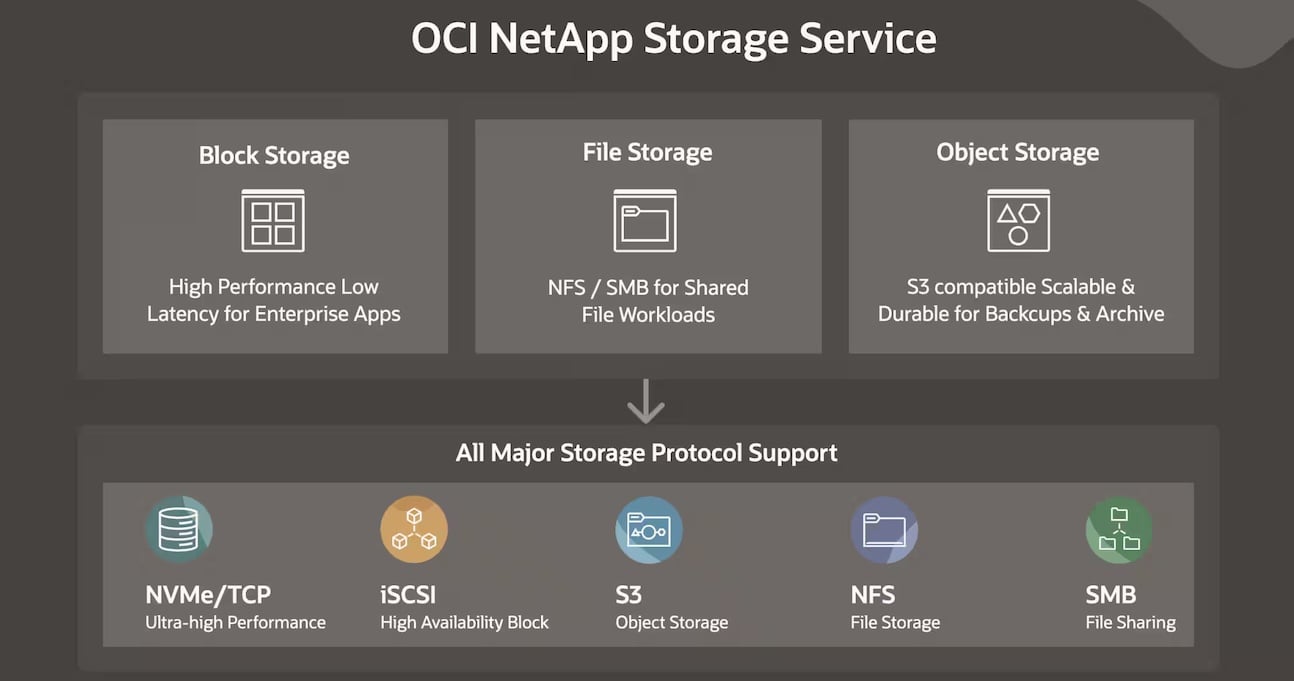
    OCI NetApp Storage Service graphic listing block, file, and object storage tiers with NVMe/TCP, iSCSI, S3, NFS, and SMB protocol support

    NetApp and Oracle announced the OCI NetApp Storage Service, a planned, fully managed, OCI-native storage service that brings ONTAP data management to Oracle Cloud Infrastructure. Customers would manage it through the OCI Console, OCI SDKs, and ONTAP APIs, with NetApp naming AI data pipelines, databases, enterprise applications, virtualized environments, EDA and HPC, and regulated workloads as targets. It is planned for general availability within the next 12 months.

    “OCI NetApp Storage Service gives customers a native OCI experience while allowing them to use the ONTAP familiar capabilities for data protection, migration, governance, and multiprotocol access,” said Pravjit Tiwana, Senior Vice President and General Manager, Cloud Storage and Services, NetApp.

    NetApp Novus Product Page

    The post NetApp Novus Splits pNFS Metadata From AFF A90 Data Nodes for a 100 TB/s AI Factory Target, Orderable Now appeared first on StorageReview.com.


    Dell Pro Rugged 13 Extreme and Pro Rugged 14 Move to Core Ultra Series 3, With 1,400 Nits and an RTX Pro 500 Blackwell Option Oct 01, 2026
    Show notes

    Dell Technologies has updated its rugged laptop lineup with new versions of the Dell Pro Rugged 13 Extreme and Pro Rugged 14, bringing Intel Core Ultra Series 3 processors and other hardware updates to both systems. The fully rugged Pro Rugged 13 Extreme now offers up to a Core Ultra X7 368H with Intel Arc B390 graphics, while the semi-rugged Pro Rugged 14 moves to LPCAMM2 memory and adds an optional NVIDIA RTX Pro 500 Blackwell GPU with 6GB of GDDR7. Dell calls the 13 Extreme the world’s most powerful and smallest 13-inch fully rugged AI PC and the 14 the most powerful and smallest 14-inch semi-rugged AI PC, both claims based on Dell’s own internal analysis from August. Both systems retain many of the rugged features of their predecessors, including hot-swappable batteries, outdoor-oriented displays, optional 5G and GNSS, and Dell’s Rugged Control Center software. We reviewed the previous-generation Dell Pro Rugged 14 last year and were impressed with its build, connectivity, and hot-swappable battery design. The updated Pro Rugged 13 Extreme pairs a 13.3-inch 1,400-nit touchscreen with IP66 protection and six-foot drop testing, while the Pro Rugged 14 has a 14-inch 16:10 display, an IP53-rated chassis, and three-foot drop testing. Dell Pro Rugged 13 Extreme The Dell Pro Rugged 13 Extreme (PR713260) is built around a 13.3-inch FHD 1920 × 1080 touchscreen rated at 1,400 nits. The anti-glare display supports standard, gloved, and wet-touch input, while the chassis carries an IP66 rating for protection against dust and pressurized water. MIL-STD-810H testing includes six-foot transit drops, operating drops, blowing rain, blowing dust, blowing sand, vibration, functional shock, humidity, salt fog with the rubberized keyboard, altitude, solar radiation, thermal extremes, thermal shock, and freeze/thaw testing. It is also MIL-STD-461G-certified and available with Class 1, Division 2 hazardous-location certification. Processor options start with the 8-core Intel Core Ultra 5 335 vPro and extend to the 12-core Core Ultra 5 338H vPro and the 16-core Core Ultra X7 368H vPro. Graphics depend on the CPU configuration, ranging from Intel Graphics with the Core Ultra 5 335 to Intel Arc B370 with the 338H and Intel Arc B390 with the Core Ultra X7 368H. Memory options include 16GB, 32GB, and 64GB of onboard LPDDR5X. Dell Pro Rugged 13 Extreme Specifications Feature Technical Specification Model Number PR713260 Processor Options Intel Core Ultra 5 335 vPro (47 TOPS NPU, 8 cores, up to 4.6 GHz Turbo)Intel Core Ultra 5 338H vPro (47 TOPS NPU, 12 cores, up to 4.7 GHz Turbo)Intel Core Ultra X7 368H vPro (50 TOPS NPU, 16 cores, up to 5.0 GHz Turbo) Operating System Options Windows 11 ProNo operating system Memory Options 16 GB / 32 GB / 64 GB LPDDR5X, up to 8533 MT/s, dual-channel (onboard)Up to 7467 MT/s with Intel Core Ultra 5 335 vPro processorsUp to 8533 MT/s with Intel Core Ultra 5 338H vPro and Intel Core Ultra X7 368H vPro processors Graphics Intel Graphics with Intel Core Ultra 5 335Intel Arc B370 GPU with Intel Core Ultra 5 338HIntel Arc B390 GPU with Intel Core Ultra X7 368H Display 33.8cm (13.3″), Touch, 1400nits, FHD, 1920 x 1080, 60Hz, Anti-Glare, WVA, LBL Storage Options 512 GB / 1 TB SSD, QLC512 GB / 1 TB SSD, TLC1 TB / 2 TB SED, QLC Audio Stereo speakers with Realtek ALC3329B Audio Controller, 2W x 2 = 4W total Battery 3-cell, 53.5 Wh, lithium-ion, ExpressCharge (supports up to two hot-swappable batteries)3-cell, 53.5 Wh, lithium-ion, Long Life Cycle (supports up to two hot-swappable batteries) Power 65 W AC adapter, USB-C105W 461G AC adapter, USB-C Connectivity Intel WiFi 7 BE211, vPro, Qualified against Bluetooth Core 6.0 wireless CardMobile Broadband option: 5G Qualcomm Snapdragon X72GNSS (GPS) Option: Discrete Airoha GPSConfigurable Triple RF Pass-Through Camera 1440p at 5MP RGB camera + 360p at 15 fps IR camera, Dual-array microphonesNo camera, no microphone Keyboard Internal sealed non-backlitInternal sealed RGB backlit (optional)Rubberized backlit keyboard (optional) Ports 1 Thunderbolt 4 (40 Gbps) with Power Delivery1 Thunderbolt 4 (40 Gbps) with Power Delivery (optional)1 Global headset port1 USB 3.2 Gen 1 (5 Gbps) port1 USB 3.2 Gen 1 (5 Gbps) port with PowerShare1 RJ45 (1.0 GB) Ethernet port1 serial port1 HDMI (TMDS) 2.1 portOptional I/O bay: USB 3.2 Gen 1 port / Serial (IOIOI) port / Fischer connector port / RJ45 (2.5 Gb) Ethernet port / Blank Slots 1 microSD-card slot1 nanoSIM-card slot (for computers shipped with WWAN support)1 Kensington lock slot1 Smart-card reader slot Security Steel reinforced cable lock slotOptional fingerprint readerContactless or Contacted SmartCard readerTPM 2.0ControlVault advanced authenticationDell Security ToolsDell Data Protection | EncryptionNIST SP800-147 secure platformDell Backup and Recovery Dimensions & Weight Without Bumper: Width: 12.75 in. (324 mm), Depth: 8.66 in. (220 mm), Height: 1.43 in. (36.50 mm)With Bumper: Width: 13.08 in. (332.40 mm), Depth: 8.99 in. (228.40 mm), Height: 1.71 in. (43.50 mm)Starting Weight: 5.33 lb. (2.41 kg) Regulatory and Environmental Compliance Regulatory model: P149G. Regulatory type: P149G001 Energy Star 8.0, EPEAT 1.0 GoldMIL-STD-810H testing: Transit drop 72″/1.82m, 60″/1.52m, 48″/1.22m; single unit; 78 drops, operating drop (36″/0.91m), blowing rain, blowing dust, blowing sand, vibration, functional shock, humidity, salt fog (with rubberized keyboard), altitude, explosive atmosphere, solar radiation, thermal extremes, thermal shock, freeze/thaw, tactical standby to operational.MIL-STD-461G CertifiedOperating thermal range: -20°F to 145°F (-29°C to 63°C); Non-operating range: -60°F to 160°F (-51°C to 71°C)IEC 60529 ingress protection: IP-66 (dust-tight, protected against pressurized water)Hazardous Location Certification: Class 1 Division 2 Hazardous Location, ANSI ISA 12.12.01 + CSA Warranty and Service Limited Hardware Warranty Standard 3-year Mail-in Service after Remote Diagnosis, optional 3-5 year Dell ProSupport & ProSupport Plus contracts and optional Next-Business-Day Service available, optional 3-5 year Accidental Damage Service Storage options range from 512GB and 1TB QLC or TLC SSDs to 1TB and 2TB self-encrypting QLC drives, with removable SSD options also available. Connectivity is extensive for a 13-inch rugged laptop, starting with Thunderbolt 4 with Power Delivery and an optional second Thunderbolt 4 port. Dell also includes two USB 3.2 Gen 1 ports, one with PowerShare, alongside Gigabit Ethernet, HDMI 2.1, serial, and a headset jack, while the configurable I/O bay can be fitted with USB, serial, a Fischer connector, or 2.5GbE RJ45. Wireless connectivity includes Intel Wi-Fi 7 BE211, with Qualcomm Snapdragon X72 5G and discrete Airoha GNSS available as options, along with triple RF pass-through for external antennas. Camera configurations include a 5MP RGB camera paired with IR and dual-array microphones; systems can also be ordered without a camera or microphones. Starting at 5.33 pounds (2.41kg), the Pro Rugged 13 Extreme can accommodate two hot-swappable 53.5Wh batteries for extended field use without shutting down the system. Battery choices include ExpressCharge and Long Life Cycle models, with either a 65W or 105W USB-C power adapter. Dell Pro Rugged 14 The Dell Pro Rugged 14 (PR514260) is a bit different, with a larger 14-inch 16:10 FHD+ display, a lower starting weight of 4.71 pounds (2.13kg), and an IP53-rated chassis. It has been tested for three-foot transit and operating drops per MIL-STD-810H, as well as dust ingress, vibration, functional shock, humidity, altitude, and thermal extremes. Three display configurations are available at 1920 × 1200. The base non-touch panel is rated at 400 nits, while 1,100-nit non-touch and touchscreen options add low-blue-light support. The touchscreen supports standard, gloved, and wet-touch operation. Dell Pro Rugged 14 Specifications Feature Technical Specification Model Number PR514260 Processor Options Intel Core Ultra 5 335 vPro (47 TOPS NPU, 8 cores, up to 4.6 GHz Turbo)Intel Core Ultra 5 336H vPro (47 TOPS NPU, 12 cores, up to 4.6 GHz Turbo)Intel Core Ultra 7 366H vPro (50 TOPS NPU, 16 cores, up to 4.8 GHz Turbo) Operating System Options Windows 11 Home, 64-bitWindows 11 Pro, 64-bit Memory Options 16 GB / 32 GB / 64 GB LPCAMM2, up to 8533 MT/s, dual-channelUp to 7467 MT/s with Intel Core Ultra 5 335 vPro processorsUp to 8533 MT/s with Intel Core Ultra 5 336H vPro and Intel Core Ultra 7 366H vPro processors Graphics Integrated: Intel GraphicsDiscrete (optional): NVIDIA RTX Pro 500 Blackwell, 6GB GDDR7 (Available with Intel Core Ultra 7 366H) Display 35.5cm (14″), 16:10 Non-Touch, 400 nits, FHD+ (1920 x 1200), Anti-Glare35.5cm (14″), 16:10 Non-Touch, 1100 nits, FHD+ (1920 x 1200), Anti-Glare, LBL35.5cm (14″), 16:10 Touch, 1100 nits, FHD+ (1920 x 1200), Anti-Glare, LBL Storage Options 512 GB / 1 TB SSD, QLC512 GB / 1 TB SSD, TLC1 TB / 2 TB SED, QLC Audio Stereo speakers with Realtek ALC3329B Audio Controller, 2W x 2 = 4W total Battery 3-cell, 53.5 Wh, lithium-ion, ExpressCharge (supports up to two hot-swappable batteries)3-cell, 53.5 Wh, lithium-ion, Long Life Cycle (supports up to two hot-swappable batteries) Power 65 W AC adapter, USB-C105W 461G AC adapter, USB-C Connectivity Intel WiFi 7 BE211, vPro, Qualified against Bluetooth Core 6.0 wireless CardMobile Broadband option: 5G Qualcomm Snapdragon X72GNSS (GPS) Option: Discrete Airoha GPSConfigurable Quad RF Pass-Through Camera 720p at 30 fps HD-RGB camera Option1440p at 5MP RGB camera + 360p at 15 fps IR camera, Dual-array microphones OptionNo camera, no microphone Option Keyboard Internal sealed non-backlitInternal sealed RGB backlit (optional)Rubberized backlit keyboard (optional) Ports 1.0Gb RJ-45 Ethernet portUSB 3.2 Gen 1 portUSB 3.2 Gen 1 port with PowerShareThunderbolt 4 / USB4 Type-C ports with Power Delivery 3.0HDMI 2.1 portRS232 serial portCombo headphone & microphone portOptional I/O bay: 2.5 Gb RJ-45 / USB Type-A / Native Serial / Fischer USB 3.0 9-pin / blank Slots Micro SD card slotNano SIM card slotSmart card reader slot (optional)Contactless card reader (optional)Kensington Security Cable Slot Security Steel reinforced cable lock slotOptional fingerprint readerContactless or Contacted SmartCard readerTPM 2.0ControlVault advanced authenticationDell Security ToolsDell Data Protection | EncryptionNIST SP800-147 secure platformDell Backup and Recovery Dimensions & Weight Without Bumpers: Width: 12.95 in. (329.10 mm) Depth: 9.17 in. (233.00 mm) Height: 1.32 in. (33.60 mm)With Bumpers: Width: 13.15 in. (334.10 mm), Depth: 9.37 in. (238.00 mm), Height: 1.57 in. (40.00 mm)Starting Weight: 4.71 lb. (2.13 kg) Regulatory and Environmental Compliance Regulatory model: P211G Regulatory type: P211G001 Energy Star 8.0, EPEAT 1.0 GoldMIL-STD-810H testing: Transit drop 36″/.91m; single unit; 26 drops, operating drop (36″/0.91m), blowing dust, vibration, functional shock, humidity, altitude, thermal extremesOperating thermal range: -20°F to 145°F (-29°C to 63°C)Non-operating range: -60°F to 160°F (-51°C to 71°C)IEC 60529 ingress protection: IP-53 (dust-protected, protected against splashing water from any direction) Warranty and Service Limited Hardware Warranty: Standard 3-year Mail-in Service after Remote Diagnosis, optional 3-5 year Dell ProSupport & ProSupport Plus contracts and optional Next-Business-Day Service available, optional 3-5 year Accidental Damage Service The Pro Rugged 14 offers a little more flexibility for upgrades, with LPCAMM2 memory replacing the soldered LPDDR5X found in the 13 Extreme. It can be configured with 16GB, 32GB, or 64GB of memory, while processor options run from the Core Ultra 5 335 vPro and 336H vPro up to the Core Ultra 7 366H vPro. That top Core Ultra 7 configuration can also be paired with an NVIDIA RTX Pro 500 Blackwell GPU with 6GB of GDDR7, giving the 14-inch model a discrete GPU option that isn’t available on the 13 Extreme. Storage options are similar across the two systems, with 512GB and 1TB QLC or TLC SSDs, plus 1TB and 2TB self-encrypting QLC drives. The Pro Rugged 14 also supports up to two hot-swappable 53.5Wh batteries, allowing one to be replaced while the system continues running on the other. Dell gives the Pro Rugged 14 a pretty broad selection of wired connectivity options, including Gigabit Ethernet, two USB 3.2 Gen 1 ports, with PowerShare available on one, Thunderbolt 4/USB4 Type-C with Power Delivery 3.0, HDMI 2.1, RS232 serial, and a combined headset jack. There is also a configurable I/O bay that can be set up with 2.5GbE RJ45, USB Type-A, native serial, or a 9-pin Fischer USB 3.0 connection. Wi-Fi 7 comes standard, with Qualcomm Snapdragon X72 5G and discrete Airoha GNSS available as options. The Pro Rugged 14 can also be configured with quad RF pass-through for external antennas and works with Dell’s redesigned vehicle dock, which Dell says improves compatibility with third-party docking and makes docking and undocking easier for workers who operate mostly from a vehicle. Rugged Control Center and Security Both laptops include Dell Rugged Control Center for configuring hardware features such as GNSS and programmable shortcuts, and for quick access to settings, including Stealth mode. Security options include TPM 2.0, fingerprint authentication, contact and contactless smart cards, IR cameras for Windows Hello, and Dell ControlVault. Dell says both systems now carry quantum-resistant protections on top of Dell SafeID, ControlVault, and BIOS-level defenses, and it calls them the world’s most secure rugged PCs, again on the strength of its own internal analysis. “Field workers keep critical operations running no matter the conditions, and their technology needs to do the same. Our new Dell Pro Rugged laptops deliver the performance, durability and connectivity that keep workers productive when it matters most, with the standardization and security IT teams need for small to large-scale deployments,” said Charlie Walker, head of product, Dell Pro Precision and Dell Pro Rugged, Dell Technologies. Dell Pro Rugged 13 Extreme and Pro Rugged 14 Availability The Dell Pro Rugged 13 Extreme and Dell Pro Rugged 14 will be available for purchase on Dell.com in early October. Dell Pro Rugged 13 Extreme Dell Pro Rugged 14 The post Dell Pro Rugged 13 Extreme and Pro Rugged 14 Move to Core Ultra Series 3, With 1,400 Nits and an RTX Pro 500 Blackwell Option appeared first on StorageReview.com.

    Full show notes at the publisher

    AMD Ross Brings an Agentic AI Assistant to Embedded Design, Starting With Vivado and Vitis HLS, 20-Plus Open Agent Skills, and Monthly Releases Sep 30, 2026
    Show notes

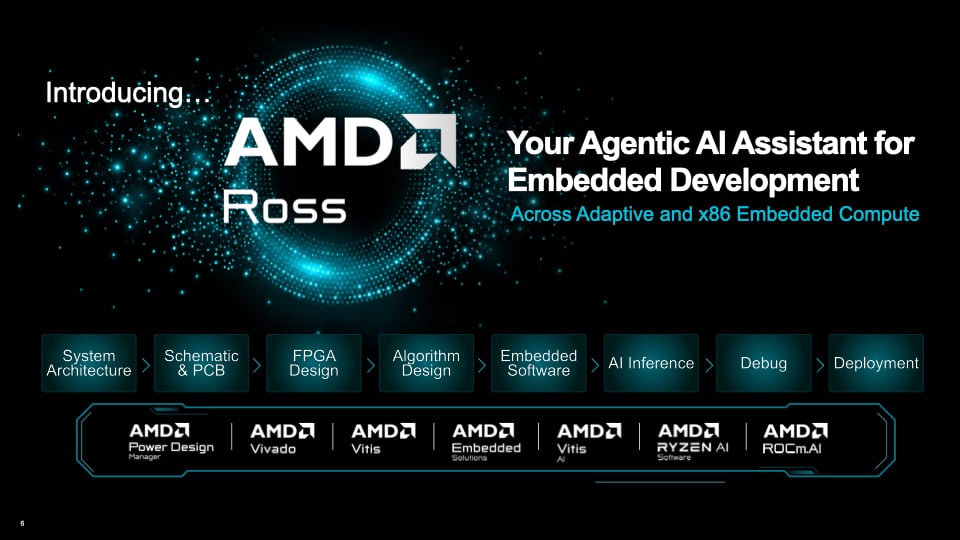
    AMD introduced AMD Ross, an agentic AI assistant built to run alongside the tools embedded developers already use, from system architecture and schematic review through FPGA and algorithm design, embedded software, AI inference, debugging, and deployment. The assistant targets the whole AMD Embedded portfolio, FPGAs, adaptive SoCs, x86 embedded processors, and edge AI platforms, by connecting a developer’s chosen large language model to AMD’s toolchains through open-standard Model Context Protocol (MCP) servers. The initial release ships with support for the Vivado Design Suite and Vitis HLS, plus AMD’s knowledge base, and AMD is committing to monthly releases from here, a sharp change from the twice-a-year cadence of tools like Vivado.

    How Ross Connects to the Tools

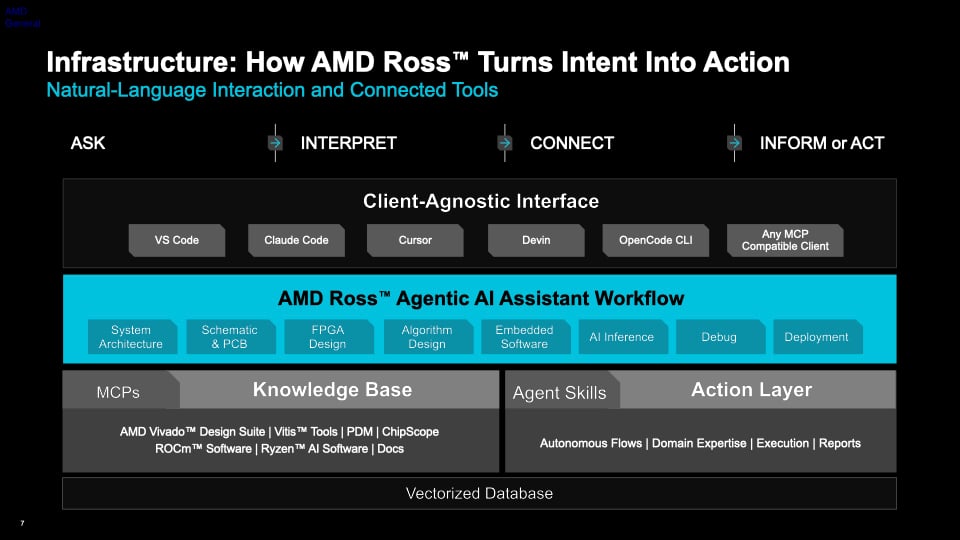
    Ross is client-agnostic. AMD’s diagram lists VS Code, Claude Code, Cursor, Devin, and the OpenCode CLI as front ends, and any MCP-compatible client works, with the developer’s preferred LLM, IDE, and command line staying in place. The MCP servers give the AI agents a live connection to the design environment, so an agent can query tool state, run commands, and read results within a session. AMD says permissions remain under the user’s control, with human review gates at the planning and execution steps.

    Salil Raje, senior vice president and general manager of AMD Embedded, said: “Embedded development is becoming increasingly complex as teams work across hardware design and debug, software development and deployment, AI inference, and system-level design. AMD Ross brings AMD Embedded tools, trusted knowledge, and expert-authored workflows together in a single agentic AI experience grounded in the technologies and methodologies our customers use every day. AMD Ross brings the power of agentic AI to embedded developers to move product innovations from design intent to deployment faster by accelerating the entire life cycle.”

    At launch, the tool coverage is the Vivado Design Suite for synthesis, place-and-route, and timing closure across the FPGA and adaptive SoC families Vivado supports, and Vitis HLS for compiling C++ algorithms into RTL. In a briefing with StorageReview, Kirk Saban, corporate vice president of product, software, and solutions for AMD’s embedded business, said the three monthly releases planned for the fourth quarter add Power Design Manager for power estimation, ChipScope for in-system hardware debug, and Vitis AI for the AI engines on AMD’s adaptive SoCs, with the schematic and PCB review, x86 embedded, and ROCm pieces of the diagram following through next year.

    Knowledge Base and Agent Skills

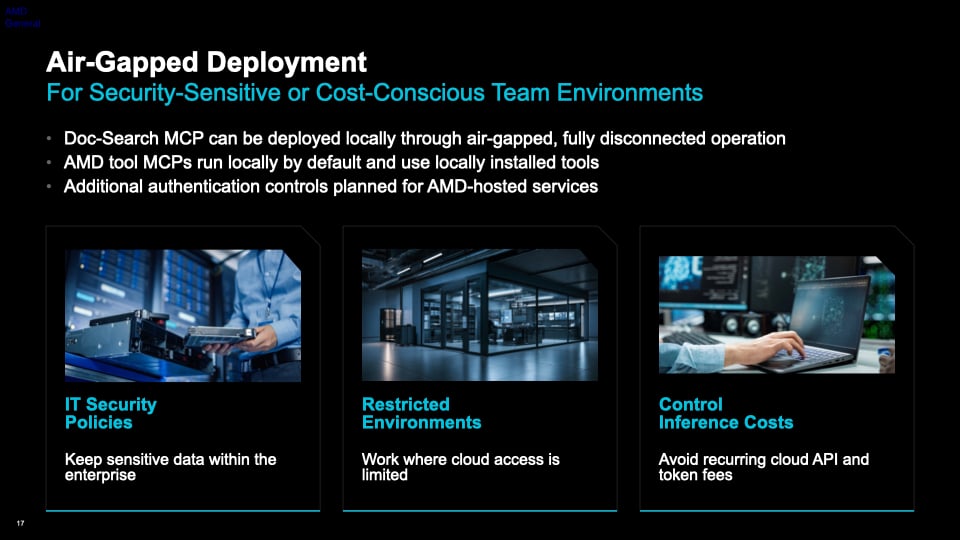
    Behind the MCP servers sits the AMD Knowledge Base, a set of AMD-validated, vectorized databases of user guides, product guides, white papers, application notes, and answer records that the assistant retrieves against, so a Vivado warning can be matched to the answer record that explains it. The knowledge base runs in the cloud or in a fully offline local deployment, which matters for the aerospace, defense, and functional-safety customers AMD called out; Saban said customers can run Ross on a laptop, a workstation, on-prem GPU servers, or a public cloud, air-gapped with open-weight models if they want, and AMD places no restriction on where it runs.

    The second layer is Agent Skills, open Markdown files that walk an LLM through a repeatable engineering task: timing closure methodology, RTL linting, dataflow, Vitis HLS loop unrolling, pipelining, and pragma insertion, among others. AMD says more than 20 skills ship in the initial GitHub repository, alongside ready-to-run design examples that show how the skills apply to real hardware, and it expects customers and partners to write their own, keep them private, or contribute them upstream.

    What AMD Showed, and Who Has Used It

    Ross has been in early access since the summer, starting with the FPGA tools, and AMD says more than 800 customers are in the program. The demos in the briefing were Vivado-centric: a one-line prompt to create a MicroBlaze-based microcontroller design for a Spartan UltraScale+ evaluation kit produced an 11-step plan and a complete working design, work AMD says takes two to three hours by hand; a single prompt against a post-route design checkpoint classified the timing violations and proposed constraints that, once approved, closed timing on the rerun; and an image sensor pipeline moved from MATLAB through C to RTL in Vitis HLS, where AMD’s HLS skills applied pragmas that cut fabric resource utilization by about 35%. A multi-agent example took a 12-camera pipeline request, generated human- and machine-readable specs, partitioned the work across the x86 CPU, GPU, NPU, and adaptive SoC on a partner board, and compiled the FPGA side in Vivado, with a human approving each stage. These are AMD’s demonstrations and figures; we did not test the assistant.

    An associate director in iWave Global’s FPGA SOM business unit is quoted in AMD’s materials: “The AMD Ross agentic AI assistant has been a valuable addition to our development workflow. It helps us identify and troubleshoot issues more efficiently, reducing the time and effort required during the debugging and bring-up stages.”

    AMD Vivado Design Suite Product Page

    The post AMD Ross Brings an Agentic AI Assistant to Embedded Design, Starting With Vivado and Vitis HLS, 20-Plus Open Agent Skills, and Monthly Releases appeared first on StorageReview.com.


    Zella Stack Micro Data Center Ships by Courier, Stacks From 24RU to 48RU, and Cools Up to 124kW Sep 30, 2026
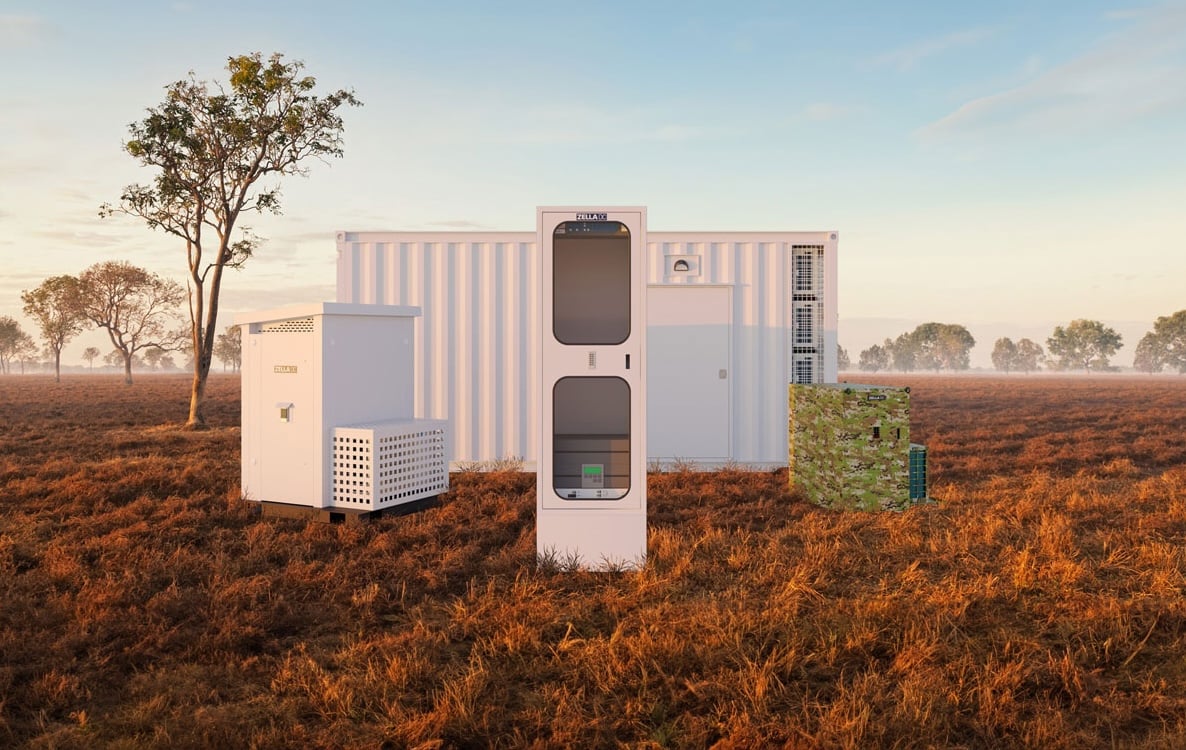
    Show notes Zella DC micro data center family rendered in an outdoor field: a white outdoor cabinet with external cooling unit, a tall single-rack enclosure with a glass door, a containerized modular data center behind them, and a camouflage rugged unit at right Zella DC micro data center family rendered in an outdoor field: a white outdoor cabinet with external cooling unit, a tall single-rack enclosure with a glass door, a containerized modular data center behind them, and a camouflage rugged unit at right

    Zella DC used Yotta 2026 in Las Vegas to introduce Zella Stack, an indoor micro data center that ships by standard courier and is assembled on site from stackable blocks. A base block carries the supporting infrastructure, IT blocks go on top of it, and the cabinet starts at 24RU and grows in 12RU increments to 48RU. Zella DC says the design is engineered for compute densities above 100kW, and its spec page lists cooling options up to 124kW with air-cooled IT and liquid-cooled compute running in the same unit. The Perth-based company, which has been building micro data centers for more than a decade, is aiming Stack at the sites its conventional cabinets can’t reach: upper floors, older buildings, and corridors where floor loading or access blocks a one-piece install.

    Zella DC micro data center family rendered in an outdoor field: a white outdoor cabinet with external cooling unit, a tall single-rack enclosure with a glass door, a containerized modular data center behind them, and a camouflage rugged unit at right

    Stack Blocks, Weight, and Cooling

    Zella DC’s spec page lists three Stack sizes: 24RU at 115kg, 36RU at 150kg, and 48RU at 185kg. Cooling comes as blocks that consume rack space, at 3kW in 6RU, 6kW in 6RU, 6kW plus 6kW N+1 in 12RU, or 15kW in 12RU, which leaves between 9RU and 39RU for IT depending on the cooling configuration. The stated 124kW ceiling applies to the cooling options, and Zella DC has not said what a fully loaded 48RU Stack draws or how many IT blocks it takes to get there.

    The weight claim needs a closer look. Zella DC says Stack is approximately one-quarter the weight of its Zella Pro micro data center, and the courier-shipping model depends on it. The company’s own spec pages tell a narrower story: a 24RU Zella Pro is listed at 160kg against 115kg for the 24RU Stack, and the 50RU Pro at 348kg against 185kg for the 48RU Stack, savings of 28% and 47%. Stack is also lighter per block, since it arrives in pieces, and that may be the comparison Zella DC is making, but the quarter figure does not match the published cabinet weights.

    Zella Sense and What’s Next

    Stack runs on Zella Sense, the monitoring, control, and automation layer built into every Zella DC cabinet. It tracks power, cooling, servers, and suspicious activity, with temperature, humidity, smoke, motion, water, and door sensors plus internal lighting and a camera, and it can respond automatically to events to protect uptime. Integration runs over SNMP, Modbus, and a full API, with email alerting and local, LDAP, RADIUS, or TACACS+ authentication, so an edge site does not need staff on hand to watch it. Access control and fire protection are built in.

    Stack is indoor-only for now. Zella DC sells Zella Outback as its standalone outdoor micro data center, and the company says an outdoor version of Stack is planned for the second half of 2027. Pricing was not disclosed. Stack is on the show floor at Yotta through September 30.

    Zella Stack Product Page

    The post Zella Stack Micro Data Center Ships by Courier, Stacks From 24RU to 48RU, and Cools Up to 124kW appeared first on StorageReview.com.


    AMD Posts the Full EPYC 9006 SKU List: 31 Venice Parts From $700 to $14,904 Across SP7 and SP8 Sep 26, 2026
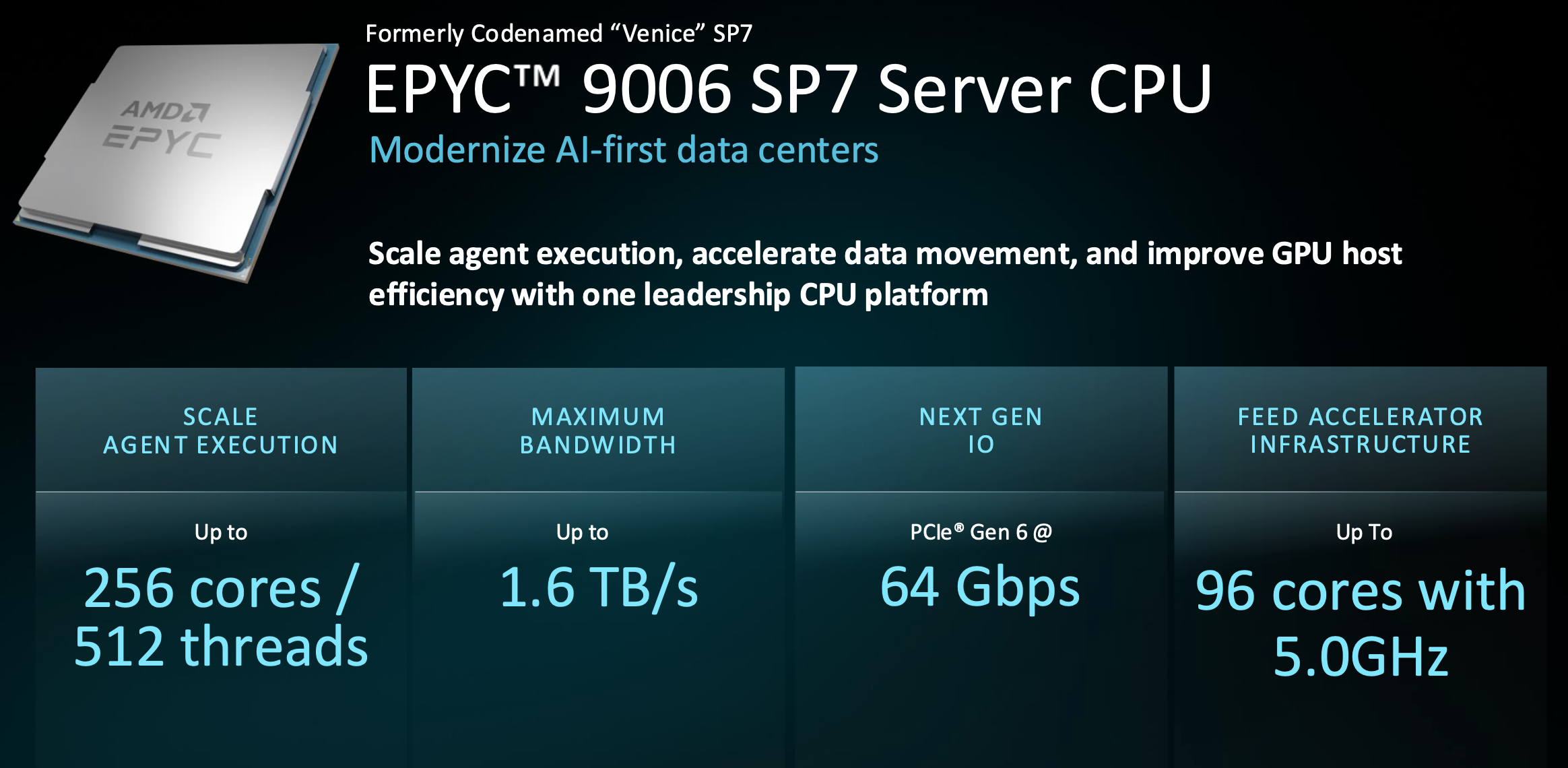
    Show notes AMD EPYC 9006 SP7 launch slide listing up to 256 cores and 512 threads, up to 1.6 TB/s memory bandwidth, PCIe Gen 6 at 64 Gbps, and up to 96 cores at 5.0GHz for accelerator hosts AMD EPYC 9006 SP7 launch slide listing up to 256 cores and 512 threads, up to 1.6 TB/s memory bandwidth, PCIe Gen 6 at 64 Gbps, and up to 96 cores at 5.0GHz for accelerator hosts

    AMD has posted the full SKU list for its 6th Gen EPYC 9006 series, the Zen 6 parts it launched as Venice at Advancing AI 2026 in July, and all of the processors offer 1Ku pricing guidance. There are 31 parts across the two sockets: nine for SP7, the 16-channel flagship platform, running from a 64-core CPU at $8,008 to the 256-core EPYC 9996 at $14,904, and 22 for SP8, the 8-channel enterprise socket, running from an 8-core EPYC 9016 at $700 to a 128-core EPYC 9746 at $11,679. AMD marks the list as subject to change, and the platform timing from July still stands: SP7 systems in the fourth quarter of this year, SP8 systems in the first half of 2027.

    AMD EPYC 9006 SP7 launch slide listing up to 256 cores and 512 threads, up to 1.6 TB/s memory bandwidth, PCIe Gen 6 at 64 Gbps, and up to 96 cores at 5.0GHz for accelerator hosts

    The naming carries over from Turin, so the first digit is the series, the middle digits track relative performance, the last digit is the generation, and the suffix tells you the bin: an F is a high-frequency part with a 5GHz boost, a P is single-socket only, and no suffix means a standard 1P or 2P part. One new label appears in the SP7 list: the EPYC 9G76, which is the host processor AMD builds into every Helios compute tray, now listed as an orderable part. AMD has also retired TDP as its power label; the product pages use “Default CPU Power,” which AMD defines as the total power consumed across the compute and I/O dies for the stated performance target, with a configurable range beside it.

    SP7: 9 Parts From 64 to 256 Cores

    Every SP7 part is a 1P or 2P processor with 16 channels of DDR5, rated at 1,024GB/s per socket with 8,000 MT/s RDIMMs and 1,638GB/s with 12,800 MT/s MRDIMMs, and AMD’s product pages list PCIe 6.0 x96 for the socket. Zen 6c carries core counts above 96; the standard Zen 6 core carries the 5GHz bins, and the 96-core tier is split three ways.

    Model Cores / Threads Base Clock Max Boost L3 Cache Default CPU Power (Range) Sockets 1Ku Price
    EPYC 9996 256 / 512 2.55 GHz 4.1 GHz 1024MB 600W (400W-600W) 1P / 2P $14,904
    EPYC 9966 192 / 384 2.9 GHz 4 GHz 768MB 600W (400W-600W) 1P / 2P $14,079
    EPYC 9846 168 / 336 2.85 GHz 3.7 GHz 768MB 500W (320W-500W) 1P / 2P $13,114
    EPYC 9756 128 / 256 3.15 GHz 4 GHz 512MB 500W (320W-500W) 1P / 2P $12,498
    EPYC 9G76 96 / 192 3.4 GHz 4.8 GHz 384MB 500W (320W-500W) 1P / 2P $11,622
    EPYC 9686F 96 / 192 3.4 GHz 5 GHz 384MB 500W (400W-600W) 1P / 2P $11,434
    EPYC 9656 96 / 192 3.05 GHz 3.7 GHz 512MB 400W (220W-400W) 1P / 2P $9,713
    EPYC 9586F 64 / 128 3.75 GHz 5 GHz 384MB 500W (400W-600W) 1P / 2P $9,701
    EPYC 9556 64 / 128 2.75 GHz 4.3 GHz 384MB 300W (220W-300W) 1P / 2P $8,008

    The 256-core EPYC 9996 sits at $14,904, the same figure AMD used in its July SPECrate comparison against Intel’s 128-core Xeon 6980P at $13,955, and it keeps 4MB of L3 per core with 1,024MB on the package. Each step down the density ladder costs less in total and more per core: the 192-core 9966 is $14,079, the 168-core 9846 is $13,114, and the 128-core 9756 is $12,498, which puts the flagship at $58 per core and the 9756 at $98. Two SKUs from the launch materials are worth noting. The 256-core EPYC 9956 at 400W, which AMD used in its rack-density endnotes in July, is not in the published list, and the 9G76 is, at $11,622 for 96 cores, a 4.8GHz boost, and a 320W to 500W range.

    The 96-core tier is where the socket best shows its range. The 9656 is the standard part, at 400W with 512MB of L3 and a 3.7GHz boost for $9,713. The 9686F is the high-frequency host part AMD showcased in July, hitting 5GHz at 500W with a 400W to 600W range for $11,434. The 9G76 lands between them on price, with a 4.8GHz boost, a 320W floor to the F part’s 400W, and the same 384MB of cache. At 64 cores, the 9556 is the least expensive SP7 SKU at $8,008 and 300W, and the 9586F pairs the same core count and 384MB of L3 with a 3.75GHz base and 5GHz boost for $9,701.

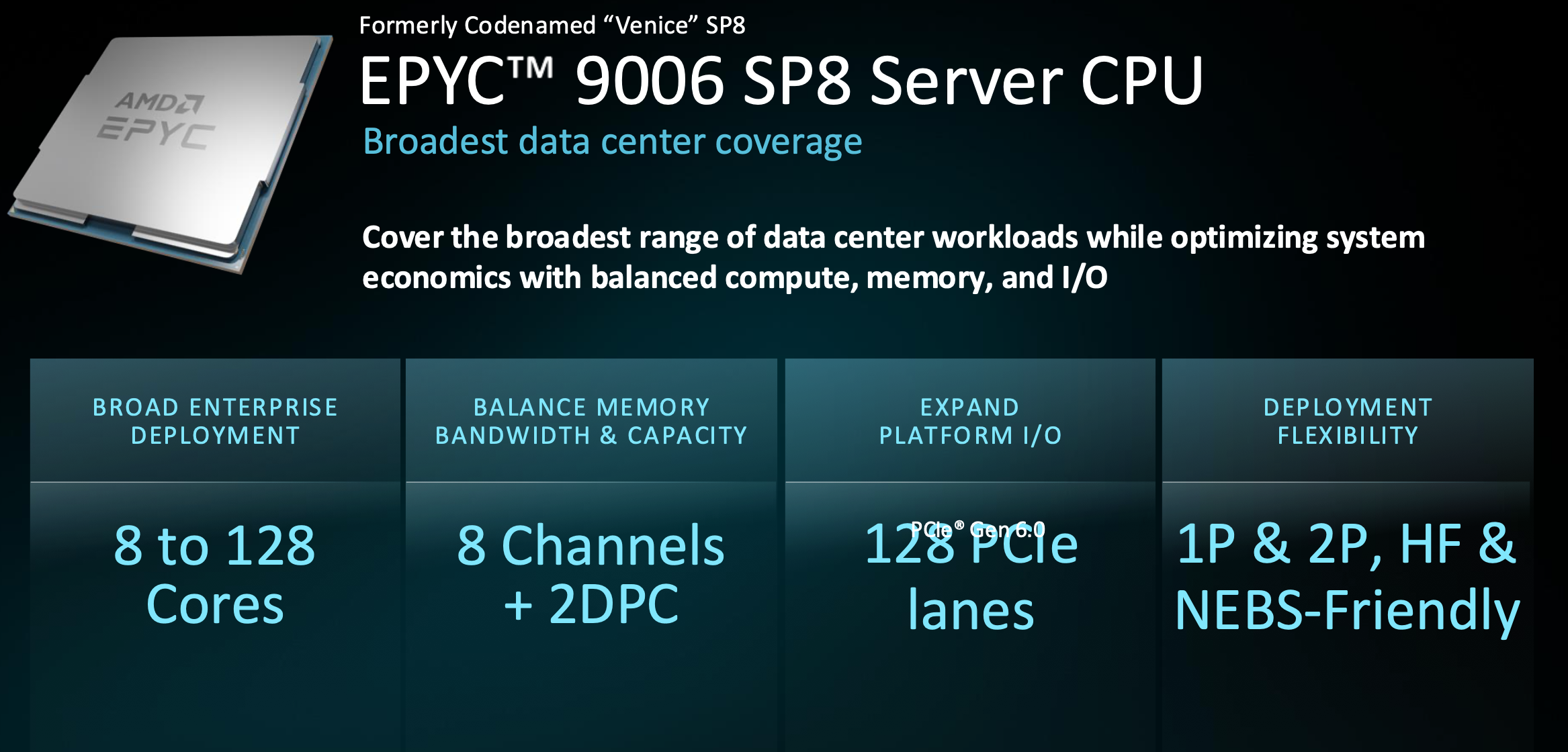
    AMD EPYC 9006 SP8 launch slide listing 8 to 128 cores, 8 memory channels with two DIMMs per channel, 128 PCIe Gen 6 lanes, and 1P and 2P, HF and NEBS-friendly options

    SP8: 22 Parts From 8 to 128 Cores

    SP8 is the socket most enterprise buyers will see, and its list is more than twice as long. Every part carries 8 memory channels at 512GB/s with RDIMMs or 819.2GB/s with MRDIMMs, PCIe 6.0 x128, and a power range that starts as low as 130W. Six F parts run to 5GHz, five P parts are single-socket only, and the remaining 11 are standard 1P or 2P processors.

    Model Cores / Threads Base Clock Max Boost L3 Cache Default CPU Power (Range) Sockets 1Ku Price
    EPYC 9746 128 / 256 2.9 GHz 4 GHz 512MB 400W (200W-400W) 1P / 2P $11,679
    EPYC 9736 128 / 256 2.7 GHz 3.7 GHz 256MB 360W (200W-400W) 1P / 2P $10,639
    EPYC 9736P 128 / 256 2.7 GHz 3.7 GHz 256MB 360W (200W-400W) 1P $9,989
    EPYC 9676F 96 / 192 3.1 GHz 5 GHz 384MB 400W (200W-400W) 1P / 2P $10,116
    EPYC 9646 96 / 192 2.8 GHz 3.7 GHz 256MB 300W (155W-300W) 1P / 2P $8,904
    EPYC 9646P 96 / 192 2.8 GHz 3.7 GHz 256MB 300W (155W-300W) 1P $8,001
    EPYC 9576F 64 / 128 3.55 GHz 5 GHz 384MB 400W (200W-400W) 1P / 2P $9,431
    EPYC 9536 64 / 128 3.25 GHz 4 GHz 256MB 300W (155W-300W) 1P / 2P $7,837
    EPYC 9526 64 / 128 2.75 GHz 3.7 GHz 256MB 220W (130W-220W) 1P / 2P $7,123
    EPYC 9536P 64 / 128 3.25 GHz 4 GHz 256MB 300W (155W-300W) 1P $6,595
    EPYC 9476F 48 / 96 3.65 GHz 5 GHz 192MB 330W (200W-400W) 1P / 2P $6,695
    EPYC 9456 48 / 96 3.2 GHz 3.7 GHz 256MB 265W (155W-300W) 1P / 2P $5,252
    EPYC 9456P 48 / 96 3.2 GHz 3.7 GHz 256MB 265W (155W-300W) 1P $4,628
    EPYC 9376F 32 / 64 3.8 GHz 5 GHz 192MB 285W (200W-400W) 1P / 2P $4,849
    EPYC 9356 32 / 64 3.6 GHz 4.5 GHz 192MB 250W (155W-300W) 1P / 2P $3,789
    EPYC 9336 32 / 64 3.15 GHz 3.7 GHz 128MB 195W (130W-220W) 1P / 2P $3,320
    EPYC 9356P 32 / 64 3.6 GHz 4.5 GHz 192MB 250W (155W-300W) 1P $2,795
    EPYC 9276F 24 / 48 3.8 GHz 5 GHz 96MB 230W (200W-400W) 1P / 2P $3,512
    EPYC 9256 24 / 48 2.85 GHz 4.5 GHz 96MB 190W (130W-220W) 1P / 2P $2,501
    EPYC 9176F 16 / 32 3.9 GHz 5 GHz 192MB 200W (200W-400W) 1P / 2P $3,787
    EPYC 9116 16 / 32 2.85 GHz 4.5 GHz 48MB 160W (130W-220W) 1P / 2P $1,200
    EPYC 9016 8 / 16 3.05 GHz 4.8 GHz 48MB 130W (130W-220W) 1P / 2P $700

    The top of the SP8 stack overlaps the bottom of SP7 on core count but undercuts it on price. The 128-core 9746 is $11,679 with 512MB of L3 at 400W, against $12,498 for the 128-core SP7 9756, and the 96-core 9646 is $8,904 at 300W against $9,713 for the SP7 9656; the difference buys the bigger socket’s double memory bandwidth. The 128-core 9736 drops to 256MB of L3 and a 3.7GHz boost for $10,639, and its single-socket twin, the 9736P, is $9,989.

    The P discount widens as the parts get smaller. At 128 cores the single-socket version saves 6%, at 96 cores 10%, at 64 cores 16%, at 48 cores 12%, and at 32 cores the 9356P is $2,795 against $3,789 for the 9356, a 26% cut for giving up the second socket. The F parts pay the opposite premium: the 64-core 9576F is $9,431, $1,594 over the standard 9536, for a 5GHz boost, 384MB of L3, and a 400W rating. The most curious part of the list is the 16-core 9176F, which carries 192MB of L3, 12MB per core, at $3,787, the profile of a CPU built for per-core software licensing, where cache per thread matters more than thread count. At the bottom, the 8-core 9016 is $700 at 130W, and the 16-core 9116 is $1,200.

    What Changed Since July

    Two details in the published pages update what AMD said in July. AMD’s launch deck listed PCIe Gen 6 as “up to 128 lanes (1P)” for the family; the SP8 slide claimed the full 128, and the SP7 slide gave no lane count at all. The processor pages now put numbers on both sockets: every SP7 part is listed at PCIe 6.0 x96, and all SP8 CPUs at x128.

    The second detail is the 400W EPYC 9956, the 256-core CPU AMD used in its rack-density endnotes in July, which has no product page yet; either it arrives later, or the density case now rests on the 600W 9996. AMD’s footnote says the list is subject to change, so that one may resolve before SP7 systems ship. Our earlier coverage of the first Venice platforms from Giga Computing, ASUS, and Supermicro has the system side; Giga Computing expects SP7 systems to ship with AMD’s November launch and SP8 systems to follow in March 2027. We’ve also seen plenty of pre-production units from others; Dell, for instance, showed early designs at the AMD event and later at DTW.

    AMD EPYC 9006 Series Product Page

    The post AMD Posts the Full EPYC 9006 SKU List: 31 Venice Parts From $700 to $14,904 Across SP7 and SP8 appeared first on StorageReview.com.


    NetApp to Acquire PEAK:AIO, Bringing Its Scale-Out pNFS Metadata Work to ONTAP Sep 25, 2026
    Show notes

    NetApp has agreed to acquire PEAK:AIO, the Manchester, UK software company whose metadata and parallel NFS work NetApp says will accelerate its AI infrastructure roadmap. NetApp plans to combine PEAK:AIO’s metadata services and parallel namespace technology with ONTAP, aiming at shared storage that scales alongside growing GPU clusters, in an architecture it says is intended to support trillions of files and multi-exabyte deployments. Terms weren’t disclosed, and the deal is subject to customary closing conditions and regulatory approvals.

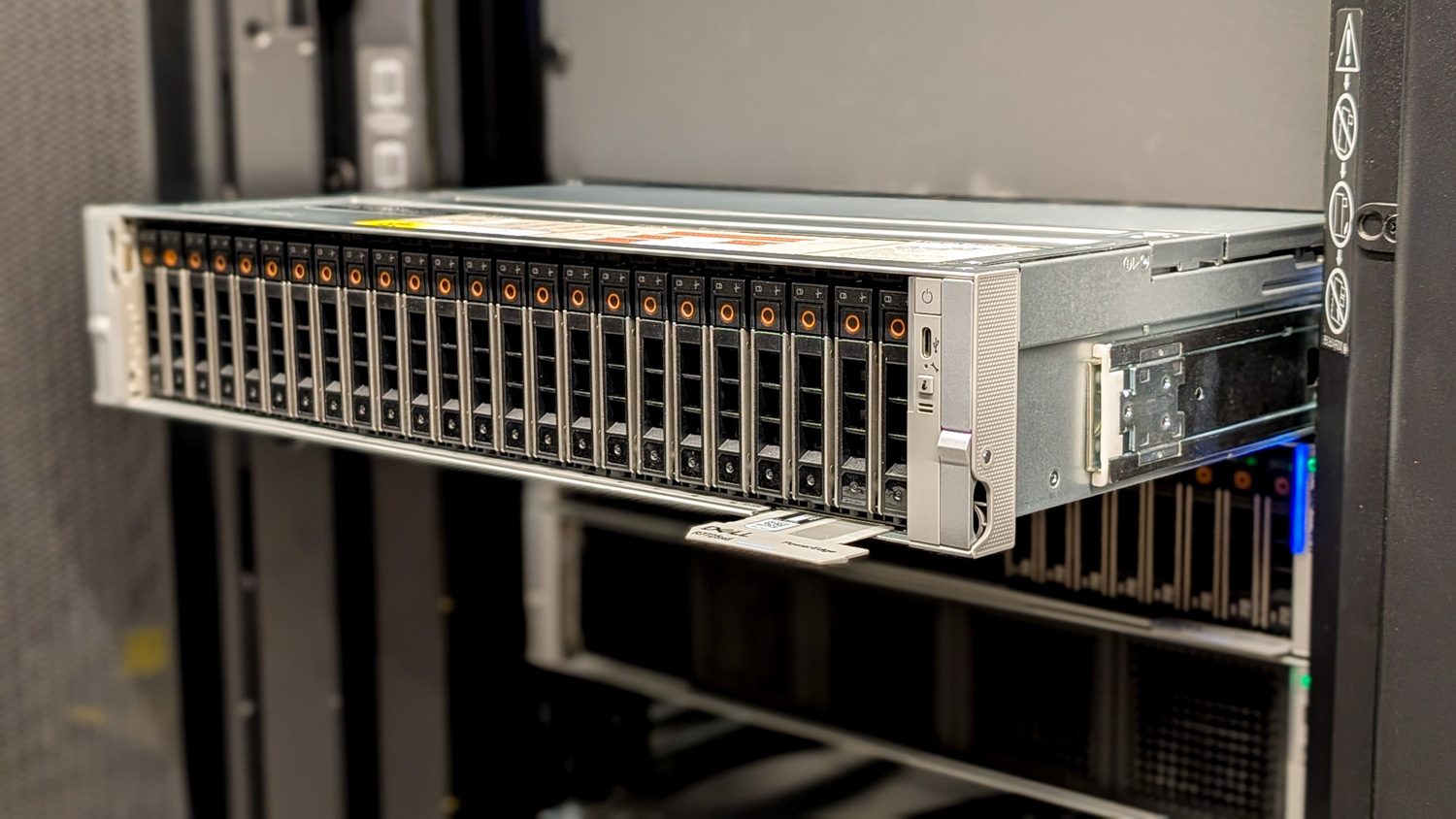
    Dell PowerEdge R7725xd with 24 front NVMe bays in a StorageReview lab rack, the server we tested with PEAK:AIO software at 160 GB/s over NVMe-oF RDMA

    “AI clouds need high-performance shared storage that can scale alongside growing GPU clusters while maintaining the resilience, security, and operational simplicity organizations depend on,” said George Kurian, CEO of NetApp. “With PEAK:AIO, we are delivering on our vision for a new generation of AI infrastructure that combines scalable metadata services with the proven foundation of ONTAP to help customers maximize infrastructure efficiency and support AI at hyperscale cloud.”

    Metadata That Scales on Its Own

    NetApp describes an architecture that disaggregates metadata from data so metadata services can scale independently of capacity. PEAK:AIO brings metadata scale, a global namespace, and parallel NFS access for massively parallel workloads, and NetApp brings ONTAP as the data foundation, with the resilience, security, and operational maturity its customers already run. NetApp says the combination is meant to reduce data-related GPU stalls and give existing ONTAP customers a clear evolution path.

    The most important piece of PEAK:AIO’s metadata work is pNFS Lattice, an open-source, scale-out metadata server for NFSv4.2 and pNFS Flex Files that PEAK:AIO initiated with Los Alamos National Laboratory and Carnegie Mellon University and published with support from the Linux Foundation. Lattice splits metadata authority, protocol coordination, and data placement into separate layers: multiple user-space metadata server daemons share a RonDB metadata store, clients reach the right metadata server through standard NFSv4 referrals, and the data servers are unpatched Linux knfsd instances serving flex-file layouts over TCP or RDMA. The code is on GitHub under an MIT license, with one GPL-2.0 file where it links to RonDB. PEAK:AIO labels it an early release for research, development, and testing, not yet recommended for production. LANL and PEAK:AIO are scheduled to present Lattice at the SNIA Developer Conference in Santa Clara September 28 to 30, including a Birds of a Feather session led by LANL’s Gary Grider.

    “NetApp and PEAK:AIO connected through the shared belief that the AI era demands a fundamentally new approach to data infrastructure,” said Mark Klarzynski, CTO and founder of PEAK:AIO. “What excites us most about joining NetApp is the opportunity to pair our culture of innovation with the reach, scale, and customer trust of a global leader.”

    What We’ve Seen PEAK:AIO Do

    We’ve followed PEAK:AIO closely for years, and the common thread is software that gets a lot out of standard servers. In 2023, PEAK:AIO’s AI Data Server pushed 80GB/s from a single storage node. In 2024, we visited London Zoo, where the Zoological Society of London runs two NVIDIA DGX systems against 1.2PB of PEAK:AIO storage for wildlife monitoring, and we covered its work with MONAI and Solidigm to keep medical AI on premises inside hospitals. In 2025, we tested a 2U AI Data Server with 1.5PB and 120GB/s on Dell hardware and Solidigm 61TB SSDs, followed by a CXL-based Token Memory Platform for KV cache reuse.

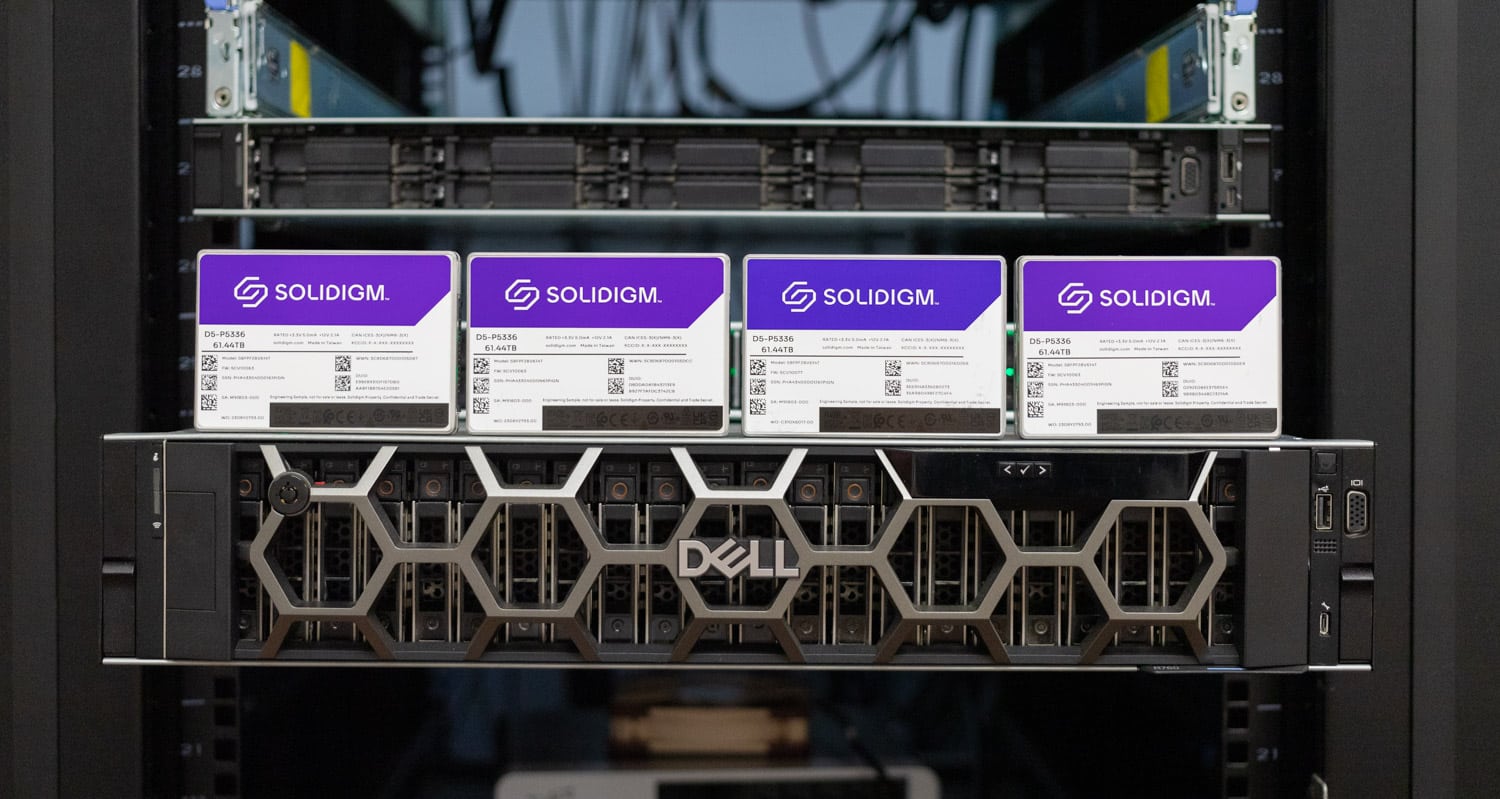
    Four Solidigm D5-P5336 61.44TB SSDs on top of a Dell PowerEdge server in the StorageReview lab, photographed for our PEAK:AIO, MONAI, and Solidigm medical AI coverage

    In our Dell PowerEdge R7725xd review, the server sustained over 300 GB/s across its 24 Gen5 NVMe drives locally, and PEAK:AIO served 160 GB/s over NVMe-oF RDMA to two clients on four 200Gb links, with random read bandwidth tracking sequential from 32K blocks up. We also used PEAK:AIO to build the NVMe-oF target for our NVIDIA DGX Spark review. When Brian sat down with Klarzynski at SC25 for Podcast #144, he talked about PEAK:AIO staying independent instead of becoming a feature inside a large vendor’s product line, and about a model where customers start with storage on a GPU server and add nodes to a growing namespace as their AI projects prove out. NetApp’s release centers on that same metadata and namespace work.

    PEAK:AIO CEO Roger Cummings put the company’s approach plainly in his LinkedIn post announcing the deal: “We didn’t start with technology and go looking for a problem to solve. We started with the problems customers were experiencing and built around them.”

    Where NetApp Takes It

    NetApp launched the AFX AI portfolio last October, pairing a disaggregated storage system that has a native parallel architecture with the AI Data Engine, and in July it bought DataPelago to run GPU data processing where the data already lives, which makes PEAK:AIO its second AI-focused acquisition in about two months. NetApp hasn’t said where PEAK:AIO’s technology will integrate first, but independently scaling metadata services, a global namespace, and parallel NFS access in front of ONTAP seem like a natural fit for AFX’s disaggregated design.

    As the deal closes, we’ll be watching whether NetApp keeps Lattice developing in the open; it’s a young, MIT-licensed project with LANL engineers presenting it at SDC this month. PEAK:AIO also built a following among hospitals, universities, and research labs that couldn’t justify a large array behind a single GPU server, and NetApp’s release is written around AI clouds at hyperscale, so it’ll be worth seeing how both ends of that spectrum play out. We like what PEAK:AIO has built, and NetApp’s sales reach and ONTAP installed base give that work a path into far more data centers than PEAK:AIO could on its own.

    PEAK:AIO

    The post NetApp to Acquire PEAK:AIO, Bringing Its Scale-Out pNFS Metadata Work to ONTAP appeared first on StorageReview.com.


    Supermicro NVIDIA Vera Rubin NVL72 Racks Now Shipping With 1.8MW In-Row CDUs and a 1,152-GPU Scalable Unit Sep 25, 2026
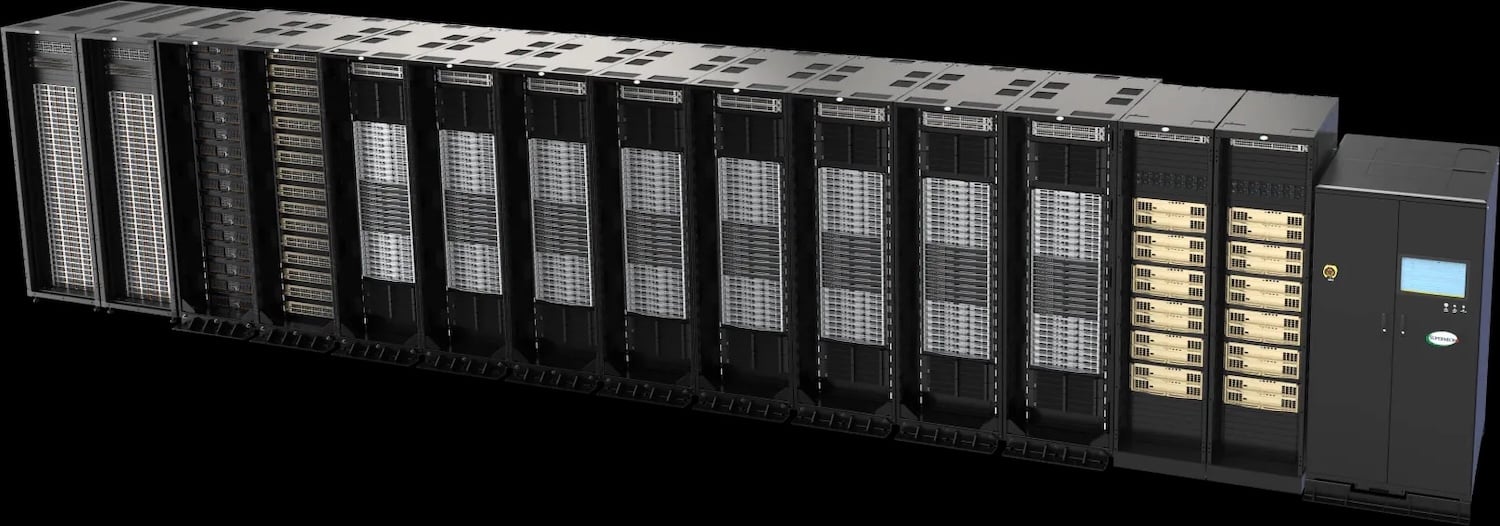
    Show notes Supermicro NVIDIA Vera Rubin NVL72 deployment render showing a row of liquid-cooled racks ending in a Supermicro in-row cooling distribution unit, vendor render Supermicro NVIDIA Vera Rubin NVL72 deployment render showing a row of liquid-cooled racks ending in a Supermicro in-row cooling distribution unit, vendor render

    Supermicro is now shipping NVIDIA Vera Rubin NVL72 racks integrated with its Data Center Building Block Solutions (DCBBS) and its DLC-2 direct liquid cooling stack. The racks follow the VR NVL72 design NVIDIA launched at CES 2026: 72 NVIDIA Rubin GPUs and 36 NVIDIA Vera CPUs in a single liquid-cooled rack that operates as one machine, spread across 18 1U compute trays with four Rubin GPUs and two Vera CPUs each. Nine sixth-generation NVIDIA NVLink switch trays connect the compute trays and deliver 216 TB/s of scale-up bandwidth, and each rack carries 20.7 TB of HBM4 and up to 54 TB of LPDDR5X.

    Supermicro NVIDIA Vera Rubin NVL72 deployment render showing a row of liquid-cooled racks ending in a Supermicro in-row cooling distribution unit, vendor render

    “We have spent years building the liquid-cooling stack, the manufacturing capacity, and the deployment teams for exactly this moment,” said Charles Liang, president and CEO of Supermicro. “Our customers can now order a Scalable Unit and receive production-ready systems with end-to-end integration, because we design and build every layer between the cold plate and the cooling tower.”

    DLC-2 From Cold Plate to Cooling Tower

    NVIDIA designed the Vera Rubin platform around direct liquid cooling, and Supermicro says the resulting heat load has to move through the full fluid distribution loop, from the cold plates through manifolds to the cooling tower. Supermicro builds that path from its own portfolio, which covers cold plates, manifolds, hose kits, rack power shelves, in-row CDUs, in-rack CDUs, Liquid-to-Air sidecar CDUs, rear door heat exchangers, and facility-side cooling towers. Supermicro first outlined its liquid cooling plans for Vera Rubin NVL72 in January.

    The shipping NVL72 package pairs the racks with Supermicro in-row cooling distribution units (CDUs) rated at 1.8MW each and deployed with N+1 redundancy, plus optional rear door heat exchangers to capture residual heat. Supermicro tests and validates every rack with the full liquid cooling stack, which it says speeds time-to-online once the racks are deployed.

    Scalable Unit Blueprint and Cluster Deployment

    Supermicro’s DCBBS Blueprint defines a balanced bill of materials for a given power envelope, from 5 MW to gigawatt scale, the same approach the company took with its Vera Rubin NVL4 DCBBS Blueprint in June. One Vera Rubin NVL72 Scalable Unit spans 16 compute racks with 1,152 Rubin GPUs and 331 TB of HBM4, sized alongside matching cooling capacity, power delivery, high-performance storage, context memory storage, and networking.

    Supermicro also handles networking integration and cabling to the NVIDIA Reference Architecture, covering the AI compute fabric, the converged fabric, and out-of-band management, and a Supermicro team runs each project from site survey and design through integration, testing, delivery, deployment, and ongoing support. Supermicro rack-scale compute is also part of Cisco’s Secure AI Factory, which added Vera Rubin NVL72 support in August.

    Supermicro NVIDIA Vera Rubin Product Page

    The post Supermicro NVIDIA Vera Rubin NVL72 Racks Now Shipping With 1.8MW In-Row CDUs and a 1,152-GPU Scalable Unit appeared first on StorageReview.com.


    WhiteFiber Continuum Goes Commercial, Scaling Its 83 km Two-Site GPU Supercluster Design to 136 Tbps Sep 25, 2026
    Show notes WhiteFiber Continuum architecture diagram showing two sites 83 km apart, each with AI compute and storage, AI-aware network fabric, and optical transport layers, joined by 12 lit fibers carrying 170 x 800G wavelength channels, vendor diagram WhiteFiber Continuum architecture diagram showing two sites 83 km apart, each with AI compute and storage, AI-aware network fabric, and optical transport layers, joined by 12 lit fibers carrying 170 x 800G wavelength channels, vendor diagram

    WhiteFiber has made WhiteFiber Continuum commercially available, turning the two-site GPU supercluster it first detailed as Project Redwood in July into a product enterprises can deploy. WhiteFiber calls Continuum its highest-performance cross-data-center networking solution and the first commercially available distributed GPU supercluster architecture. It links geographically separated data centers into a single logical GPU supercluster, and WhiteFiber says that removes bandwidth and throughput as constraints on how and where AI infrastructure can be deployed.

    WhiteFiber Continuum architecture diagram showing two sites 83 km apart, each with AI compute and storage, AI-aware network fabric, and optical transport layers, joined by 12 lit fibers carrying 170 x 800G wavelength channels, vendor diagram

    Continuum runs across two HITRUST-certified QTS facilities 83 kilometers apart, joined over 12 Zayo dark fiber strands, with DriveNets AI Fabric carrying the network and WEKA NeuralMesh providing data storage and memory infrastructure across the cluster. WhiteFiber rates the architecture at 136 Tbps of aggregate bandwidth, which its product page breaks out as 170 800G wavelength channels, with 0.9 milliseconds of guaranteed round-trip latency that it says is within 8% of the physical limit for light in fiber over that distance. The July R&D result measured 111.2 Tbps on part of the fiber spectrum; WhiteFiber says the design reaches 136 Tbps after additional wavelengths come online, and full-fiber spectrum testing is underway to confirm the guaranteed commercial specifications. The company has submitted patent applications for the underlying implementation.

    “WhiteFiber Continuum is the infrastructure answer to a problem the industry has lived with for years: geographic distance as a ceiling on what a cluster can do,” said Sam Tabar, CEO of WhiteFiber. “Today we are making it commercially available to enterprises that need AI compute to perform at scale, hold up under compliance requirements, and not break when a single site has a problem.”

    DriveNets AI Fabric Across the 83 km Link

    DriveNets supplies the Ethernet-based AI Fabric connecting both sites, the same role it played in the July R&D work. “DriveNets’ Ethernet-based AI fabric delivers the highest performance even in the most demanding, high-bandwidth, low-latency environments, ensuring scale-across superclusters move data efficiently, maximize GPU utilization, and optimize power efficiency,” said Yossi Kikozashvili, VP Product and GTM for AI Infra at DriveNets. WhiteFiber’s product page says both sites carry live traffic at the same time and only model gradients cross the inter-site link, so a single job can run across the full cluster or split into independent workloads that burst across sites as demand shifts.

    WEKA NeuralMesh as the Shared Data Layer

    WEKA provides the storage and memory tier with NeuralMesh, which gives Continuum a single storage and memory foundation spanning both facilities. Liran Zvibel, co-founder and CEO at WEKA, said “a supercluster is only as unified as its data,” adding that “WEKA’s NeuralMesh gives Continuum a single, high-performance storage and memory foundation across sites, so GPUs that sit many kilometers apart operate as if the data were local.”

    Power Aggregation and Regulatory Data Boundary Control

    Continuum lets telecom and metro facilities with spare power and fiber capacity contribute to a single logical GPU supercluster, which WhiteFiber pitches as a way to turn stranded telco and metro assets into capacity for last-mile inference and agent workloads. Enterprises can use the same architecture to pool GPUs across sites and get past the power and space ceiling of a single campus, adding overflow training and inference capacity without standing up a separate greenfield deployment. For regulated industries, WhiteFiber says Continuum keeps sensitive workloads within their originating jurisdiction while failover and pooled compute happen across locations, and because neither site is a single point of failure, it’s designed so training runs continue when one location goes down.

    WhiteFiber says additional sites can join the same logical cluster over time using the same networking approach, and it’s hosting a technical walkthrough of the architecture with DriveNets and WEKA on October 14.

    WhiteFiber Continuum Product Page

    The post WhiteFiber Continuum Goes Commercial, Scaling Its 83 km Two-Site GPU Supercluster Design to 136 Tbps appeared first on StorageReview.com.


    Previous 1 10 11 12 13 14 15 Next

    Related Podcasts

    Reply All

    1

    Reply All Games & Hobbies
    Inside VR & AR

    2

    Inside VR & AR Gadgets
    Note to Self

    3

    Note to Self News
    BrainStuff

    4

    BrainStuff Natural Sciences
    This Week in Tech (Audio)

    5

    This Week in Tech (Audio) News
    Hands-On Tech (Audio)

    6

    Hands-On Tech (Audio) Technology
    footer-logo

    Contact Us

    Toll Free: 844-670-7747

    Links

    • Home
    • Top Charts
    • Networks
    • Apps
    • Independents Podcasts
    • Podcast Advertising
    • Podcast News
    • Contact Us
    • About Us
    • Analytics & Insights

    Stay Connected

      Privacy, Terms of Use & Our Code of Ethics Protecting Content Creators Copyrights