Manufacturing and industrial environments provide their own unique
challanges for wireless communications. Harsh conditions, both indoors and
out, create a daunting task for engineers work through. This is where we
come to discuss those challenges, share ideas and help one another out.
My name is Scott McNeil and welcome to the Industrial Wi-Fi Shop
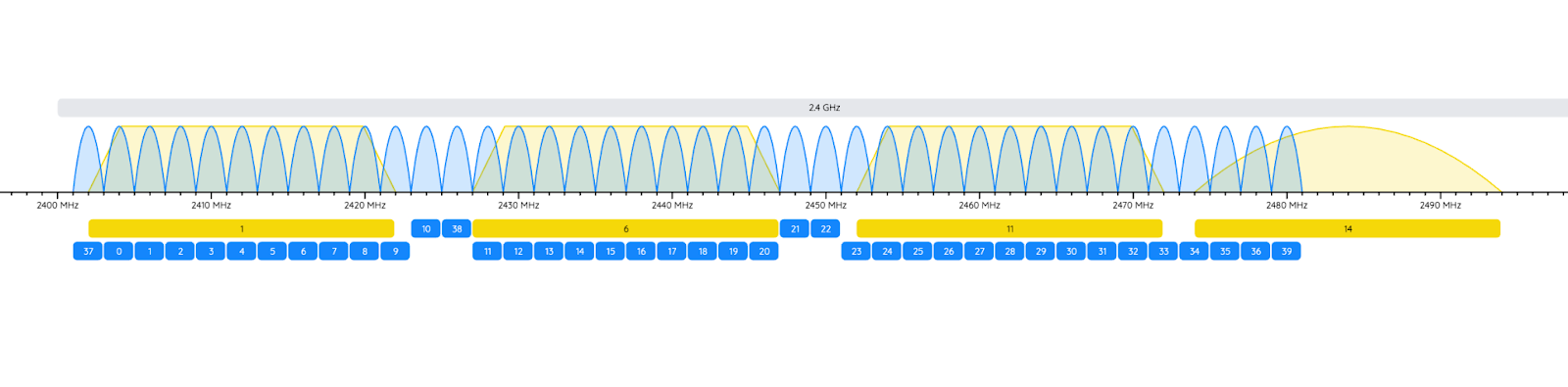
On Monday, July 14th, Metageek will be dropping their latest update for Chanalyzer. In this update they will have channel breakouts for both Bluetooth Standard/Classic (79) and Bluetooth Low Energy (40)
The Basics of Bluetooth
Handy spectrum reference, Bluetooth channels included.
Notes: Both devices must be Class 1 to achieve maximum range.
Key Points
Range depends on both devices: The effective range is determined by the lower class (lower power) device in the connection.
Power vs. Range: Higher power output allows for greater range but increases energy consumption.
Class 2 is standard: Most consumer Bluetooth devices use Class 2 for a balance of range and battery life.
All about BLE (in general)
Ultra-Low Power Consumption: BLE is optimized to use minimal energy, allowing devices to operate for months or even years on small batteries. It achieves this by keeping the radio off most of the time and transmitting data in short, infrequent bursts.
Short-Range Communication: BLE typically operates within a range of 10 to 50 meters indoors, but with Bluetooth 5.0 and newer, the range can extend up to 150 meters in open environments.
Efficient Data Exchange: BLE is designed for applications that require periodic transmission of small amounts of data, such as sensor readings or device status updates. It is not suitable for continuous, high-bandwidth tasks like audio streaming.
Fast Connection and Low Latency: BLE enables quick device discovery and connection, with latency as low as 6 milliseconds—much faster than classic Bluetooth, which has around 100 ms latency.
Frequency and Channels: BLE operates in the 2.4 GHz ISM band, using 40 channels (each 2 MHz wide), compared to 79 channels in classic Bluetooth. This helps reduce interference and improve efficiency.
How BLE Works
Advertising and Scanning: BLE devices periodically broadcast small advertising packets on three primary channels. Other devices scan for these packets to discover and connect with peripherals.
Connection Roles: BLE uses an asymmetric design:
Central: Typically a smartphone or computer, handles more processing and power.
Peripheral: Usually a sensor or wearable, optimized for minimal energy use.
Data Transmission: Once connected, devices exchange data in short bursts, then return to sleep mode. This pulsed operation leverages battery recovery effects, further extending battery life.
BLE employs two main channel selection algorithms for frequency hopping:
1. Algorithm #1 (CSA #1)
Introduced in the original BLE specification.
Uses a simple, incremental approach to select the next channel.
The sequence is uniform and deterministic, without randomization.
Primarily used in earlier versions of BLE.
2. Algorithm #2 (CSA #2)
Introduced in Bluetooth 5.0 to enhance security and randomness.
Generates a pseudo-random sequence of channels for each connection event.
Provides better distribution and reduces predictability, making it harder for attackers to track or jam communication.
Now the preferred algorithm in modern BLE devices.
Adaptive Frequency Hopping (AFH)
BLE divides the 2.4 GHz band into 40 channels (each 2 MHz wide), with 37 used for data and 3 for advertising.
AFH continuously monitors the radio environment for interference.
Channels identified as “bad” (due to high interference or error rates) are excluded from the hopping sequence.
The channel map, updated dynamically, ensures only “good” channels are used for hopping.
How It Works
At each connection event, the devices select the next channel using the current channel selection algorithm and the updated channel map.
The hopping sequence is synchronized between connected devices, ensuring reliable and interference-avoiding communication.
Feature
Algorithm #1 (CSA #1)
Algorithm #2 (CSA #2)
Introduction
Original BLE spec
Bluetooth 5.0
Selection Method
Incremental, deterministic
Pseudo-random, more secure
Randomization
None
Yes
Interference Avoidance
Basic
Improved
Current Usage
Legacy devices
Modern BLE devices
Key Takeaways
BLE uses adaptive frequency hopping (AFH) with either Algorithm #1 or Algorithm #2 for channel selection.
Algorithm #2 is now the standard for newer BLE versions, offering improved security and interference mitigation.
Channels are dynamically assessed and “bad” channels are avoided in real time to maintain reliable connections.
General questions about Aunex BLE
Do the Dataeagle series of radios use BLE as per the standard set forth by the Bluetooth SIG or do they modify it in any fashion?
How does Aunex get such crazy ranges/distances out of BLE?
Special software?
Low level chip access?
Proprietary marshmallow magic?
What kind of latency do you see for data transport?
100ms?
50ms?
Less?
What other products
If you would like to connect with Tobias or learn more about his employer, Aunex, then check the following:
NIST stands for the National Institute of Standards and Technology
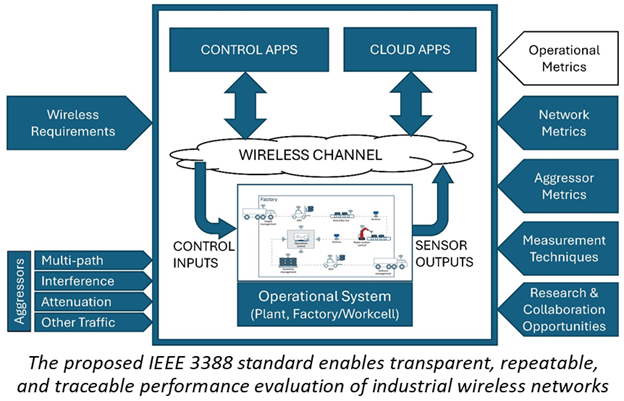
Rick Candell, NIST’s Industrial Wireless Systems Project Leader, and his team have led the working group developing the draft IEEE 3388 Standard.
The standard focuses on the Performance Assessment of Industrial Wireless Systems.
A major milestone was reached:
The draft passed the IEEE Standards Association RevCom (Standards Review Committee) review.
It received approval from the IEEE Standards Association Standards Board.
Key features of the standard:
Establishes a functional model for RF industrial wireless performance degradation factors (called “aggressors”).
Provides a reference test architecture for evaluating the performance of industrial wireless networks.
Target applications:
Manufacturing
Power generation
Precision time-sensitive sensing
Closed-loop control
Any mission-critical use where wireless is the primary communication mode
Benefits:
Enables standardized testing before deployment.
Enhances reliability of wireless systems in mission-critical environments.
Next steps:
Detailed specification of interference and propagation aggressors.
Creation of profiles tailored to specific industry verticals.
This milestone reflects:
The team’s dedication to advancing industry standards.
A strong commitment to fostering innovation in critical wireless communication applications.
Growth of Industrial related Wireless communications
The Exactitude Consultancy report on the Industrial Wireless Automation Market, published in April 2025, provides a comprehensive analysis of the market’s current status and future prospects.
Projected 2034 Market Value: Expected to reach $50.8 billion.
Compound Annual Growth Rate (CAGR): Forecasted at 6.9% from 2025 to 2034.
Historical Data Period: Covers data from 2020 to 2023.
Largest Market Region: North America.
Market Segmentation:
By Product Type:
Wireless Sensors
Wireless Controllers
Wireless Gateways
By Application:
Process Automation
Factory Automation
Machine Automation
By End User:
Manufacturing
Oil and Gas
Energy and Power
By Technology:
Wi-Fi
Zigbee
CellBluetooth
Key Market Drivers
Adoption of IIoT: The increasing implementation of Industrial Internet of Things (IIoT) technologies is enhancing connectivity and real-time data exchange in industrial settings.
Operational Efficiency: Wireless automation solutions are contributing to improved operational efficiency and cost savings across various industries.
Advancements in Wireless Technologies: Developments in technologies like 5G and LPWANs are facilitating faster and more reliable wireless communication.
Top 15 Key Competitors
Siemens AG
Schneider Electric SE
Rockwell Automation, Inc.
Honeywell International Inc.
ABB Ltd.
Emerson Electric Co.
Yokogawa Electric Corporation
Mitsubishi Electric Corporation
General Electric Company
Panasonic Corporation
Continental AG
Advantech Co., Ltd.
Omron Corporation
Phoenix Contact GmbH & Co. KG
Belden Inc.
Importance of Best Practices
Best practices in industrial wireless applications are crucial for several reasons — they ensure reliability, safety, scalability, and long-term maintainability of the system. Here’s a breakdown of why they matter:
1. Reliability
Industrial environments are often full of interference (from motors, metal structures, etc.), so best practices help mitigate:
Signal dropouts
Latency issues
Data loss By following established design principles like proper frequency planning, antenna placement, and interference mitigation, wireless systems can perform consistently.
2. Security
Wireless systems are more vulnerable than wired ones. Best practices enforce:
Encryption protocols (e.g., WPA3, TLS)
Authentication
Access control to protect critical infrastructure from cyber threats or sabotage.
3. Safety
In industrial environments, failures can be dangerous. For instance, if a sensor signal is lost and a machine doesn’t stop, it could lead to injury or damage. Adhering to best practices ensures:
Redundancy
Fail-safe mechanisms
Real-time communication standards (like ISA100 or WirelessHART)
4. Scalability & Performance
As operations grow, wireless systems need to:
Handle more devices
Maintain low latency
Manage network congestion Best practices guide network architecture that can expand smoothly (e.g., mesh networks, QoS policies).
5. Maintenance and Troubleshooting
Standardized practices make diagnosing problems and upgrading systems easier by:
Using documented configurations
Employing remote management tools
Ensuring interoperability between devices from different manufacturers
6. Compliance and Standards
Industries often need to comply with regulations like:
IEEE 802.11/802.15 standards
FCC/ETSI rules
Industry-specific protocols (e.g., IEC, ISA standards) Best practices ensure you’re not just compliant, but also audit-ready.
7. Long Term Support
Just general comments about how best practices keep things easy to use later.
Eliminates dependence on tribal knowledge
Starting in May, the Industrial Wi-Fi Shop will begin releasing a series of wireless best practices guides. Topics will include everything from CIP Safety over wireless to best practices for radiant coax. Possibly redundant wireless links, iPCF, These resources will be freely available to our audience as a way of giving back to the wireless community that has supported us.
What’s on the bench?
What are some projects or technologies we have been trying out.
WLAN Pi Go/WEPi
Eero Pro/Con
Halowlink mention some of the stuff from slack – tests people have. (enter giveaways, free hardware is awesome)
Data Eagle
What’s next?
Aunex Tobias Meyer
NetAlly TBA
Maybe a different approach to RCoax
If you would like to connect with Scott or learn more about his employer, Global Process Automation (GPA), then check the following:
But wait, there’s more. Adrian has agreed to give us a few licenses to go with the books.
If you currently have WE3 and you are selected we will send you the book, and pull a name from someone who enters but does not have the software, that way we can get this tool in the hands of a listener who hasn’t yet seen the beauty of WiFi Explorer Pro 3.
Really cool blog I wish I would have heard about sooner. Robin Decloedt is behind the robinwifi blog, where he covers his experience pursuing several certifications. It is thoughtful and he puts together nice summaries of the chapters. Wish I would have known about this before all of my CWAP prep.
Some of the most popular spectrum analyzer software out there for PC/MAC
Dongles for 900MHz, 2.4, 5 and 6GHz
Solid reporting tool built in with great spectrum visualization and exporting abilities
Easy to learn, read and use
Any plans to make Chanalyzer available for tablets? ( iPad / Android )
Includes some base signatures for identification, possible expansion of signatures?
BRING BACK THE WI-SPY900 !!!
Eye P.A. / Tonic / Chanalyzer 6
Wireless packet capture and analysis tools
Is it now the “MetaGeek App”?
inSSIDer (First scanner I cut my wireless teeth on!)
Comprehensive Wi-Fi scanner tool
Oscium
Where did the name “Oscium” come from?
Oscium offers a range of spectrum analyzers designed for wireless professionals, engineers, and field technicians. They also built the Nomad for Hamina Onsite.
For Spectrum Analysis, different dongles support 300–348 MHz and 387–464 MHz (EOL), 900 MHz, dual-band (2.4 GHz and 5 GHz) and tri-band (2.4 GHz, 5 GHz, and 6 GHz for Wi-Fi 6E/7) depending on the model.
But wait, there’s more. Adrian has agreed to give us a few licenses to go with the books.
If you currently have WE3 and you are selected we will send you the book, and pull a name from someone who enters but does not have the software, that way we can get this tool in the hands of a listener who hasn’t yet seen the beauty of WiFi Explorer Pro 3.
One of the things we love is sharing information that makes all of our lives easier.
If you need to do multi-channel capture, the Oscium Nomad (Hamina’s WiFi measurement device) has been integrated with Airtool 2 to allow simultaneous capture of up to 4 separate channels. This works in 2.4, 5, and 6 GHz. Airtool also allows Zigbee and BLE capture with appropriate dongles.
This is a young conference, but seems like there is lots of potential.
Last year they had 50 attendees, this year they are looking to double. I saw the lineup and it seems like there is a little something for everyone.
July 23-25th in Houston (Might be hot, so wear your cargo shorts)
Here are a few of the topics that they will have speakers present on:
PLCs and I/O, HMI, Machine Safety, Machine Vision, Robots, Cobots, DCS, OT Cybersecurity and many more.
This just looked really cool and is probably a great way for the OT curious to get a broad feel for what we touch on in Operational Technology. It is probably an even better opportunity for the swiss army person to deepen their knowledge about some of the systems us wireless and networking folks get asked to get talking.
Which makes it a perfect segway into our guests today.
What is NearFi?
First, NearFi is NOT NFC or Near Field Communication which is used for things like phone to phone data communications or payment card chip reading
It is a contactless technology for real-time transmission of power and data across short distances, typically a few centimeters.
How does it work?
Data transfer
Speeds? – 100 Mbps full duplex
Frequency? 60 GHz
Latency? 1 Microsecond “faster than 5G”
Supported protocols? Any Ethernet Protocol, communication is transparent
Range? 10 cm
Power transfer (power induction)
How is this done? Inductive coils
How much power can be transferred? 50W per pair
How is that energy then passed to other devices? The remote coupler has a power output connector that allows the induced power to be transferred to a cable
Range? 1cm
How safe is this technology? Very safe, power transfer is over very short distances. Additionally, industrial use cases by their nature prevent people from getting close while the devices are transferring power.
Use Cases
End effector tool change on robotic arm
AGV/AMR communicating with work cell or loading dock
Slip ring replacement – indexing tables or turntables
Machines that move/rotate
Modular machines
Presses
Workpiece tracking
Comms between train cars, entertainment systems, standard connectors don’t have pins available to support increasing data needs.
I/O is… (Input/Output) refers to the systems and devices that enable communication and data transfer between industrial equipment, control systems, and computers in manufacturing and automation environments. I/O systems play a crucial role in monitoring, controlling, and managing industrial processes by handling inputs from sensors and outputs to actuators and other devices.
Sometimes these communication signals are analog (4 to 20 milliamp for example) and sometimes they are digital
Thus, wireless I/O is… the same thing with the exception of some kind of wireless module takes the place of copper or fiber cabling backhauling the information to other systems
How does it work?
Do Phoenix Contact wireless I/O modules base communication on 802.11, 802.15.4 or some kind of proprietary protocol?
Uses proprietary FHSS protocol on the 868 MHz (Europe), 900 MHz, (Americas) and 2.4 GHz (Worldwide)
Speeds?
Up to 500 kbps
Frequency?
See above
Latency?
Depends on the data rate and application, but the dwell time on the frequency hopping can be as fast as 16 ms
Welcome to the 1 Year Anniversary episode of the IWS!!
Upcoming Events!
Wi-Co
-Chapel Hill NC- 5/14 -Scott presenting or maybe another hands on lab
-Nashville 5/29- Jeremy possible presentation on CURWB
WLPC
Jeremy – 10 talk on site surveys in machine cells and entertainment…
For those not familiar, what is Token Ring?
A LAN technology that uses a token to control data transmission between devices. It was created by IBM in the early 1970s and standardized as IEEE 802.5 in 1989
How it works
A token is passed around a logical ring of devices.
A device can only transmit data when it has the token.
When a device has data to send, it captures the token and converts it to a “busy” token.
The device then transmits a data frame, which travels around the ring until it
reaches its destination.
The destination device copies the data and sends an empty frame back around the ring.
When the originating device receives the empty frame, it releases a new token for other devices to use.
Benefits
Token ring ensures that every device gets a chance to transmit data, which makes the network more reliable and predictable.
It eliminates collisions that can occur when multiple devices try to transmit data at the same time.
History of EchoRing and Technology Deep Dive
James Gross and Christian Dombrowski laid the foundations of Echoring technology. James Gross was an assistant professor at RWTH Aachen University from 2008 to 2012 in the DFG-funded research center UMIC (Ultra High-Speed Mobile Information and Communication), working on a wireless, highly available real-time communication solution using the Token Ring protocol. Christian Dombrowski completed his PhD under Gross.
Together, they used mathematical methods to prove the reliability of the technology. Christian Dombrowski started implementing Echoring on an FPGA-based Wireless Open-Access Research Platform (WARP) as part of his PhD thesis in 2010. They mainly used a PTA (Probabilistic Timed Automata) to evaluate the communication protocol. In 2012, a patent application was filed for the Echoring protocol. 2014, the system was stable for the first time and successfully tested in real scenarios in several BMBF-funded projects.
2015 James Gross and Christian Dombrowski founded the company R3 with Mathias Bohge and Florian Bonanati. The Echoring protocol is implemented on a ‘WiLink 8’ Bluetooth chip from Texas Instruments, making it ready for mass production. In 2017, the ‘Echoring Radio Board,’ the first product with Echoring technology, was released in collaboration with Schleicher.
2018, the seamless roaming function was implemented, and a patent was filed. End of 2019, the ‘Bridge E’ was launched at the SPS trade show in Nuremberg, Germany.
EchoRing Technology facts – The Lord of the Ring
Echoring is a highly reliable, decentralized, wireless radio protocol capable of real-time use due to two measures.
The first measure is that Echoring is based on the idea of token ring technology. Each participant in the Echoring network acts both as a sender and as a receiver. In line with the concept behind the token ring, only the token holder can send and effectively prevent collisions. Also, the token ring ensures a deterministic sequence in the system, which is perfect for industrial control systems.
As a second measure, echoring achieves high reliability using an ‘echo system’ to achieve ‘massive cooperative communication .’In this case, should the connection between a sender and a receiver be interrupted, the signal is automatically sent to the actual receiver by a third network participant.
The measures described as core functions allow for calculating the signal runtime and reliability, making Echoring suitable for use in time-critical industrial applications.
An Echoring network consists of at least two network nodes. A third node is recommended as an echo station. The reliability of Echoring networks increases with the number of network nodes. We specify the maximum number of network nodes in one radio channel as 20.
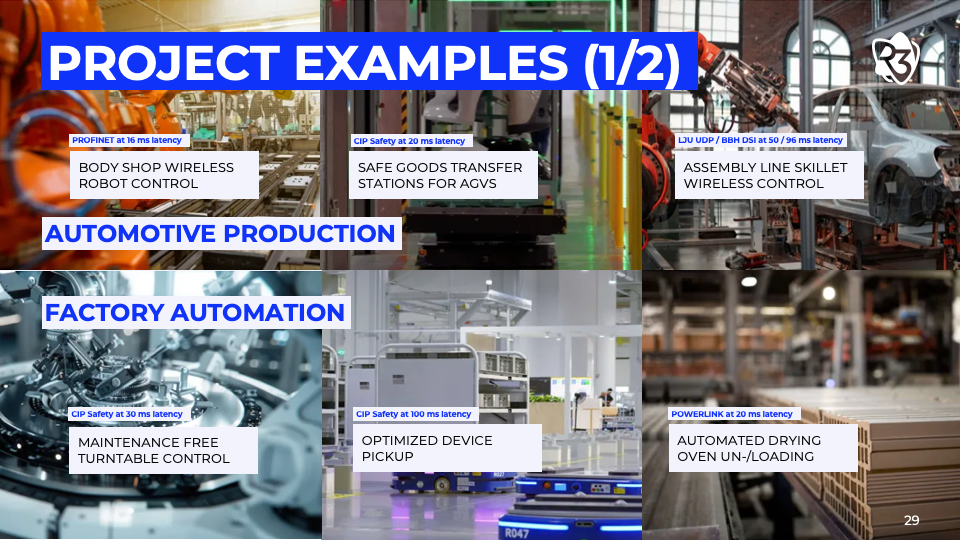
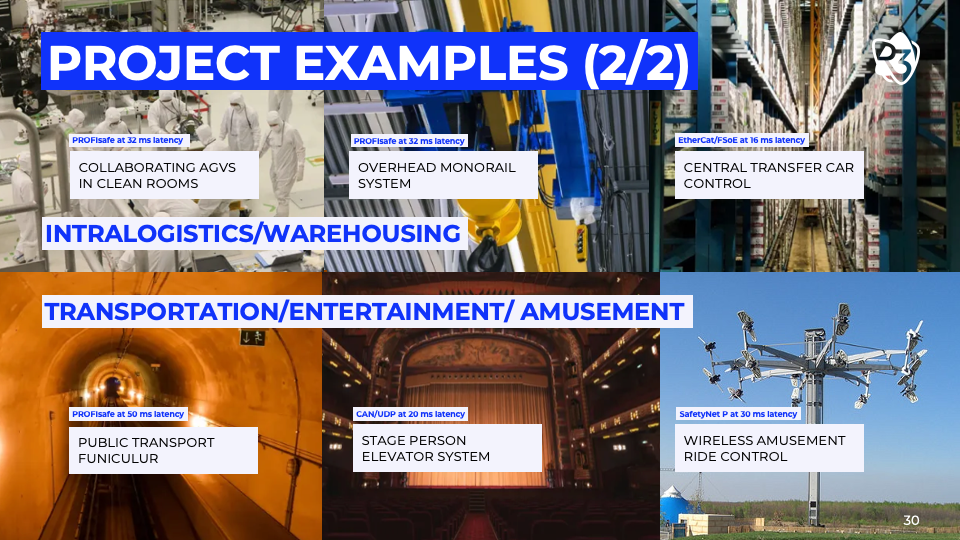
If more extensive networks are to be formed, individual Echoring networks can be operated as sub-networks and connected to create a more extensive network. Applications with mobile network nodes, such as skillets, overhead monorail, or AGV/AMR applications, can seamlessly switch from one sub-network to the next via roaming and handover.
Echoring is transparent to the network technologies used and can be used for a wide range of technologies. Numerous field buses and industrial Ethernet technologies, such as PROFINET, EtherNet/IP, CIP Safety, Ethernet Powerlink, and CC-Link, can be transmitted via an EchoRing network.
This is the first spectrum capture. The radios were set for 5GHz channel 153. For reference, there is a Wi-Fi access point in channel 157 with no clients connected (it’s one of my lab AP’s). It’s about 10 minutes. Can you see the center line I was talking about on the show?This is the entire 40 minute capture.
Wi-Fi 7 possibilities in Industry, manufacturing and safety
Are massive gains in throughput a selling point for manufacturing
4096 QAM
Massive channel widths (320 plus non-contiguous)
What about Multi-Link Operation (MLO), a feature that increases capacity by simultaneously sending and receiving data across different frequency bands and channels. (2.4 GHz, 5 GHz, 6 GHz)
Wi-Fi 7 claims dramatically lower overall latency
Probably going to be great for camera systems.
Oscium/Metageek
Q1 planned discussion around the merger, spectrum analysis, potential new hardware,
old friends
WLAN Pi
App and API
M4 Plus
OTG
Go
HaLow surveying?
WLPC 2025
Surveying private cellular Mark Houtz looks like it is on the horizon. Heatmaps, pcaps, oh my
WLPC 10 talk on site surveys in machine cells and entertainment…
WiCo
-Chapel Hill NC- 5/14 -Scott presenting on …
-Nashville 5/29- Jeremy possible presentation on CURWB
What’s coming up for the IWS in 2025?
Some great guests lined up
Oscium – Lord High Commanders of Spectrum Analysis
Dr. Rick Candell from NIST/IEEE
Dr. Emmett Brown to discuss 1.21 gigawatt power thresholds
The gang from Industrial Wireless manufacturers Phoenix Contact
January will be the 1 year anniversary of the IWS!!!
New CWNP study guide giveaway opportunity!
The Industrial Wi-Fi Shop Podcast – Ep. 11 Cable Guy!
Nov 06, 2024
Show notes
Contact the guys at the Industrial Wi-Fi Shop! Scott – scott@industrialwifishop.com Jeremy – jeremy@industrialwifishop.com
R-Coax Deep Dive
High Level
What is Radiating Cable? Is it “Wire for a wireless system?” Let’s dig in.
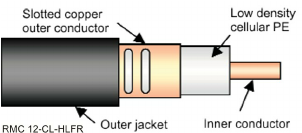
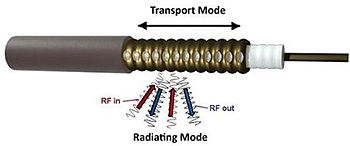
Leaky Coax is an extruded copper core, with an external copper sheath. Featuring slits along one side which allow RF to escape (the matrix).
It is composed of just four components. An inner conductor, a dielectric or low density PE layer, an outer conductor with slots, and a cable jacket. This technology has been around for 40-50 years from what I can tell.
The slits allow emission of certain frequencies.
It goes by several names, but most commonly referred to (by me) as leaky coax. You may have heard of:
Radiant Coax
Radiating Cable
Leaky Coax
Leaky Feeder
RCoax
<expletive deleted>
The standard boiler plate use cases are AGV systems, overhead cranes, rotating machinery, skillet systems, monorails, mining, even tunnels in some cellular applications. We deploy it in these scenarios and also entertainment applications.
This stuff is a pain to get in, stiff and easy to damage if you aren’t careful. Siemens documentation says it has a spatially limited radio link, but the stuff can be detected up to 30 meters away if using enough power from the radio.
The main benefit is that it replaces things like slip rings where constant flexing of ethernet cables leads to wear and failure.
RF Propagation
This can work in 2.4GHz, 5GHz and also the new 1.21 Gigawatts band they teased for release in early 2025
Think about it kinda like one of this perforated garden hoses, a little water comes out at every inch of the cable.
I call it the astropop, essentially at the head end, where the most energy comes out it’s the broad base of a cone and tapers to the end of the cable.
Near field 2-10 cm
Far Field: 0 to 3M
Typical loss (approximate) per 100m 17dbm for 2.4 and 27 for 5GHz
Segment length reduces transmission rate.
Installation
There is a ridge on the back side of the transmission surface, which is used to align the cable. Make sure your antenna is on the side of the remote antenna.
Not intended to be mounted directly to surfaces, requires standoffs with a minimum of about 5cm.
Secure with a clip at least every meter. There are metal reinforced clips available for more secure mounting and can be interspersed every 10 meters. YMMV
DO NOT MOUNT CLOSE TO BUS BARS!!!
A 480 bus bar is an electrical connection point that distributes and transports electricity.
SHOEs or Induction of current. Think of a trolley.
<— Wanna hear about how I got shocked?
Some radio vendors recommend overlap, some don’t.
Can be installed outdoors. If it is in danger of being stepped on you can protect with something like cable tray. <— Picked this tip up from some smart guys on a carousel installation
A hacksaw file and a few wrenches is all you really need to put the N-Type connectors on the end. Don’t use snips.
You can also use rubber pipe wrenches to help grip for twisting the cable as you lay it or fix misalignments.
Best Practices
Keep the antenna within 1” to 2 meters, you can get away with a longer distance though. The signal will degrade the further you get away from the cable. If you can reach out and touch the coax, you should be good to go.
Don’t put it in channels.
Check the alignment with the ridge, then check it again every few weeks after initial install make sure it settles into the installation. This stuff will relax after some time.
Don’t get shocked, or do, but don’t say I didn’t warn you. Keep it the minimum distance from high voltage rails.
Keep the remote antenna in line with the central axis of the EM field.
Mind the bend radius.
Torque stripe the cable at the clips for easy visual inspection. Do this after the cable has settled.
Don’t install the radio in EX zones (Class1, Div 2 – explosive zones),
cable is passive so treat it like an antenna
Be mindful of common outdoor, corrosive environments and follow the same component sealing best practices.
Not sure about direct burial of this stuff, but it might work.
Typically we only use this as SISO, though it appears ProSoft will allow you to install using two tx chains.
You can dual feed and use something like a UNII-1 and UNII-2 channel to send signals from both ends.
This is an exotic application so be wary of the hardware you use.
Angling antennas slightly improves performance.
Fun Stuff
My most famous project and probably the only one I can talk about with much detail is the Secret Life of Pets ride in Universal Studios Hollywood. Got it in right before Covid locked everything down.
We won an award for this ride.
It is what is referred to as an omni mover. The cable is installed inside the machine guarding and has tons of bends and turns in it.
A few takeaways, not all unions are the same, which is fun. I learned about the delicate nature of sitting around waiting on someone who has no idea what they are doing install hardware while I scream internally. Mostly good people, so don’t take this as a total knock against union workers.
We made some on the fly brackets after the custom client brackets we built hit some stuff in line of travel which wasn’t supposed to be there. Amazing what you can do with bar stock, a bench vise, a step bit, and a hammer.
We got to figure out how to make the Fluidmesh radios work with this cable. So that was fun.
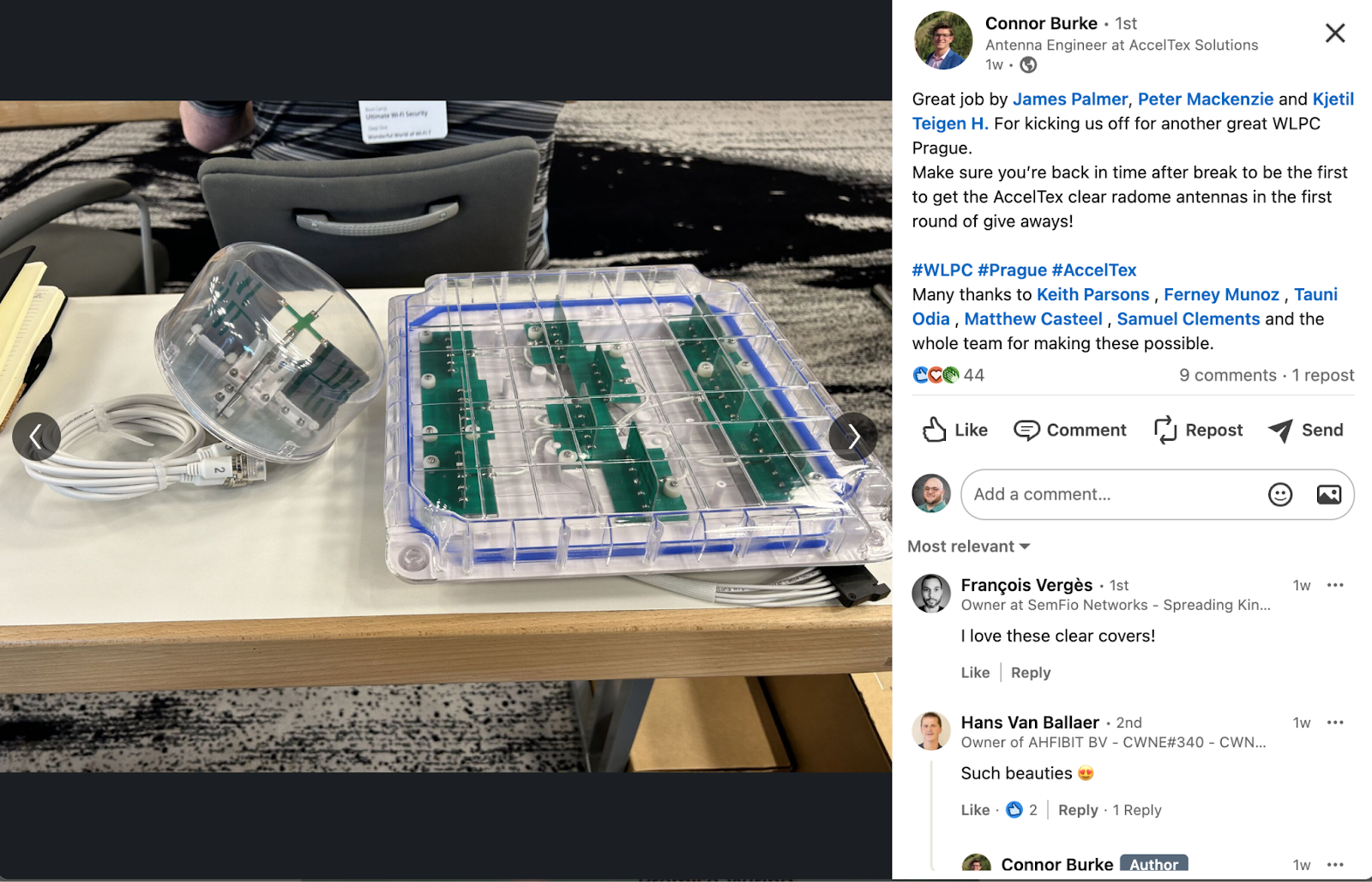
Acceltex Clear Antennas
End of show question
How would you apply RCoax at your site?
How does Fluidity work vs traditional 802.11 communications? Might be a good topic for an upcoming episode.
The Industrial Wi-Fi Shop Podcast – Ep. 10 Wi-Fi of Steel
Oct 10, 2024
Show notes
CWISA Guide Giveaway details
There are two copies of the Certified Wireless IoT Solutions Administrator (CWISA) study/reference guides
Winners have been drawn at random
The winner from IT is: Hiten Thakkar from Santa Cruz, CA
The winner from OT is: Jace Allen from Kaysville, UT
(WEST Coast BIAS!!!)
Congratulations!! I have your email addresses and will be reaching out for shipping information!
Let’s dive into the environment first
Outside of the office spaces, what’s it like down in the dark and dirty spaces?
Heat?
Humidity?
Dust, dirt and grime.
To that end, is the dust more metallic and if so does that cause you problems?
Tools of the trade
What is your use of wireless technologies primarily for?
Standard Wi-Fi for user client connections?
Mobility deployments?
Machine to Machine communication?
Specific industrial wireless protocols?
Any special tools for remote support?
What wireless systems are deployed on site?
Example – Cisco or Aruba
Any specialty systems for sensors like LoRaWAN?
Wireless I/O?
Any special tools you use to help solve issues?
Spectrum analysis
Wi-Fi scanners
Etc.
What do you use for planning?
Now for the fun stuff
What are the main issues you have to deal with on siteWhat is the most challenging area at your site?Did you really have an antenna (maybe an AP) or two melt?
If so, story time, we want to know!
Melted antenna (radio isn’t looking to great either)
What kinds of RFI/EMI do you run into?
Is an arc furnace in use?
What are some interesting technologies you have been looking into?
Scott got R3 test units, and we are going to look into their capabilities.
Interesting that they integrate well with Rockwell
Would like to get more familiar with EchoRing protocol
Where do they fit in with low bandwidth capabilities?
HaLow as backhaul
Jeremy submitted a talk for WLPC Phoenix!
IPCAM Power, Moxa POE Splitters
IPCAM is pretty beefy
Resolves issue we saw with Siemens D-Coded pinout not pulling power from Acceltex POE battery
Jeremy is planning an informal documentation round table!
NDA Friendly, please don’t get yourself in trouble even though we really want to know about the secret cool stuff.
Scott, what are you working on?
Started developing a 2 day, hands on industrial wireless class
Heath, what are you working on?
Migration to Juniper/Mist
If you would like to know more about our guests, check them out on LinkedIn:
WiFi6 and Mobile Robots: AS/RS, Conveyors, AGVs, AMRs, Automotive Skillet Lines, Electrified Monorails…. All have one thing in common: THEY ROAM…. A lot!
Challenges going to WiFi6
The OT traffic is different than IT.
Instead of pushing big-huge files through the air, mobile robot applications need to move lots of small files – rapid fire, fast!
PLC-to-PLC communication.
The reliable, uninterrupted, consistent nature of the OT traffic is different with mobile bots.
The OT networks are different.
Think 20ms RPI, so the roam time has to be a fraction of that.
The generation level of the WiFi doesn’t necessarily matter. … except for 6E (that “E” is really nice). How will we handle the common need for “purpose built” antennas/ signal reciprocity. For example a linear stacker crane usually only needs directional/ bi-directional antennas. No external antennas means you waste energy. The power differential is also a concern.
The changes in generation levels focus on more volume of data thru the air.
The changes are not necessarily focused on reliability.
The fast-roaming standard hasn’t changed.
95% of the chips end up in enterprise IT, and the current roaming standard satisfies that IT market.
Adding video, bandwidth, machine learning, etc. is important to enterprise IT, usually not to the bots.
The ProSoft radios do not support multiple SSIDs, on purpose. The idea is to have the SSID dedicated to the robot “fleet” network. Any additional WiFi required nearby will be handled by a completely different AP.
Automotive skillet lines and AS/RS roaming bots don’t need that. They need really, really reliable connections and ultra-fast roams.
Think Safety I/O
Think CIP Safety, ProfiSafe.
Think 20ms RPI and 40ms timeouts.
ProSoft buys the RF modules like everyone else.
Ex: We buy Qualcomm, package it, and sell it with our software running on it. I don’t know exactly how we do it, but somehow we hijack the chip and take control of many of the low-level decisions.
WiFi4 (802.11n) gave us access to the chip’s low-level functions.
We could monitor data from the RF chip so our software makes the roaming decisions, not the chip. The chip’s roaming standard is too slow.
We run our own calculations. We had a lot of control, resulting in consistent roams under 10ms – often down to 2ms if the client and AP were both the ProSoft RLX2-IHNF-A.
We can roam on the same channel.
These are ProSoft’s killer features for mobile applications.
What is the most common installation case for ProSoft? Were you always geared towards single-band applications? The radios have always offered 2.4 and 5.0. We had another line of 900MHz frequency hoppers, but discontinued them in 2020.
Most common installations are AMRs in automotive, warehousing, oil/gas, cranes.
With WiFi6, the downside is we’ve been locked out by the chip makers, and don’t have access to those low-level functions. We can only do high-level computations.
So the WiFi6 chip handles the roam. Is this part of the standard? Does this lock you out from using the chipset and modified frames? There is a roaming standard, but from a ProSoft point of view, it’s too slow. That’s why we take control of the roaming decision. For whatever reason, we were not locked out of accessing the low-level functions required to take over the roaming decision. Now, with WiFi6, the manufacturers of the chipsets have locked that down.
Unfortunately, the 802.11r standard is way too slow.
Challenge: Can we figure a way to still get to that low-level data? ProSoft is working on it.
Fluid Mesh puts 2 radios in each bot, and this might be the only way to fast-roam with WiFi6. Literally 2-4 radios that link logically. Newer hardware has two internal radios. Similar function. Splitting fleets is also a use case here.
Radio A talks to AP1
Radio B talks to AP2
When radio A is moving out of range of AP1, it starts roaming to AP3… in the meantime Radio 2 is still linked with AP2,
Siemens says IPCF does not currently work with WiFi6 to accomplish fast roaming. They also lost the second radio model from the W788 so those deployments are getting forced into WiFi6 one way or the other. Give and take with RPI and timeouts, some of these applications will have to relax constraints to get it to function. I see that give and take a lot, especially before I start talking to them. Slowing down RPIs and timeouts to allow for the longer roams.
BENEFITS of WiFi6:
If you need more bandwidth,
If you have pushing gobs of data,
Machine vision.
video
If you have a huge number of bots (clients) tied to 1 AP.
As the bot count goes up – 700, 800, 1,000 bots all in one warehouse – WiFi6 manages the data and traffic more efficiently.
WiFi6E is nice, opening up that 6GHz spectrum, you go from 8-9 channels to almost 60 more channels (at 20MHz)
2.4 is almost never used by ProSoft. It’s there. You can use it. But it’s too crowded with bluetooth, cordless things, microwave ovens, everyone’s cell phone which makes for an unreliable connection handling 20ms RPIs. Unreliable when you’ve got 500+ bots in a warehouse, and there are people there too with cell phones, and airpods, and apple watches. I learned the hard way that airpods really are a no-no when surveying 2.4 :).
We use 5.0, including the DFS channels.
More channels, more likely to get customer’s IT to STAY OFF a few of them.
Avoids all that saturated 2.4 traffic.
Siemens iPCF will not work on DFS channels.
WiFi4 is going away, one day. RIP
We need to get WiFi6 functioning in the OT space similar to how we currently have it with WiFi4, i.e. Ultra Fast Roaming <10ms in the RLX2-IHNF-A
For mobile applications, it has to support Safety I/O, CIP Safety, ProfiSafe, etc., etc.
For mobile applications, it has to support high client density (bot swarms), 6E is the answer, if we could only now just get it to fast roam.
If you would like to know more about our guests, check them out on LinkedIn:

 Our TOPPODCAST Picks
  Stay Connected