TopPodcast.com
Menu
  • Home
  • Top Charts
  • Top Networks
  • Top Apps
  • Top Independents
  • Top Podfluencers
  • Top Picks
    • Top Business Podcasts
    • Top True Crime Podcasts
    • Top Finance Podcasts
    • Top Comedy Podcasts
    • Top Music Podcasts
    • Top Womens Podcasts
    • Top Kids Podcasts
    • Top Sports Podcasts
    • Top News Podcasts
    • Top Tech Podcasts
    • Top Crypto Podcasts
    • Top Entrepreneurial Podcasts
    • Top Fantasy Sports Podcasts
    • Top Political Podcasts
    • Top Science Podcasts
    • Top Self Help Podcasts
    • Top Sports Betting Podcasts
    • Top Stocks Podcasts
  • Podcast News
  • About Us
  • Podcast Advertising
  • Contact
Not in our directory?
Add Show Here
Podcast Equipment
Center

toppodcastlogoOur TOPPODCAST Picks

  • Comedy
  • Crypto
  • Sports
  • News
  • Politics
  • True Crime
  • Business
  • Finance

Follow Us

toppodcastlogoStay Connected

    View Top 200 Chart
    Back to Rankings Page
    Technology

    StorageReview.com

    StorageReview.com is a leading provider of news and reviews throughout the entire IT stack – from the datacenter to the edge, and all points in between.

    Advertise
    • Apple Podcasts
    • Google Play
    • Spotify

    Latest Episodes:
    SC26 Roundup: Record-Low TOP500 Turnover, Supermicro Ships PCIe Gen6 Flash, and VAST Adds Job-Level QoS Nov 19, 2026
    Show notes

    SC26 is under way at McCormick Place in Chicago, and behind the headline launches we have already covered, a second tier of announcements fills in the storage, server, and networking picture. The TOP500 turned over fewer systems than in any prior edition, Aurora took the IO500 production list by a wide margin, Supermicro began shipping a PCIe Gen6 all-flash server, VAST Data tied storage QoS to the job scheduler, and eight server vendors are showing the hardware that sits around the GPUs. This SC26 roundup collects the items that did not get a standalone story, and the Hammerspace Data System launch is covered separately. TOP500: An Unchanged Top 10 and the Fewest New Systems on Record The 68th TOP500 list left the top 10 unchanged from the June list. China’s LineShine at the National Supercomputer Center in Shenzhen holds No. 1 at 2.198 exaflops on HPL, followed by El Capitan at 1.809, Frontier at 1.353, Aurora at 1.012, and JUPITER Booster at 1.000. Only 27 systems are new, 5.4 percent of the list, which the organizers call the lowest turnover in its history. Combined performance rose 4.4 percent to 19.57 exaflops, the entry point at No. 500 moved up to 2.857 petaflops, and 291 systems now use accelerators. The highest-ranked newcomer is HANGANG at KISTI in South Korea, an HPE Cray EX254n built on NVIDIA GH200 Superchips that enters at No. 12 with 342.6 petaflops. HPE’s Lux system at Oak Ridge, which we covered separately, debuted two places lower at No. 14. LineShine also leads the HPCG benchmark at 22.00 petaflops, and El Capitan leads the mixed-precision HPL-MxP test at 16.7 exaflops. The Green500 top 10 is unchanged as well, with France’s KAIROS first at 73.28 gigaflops per watt on a BullSequana XH3000 with GH200 Superchips. TOP500 November 2026 List IO500: Aurora Tops the Production List at 13 Times the Runner-Up Argonne’s Aurora leads the SC26 IO500 production list with a new DAOS submission that scored 46,192.01 from 4,096 client nodes, at 12,296 GiB/s of bandwidth and 173.5 million metadata operations per second. That is about 13 times the score of LRZ’s SuperMUC-NG Phase 2 in second place at 3,470.22. KISTI’s HANGANG, the HPE Cray system that led the TOP500 newcomers, enters third on Lustre at 1,155.89. Eight of the 52 production entries are new, including IBM’s Blue Vela on Storage Scale System 6000, Georgia Tech’s Nexus on VAST, and two DDN EXAScaler systems at Purdue. The research list has no new entries in its top five, which Pengcheng Cloudbrain-II still leads at 210,255. Vendor labs account for much of the new activity among 10-node submissions: Hammerspace entered a Tier 0 configuration over pNFS at No. 29 with a score of 688.01 and 449.86 GiB/s of bandwidth, Dell’s Lightning File System scored 568.66 at No. 37, and DDN’s AI400X3M with EXAScaler scored 317.47 at No. 53. IBM added several Storage Scale System 6000 results, and Korea’s Telecommunications Technology Association placed a 10-node DAOS system from Gluesys at No. 19 with 1,242.79. IO500 SC26 Production List AIC Shows a Four-DPU JBOF and a PCIe Gen6 All-Flash Server AIC is showing a system for each storage tier of an inference cluster, on the premise that KV cache is moving to shared flash near the GPUs with capacity storage behind it. The F2026 is a 2U PCIe Gen5 JBOF with 26 dual-port NVMe bays, dual canisters, and support for up to four DPUs, serving flash over NVMe-over-Fabrics, and MangoBoost builds its Mango KESAR-E enclosure on it. The HA2026-HC puts two active-active AMD EPYC nodes behind the same 26 bays. AIC’s newest system, the SB103-JP, is a 1U server with up to 16 E3.S PCIe Gen6 NVMe bays and a single EPYC 9006 processor. The capacity tier is covered by the SB407-ID, a 4U server with 60 hot-swap 3.5-inch bays, six rear PCIe Gen5 NVMe bays, and dual Intel Xeon 6 processors, and by the J4078-02-04X, a 4U 78-bay 24Gb/s SAS JBOD. On the compute side, the 5U CB502-NM takes dual EPYC 9004 or 9005 processors and up to eight dual-slot GPUs at up to 600W each. AIC did not give availability or pricing for any of the systems. AIC MSI Brings PCIe 6.0 E3.S Bays to EPYC 9006 Servers Much of MSI’s SC26 lineup has been shown before, including the liquid-cooled CG681-S6093 MGX rack with up to eight RTX PRO 6000 Blackwell Server Edition GPUs per 6U system and the XpertStation WS300, the GB300 desktop we reviewed, which MSI says will support Windows. The EPYC 9006 servers are the part of the lineup we had not covered. The 2U dual-socket CX272-S6082 has 32 DDR5-8000 RDIMM slots and 32 front E3.S 1T bays on PCIe 6.0 x4, and the 1U single-socket CX172-S4081 has 16 of each. For multi-node deployments, the ORv3 CD182-S6091-X2 packs two direct liquid-cooled, dual-socket nodes into 1OU with 32 DDR5-8000 slots and four E1.S PCIe 6.0 bays per node, and the air-cooled CD281-S4091-X2 puts two single-socket nodes in 2OU with eight E3.S 1T bays each. MSI lists CPU TDPs of up to 600W on the Open Compute platforms. The Xeon 6 versions stay on PCIe 5.0 U.2 bays, and MSI also lists Instinct MI350P-based configurations without model details or availability dates. Supermicro Ships a PCIe Gen6 Petascale Server With 32 E3.S Bays Supermicro says its first PCIe Gen6 all-flash storage servers are shipping, starting with a Petascale system on AMD EPYC 9006 SP7 processors. The 2U chassis takes up to 32 E3.S NVMe SSDs, which comes to 3.93PB with 122.88TB drives, and has room for up to four x16 network cards. Supermicro claims up to 100 percent more sequential read bandwidth than PCIe Gen5 and gives no test configuration behind the figure. More models are due as AMD releases SP8 versions of the processor. Supermicro lists Hammerspace, IBM, MinIO, Nutanix, Scality, VAST Data, VDURA, and WEKA as software-defined storage partners validated on the platform, which also spans its CloudDC, GrandTwin, and Hyper families. IBM said Storage Scale runs on the new server for inference pipelines that include KV cache, a pairing the two companies introduced on earlier Supermicro hardware. With AIC and MSI showing 16-bay and 32-bay E3.S designs on the same processor, three vendors at SC26 have PCIe Gen6 storage servers on EPYC 9006, and Supermicro is the one that says its system is shipping. Phison Targets 28GB/s With a PCIe Gen6 SSD Controller and Shows Computational and Mixed-Media Designs Phison used SC26 to preview three storage technologies. Its X3 (PS5303) enterprise SSD controller targets up to 28GB/s of sequential throughput and 6.8 million IOPS over PCIe Gen6 x4 with NVMe 2.3, close to twice what Gen5 drives deliver, and the company’s PS7161 is the first PCIe 6.0 redriver on the PCI-SIG Integrators List. A computational storage design puts an NPU rated at 36,800 DMIPS and 64GB of memory inside the drive, with support for PyTorch, vLLM, OpenVINO, and llama.cpp, and Phison estimates it can cut data transfers by 10 to 100 times for workloads that suit it. The third, Mixed Media, puts high-endurance pSLC and high-capacity QLC flash behind one 16-channel controller, so a system needs no dedicated cache drives and every bay adds usable capacity. Phison notes that losing one of 24 such drives removes about 4 percent of the cache, where a design with dedicated cache drives would lose 25 percent. Phison gave no product names, capacities, or dates for the computational or mixed-media drives. Phison also launched the Phison AI Data Platform with generative BI, an on-premises system sold in four-GPU or eight-GPU configurations and available now. It pairs the company’s aiDAPTIV cache memory with Wren AI, which turns natural-language questions into SQL-backed dashboards, and TrueNAS as a storage target for backup and restore. In Phison’s lab testing with the Wren AI agent, aiDAPTIV supported twice the concurrent sessions on the same GPUs with 3.7 times faster time to first token. Phison AI Data Platform TRUSTA Debuts ADATA’s Enterprise Brand With vLLM KV Cache Offload to PCIe Gen5 SSDs TRUSTA, the enterprise storage brand of ADATA, is exhibiting at SC for the first time with an upgraded AI Scaler Toolkit. The software integrates vLLM and spreads its KV cache across three tiers, with GPU memory for active requests, DRAM as a fast cache, and TRUSTA PCIe Gen5 SSDs as a large tier that persists across restarts. Long contexts reload from flash and conversations resume after a reboot without being recomputed. TRUSTA published no time-to-first-token or throughput figures for the offload, unlike Lightbits Inferra, which launched with session-density claims. The toolkit supports llama.cpp and the Strata inference engine, and TRUSTA’s Strata build uses Intel AMX to speed prompt prefill by up to 25 percent over upstream Strata v0.2.11. That figure comes from TRUSTA’s testing on a Xeon w5-3535X with one RTX 6000 Ada GPU, where the gain was about 11 percent on a single 8K-token input and about 25 percent in multi-turn conversations, and it found no gain for inputs above 12K tokens. The drives behind it are the TD7P51 ECO and T7P5, PCIe Gen5 SSDs at up to 15.36TB in U.2, E1.S, and E3.S with up to 3 DWPD, Flexible Data Placement, and power draw under 20W. VAST Data Adds Job-Level QoS Tied to Slurm, PBS Pro, and LSF VAST Data announced Job-Level Quality of Service for the VAST AI Operating System, a control that carries a job’s identity from the workload manager into the storage layer. The VAST NFS client tags I/O requests with configurable job identifiers from Slurm, PBS Pro, or LSF, and administrators set separate bandwidth and IOPS policies per job, including for several jobs on one node. Policies can be changed while jobs run, with no restart, application change, or remount. An optional open-source VNFS Collector reports per-job bandwidth, IOPS, and errors to Prometheus, Grafana, or the VAST DataBase. The feature targets shared clusters where one I/O-heavy job can starve the others on the same file system, and VAST’s pitch is that limits can be applied without interrupting the job that is causing the contention. VAST plans general availability with VAST AI OS 5.6 by February 2027, and the feature requires VAST NFS 4.8 or later. The company is demonstrating it at SC26, says the design also supports Kubernetes and other orchestrators, and published no performance figures. Hitachi Vantara Cuts VSP One Object to a Four-Node Start and Adds In-Place Lakehouse Queries Hitachi Vantara lowered the entry point for VSP One Object to a four-node starting configuration with a simplified deployment process, and it says continued small-object tuning delivers up to 5.5 times faster data access for AI, analytics, and S3 workloads. The object store can now run analytical queries directly against Iceberg, Parquet, JSON, and CSV data, which Hitachi Vantara puts at up to 5 times faster with 80 percent fewer CPUs. The company gave no baseline or test configuration for any of the three figures, and it also expanded multisite replication and regional capabilities. On the software side, Hitachi iQ Studio adds filesystem and NFS knowledge sources for retrieval-augmented generation, a Model Gateway for governed access to local and external models, governed Model Context Protocol connectivity, and ServiceNow support. Hitachi Vantara is demonstrating iQ Studio agents and analytics running against VSP One Object data at SC26. The update puts the company alongside Dell ObjectScale and MinIO AIStor in on-premises object storage aimed at AI data, and Hitachi Vantara listed no node specifications, capacities, pricing, or availability dates. Hitachi Vantara VSP One Google Cloud Lists Managed Lustre at Up to 10TB/s and Opens A5X Bare Metal on Vera Rubin NVL72 Google Cloud’s SC26 summary puts Managed Lustre at up to 10TB/s of read throughput, with GPUDirect Storage over RDMA and an 80PB Dynamic Tier that mirrors to Cloud Storage. Managed Lustre is one of the cloud routes to EXAScaler that DDN cited in its software-defined EXAScaler 7 announcement, and Google gave no configuration behind the throughput figure. On the compute side, A5X bare metal instances on NVIDIA Vera Rubin NVL72 are newly available alongside the A4 and A4X Blackwell instances, and Google’s Batch service now supports single-host TPU slices. Marvell Demos Photonic Fabric Memory and 1.6T Active Electrical Cables Marvell announced no new products at SC26 and is using the show for demonstrations built on one argument, that AI clusters are now held back by memory and connectivity as much as by compute. The demos include a Photonic Fabric memory module, Structera CXL add-in cards for memory expansion and compression, Alaska A active electrical cables at 800G and 1.6T, and Teralynx 10 and T100 switch silicon, with OCTEON DPU storage designs and Bravera SSD controllers alongside. Marvell gave no performance, reach, or power figures for the demonstrations, and it did not name the partners involved. Compal Shows HGX Rubin NVL8 and a Vera CPU Compute Tray Compal is showing three NVIDIA-based servers: the air-cooled SGX30-2 and the direct liquid-cooled OG430-2-L1, both built on HGX B300, and the OG231-2-L1 on HGX Rubin NVL8. It is also displaying an NVIDIA Vera CPU compute tray alongside BlueField-4 DPUs, ConnectX-9 SuperNICs, and Spectrum-6 Ethernet switches, and NVIDIA detailed its Vera CPU racks at the show. Compal published no specifications, availability, or pricing for the systems. It pointed to its Daxi AI server manufacturing center in Taiwan, which opened in August 2026, and to added capacity in Texas and Vietnam. Compal OG231-2-L1 ASUS Ramps Vera Rubin NVL72 Shipments and Shows HGX Rubin NVL8 Systems ASUS says it is ramping volume shipments of NVIDIA Vera Rubin NVL72 racks in the fourth quarter. Its AI POD XA VR721-E3 holds 72 Rubin GPUs and 36 Vera CPUs in a fully liquid-cooled rack, and ASUS is showing it with NVIDIA Groq 3 LPX and Vera CPU trays, a Spectrum-X SN6600 switch, and NVIDIA CMX context memory. Two HGX Rubin NVL8 systems are on display as well, the 3U hybrid-cooled XR R1I12B-M1BHFS and the 2U liquid-cooled XR R1I12B-M1BLFS. ASUS gave no shipment volumes or customer names. On the storage side, ASUS is showing the VS320D-RS26N enterprise storage platform, the OJ340A-RS60 object storage system, and the RS500A-E14B-R12U, a 1U EPYC 9006 server with PCIe 6.0 and NVMe storage, without publishing specifications for them. The company describes automated L10 and L11 manufacturing and a six-layer validation process that runs from node-level checks to full-rack testing, and it uses NVIDIA’s Omniverse DSX Blueprint with Schneider Electric, AVEVA, and IBM to simulate facilities before deployment. A second ASUS release adds the RS700A-E14B-R16U, a dual-socket 1U EPYC 9006 server with PCIe 6.0 and up to 16 E3.S drives, and previews the ESC8000-E13P on Diamond Rapids with Intel GPU D-series accelerators. Giga Computing Shows a 5,120-Core Liquid-Cooled Blade Chassis and Its First HGX Rubin NVL8 Server Giga Computing’s new 6U liquid-cooled blade chassis puts cold plates on the CPUs, memory, and NICs to capture what the company says is nearly 90 percent of system heat. The B685-D80-LS1 version takes AMD EPYC 9006 processors for up to 5,120 cores in one chassis, and the G684-A80-LAS1 uses Xeon 6 in the same form factor. The H295-D80-CS1 is a 2U four-node server with closed-loop liquid cooling and two EPYC 9006 processors per node, up to 2,048 cores, built for data centers without facility water. On the GPU side, the G3L4-SD5-LA08 is GIGABYTE’s first server for NVIDIA HGX Rubin NVL8, a 3U design that adds U.2 drives for KV caching, and the G494-AB0 is a prototype for Intel’s Diamond Rapids Xeon with 16-channel memory and PCIe Gen6 GPUs. The R164-SG6-AAJ1 fits 16 E3.S drives in a 1U Xeon 6 server. Giga Computing’s GIGAPOD management rack is shown with VAST and WEKA storage and UfiSpace switches, and the company gave no availability dates. MiTAC Proposes Split Prefill and Decode Servers and Shows a 96-GPU Liquid-Cooled Rack MiTAC and Skymizer are proposing an on-…

    Full show notes at the publisher

    Hammerspace Data System Launches With OFP, a 1U DPU Flash Tray Rated at 390GB/s and Up to 9.83PB Nov 18, 2026
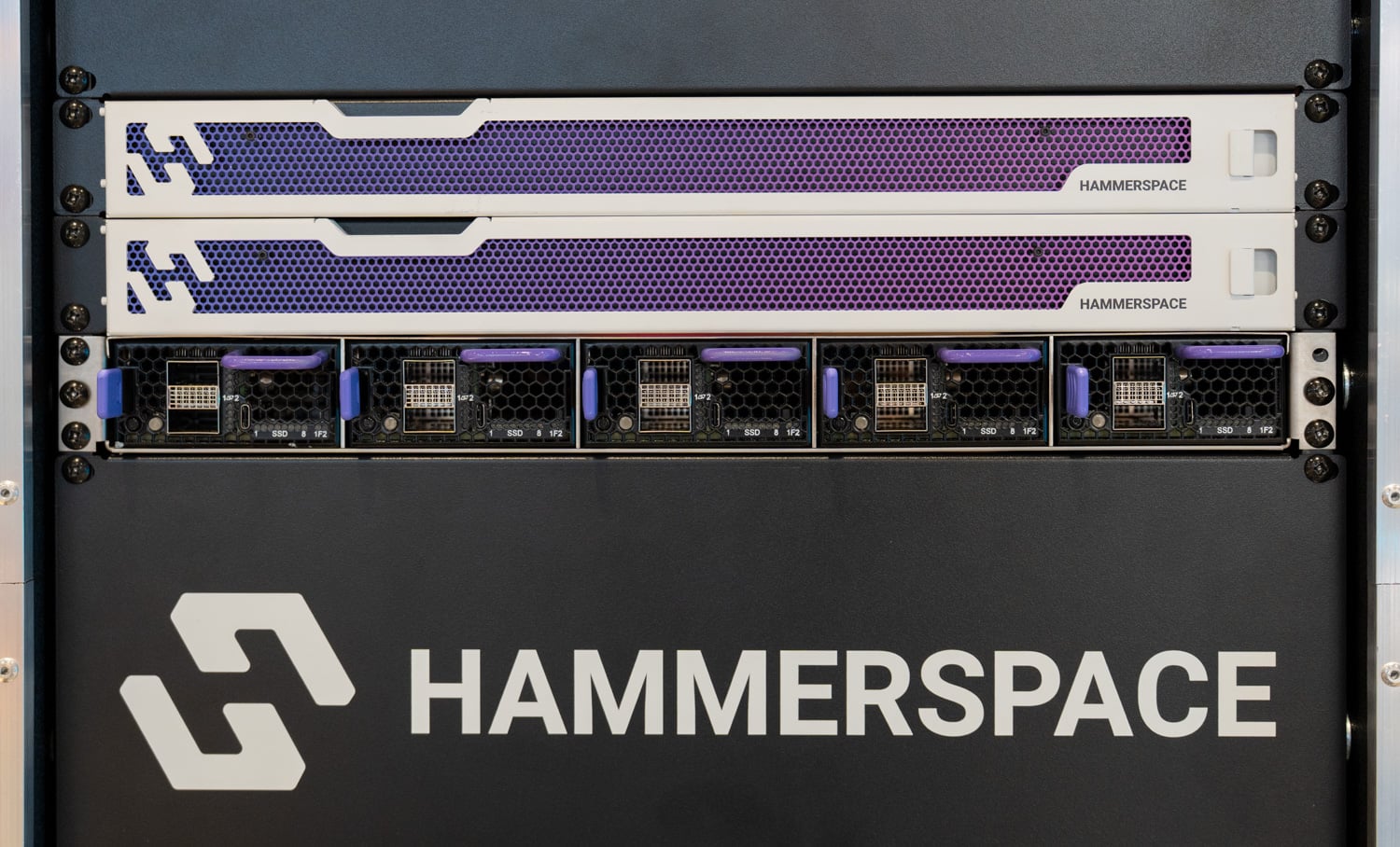
    Show notes Hammerspace Data System at SC26: two Hammerspace nodes with purple mesh bezels above an OFP 1U tray holding five sleds in a branded rack Hammerspace Data System at SC26: two Hammerspace nodes with purple mesh bezels above an OFP 1U tray holding five sleds in a branded rack

    Hammerspace has turned its software-defined Data Platform into the Hammerspace Data System and, for the first time, will sell it as a complete system with hardware. The centerpiece is the Hammerspace Open Flash Platform (OFP), a 1U tray that holds five DPU-based flash nodes with no x86 storage server, rated by the company at 390GB/s of writes and 15 million IOPS per rack unit and up to 9.83PB raw. The launch also adds a data intelligence layer and a KV cache role for GPU-local NVMe. OFP is available to quote now and ships in the first half of 2027.

    Hammerspace Data System at SC26: two Hammerspace nodes with purple mesh bezels above an OFP 1U tray holding five sleds in a branded rack

    From Data Platform to Data System

    Hammerspace’s core product is a parallel global file system that separates metadata from the data path and presents existing NAS, object, and cloud storage as one namespace over pNFS, NFS, SMB, and S3. Clients reach it through the NFSv4.2 client built into standard Linux distributions, with no proprietary agent, using the Flex Files layout that Hammerspace says it engineered for the NFS specification. The company describes the Data System as an extension of that software, organized around five capabilities: data unification, intelligence, orchestration, acceleration, and storage, of which intelligence and storage are new.

    The commercial change is that the whole system can be bought from Hammerspace, with software, metadata nodes, and storage installed and supported by the company. The metadata nodes, which Hammerspace calls Anvils, are 1U x86 servers in Standard and Large M-Series configurations with two 100GbE data ports, deployed as a high-availability pair at each site to run the control plane that manages the namespace and executes placement policies. Software-only deployment on customer hardware continues, as do Hammerspace Ready Nodes from Dell, Supermicro, and Hitachi Vantara, and marketplace images on AWS, Azure, Google Cloud, and Oracle Cloud.

    The system option answers a pattern Hammerspace has seen in sales, where the software won the technical evaluation, and the customer still bought an integrated product from another vendor for the simpler purchase. The software is licensed as a subscription priced by capacity under management. Hammerspace storage is usually brought in when a new GPU cluster needs high-performance storage while the customer’s existing data sits on NetApp, PowerScale, or object systems that the namespace can take over in place.

    Each site’s cluster pairs those Anvils with a set of data services nodes, and clusters join into one global file system. Metadata replicates between sites continuously, with about a second of lag between distant locations, while the data itself moves only when a policy or an access request calls for it. Job schedulers can start that movement through the API and native connectors. The company gave the example of life sciences customers that ingest instrument data over SMB, process it over pNFS, and serve it over S3 from the same system.

    Evaluations usually run as a proof of concept, with bring-your-own-license cloud images as the self-service route. Disk capacity comes from JBODs and storage servers built by hard drive suppliers; OFP is a Hammerspace design built by a contract manufacturer, and reseller and integration partners deliver the systems. A block array joins the namespace only when it can be mounted over NFS.

    “Simply adding more storage isn’t the answer,” said David Flynn, Founder and CEO of Hammerspace. Flynn framed the launch as bringing to data the consolidation that AI factory designs brought to compute.

    Inside the Open Flash Platform

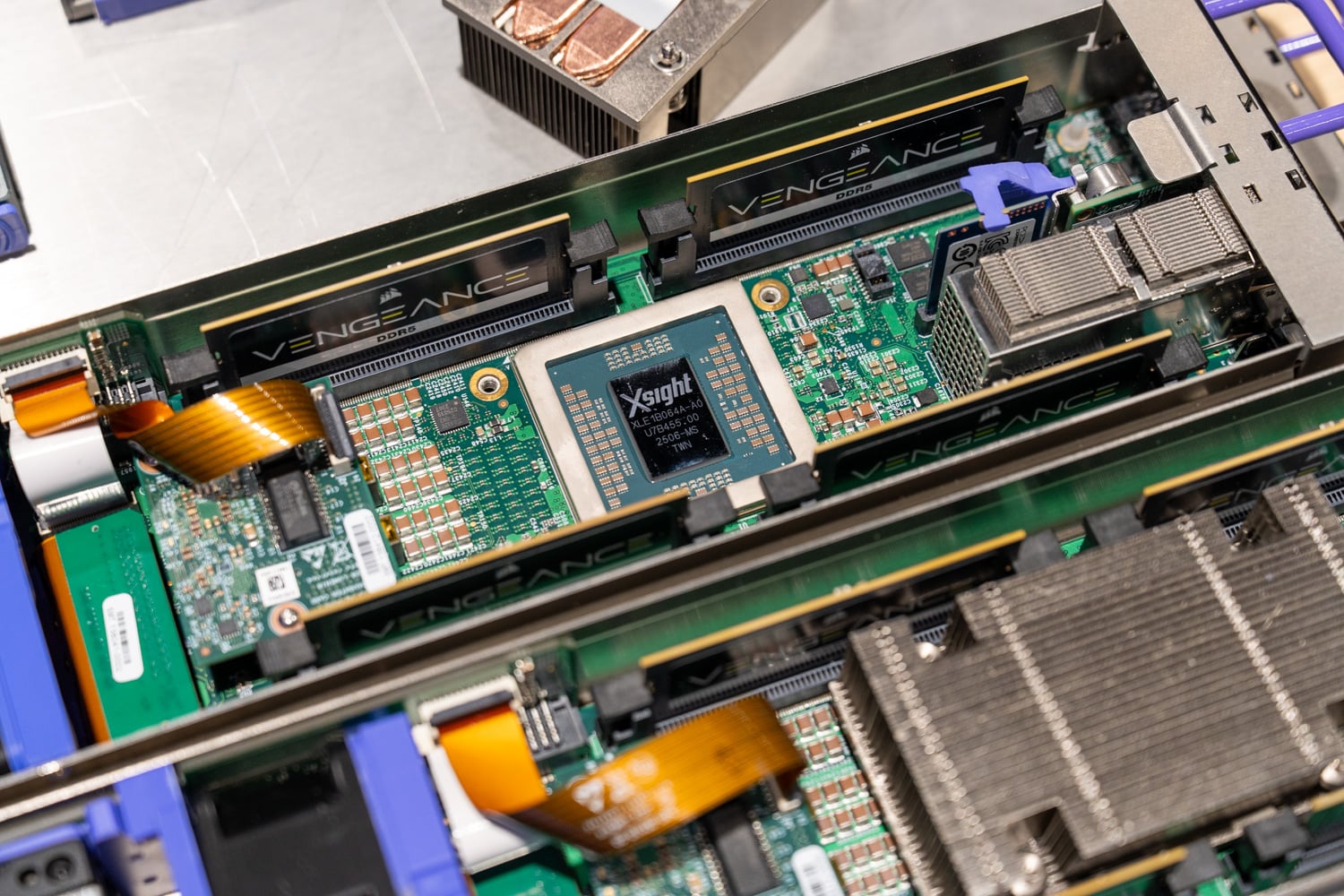
    Each OFP sled is a complete storage node, one-fifth of a rack unit wide, with eight U.2 or U.3 NVMe SSDs in two removable four-drive packs, two 400GbE QSFP-DD ports, and a 64-core Arm DPU in place of an x86 motherboard. The DPU is the Xsight Labs E1, which Xsight builds on TSMC’s 5nm process with 64 Arm Neoverse N2 cores, two 400G MACs, PCIe Gen5, and a typical power figure of 70W. It runs standard Linux, and each sled appears to the Hammerspace file system as an NFS server.

    Hammerspace OFP sled with the cover off, showing the Xsight Labs DPU, DDR5 memory modules, and a network port cage

    A 1U tray holds one to five sleds, for up to 40 drives, 320 Arm cores, and ten 400GbE ports per rack unit. Hammerspace lists a maximum of 360W per sled and 1,800W per tray on dual 2,160W Titanium power supplies, with tool-less service for sleds and drive packs and IPMI and Redfish for management. The tray is 106.64cm deep and requires a 1,200mm rack, which rules out shallower enterprise cabinets. Hammerspace puts drive density at 3.3 times that of a typical 2U, 24-bay NVMe server, at 160 SSDs in 4U against 48.

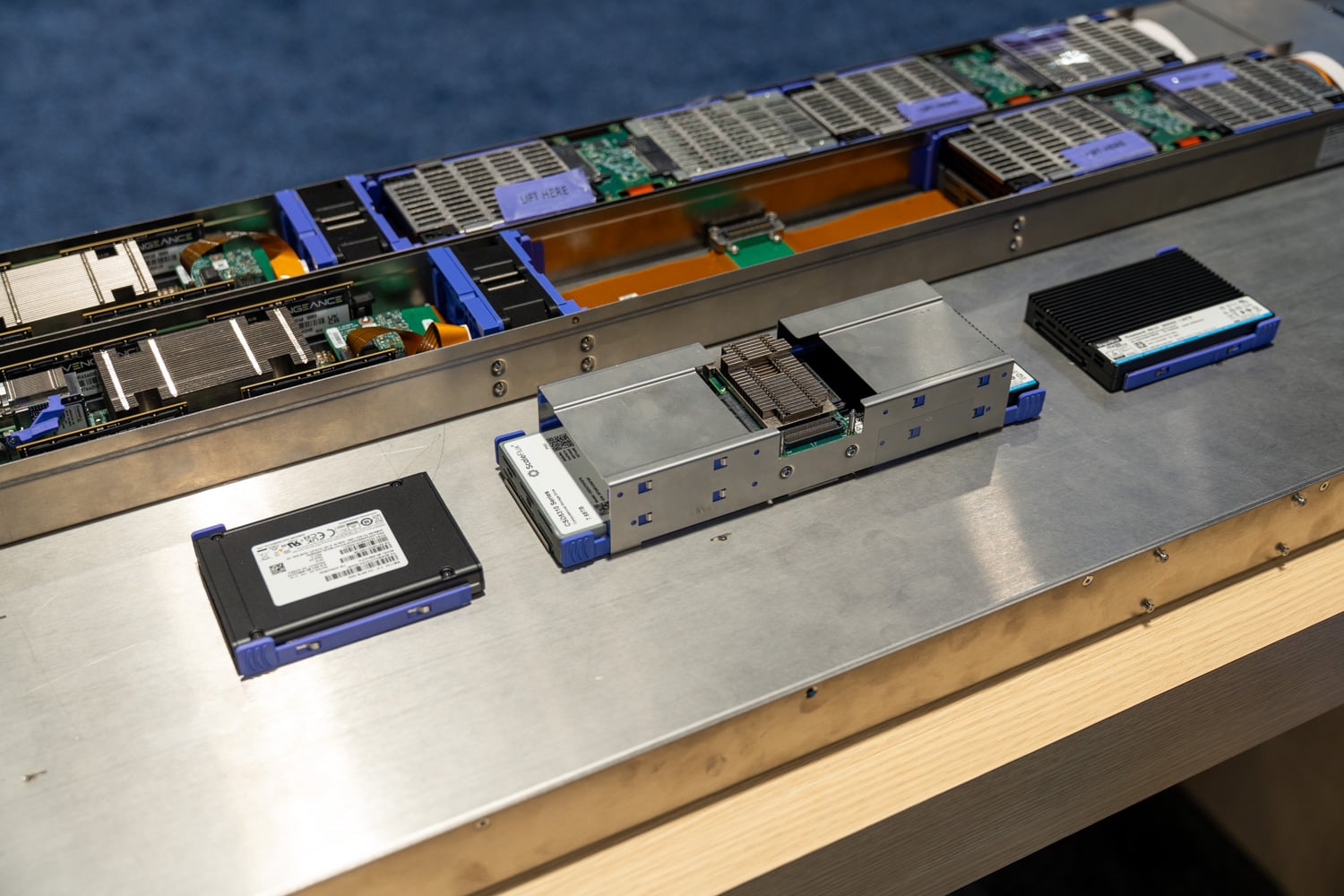
    Hammerspace Data System OFP sleds on a table at SC26, with a four-drive pack partly loaded and two loose U.2 NVMe SSDs

    With eight 245.76TB QLC SSDs, the largest Hammerspace lists and the capacity of drives such as the KIOXIA LC9, a sled holds 1.97PB raw and a full tray holds 9.83PB. At the tray’s 1,800W maximum, that is about 183W per raw petabyte. Sleds accept TLC or QLC drives on PCIe Gen5 or earlier, and Hammerspace positions TLC for performance and QLC for capacity. A 42U rack filled with trays would hold about 413PB and draw up to 75.6kW.

    The design traces to the Open Flash Platform initiative that Hammerspace started in 2025, with Xsight Labs and Los Alamos National Laboratory among the named participants. In October 2025, Hammerspace said production systems would be available in early 2026, so the schedule has moved by about a year. The sled uses U.2 and U.3 drives because those ship in volume now, and Hammerspace laid out the design with denser form factors in mind. Hammerspace and Xsight have described a path to an exabyte per rack, more than twice what a full 42U of the largest current drives would hold.

    Hammerspace said prototype work on the sled began about two years ago, and that early adoption has come from hyperscalers that place one or two trays at the top of each GPU rack and value rack and performance density over the power savings. In that layout, Hammerspace maps the NVMe inside GPU servers to the tier NVIDIA labels G3 and a TLC-filled OFP tray in each rack to G4.

    Performance Claims and Test Conditions

    Hammerspace rates a five-sled tray at 390GB/s of write throughput without mirroring and 15 million 4K random read IOPS. The stated conditions are NFSv4.2 with pNFS over TCP on a 400GbE fabric with enterprise Gen5 TLC SSDs. Reads are rated at up to 80GB/s per sled, or 400GB/s per tray. That is about 40GB/s through each of a sled’s two 400GbE ports, which essentially saturates the links once protocol overhead is counted, so the network ports set the ceiling on read throughput.

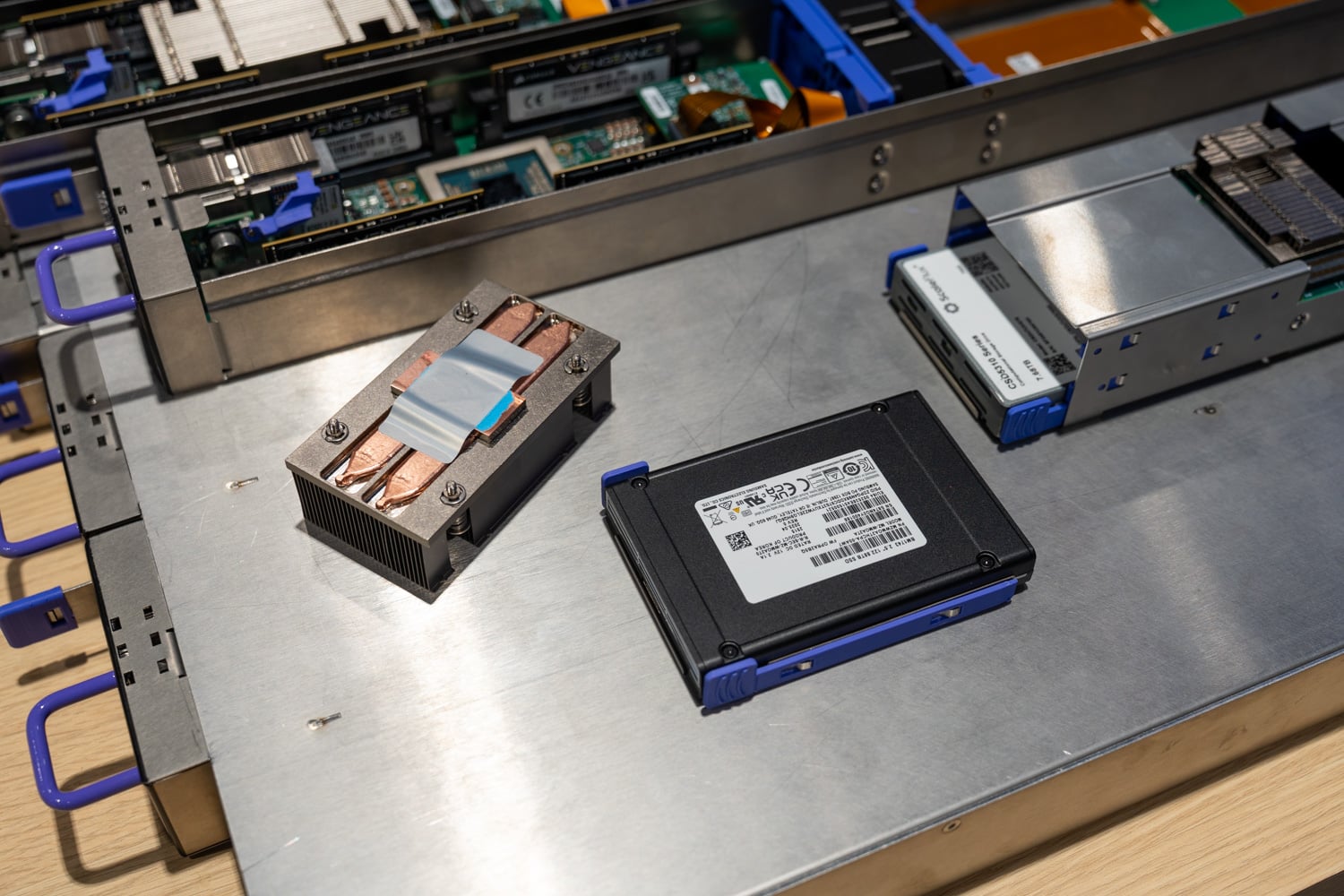
    DPU heatsink with copper heat pipes beside a U.2 NVMe SSD and a four-drive pack removed from a Hammerspace OFP sled

    Protection is by mirroring, set per file or directory by policy and changeable online. Writes fall to 195GB/s per tray with two-way mirroring and 130GB/s with three-way, and two-way mirroring also halves usable capacity, to about 4.9PB on a fully populated QLC tray. Hammerspace suggests running without mirrors for data that can be regenerated, such as KV cache. The company claims two to five times the per-rack-unit performance of an unnamed nearest competitor. It has not published latency, client counts, or IO500 and MLPerf Storage results for OFP, and we did not run or audit these tests.

    Specification Hammerspace Open Flash Platform
    Platform Overview
    Architecture DPU-based flash storage nodes with no x86 storage server
    Sled 8 x U.2/U.3 NVMe SSDs in two 4-drive packs
    64-core Arm DPU (Xsight Labs E1)
    2 x 400GbE QSFP-DD
    1U Tray 1 to 5 sleds
    Up to 40 SSDs
    Up to 320 Arm cores
    Up to 10 x 400GbE
    Drive Support Qualified U.2/U.3 SSDs, PCIe Gen5 or earlier
    TLC or QLC
    Maximum Raw Capacity 1.97PB per sled
    9.83PB per tray
    Based on 245.76TB QLC SSDs
    Protocols NFSv4.2 with pNFS
    Data Protection Mirroring by policy per file or directory: none, 2-way, or 3-way
    Performance (Hammerspace figures, Gen5 TLC SSDs, 400GbE, TCP)
    Read Throughput 80GB/s per sled
    400GB/s per tray
    Write Throughput, No Mirror 78GB/s per sled
    390GB/s per tray
    Write Throughput, 2-Way Mirror 39GB/s per sled
    195GB/s per tray
    Write Throughput, 3-Way Mirror 26GB/s per sled
    130GB/s per tray
    4K Random Read 3 million IOPS per sled
    15 million IOPS per tray
    Power and Physical
    Maximum Power 360W per sled
    1,800W per tray
    Power Supplies Dual 2,160W Titanium per tray
    Form Factor 1U tray, 106.64cm deep
    Requires a 1,200mm rack
    Cooling Air, 40C maximum inlet temperature at sea level
    Management IPMI, Redfish
    Availability Quoting now
    Shipping in the first half of 2027

    Tier 0 and KV Cache

    Hammerspace positions OFP as Tier 1, behind a Tier 0 made of the NVMe already inside GPU servers, which it exports over NFS and aggregates into a shared, cluster-wide tier with no client or agent on the compute nodes. Data written there is mirrored across the cluster for protection and moved to other tiers by policy, and Hammerspace says a common pattern is to write training checkpoints locally and let the system move older ones to object storage. Hammerspace quotes 4.4 times the sequential bandwidth and 56 percent lower latency for Tier 0 against external shared storage, without publishing the test configuration.

    The KV cache role uses the same tier, on the reasoning that an inference server which can reload the computed context of a conversation from shared storage does not have to recompute those tokens on the GPU. Hammerspace does not act as the cache manager, and it presents the pooled Tier 0 NVMe, with OFP behind it, as POSIX storage for the inference software’s cache manager to use.

    Data Intelligence: Catalog, DeepScan, and Natural-Language Queries

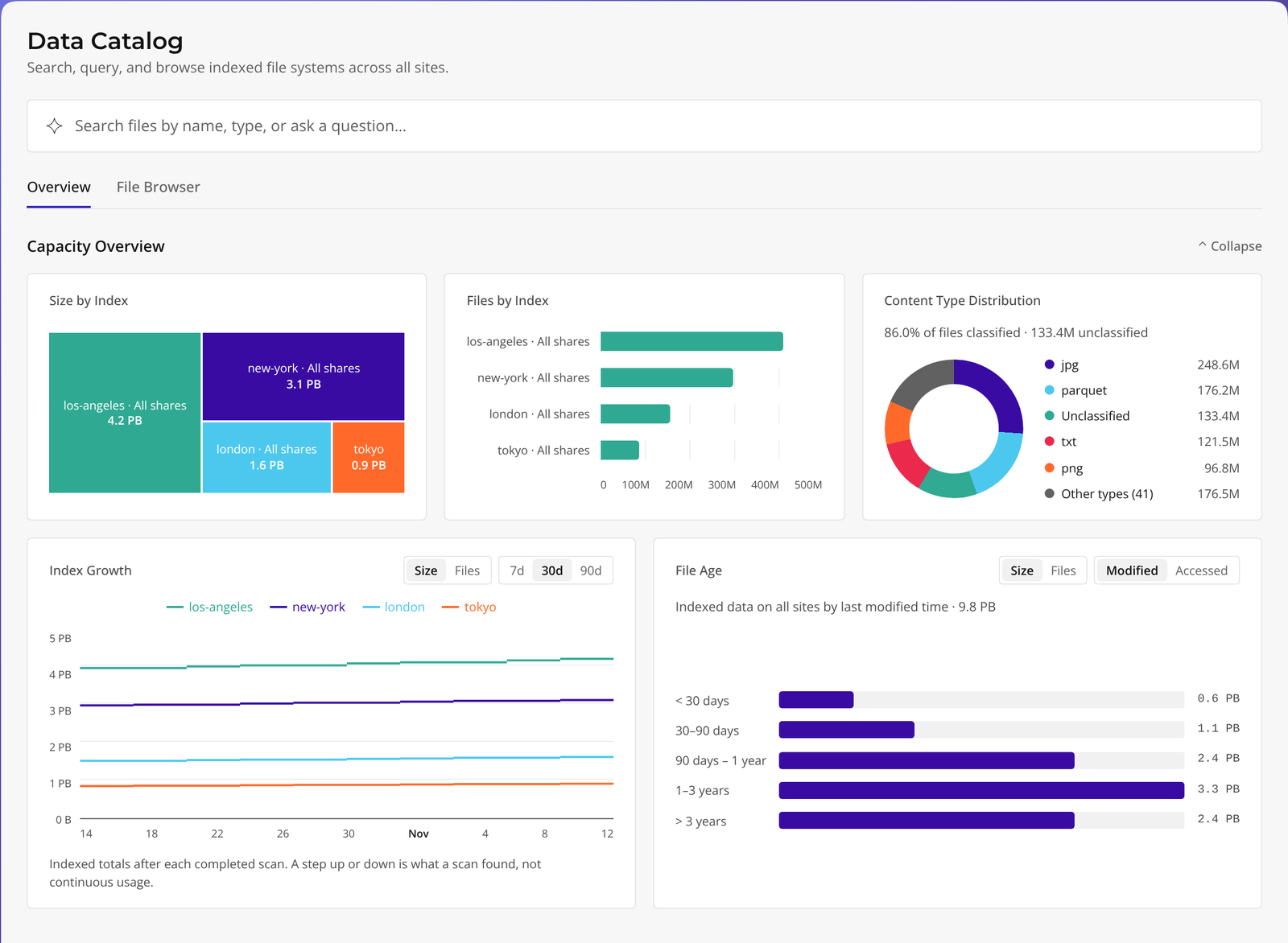
    The data intelligence layer starts with a catalog that indexes file and object metadata across every storage system in the namespace without moving data. A second level, DeepScan, opens files to look for personal, financial, and protected health information on demand or on a schedule, and its findings become searchable tags. Queries can be written in natural language through an LLM of the customer’s choice. Results feed the existing policy engine, which Hammerspace calls objectives, so an administrator can find every file tagged as training-ready or restricted to one country and set a placement rule on that set.

    Hammerspace Data System data catalog view with capacity by site, files by index, content type distribution, index growth, and file age, shown with sample data on Hammerspace's product page

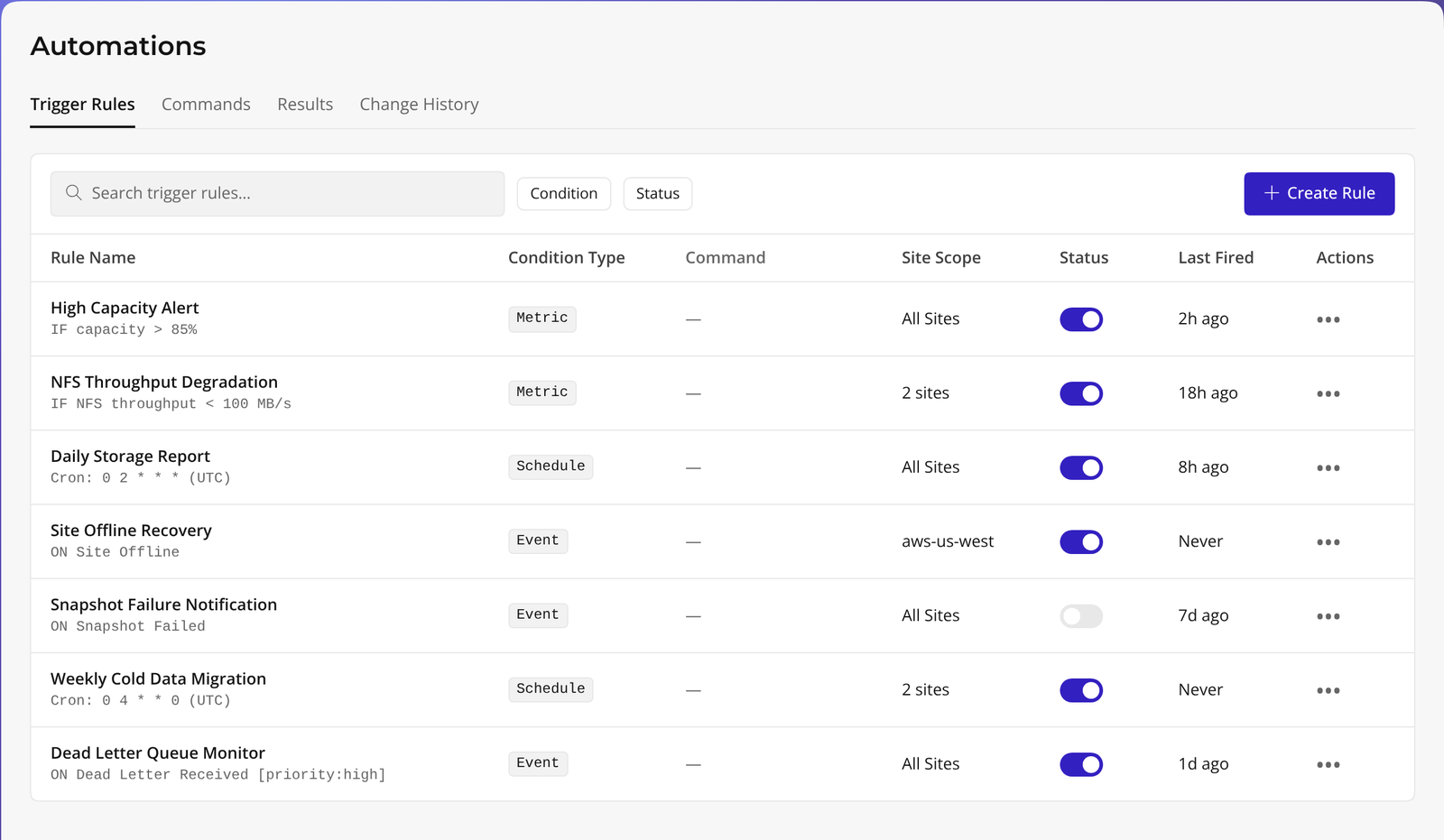
    Objectives are declarative rules attached to a share, volume, directory, or file, such as moving data untouched for 30 days or keeping three copies at three sites. New automations trigger them from conditions that include capacity thresholds, schedules, and events, with a preview step before changes are approved. Tags inherit down the directory tree and follow files between storage systems and clouds. The software covers file and object stores from any vendor and does not manage structured data.

    Hammerspace automations view listing trigger rules with metric, schedule, and event conditions, shown with sample data on Hammerspace's product page

    Early Customers and Outlook

    The reference customer at launch is kaiko, a clinical AI company with offices in Amsterdam and Zurich that trains models on imaging and pathology data. Kaiko runs Hammerspace across Microsoft Azure and the Nebul and Nebius GPU clouds as one namespace, uses the NVMe in its GPU nodes as Tier 0 for training, and has checkpoints placed on Azure Blob Storage by policy. Hammerspace says all of kaiko’s ML engineering workflows on those three clusters have moved to the system. The case study does not involve OFP hardware.

    Hammerspace told us kaiko adopted the system while growing from about 128 GPUs to more than 1,000 on Nebius, and that its existing all-flash NAS in the Nebul cloud was brought into the namespace in place. The company also described an unnamed hyperscale AI research lab that replaced Amazon FSx for Lustre with a 30PB Hammerspace cluster in AWS after a year in which Lustre was its largest source of support tickets, and is now extending the namespace to an on-premises data center. Hammerspace cites about three times faster large-file operations there.

    OFP joins other designs that put a DPU where the storage server’s processor used to be, including the BlueField-4 STX reference architecture NVIDIA introduced at GTC, and Hammerspace’s version differs in pairing it with a file system that also runs without its hardware. Hammerspace is demonstrating the hardware at SC26 and has not published pricing.

    We filmed a walkthrough of the OFP sled and tray with Hammerspace at SC26, and we will add the video to this article when it publishes.

    Hammerspace Data System

    Hammerspace Open Flash Platform

    The post Hammerspace Data System Launches With OFP, a 1U DPU Flash Tray Rated at 390GB/s and Up to 9.83PB appeared first on StorageReview.com.


    Microchip Flashtec NVMe 4016 Controller Features 16 NAND Channels and Over 14 GB/s Nov 18, 2026
    Show notes

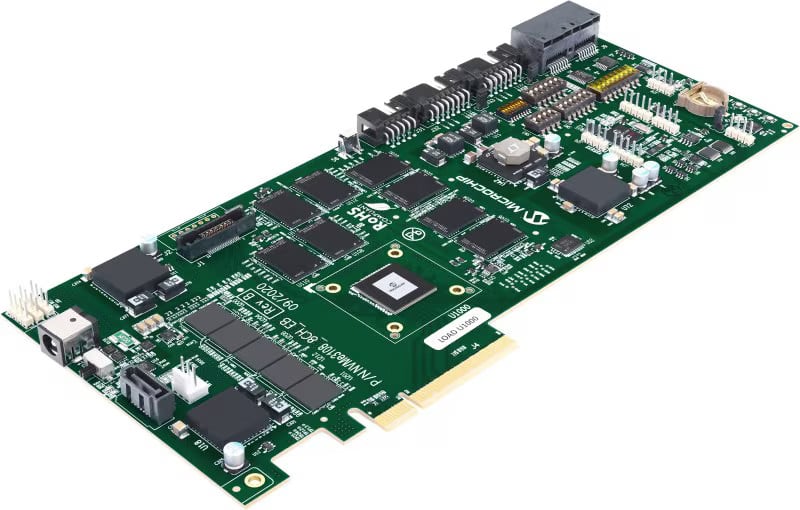
    Microchip has announced the Flashtec NVMe 4016 SSD controller, a fourth-generation Flashtec design with a PCIe Gen 5 x4 interface and 16 programmable NAND Flash channels. The company says the controller delivers more than 14 GB/s of throughput and over 3 million IOPS. It’s now sampling; Microchip hasn’t specified a general availability date.

    NAND Interface and NVMe Features

    Each of the controller’s 16 NAND channels supports speeds up to 2400 MT/s. Microchip says the design can fully utilize PCIe Gen 5 x4 bandwidth and incorporates Credit Management technology for quality of service in cloud data center applications. The company hasn’t provided test conditions for its throughput or IOPS figures.

    The NVMe 2.0-compliant controller supports Zoned Name Spaces (ZNSs) and cloud Open Compute Project (OCP) applications. Microchip says existing customers can use firmware from previous Flashtec generations, and the controller supports SSD form factors including EDSFF.

    Attribute Specification
    Controller Microchip Flashtec NVMe 4016 SSD controller
    Generation Fourth-generation Flashtec controller
    PCIe Interface PCIe Gen 5 x4
    NAND Flash Channels 16 high-speed, programmable channels
    NAND Flash Channel Speed Up to 2400 MT/s
    Throughput More than 14 GB per second
    IOPS Over 3 million IOPS
    NVMe Compliance NVMe 2.0
    Supported Features Zoned Name Spaces (ZNSs), Cloud Open Compute Project (OCP), Credit Management technology
    Security PCIe link encryption, dual signature authentication, Trusted Platform support
    Virtualization Virtual Machines (VMs) and Physical Functions (PFs) per port
    Error Correction Advanced ECC features with stronger bit error-correction capabilities
    NAND Technologies Supports denser NAND Flash technologies, including Quad-Level Cell (QLC) Flash
    Machine Learning Engine Programmable engine for pattern recognition and classification functions
    Form Factors Includes EDSFF
    Development Tools Software development kit, reference firmware, optional hardened firmware modules, simulation and debug tools, Chiplink diagnostic tools, evaluation boards, and reference designs
    Availability Now Sampling

    Security, Virtualization, and Development

    The NVMe 4016 supports PCIe link encryption, dual signature authentication, and Trusted Platform support. Its virtualization features support deployment of virtual machines and Physical Functions per port. Microchip also says the controller’s advanced error correction supports denser NAND technologies, including QLC Flash.

    A programmable machine learning engine supports pattern recognition and classification functions. For SSD developers, Microchip offers a software development kit with reference firmware, optional hardened firmware modules, simulation and debugging tools, Chiplink diagnostic tools, evaluation boards, and reference designs.

    Microchip Technology

    The post Microchip Flashtec NVMe 4016 Controller Features 16 NAND Channels and Over 14 GB/s appeared first on StorageReview.com.


    Dell PowerMaxOS 10.5 Brings Back PowerPath With Up to 29% Higher IOPS and Adds Cyber Detect Snapshot Scans Nov 18, 2026
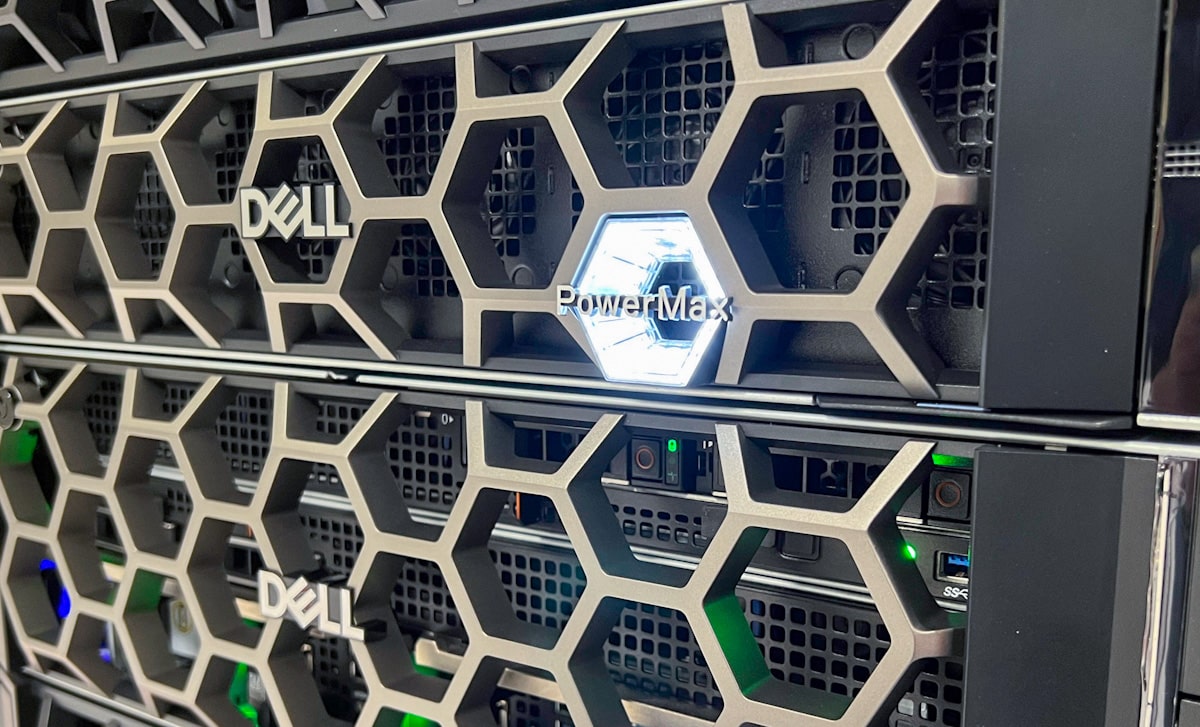
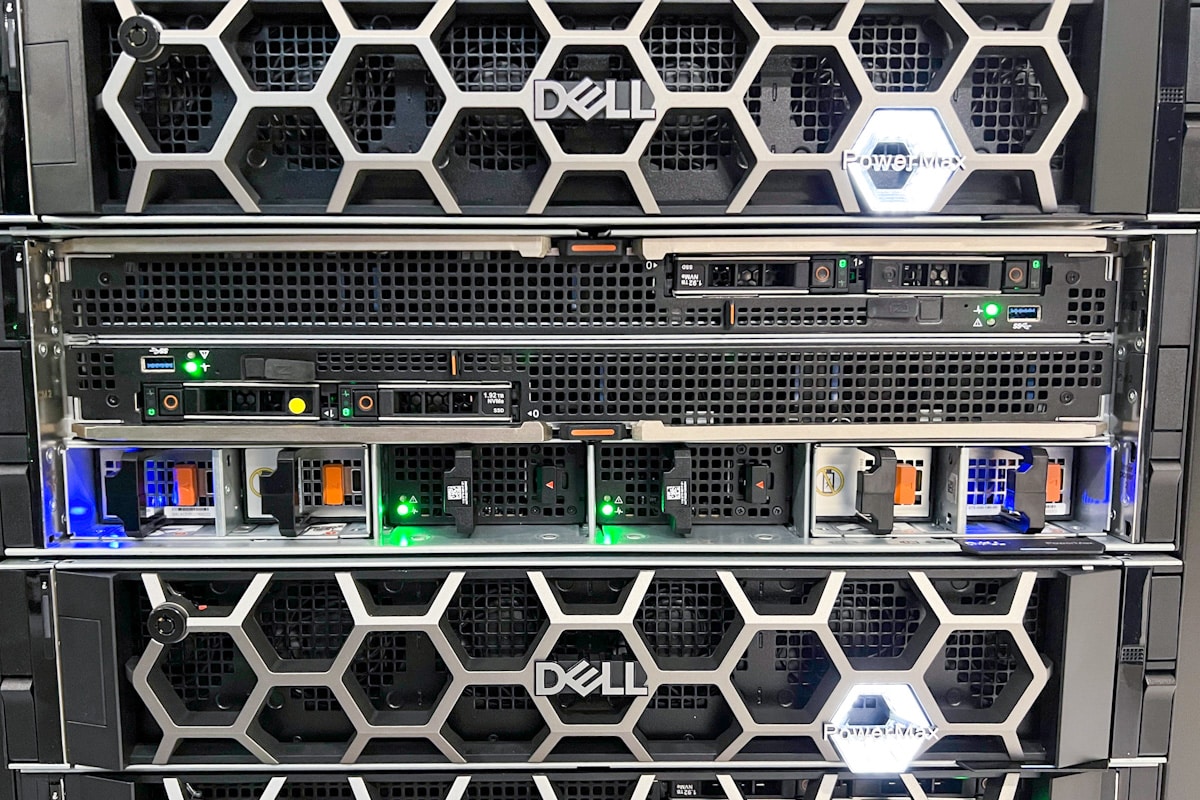
    Show notes Dell PowerMax front bezels with the illuminated PowerMax badge Dell PowerMax front bezels with the illuminated PowerMax badge

    Dell announced PowerMaxOS 10.5 today, a software update for the PowerMax 2500 and 8500 that returns PowerPath multipathing to the platform, adds Dell Cyber Detect scanning of PowerMax snapshots, and opens array telemetry through OpenTelemetry and faster bulk REST APIs. Dell’s headline figure is up to 29 percent higher IOPS from cache-aware PowerPath against native round-robin multipathing on a PowerMax 8500. The update installs non-disruptively at no additional charge under an active Dell service contract. It is available now, with a Model Context Protocol (MCP) integration planned for later this year.

    Dell PowerMax front bezels with the illuminated PowerMax badge, the array family that PowerMaxOS 10.5 updates

    The release follows PowerMaxOS 10.4, which focused on SRDF read latency and ransomware detection, and it relies on software to get more from arrays customers already have installed. Dell frames that against constrained NAND supply, and it says PowerMax sales grew more than 60 percent in fiscal 2026. The company also cites IDC data giving it 42 percent of high-end storage, more than twice the share of its nearest competitor, a lead we covered when IDC’s first-quarter external storage figures came out.

    Telemetry and Automation

    Dell says the enhanced bulk REST APIs return performance metrics up to 14x faster through a single filter-driven request. That figure comes from Dell’s comparison of one bulk call covering 10 instances in PowerMaxOS 10.5 with 14 standard API calls in PowerMaxOS 10.4. Native OpenTelemetry support streams performance data to Prometheus or any OpenTelemetry-compatible collector without custom polling code. Fabric Performance Impact Notification (FPIN) events from Broadcom Brocade SAN fabrics now appear in the REST API beside storage performance data, so fabric events and array metrics can be read from one source.

    The MCP integration will let IT managers ask about capacity, performance, or response times in plain language from AI clients such as ChatGPT, Claude, or Gemini. Dell says storage administrators retain full control over configuration changes, which points to a query path for reporting while changes stay with the storage team. We noted in our PowerStoreOS 5.0 deep dive that Dell’s developer site lists more than 100 MCP tools across its storage lines, PowerMax included. The release also speeds up Red Hat OpenShift operations with streamlined provisioning and quicker cleanup for containerized workloads, though Dell gives no figures for those gains.

    Cyber Detect for PowerMax

    PowerMax already takes immutable snapshots that can’t be altered or deleted, and Dell Cyber Detect now checks whether those snapshots are clean. Cyber Detect is Dell’s integration of Index Engines CyberSense, which reached PowerStore first, and it runs byte-level analysis trained on more than 7,500 ransomware variants. Dell cites up to 99.99 percent confidence in detecting corruption, a figure from an ESG report that Index Engines commissioned in June 2025. Cyber Detect requires a separate license and a supported Dell PowerEdge server, so it sits outside the no-charge PowerMaxOS upgrade.

    Array-based snapshot scans can run several times a day, which helps teams catch an attack in progress and establish when data became at risk. Policy-based or on-demand scans identify the last clean copy, and the forensic output lists affected servers, corrupted files, the attack timeline, and the blast radius. Findings can be sent to SIEM and SOAR platforms such as Splunk, QRadar, and Microsoft Sentinel. Drew Schulke, vice president of product management for primary storage at Dell, wrote that the urgent question after an attack is whether a team “can trust that copy.”

    PowerPath and NVMe over TCP

    PowerPath support covers the PowerMax 2000, 2500, 8000, and 8500, so the two previous-generation arrays get the multipathing software even though PowerMaxOS 10.5 targets the 2500 and 8500. Native round-robin multipathing (MPIO) sends reads down each path in turn, whether or not the data is waiting at the other end. PowerPath tracks which PowerMax node already holds the data in cache and sends the read there. Dell measured up to 29 percent higher IOPS than round-robin in internal testing on a PowerMax 8500 with an 8K random read hit workload, so the figure describes reads served from cache.

    Dell PowerMax with one bezel removed, showing NVMe SSD slots, fans, and power supplies; PowerMaxOS 10.5 adds PowerPath support for these arrays

    End-to-end NVMe over TCP gains external Unisphere and Solutions Enabler management, simplified provisioning, and support for 100GbE single-mode optics. Dell says the additions let administrators operate and manage a PowerMax entirely over standard IP networks. NVMe/TCP has been part of the platform since PowerMaxOS 10 arrived with the 2500 and 8500, and Dell describes the past year of PowerMax releases as focused on security, ease of use, hypervisor flexibility, and maturing that protocol.

    PowerMaxOS 10.5 at a Glance

    Feature PowerMaxOS 10.5
    Release PowerMaxOS 10.5
    Platforms Dell PowerMax 2500 and 8500
    Upgrade Non-disruptive
    No additional charge with an active Dell service contract
    Bulk REST APIs Up to 14x faster access to performance metrics (Dell)
    One bulk call for 10 instances vs. 14 standard calls in PowerMaxOS 10.4
    Telemetry Native OpenTelemetry streaming to Prometheus or any compatible collector
    FPIN events from Broadcom Brocade SAN fabrics through the REST API
    Dell PowerPath PowerMax 2000, 2500, 8000, and 8500
    Up to 29% higher IOPS than round-robin MPIO (Dell internal test, PowerMax 8500, 8K random read hit)
    NVMe over TCP External Unisphere and Solutions Enabler management
    Simplified provisioning
    100GbE single-mode optics
    Dell Cyber Detect Index Engines CyberSense, trained on more than 7,500 ransomware variants
    Byte-level snapshot analysis, up to 99.99% confidence (ESG report commissioned by Index Engines)
    Findings to Splunk, QRadar, and Microsoft Sentinel
    Separate license and a supported Dell PowerEdge server required
    Red Hat OpenShift Streamlined storage provisioning and faster cleanup
    MCP integration Planned for later this year
    Availability Available now

    Dell PowerMax

    The post Dell PowerMaxOS 10.5 Brings Back PowerPath With Up to 29% Higher IOPS and Adds Cyber Detect Snapshot Scans appeared first on StorageReview.com.


    DDN EXAScaler 7 Adds a Software-Defined Option, Starting on the AI2200 With Third-Party Appliances to Follow Nov 18, 2026
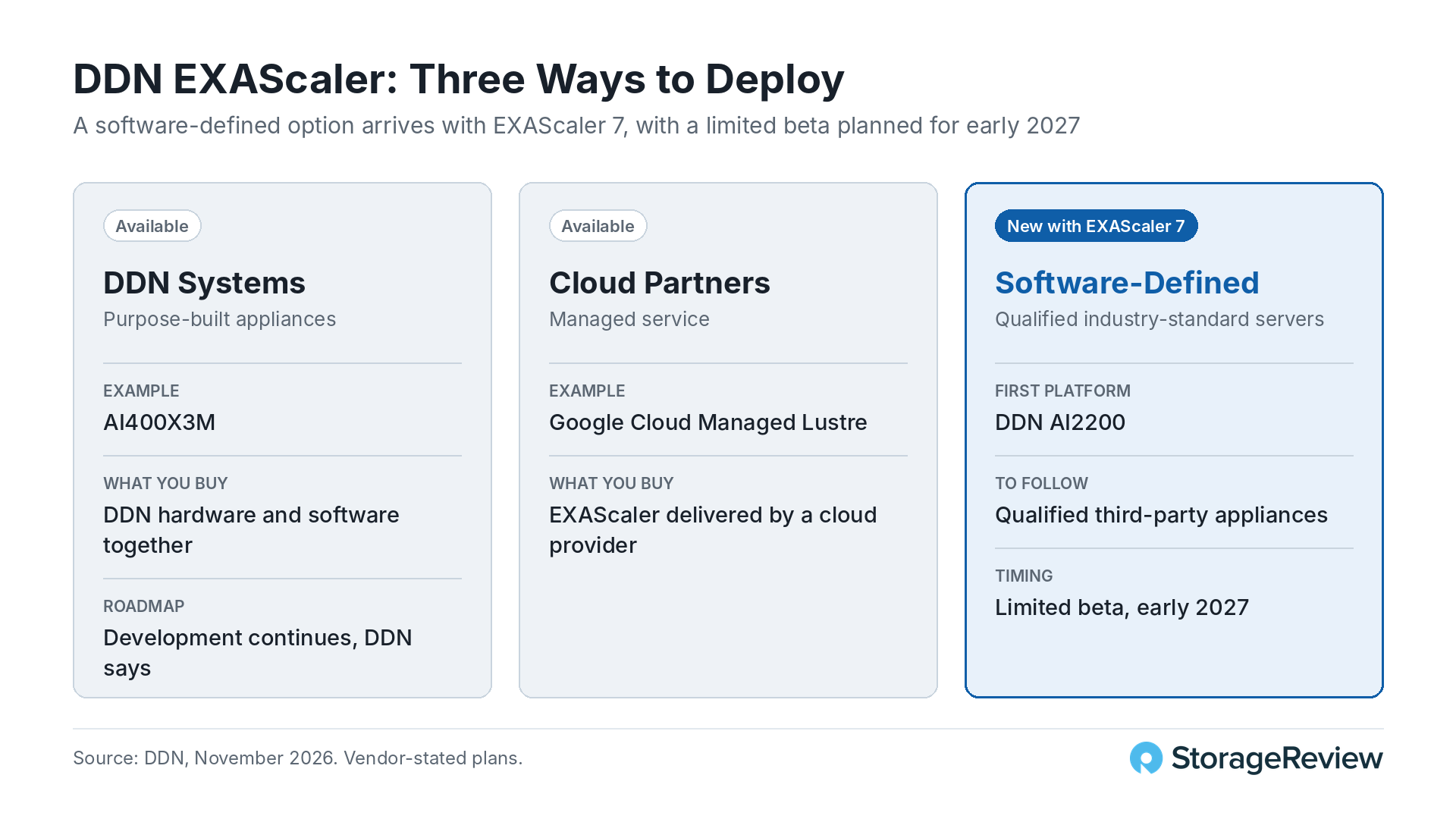
    Show notes DDN EXAScaler 7 deployment options graphic: DDN purpose-built systems, cloud partners, and the new software-defined option on qualified servers starting with the AI2200 DDN EXAScaler 7 deployment options graphic: DDN purpose-built systems, cloud partners, and the new software-defined option on qualified servers starting with the AI2200

    DDN will offer EXAScaler as software that customers install on qualified industry-standard servers, a change that arrives with the upcoming EXAScaler 7 release. The Lustre-based parallel file system has been sold only inside DDN’s purpose-built appliances or through cloud partners, and the new option starts on the DDN AI2200, with qualified third-party appliances to follow. A limited beta is planned for early 2027, and DDN is separately adding multi-tenancy, data protection, and performance features to EXAScaler in the first half of 2027.

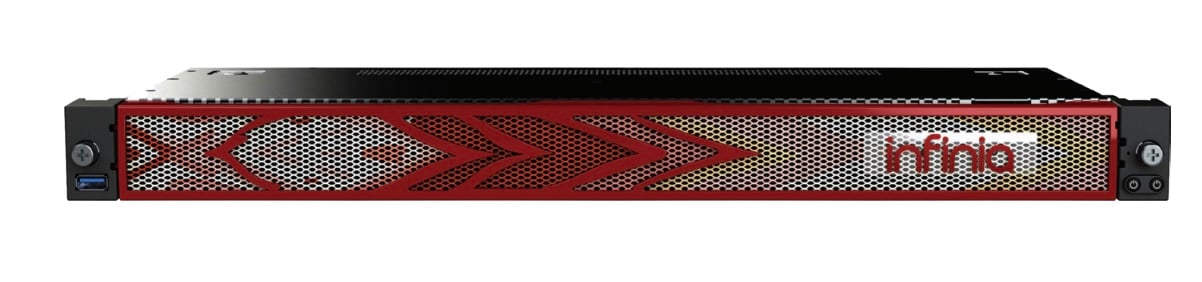
    DDN AI2200 1U server with a red mesh front bezel carrying the Infinia badge

    Software-Defined Lustre for AI and HPC

    DDN describes EXAScaler as open Lustre with AI I/O optimization, automated deployment, and enterprise support. A parallel file system reads from many storage servers at once, which is how it keeps up with the small files, metadata-heavy reads, and frequent checkpoints that AI and HPC jobs generate. EXAScaler is the file system inside appliances such as the AI400X3M that DDN launched at ISC 2026, and DDN says it will keep building purpose-built systems for customers who want a complete DDN solution.

    With EXAScaler 7, the same software runs on what DDN calls verified hardware from a growing ecosystem of suppliers, beginning with its AI2200 server. DDN pitches the option at hyperscalers and cloud providers that already have storage infrastructure, and at AI platform teams that want to pick hardware to suit their requirements. DDN has not named third-party hardware vendors, published minimum hardware requirements, or said how the software will be licensed.

    DDN EXAScaler 7 deployment options graphic: DDN purpose-built systems, cloud partners, and the new software-defined option on qualified servers starting with the AI2200

    Omer Asad, Chief Product Officer at DDN, tied the move to the rest of the lineup: “By making EXAScaler available as software, we’re extending that flexibility across our portfolio.” DDN Infinia, which gained multi-tenancy and POSIX support in version 2.4, is already available in a software-defined format, so both DDN data platforms will have that option. EXAScaler also remains available through cloud partners such as Google Cloud Managed Lustre.

    Tenant Controls and Data Protection

    EXAScaler 7 will add multi-tenancy REST APIs that apply per-tenant quality-of-service limits and fair sharing, so several teams can share one system with less interference between their jobs. File Restore recovers accidentally deleted files, and an audit log supports investigations. On the performance side, DDN lists intelligent hybrid I/O for higher throughput and IOPS. The company has published no performance figures for these features and says validated data will follow.

    Shared Data for Simulation and AI Training

    DDN’s example for the software-defined option is a site that runs HPC simulation and AI training against the same data without copying it between environments. In life sciences, researchers train AI surrogate models on the outputs of molecular dynamics simulations to predict protein behavior without rerunning every simulation. DDN has not given a general availability date for the software-defined deployment beyond the early 2027 beta, and it says all of the dates are targets that may change.

    AMPHIX HyperPOD Test Reports 98.8 Percent GPU Utilization on Infinia

    DDN also published results from the first DDN Enterprise AI HyperPOD installed at AMPHIX, the RAVEL and Strata Expanse deployment model that named RT-One as its first commercial customer. HyperPOD is a packaged system built on Supermicro servers with NVIDIA accelerated computing and DDN Infinia as its storage, so the result applies to DDN’s other data platform and was not run on EXAScaler. In a 24-hour training test at the AMPHIX Center of Excellence in California, RAVEL recorded 98.8 percent GPU utilization with zero thermal throttling or GPU errors and 37C of thermal headroom at peak load.

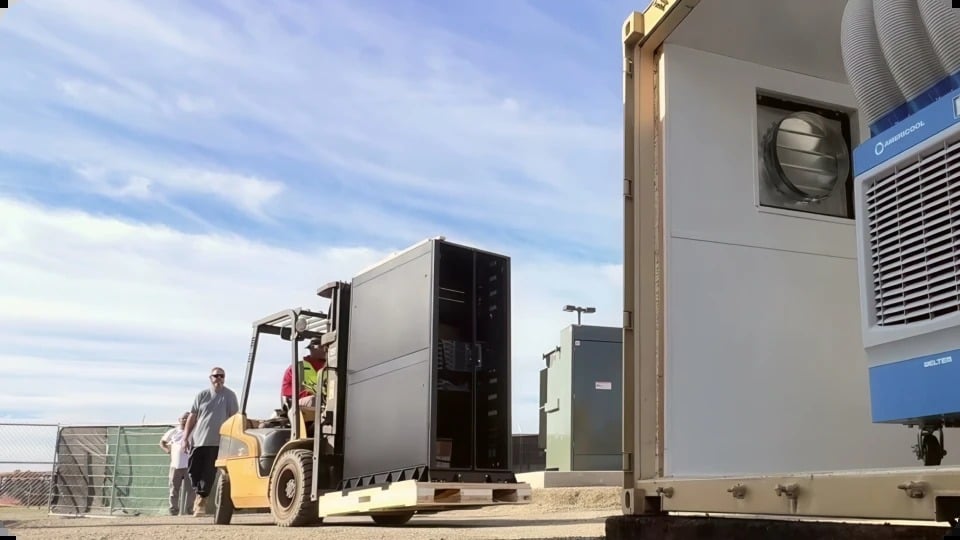
    Forklift carrying an equipment rack toward a containerized data module with an external cooling unit at the AMPHIX site, where the first DDN HyperPOD is installed

    DDN told us the system had eight NVIDIA RTX PRO 6000 GPUs and 500TB of Infinia running on Supermicro hardware. The job trained a large language model based on the GPT-2 architecture from 70TB of raw training data, with all of it read from and written back to storage over S3 across the network. GPUs held 95 percent utilization or higher for 98 percent of the run, and hardware telemetry was sampled once per second. DDN describes this as an AMPHIX internal test, and we did not run or audit the results.

    Eight GPUs typically fit in a single server, so the test shows a small HyperPOD keeping its GPUs busy for a day while streaming training data over S3, and it leaves behavior at cluster scale unmeasured. DDN has not published the training throughput, the inference results RAVEL also collected, or the server and network configuration. AMPHIX is offering the system for customer proofs of concept at the California site, and Strata Expanse and RAVEL describe a plan to connect more than 100 sites.

    DDN EXAScaler

    The post DDN EXAScaler 7 Adds a Software-Defined Option, Starting on the AI2200 With Third-Party Appliances to Follow appeared first on StorageReview.com.


    ASUS ProArt GR1X Review: RTX Spark N1X With Two M.2 2280 Slots in 1.15 Liters Nov 18, 2026
    Show notes

    The ASUS ProArt GR1X packs NVIDIA’s RTX Spark N1X into a 150mm-square, 1.15-liter desktop with two M.2 2280 SSD slots, 10GbE, and a dual-fan cooler ASUS built to sustain 140W. Our review unit is the 64GB configuration with a 1TB PCIe Gen4 SSD and Windows 11 Pro. We tested it alongside MSI’s 128GB EdgeMesa N AI+, the other RTX Spark mini PC in our lab, and the two fastest RTX Spark laptops we have reviewed, to measure how much a desktop cooler affects the same 20-core chip. Key Takeaways The GR1X stayed under 90C through our 30-minute Cinebench loop. It averaged 83.3C and peaked at 88.7C, while the HP OmniBook Ultra 16 and Dell XPS 16 Creator Edition both averaged 97C and sat at their 98C limit. MSI’s EdgeMesa N AI+ mini PC averaged 88.4C in the same loop and peaked at 107.3C. The cooler is worth 5 to 12 percent in sustained CPU work. The GR1X held 7,306 points in the loop’s steady state against 6,970 and 6,550, and its x265 encode ran at 44.1 fps against 40.6 and 38.8. The EdgeMesa was level at 7,276 points and 43.7 fps. Two M.2 2280 slots are the design win. ASUS lists PCIe 5.0 and 4.0 support with up to 4TB, and the second slot takes standard retail drives for models and datasets. The 1TB Gen4 SSD in our unit is the part to upgrade. It read at 6,511MB/s, and a cold load of a 12.8GB model took 10.94 seconds against 7.00 and 6.70 on the Gen5 drives in the EdgeMesa and the HP. Concurrent LLM serving showed the widest gap over the laptops. With eight requests on Qwen3.8 27B, the GR1X generated 40.0 tokens per second and the EdgeMesa 39.8, against 33.8 and 31.9 on the laptops, while single-request results stayed within 6 percent. The 64GB configuration covered models through the 27B class. It served Qwen3.8 27B with eight concurrent requests at the default memory allocation, while the 128GB EdgeMesa also ran Qwen-Image at Q8 and a 35B coding-agent model. Where the GR1X Sits in ASUS’s RTX Spark Lineup ASUS introduced its RTX Spark systems under the ProArt creator brand, and the GR1X is the desktop in a family that also includes the 16-inch ProArt P16 and 14-inch ProArt P14 laptops. The company separately sells the Ascent GX10, a DGX Spark system that runs NVIDIA’s Linux-based DGX OS for AI development. The GR1X is the Windows counterpart, and ASUS describes it as a machine for prosumers, AI-powered creators, workflow builders, developers, and gamers who want local agents inside everyday Windows applications. ASUS offers the GR1X with 64GB or 128GB of LPDDR5X-9400 unified memory, in black or silver, and with Windows 11 Home or Pro. The software list includes ProArt Creator Hub, the StoryCube and MuseTree creative applications, validated ComfyUI workflows, and a three-month Adobe Creative Cloud subscription. ASUS sells the GR1X in the US through its eShop, Best Buy, Micro Center, Central Computers, and Amazon. The 64GB model with a 1TB Gen4 SSD and Windows 11 Home is $4,499 at the eShop and $4,499.99 at Best Buy, which also lists a 2TB version at $4,999.99. Our review unit matches that 1TB configuration with Windows 11 Pro installed. The eShop listed the system as out of stock when we checked, and Best Buy showed it as coming soon. NVIDIA told us RTX Spark desktops start at $4,399, which puts the 64GB GR1X $100 above the entry price. ASUS credits the platform with up to 1 petaFLOP of FP4 AI performance, 120B-parameter LLMs with up to 1 million tokens of context, 3D scenes up to 90GB, and 1440p gaming above 100 fps. The company’s RTX Spark overview qualifies the model figures as capacity guidance that assumes suitable quantization, and it ties 70B and 120B-class models to the 128GB configuration. That qualifier matters for this review, because our unit is the 64GB configuration. Design and Build The GR1X measures 150 x 150 x 51mm and weighs 1.48kg, which works out to 1.15 liters, in line with the 1.1 liters ASUS quotes. The MSI EdgeMesa N AI+ comes to 1.18 liters at 152 x 147 x 53mm and weighs 1.32kg, so the two RTX Spark mini PCs take up about the same space on a desk, with the ASUS about 160g heavier. The black version has an anodized finish, and the silver version is sandblasted, both with an anti-fingerprint matte coating, and the Wi-Fi antenna sits under a textured, glass-like panel. A power button with an LED is the only control on the front. Power arrives over USB Type-C from a 240W adapter, so there is no barrel connector on the chassis. ASUS places every port on the rear panel: four USB Type-C ports at 20Gbps, HDMI 2.1, a 10GbE RJ45 port, and a Kensington lock slot. Three of the Type-C ports support DisplayPort Alt Mode, and the fourth is the power input under the USB PD 3.1 EPR specification. Wireless is Wi-Fi 7 with a 2×2 radio and Bluetooth 5.4. The system drives up to four displays through HDMI and the three DisplayPort-capable ports. ASUS lists no USB Type-A port, no audio jack, and no front-panel USB, so most desks will need a hub or dock. Cooling is a dual-fan design that pulls air through vents in the base and moves it across 57 fins fed by four heat pipes. ASUS specifies 109 blades per fan and says the system is built to sustain 140W, adding that owners will rarely notice thermal throttling even at 25C to 30C ambient. Our sustained-load testing below addresses that statement directly, since the two laptops in the comparison run the same chip against a 98C ceiling for most of our CPU suite. Storage is the part of the GR1X design we would point to first, because two full-length M.2 slots are rare in a system this size. The chassis offers two M.2 2280 slots, and ASUS lists support for PCIe 5.0 and 4.0 drives with up to 4TB. The 2280 length is the most common retail size for Gen4 and Gen5 SSDs, so a buyer can add a second drive for models and datasets or replace the boot drive with an off-the-shelf part. ASUS’s listed factory options are a 4TB Gen5 drive and 1TB or 2TB Gen4 drives, and our unit shipped with a 1TB Micron drive, the module visible beside the heat pipes in the photo above. That primary slot sits on the motherboard under the CPU fan structure. The second M.2 2280 slot is on the underside of the board, empty in our unit, and simple to reach once the chassis bottom plate is off. Limited storage has been the biggest shortcoming of the GB10 systems we have tested, which ship with a single short M.2 drive, so the open slot lets GR1X buyers add capacity. ASUS ProArt GR1X Specifications Specification ASUS ProArt GR1X Platform Model ProArt GR1X Processor NVIDIA RTX Spark N1X20-core Arm CPU (two classes of 10 cores) Graphics 6,144-core NVIDIA Blackwell RTX GPU, integratedUp to 1 petaFLOP FP4 (ASUS) Memory 64GB or 128GB LPDDR5X-9400 unified memory64GB as tested GPU Memory as Tested 30.5GB dedicated, 16.2GB shared (default allocation) Storage 2x M.2 2280 NVMe slots, PCIe 5.0/4.0, up to 4TB1TB Micron MTFDKBA1T0QGN on a PCIe Gen4 x4 link as tested Operating System Windows 11 Home or ProWindows 11 Pro 26H1 as tested Connectivity Rear Ports 3x USB Type-C 20Gbps with DisplayPort Alt Mode1x USB Type-C 20Gbps with PD input (PD 3.1 EPR)1x HDMI 2.11x 10GbE RJ45 Front Power button with LED Display Outputs Up to four displays over HDMI and 3x USB Type-C Networking 10GbEWi-Fi 7 (2×2), Bluetooth 5.4 Security Kensington lock slot Cooling, Power, and Chassis Cooling Dual fans, 109 blades each57 fins, 4 heat pipesBuilt to sustain 140W (ASUS) Power 240W USB Type-C adapter Dimensions 150 x 150 x 51mm (5.91 x 5.91 x 2.01 in), 1.15L Weight 1.48kg (3.26 lb) Colors Black, Silver Price $4,499 (64GB, 1TB, Windows 11 Home, ASUS eShop)$4,999.99 (64GB, 2TB, Best Buy) Test Setup and Methodology We tested the GR1X as it arrived, with the RTX Spark N1X, 64GB of LPDDR5X-9400, a 1TB Micron SSD on a PCIe Gen4 x4 link, and Windows 11 Pro 26H1 on Arm. The power mode was set to Best performance, and a 4K external monitor was attached for the run. Windows assigned 30.5GB of the unified memory to the GPU as dedicated memory and another 16.2GB as shared. That memory is one physical pool, and Windows treats the GPU allocation as dedicated GPU memory and the remainder as system memory, which the GPU can spill into when it needs more. A slider in the NVIDIA app sets the allocation; the default sits close to an even split on 64GB and 128GB RTX Spark systems, and the app warns that minimum and maximum settings may cause issues. NVIDIA advises keeping the default unless a workload needs more, because a larger GPU share leaves less memory for Windows and other applications, and it recommends leaving at least 16GB for the CPU. NVIDIA says agents and LLMs see little performance loss when they spill into system memory, and it suggests raising the allocation for image and video generation models that need more than the default provides. We test every system at its default, and our suite sizes its model tiers to the dedicated amount, so a model it skips on a 64GB system may still run there with spillover or a larger allocation. All results come from sr-client 1.13, the Windows client suite we use for local AI, content creation, CPU, graphics, and storage. LLM serving and MLPerf Client run through llama.cpp on CUDA, while model loading, the coding agent, and RAG run through Ollama on CUDA, and image generation uses stable-diffusion.cpp on Vulkan. We report the median of repeated passes and the newest valid result where a test ran more than once. An asterisk marks a result the suite flagged for a failed pass or high run-to-run variance. The two laptops were tested earlier on sr-client 1.11. The comparison set starts with the other RTX Spark mini PC in our lab, the MSI EdgeMesa N AI+, a 1.18-liter desktop with 128GB of memory and a 4TB Samsung Gen5 SSD that ran the same sr-client 1.13 release. Beside it are the fastest RTX Spark laptops we have tested at each memory size: the 128GB HP OmniBook Ultra 16 with a 2TB Sandisk Gen5 SSD and the 64GB Dell XPS 16 Creator Edition with a 1TB SK hynix drive. The XPS 16 is the direct match for our GR1X on memory, and the EdgeMesa and the HP show what the larger configuration adds. All four use the same 20-core N1X, which the two desktops run at a higher power limit under larger coolers, leaving power, cooling, memory, and storage as the variables. An x64 build of Cinebench crashed under emulation on all four, so no emulation result appears here. Configuration CPU Memory GPU Memory Boot Drive Operating System ASUS ProArt GR1X NVIDIA RTX Spark N1X, 20 cores 64GB LPDDR5X-9400 30.5GB dedicated 1TB Micron MTFDKBA1T0QGN, PCIe Gen4 Windows 11 Pro 26H1 MSI EdgeMesa N AI+ NVIDIA RTX Spark N1X, 20 cores 128GB LPDDR5X-9400 62.5GB dedicated 4TB Samsung MZALC4T0HBL1, PCIe Gen5 Windows 11 Pro 26H1 HP OmniBook Ultra 16 NVIDIA RTX Spark N1X, 20 cores 128GB LPDDR5X-9400 62.5GB dedicated 2TB Sandisk SN8050S, PCIe Gen5 Windows 11 Pro 26H1 Dell XPS 16 Creator Edition NVIDIA RTX Spark N1X, 20 cores 64GB LPDDR5X-9400 30.5GB dedicated 1TB SK hynix PVC10 Windows 11 Pro 26H1 Sustained Performance and Thermals Cinebench 2026 and the 30-Minute Loop Cinebench 2026 (points, higher is better unless noted) ASUS ProArt GR1X (N1X, 64GB) MSI EdgeMesa N AI+ (N1X, 128GB) HP OmniBook Ultra 16 (N1X, 128GB) Dell XPS 16 Creator Edition (N1X, 64GB) Single core 553 548 561 565 Multi core 7,304 7,284 7,001 6,631 30-minute loop, first pass 7,256 7,219 7,014 6,539 30-minute loop, steady state 7,306 7,276 6,970 6,550 Steady state / first pass 1.007 1.008 0.994 1.002 Loop CPU temperature, mean (C) 83.3 88.4 97.4 97.3 Loop CPU temperature, max (C) 88.7 107.3 98.2 98.3 Steady-state CPU clock, mean (MHz) 3,385 3,372 3,239 3,083 We start with the sustained test because it is the one a mini PC has to win. The loop renders the Cinebench 2026 multi-core scene continuously for 30 minutes, and the GR1X finished it at 7,306 points in the steady state, 1.007 times its first pass, so it did not throttle. The HP held 6,970, and the XPS 16 held 6,550, which puts the ASUS 5 and 12 percent ahead. Mean clock speed in steady state was 3,385MHz on the GR1X, compared with 3,239MHz and 3,083MHz on the laptops. The EdgeMesa held 7,276 points at 3,372MHz, level with the ASUS. Temperature separates the systems more than the scores do, because both laptops averaged 97C for the full loop and sat at their 98C limit. The GR1X averaged 83.3C and peaked at 88.7C, nearly 10C under that limit while running a higher clock. The EdgeMesa delivered the same score at an 88.4C average, 5C warmer than the ASUS, and its peak reached 107.3C. A single multi-core run shows the same order against the laptops: 7,304 points against 7,001 and 6,631, leads of 4 and 10 percent, with the EdgeMesa at 7,284. Single-core scores were 553 on the GR1X, 548 on the EdgeMesa, and 561 and 565 on the laptops, a 3 percent spread that slightly favors the laptops and fits a test that never loads the cooler. Temperatures Across the Suite CPU temperature, mean / max (C, lower is better) ASUS ProArt GR1X (N1X, 64GB) MSI EdgeMesa N AI+ (N1X, 128GB) HP OmniBook Ultra 16 (N1X, 128GB) Dell XPS 16 Creator Edition (N1X, 64GB) Cinebench 2026 65.3 / 103.8 69.0 / 93.4 83.3 / 98.2 90.5 / 98.3 Cinebench 30-minute loop 83.3 / 88.7 88.4 / 107.3 97.4 / 98.2 97.3 / 98.3 7-Zip 55.4 / 74.4 62.2 / 81.2 78.2 / 97.7 81.2 / 98.0 Blender 4.5 70.0 / 81.9 76.0 / 87.7 96.7 / 98.3 94.2 / 98.3 LLVM build 67.2 / 79.2 70.5 / 85.9 91.6 / 98.1 92.9 / 98.2 HandBrake 66.5 / 87.9 74.1 / 90.9 87.5 / 97.9 90.3 / 98.4 Stockfish 80.8 / 88.6 84.5 / 105.3 97.4 / 98.4 97.6 / 98.3 LLM serving 73.4 / 88.4 85.0 / 95.0 81.0 / 92.9 94.0 / 97.8 Image generation 63.9 / 72.7 82.3 / 89.3 81.9 / 94.3 91.8 / 97.1 RAG 65.3 / 72.5 76.2 / 89.7 88.9 / 93.4 93.2 / 96.8 The pattern from the loop holds in every CPU test we logged. The GR1X averaged 70.0C in Blender, 67.2C in the LLVM build, 66.5C in HandBrake, and 55.4C in 7-Zip, where the laptops averaged between 78C and 97C. That is a gap of 21C to 27C against the HP in those four tests, on a system that matched or beat the HP’s throughput in three of them. Stockfish ran at an 80.8C mean on the ASUS and 97C on both laptops. The EdgeMesa gives the closer comparison, since it is the same class of chassis. The GR1X ran 3C to 8C cooler than the MSI on average across the seven CPU tests in the table, at 70.0C vs. 76.0C in Blender and 66.5C vs. 74.1C in HandBrake. The gap widened to 11C to 18C in LLM serving, RAG, and image generation, where the GR1X averaged 73.4C, 65.3C, and 63.9C. The two desktops produced the same throughput in those tests. Peak readings stayed below 90C in nine of the ten tests in the table, including 88.7C in the loop, 88.6C in Stockfish, and 88.4C in LLM serving. The exception was the standalone Cinebench run, which logged a 103.8C maximum against a 65.3C mean, a short excursion that did not repeat in the 30-minute loop. The EdgeMesa logged peaks above 100C in three tests. GPU-heavy work ran cooler still, with image generation averaging 63.9C and RAG averaging 65.3C. The SSD reached 53C during the storage test. 7-Zip, Blender, HandBrake, and LLVM Content creation and build (higher is better unless noted) ASUS ProArt GR1X (N1X, 64GB) MSI EdgeMesa N AI+ (N1X, 128GB) HP OmniBook Ultra 16 (N1X, 128GB) Dell XPS 16 Creator Edition (N1X, 64GB) 7-Zip, all threads, total (GIPS) 153.8 152.6 150.6 147.0 7-Zip, one thread, total (GIPS) 8.92 8.92 9.10 9.13 Blender 4.5 Monster (samples/min) 215.6 215.1 211.4 198.9 Blender 4.5 Junkshop (samples/min) 127.2 129.7 127.7 119.1 Blender 4.5 Classroom (samples/min) 95.7 95.7 92.8 86.7 HandBrake x265 (fps) 44.1 43.7 40.6 38.8 HandBrake SVT-AV1 (fps) 16.4 16.3 15.4 14.0 LLVM build (s, lower is better) 225 217 218 232 Video encoding produced the largest application lead for the GR1X. HandBrake’s x265 encode ran at 44.1 fps against 40.6 on the HP and 38.8 on the XPS 16, a 9 and 14 percent lead, and SVT-AV1 ran at 16.4 fps against 15.4 and 14.0. The EdgeMesa was level at 43.7 and 16.3 fps. Blender’s Classroom scene rendered at 95.7 samples per minute, 3 and 10 percent ahead,…

    Full show notes at the publisher

    MSI EdgeMesa N AI+ Review: RTX Spark N1X and 128GB in a 1.18-Liter Mini PC Nov 18, 2026
    Show notes

    The MSI EdgeMesa N AI+ is a 1.18-liter aluminum mini PC built on NVIDIA’s RTX Spark N1X, the 20-core Arm processor with a 6,144-core Blackwell RTX GPU that we had previously tested only in laptops. Our review unit carries 128GB of unified memory, a 4TB PCIe Gen5 SSD, 10GbE, and Windows 11 Pro. We ran it against ASUS’s 64GB ProArt GR1X, the other RTX Spark mini PC in our lab, and the fastest 128GB and 64GB RTX Spark laptops we have tested, to measure what a desktop chassis and a 240W power adapter add to the same silicon. Key Takeaways The desktop chassis is worth 4 to 11 percent in sustained CPU work. The EdgeMesa held 7,276 points in the steady state of our 30-minute Cinebench 2026 loop, against 6,970 for the 128GB HP OmniBook Ultra 16 and 6,550 for the 64GB Dell XPS 16 Creator Edition. The ASUS ProArt GR1X mini PC held 7,306. The desktop chassis also ran cooler than the laptops on average. The CPU averaged 88.4C across the loop while both laptops sat at 97C, and in Blender it averaged 76.0C against 96.7C and 94.2C. Peak readings were higher on the MSI, reaching 107.3C in the loop, and the GR1X ran the same loop at an 83.3C average with an 88.7C peak. Concurrent LLM serving showed the widest gap over the laptops. With eight requests on Qwen3.8 27B, the EdgeMesa generated 39.8 tokens per second and the GR1X 40.0, against 33.8 and 31.9 on the laptops, while single-request results landed within 6 percent on every model. 128GB ran a larger model tier than the 64GB systems. Qwen-Image 20B at Q8 and a 35B coding-agent model both ran here at the default memory allocation, and the EdgeMesa completed the agent task on all three attempts in 145 seconds. Our suite ran neither on the 64GB GR1X and XPS 16. The 4TB Gen5 SSD keeps pace with the platform. It read at 13,315MB/s and wrote at 12,910MB/s on a 25GiB footprint, at least twice the rate of the 1TB Gen4 drive in the GR1X, and peaked at 62C. MSI’s Edge AI PC Line Gets a Windows System MSI sells the EdgeMesa N AI+ in its Edge AI PC category beside the EdgeXpert, a 1.2-liter desktop built on NVIDIA’s DGX Spark platform that ships with DGX OS, a 200GbE ConnectX-7 port for clustering, and 64GB or 128GB of memory. The EdgeMesa takes the Windows side of that line, with the RTX Spark N1X, Windows 11, and a port set built around a desk with up to four displays. MSI first showed it at Computex in June 2026 and describes it as a compact desktop for AI developers, software engineers, system integrators, and creators who want agents, RAG, and coding assistants running locally. MSI’s product page credits the system with up to 1 petaFLOP of FP4 AI performance, support for 120B-parameter LLMs with up to 1M tokens of context, and 1440p gaming above 100 fps. The page does not list the models, quantization, or settings behind those figures. Our testing below measures token rates on models from 3B to 27B parameters and runs a 35B coding-agent model. Our Windows client suite tops out at that 35B agent model, and 120B-class models run only in our Linux suite, so the model-size claim went untested on this system. The EdgeMesa N AI+ is bought as a fixed configuration, because its LPDDR5X is unified memory shared by the CPU and GPU and cannot be upgraded later. MSI lists up to 128GB of memory and a single NVMe SSD of up to 4TB, which is the configuration we tested, and its US store carries two versions under the X-005US and X-006US part numbers. NVIDIA told us the 128GB unit we tested carries a $7,499 MSRP and that RTX Spark desktops start at $4,399, with pricing that varies by region, manufacturer, and configuration. Build and Design The EdgeMesa N AI+ uses an aluminum chassis with an anti-fingerprint finish. It measures 152 x 147 x 53mm and weighs 1.32kg, which works out to 1.18 liters, a little under the 1.3 liters MSI advertises and close to the company’s 1.2-liter EdgeXpert. The ASUS ProArt GR1X comes to 1.15 liters at 150 x 150 x 51mm, so the two RTX Spark mini PCs take up about the same space on a desk. The front is a perforated grille under an MSI badge with no ports or controls, the base is perforated across most of its area, and power comes from a 240W adapter. Everything connects at the rear, where our unit has the power button, four USB Type-C ports at 20Gbps, one HDMI 2.1b output, one 10GbE RJ45 port, and a Kensington lock slot below a full-width vent. Three of the Type-C ports support DisplayPort 1.4 Alt Mode, and the fourth is the power input, so the system can drive up to four displays with HDMI in use. MSI lists wireless connectivity as Wi-Fi 7 and Bluetooth 5.4. There is no USB Type-A port and no audio jack, so a hub or dock is needed for most desks. MSI calls the thermal design the AI Pulse Cooling System, a vapor chamber with two fans that the company rates to sustain 140W. With the outer shell removed, a fin stack runs the full width of the chassis behind the rear vent, above the port row. The XPS 16 Creator Edition fits the same chip into a 17.8mm chassis, so the cooler is where a mini PC should separate itself, and the sustained-load and thermal results later in this review test that. Storage sits on a single M.2 NVMe slot inside the chassis. Reaching the SSD and other internals takes some effort, since the inner sled slides out of the outer case. From there, the drive sits under a thermal pad in a cutout of the inner frame, and the 4TB Samsung module in our unit is the short M.2 2242 format. That limits replacement options to 2242 drives, a smaller retail selection than the common 2280 length, and it makes the factory capacity choice more important. The ProArt GR1X takes the other approach, with two M.2 2280 slots in a 1.15-liter chassis. MSI EdgeMesa N AI+ Specifications Specification MSI EdgeMesa N AI+ Platform Model EdgeMesa N1x N AI+ (MS-B215) as tested Processor NVIDIA RTX Spark N1X20-core Arm CPU (two classes of 10 cores) Graphics 6,144-core NVIDIA Blackwell RTX GPU, integratedUp to 1 petaFLOP FP4 (MSI) Memory Up to 128GB LPDDR5X unified memory128GB LPDDR5X-9400 as tested GPU Memory as Tested 62.5GB dedicated, 47.9GB shared (default allocation) Storage 1x M.2 NVMe slot, up to 4TB4TB Samsung MZALC4T0HBL1 (M.2 2242) on a PCIe Gen5 x4 link as tested Operating System Windows 11Windows 11 Pro 26H1 as tested Connectivity Rear Ports 4x USB Type-C 20Gbps (3x with DisplayPort 1.4 alt mode, 1x power input)1x HDMI 2.1b1x 10GbE RJ45Power button Display Outputs Up to four displays over HDMI and 3x USB Type-C Networking 10GbEWi-Fi 7, Bluetooth 5.4 Security Kensington lock slot Cooling, Power, and Chassis Cooling AI Pulse Cooling System: vapor chamber, dual fansRated to sustain 140W (MSI) Power 240W adapter Dimensions 152 x 147 x 53mm (5.98 x 5.79 x 2.09 in), 1.18L Weight 1.32kg (2.91 lb) Chassis Aluminum with anti-fingerprint finish Price $7,499 MSRP (128GB, 4TB, as tested, per NVIDIA) Test Setup and Methodology Our review unit is the MS-B215 with the RTX Spark N1X, 128GB of LPDDR5X-9400, and a 4TB Samsung SSD, running Windows 11 Pro 26H1 on Arm with the Best performance power mode. It was connected to a 4K external display for the run. As shipped, Windows presented 62.5GB of the unified memory to the GPU as dedicated memory, with another 47.9GB shared. That memory is one physical pool, and Windows treats the GPU allocation as dedicated GPU memory and the remainder as system memory, which the GPU can spill into when it needs more. A slider in the NVIDIA app sets the allocation, the default sits close to an even split on the 64GB and 128GB systems here, and the app warns that minimum and maximum settings may cause issues. NVIDIA advises keeping the default unless a workload needs more, because a larger GPU share leaves less memory for Windows and other applications, and it recommends leaving at least 16GB for the CPU. NVIDIA says agents and LLMs see little performance loss when they spill into system memory, and it suggests raising the allocation for image and video generation models that need more than the default provides. We test every system at its default, and our suite sizes its model tiers to the dedicated amount, so a model it skips on the 64GB systems may still run there with spillover or a larger allocation. Results come from sr-client 1.13, our Windows client suite, which covers local AI, content creation, CPU, graphics, and storage. The AI tests use llama.cpp on CUDA for LLM serving and MLPerf Client, Ollama on CUDA for model loading, the coding agent, and RAG, and stable-diffusion.cpp on Vulkan for image generation. Each figure is the median of repeated passes, and where a test ran more than once, we report the newest valid result. Results the suite flagged for run-to-run variance or a failed pass carry an asterisk. We tested the two laptops earlier on sr-client 1.11. The comparison set starts with the other RTX Spark mini PC in our lab, the ASUS ProArt GR1X, a 1.15-liter desktop with 64GB of memory and a 1TB Micron Gen4 SSD that ran the same sr-client 1.13 release. Beside it are the two fastest RTX Spark laptops we have tested at each memory size. The HP OmniBook Ultra 16 is the 128GB system and carries a 2TB Sandisk Gen5 SSD, and the Dell XPS 16 Creator Edition is the 64GB system with a 1TB SK hynix drive. All four machines run the same 20-core N1X, and the two desktops run it at a higher power limit with larger coolers, so differences come down to power, cooling, memory capacity, and storage. The GR1X shows what a second desktop design does with the same chip, and the laptops show what the chassis is worth. An x64 build of Cinebench run under emulation crashed on all four, so we have no emulation results to report. Configuration CPU Memory GPU Memory Boot Drive Operating System MSI EdgeMesa N AI+ NVIDIA RTX Spark N1X, 20 cores 128GB LPDDR5X-9400 62.5GB dedicated 4TB Samsung MZALC4T0HBL1, PCIe Gen5 Windows 11 Pro 26H1 ASUS ProArt GR1X NVIDIA RTX Spark N1X, 20 cores 64GB LPDDR5X-9400 30.5GB dedicated 1TB Micron MTFDKBA1T0QGN, PCIe Gen4 Windows 11 Pro 26H1 HP OmniBook Ultra 16 NVIDIA RTX Spark N1X, 20 cores 128GB LPDDR5X-9400 62.5GB dedicated 2TB Sandisk SN8050S, PCIe Gen5 Windows 11 Pro 26H1 Dell XPS 16 Creator Edition NVIDIA RTX Spark N1X, 20 cores 64GB LPDDR5X-9400 30.5GB dedicated 1TB SK hynix PVC10 Windows 11 Pro 26H1 Local AI Performance LLM Serving LLM serving, llama.cpp CUDA, Q4_K_M (higher is better unless noted) MSI EdgeMesa N AI+ (N1X, 128GB) ASUS ProArt GR1X (N1X, 64GB) HP OmniBook Ultra 16 (N1X, 128GB) Dell XPS 16 Creator Edition (N1X, 64GB) Ministral 3 3B, 1 request, output (tokens/s) 58.1 58.4 57.5 57.8 Ministral 3 3B, 4 requests, output (tokens/s) 152.0 154.9 148.8 146.4 Ministral 3 3B, 1 request, time to first token (ms, lower is better) 566 557 607 669 Ministral 3 8B, 1 request, output (tokens/s) 42.5 42.7 41.5 40.6 Ministral 3 8B, 4 requests, output (tokens/s) 107.5 109.3 104.1 96.3 Ministral 3 8B, 1 request, time to first token (ms, lower is better) 1,343 1,331 1,554 1,794 Qwen3.8 27B, 1 request, output (tokens/s) 13.0 13.1 12.6 12.4 Qwen3.8 27B, 4 requests, output (tokens/s) 31.1 31.4 28.1 27.5 Qwen3.8 27B, 8 requests, output (tokens/s) 39.8 40.0 33.8 31.9 Qwen3.8 27B, 1 request, time to first token (ms, lower is better) 8,721 8,604 10,818 10,935 LLM serving runs each model through llama.cpp with one, four, and eight simultaneous requests, which is how a small team sharing one box would load it. With a single request, the four systems are within 6 percent of each other on every model, at 58.1 tokens per second for Ministral 3 3B, 42.5 for the 8B model, and 13.0 for Qwen3.8 27B on the EdgeMesa. One request leaves most of the chip idle, so cooling’s role is minimized. The gap opens as requests stack up: at four requests on Qwen3.8 27B the EdgeMesa generated 31.1 tokens per second against 28.1 for the HP and 27.5 for the XPS 16, and at eight requests it reached 39.8 against 33.8 and 31.9, leads of 18 and 25 percent. Time to first token on that model was 8.7 seconds on the MSI and 10.8 to 10.9 seconds on the laptops. Ministral 3 8B at four requests showed a smaller version of the same pattern, at 107.5 tokens per second against 104.1 and 96.3. The ProArt GR1X tracked the EdgeMesa at every step, with 31.4 tokens per second at four requests and 40.0 at eight on Qwen3.8 27B, 109.3 on Ministral 3 8B at four requests, and an 8.6-second first token on the 27B model. The two desktops finished within 2 percent of each other across the serving table, even though the GR1X has half the memory, because every model in that table fits on the 64GB system. The serving table stops at the 27B class by design. Our Windows client suite, which every RTX Spark system here ran, does not include gpt-oss 120B or other models of that size. We test those in our Linux suite on larger unified-memory desktops and GPU workstations. MSI advertises support for 120B-parameter LLMs on this system, and that is a claim we did not test. MLPerf Client v2.0 MLPerf Client v2.0, llama.cpp CUDA (higher is better unless noted) MSI EdgeMesa N AI+ (N1X, 128GB) ASUS ProArt GR1X (N1X, 64GB) HP OmniBook Ultra 16 (N1X, 128GB) Dell XPS 16 Creator Edition (N1X, 64GB) Llama 3.1 8B, time to first token (s, lower is better) 0.25 0.24 0.28 0.31 Llama 3.1 8B, token rate (tokens/s) 56.3 56.8 56.5 55.7 Phi-4-mini, time to first token (s, lower is better) 0.11 0.11 0.13 0.14 Phi-4-mini, token rate (tokens/s) 96.8 96.3 97.0 96.2 MLPerf Client sends one prompt at a time, and the four systems tie on it. The EdgeMesa generated 56.3 tokens per second on Llama 3.1 8B and 96.8 on Phi-4-mini, compared with 56.8 and 96.3 for the GR1X, 56.5 and 97.0 for the HP, and 55.7 and 96.2 for the XPS 16. Time to first token was slightly shorter on the desktops (0.25 and 0.24 seconds for Llama 3.1 8B) than on the laptops (0.28 and 0.31 seconds). For a single user chatting with a small model, the mini PCs and the laptops deliver the same experience. Model Loading and the Coding Agent Model loading and coding agent, Ollama CUDA MSI EdgeMesa N AI+ (N1X, 128GB) ASUS ProArt GR1X (N1X, 64GB) HP OmniBook Ultra 16 (N1X, 128GB) Dell XPS 16 Creator Edition (N1X, 64GB) gpt-oss:20b cold load to first token (s, lower is better) 7.00 10.94 6.70 7.73 gpt-oss:20b warm load to first token (s, lower is better) 3.96 3.68 3.68 3.69 qwen3.6:35b cold load to first token (s, lower is better) 8.32 Not run 9.33 Not run Agent, gpt-oss:20b 64K context, successful runs (of 3) 2* 1* 2* 3 Agent, gpt-oss:20b 64K context, wall time (s, lower is better) 294* 154* 216* 360 Agent, qwen3.6:35b 64K context, successful runs (of 3) 3 Not run 1* Not run Agent, qwen3.6:35b 64K context, wall time (s, lower is better) 145 Not run 1783* Not run Agent, qwen3.6:35b 64K context, generation rate (tokens/s) 86.8 Not run 72.7 Not run Speedometer slowdown beside the agent (x, lower is better) 1.78 1.79 2.35 2.79 *Flagged by the suite: at least one of the three agent runs did not pass all tests. Cold loads track the SSD and the memory path more than the chassis. The EdgeMesa brought gpt-oss:20b from a cold start to its first token in 7.00 seconds, between the HP at 6.70 and the XPS 16 at 7.73, and loaded the 21GB qwen3.6:35b model in 8.32 seconds, compared with 9.33 for the HP. The GR1X took 10.94 seconds to load the gpt-oss:20b model from its Gen4 drive. The suite does not run the 35B model on the 64GB GR1X and XPS 16. The coding agent instructs a model to write and test code over several rounds, three times per configuration. With qwen3.6:35b the EdgeMesa passed all three attempts in 145 seconds at 86.8 tokens per second, where the 128GB HP passed one of three and took 1,783 seconds. With gpt-oss:20b, the MSI passed two of three attempts, the GR1X one, and the XPS 16 all three, so pass counts on that model vary by run. Running Speedometer beside the agent slowed the browser by 1.78x on the MSI and 1.79x on the GR1X, against 2.35x and 2.79x on the laptops. RAG RAG pipeline (higher is better unless noted) MSI EdgeMesa N AI+ (N1X, 128GB) ASUS ProArt GR1X (N1X,…

    Full show notes at the publisher

    MinIO AIStor Memory Reaches GA at SC26 as Datadog Certifies AIStor for On-Premises BYOC Logs Nov 18, 2026
    Show notes MinIO booth on the SC26 show floor in Chicago, with demo stations labeled Agentic AI and AI Inference and Training MinIO booth on the SC26 show floor in Chicago, with demo stations labeled Agentic AI and AI Inference and Training

    MinIO announced the general availability of AIStor Memory today at SC26, moving its agent memory layer out of the technology preview we covered in July. AIStor Memory keeps long-term memory, persistent workspaces, and secrets for AI agents on infrastructure the enterprise controls. MinIO also announced a partnership with Datadog, which has certified AIStor as an on-premises foundation for Datadog Bring Your Own Cloud (BYOC), so log data can stay in a customer’s AIStor cluster while Datadog’s tools query it. Both are available now, and the announcements mark two years since AIStor launched in November 2024.

    MinIO booth on the SC26 show floor in Chicago, with demo stations labeled Agentic AI and AI Inference and Training

    Persistent Agent Context, Unified Table Storage

    AIStor Memory stores what agents learn as governed organizational knowledge that authorized agents can reuse across sessions. MinIO says that reuse improves response quality while reducing latency and token costs, though it has not published figures for either. The GA release keeps the three components from the preview in one system: long-term memory, workspaces that persist between runs, and secrets management. MinIO has not said whether AIStor Memory is licensed separately, and its availability statement covers AIStor as a whole, including AIStor Tables and AIStor Memory.

    MinIO AIStor Memory timeline graphic: AIStor launch in November 2024, AIStor Tables GA, Open Sharing for Databricks, the AIStor Memory preview, and AIStor Memory GA with Datadog BYOC certification in November 2026

    AIStor Tables, generally available since February, puts native Apache Iceberg tables and objects in the same data store. MinIO describes the result as a lakehouse in which Iceberg tables index logs, telemetry, financial transactions, machine-generated events, and vector embeddings alongside information from documents, audio, and video. A common catalog makes that data discoverable to analytics tools and authorized agents. AIStor Memory sits on the same store, so enterprises keep both the data agents read and the knowledge they generate on infrastructure they control.

    Since launch, AIStor has added S3 Express API support, S3 over RDMA, and ExaPOD, a reference architecture developed with Intel, Solidigm, and Supermicro for exabyte-scale deployments. AIStor Open Sharing for Databricks, introduced in March, connects on-premises tables to Databricks without duplicate cloud datasets or replication pipelines, and Databricks named MinIO its 2026 ISV Storage Partner of the Year. Stephen Orban, SVP of product ecosystem and partnerships at Databricks, said teams can query on-premises Iceberg and Delta tables through OpenSharing and govern them in Unity Catalog.

    Datadog BYOC Certification

    Datadog BYOC lets a customer ingest, retain, and search logs inside its environment while querying and correlating them with metrics and traces in Datadog. With AIStor as the storage layer, logs are written to the customer’s AIStor cluster, the BYOC engine runs in that environment, and only query results travel to Datadog. Datadog describes the pieces as Observability Pipelines workers that collect logs, BYOC indexers that write searchable files to an AIStor bucket, and searchers that connect to Datadog over an outbound TLS connection, with indexing and search running in the customer’s Kubernetes cluster.

    Diagram of Datadog BYOC on MinIO AIStor: Observability Pipelines workers, BYOC indexers, and searchers run in the customer environment with logs stored in AIStor, and only query results travel to Datadog

    MinIO pitches the arrangement at regulated industries such as financial services, healthcare, and telecom, and at teams that sample traffic, drop fields, or shorten retention to hold down log costs. Keeping every log on AIStor also means an investigation that reaches back months does not wait on a restore from a cold tier. Michael Whetten, SVP of Product at Datadog, said AIStor lets on-premises customers “keep every log locally without compromising on visibility.” Built-in key management supports encryption requirements, and AIStor Tables lets the same system hold Iceberg data beside the logs.

    Datadog says BYOC currently supports logs, with trace and metric support coming, so the API-call and Model Context Protocol telemetry MinIO cites as a driver of log growth is covered to the extent it arrives as logs. Neither company defines what the certification tested, and neither has published sizing guidance, ingest rates, or query performance for the combination. MinIO says AIStor is priced on usable capacity with no per-operation or egress charges, and the store exposes native Prometheus metrics and OpenTelemetry tracing for monitoring AIStor itself.

    NVIDIA and Micron Partner Work

    MinIO joined the NVIDIA STX ecosystem in March and announced further work in May to support the NVIDIA Vera BlueField-4 STX storage architecture. On the flash side, Larry Hart, senior director of solutions marketing for Micron’s Core Data Center Business Unit, said testing of AIStor with Micron 6600 ION SSDs showed greater performance with lower demands on power and compute, and no figures from that testing were published. MemKV, which MinIO positions for inference context, remains a separate product from AIStor Memory.

    MinIO AIStor

    The post MinIO AIStor Memory Reaches GA at SC26 as Datadog Certifies AIStor for On-Premises BYOC Logs appeared first on StorageReview.com.


    SSSTC PQ2 Brings KIOXIA BiCS FLASH 8 QLC to Industrial M.2 SSDs at Up to 7,000MB/s Nov 18, 2026
    Show notes SSSTC PQ2 M.2 2280 and M.2 2230 PCIe Gen4 QLC SSDs with teal product labels SSSTC PQ2 M.2 2280 and M.2 2230 PCIe Gen4 QLC SSDs with teal product labels

    Solid State Storage Technology Corporation (SSSTC), a KIOXIA subsidiary, has announced the PQ2 series, its first industrial-grade QLC SSD. The drives pair a PCIe Gen4 x4 interface with KIOXIA’s BiCS FLASH generation 8 QLC and are rated at up to 7,000MB/s for sequential reads, in M.2 2280 and M.2 2230 form factors at 512GB, 1TB, and 2TB. SSSTC lists endurance above one drive write per day over three years and aims the series at AI PCs and embedded systems with read-heavy workloads. The company has not stated pricing or availability.

    SSSTC PQ2 M.2 2280 and M.2 2230 PCIe Gen4 QLC SSDs with teal product labels

    NAND, Controller Design, and Capacity

    The PQ2 uses KIOXIA’s 4-bit-per-cell QLC NAND with CMOS directly Bonded to Array (CBA) technology, which SSSTC says improves memory density, performance, and power efficiency. The drives are DRAM-less and use Host Memory Buffer (HMB) technology, which borrows a portion of system memory for work an onboard DRAM chip would typically handle. The 2280 card measures 80mm by 22mm and weighs up to 6g, and the 2230 card is 30mm long at up to 3g, sized for compact devices and embedded boards. Both lengths come in 512GB, 1TB, and 2TB capacities.

    Performance

    The PQ2 supports NVMe 2.0d, and SSSTC rates it at up to 7,000MB/s sequential read, 6,200MB/s sequential write, and up to 1,000K IOPS for both 4KiB random reads and random writes. SSSTC does not break those figures out by capacity or publish the test platform behind them, and it notes that speeds vary with the host and workload. The ratings match the EG7 Series, the client QLC drive from parent KIOXIA, which uses the same generation of flash, the same DRAM-less design, and the same three capacities.

    Specification SSSTC PQ2 Series
    Platform Overview
    Models M.2 2280: PQ2-8H512G, PQ2-8H1T02, PQ2-8H2T04
    M.2 2230: PQ2-3H512G, PQ2-3H1T02, PQ2-3H2T04
    Interface PCIe Gen4 x4, NVMe 2.0d
    Flash Memory KIOXIA BiCS FLASH generation 8 QLC (4 bits per cell)
    Design DRAM-less with Host Memory Buffer (HMB)
    Form Factors M.2 2280: 80 x 22mm, up to 6g
    M.2 2230: 30 x 22mm, up to 3g
    Capacities 512GB
    1TB
    2TB
    Performance
    Sequential Read Up to 7,000MB/s
    Sequential Write Up to 6,200MB/s
    4KiB Random Read Up to 1,000K IOPS
    4KiB Random Write Up to 1,000K IOPS
    Endurance and Reliability
    Endurance Above 1 DWPD over 3 years
    MTBF Above 3 million hours
    Operating Temperature 0C to 85C
    Storage Temperature -40C to 85C
    Features
    Security AES 256-bit hardware encryption
    TCG Opal or TCG Pyrite (optional)
    Data Protection LDPC ECC
    End-to-end data protection
    Firmware power-loss protection
    Applications AI PCs
    Point-of-sale terminals
    Thin clients
    Networking devices
    Embedded boot storage

    Target Workloads and Environmental Ratings

    SSSTC designed the series for read-intensive work, which in an AI PC means loading locally stored models and reading application data. The company also lists point-of-sale terminals, thin clients, networking devices, and boot storage in embedded systems. SSSTC puts endurance above one drive write per day across three years and does not publish total-bytes-written figures for each capacity. KIOXIA uses the same BiCS FLASH generation 8 QLC in data center drives such as the LD4 Series, where it also targets read-heavy storage.

    For industrial deployments, the drives operate from 0C to 85C and can be stored from -40C to 85C, and SSSTC lists every model at that standard temperature grade with no wide-temperature version. The series is rated above 3 million hours MTBF, and SSSTC cites vibration and shock resistance without publishing numeric ratings. Data protection covers AES 256-bit hardware encryption, LDPC error correction, end-to-end data protection, and firmware-based power-loss protection, with TCG Opal or TCG Pyrite support available as options.

    SSSTC PQ2 Series

    The post SSSTC PQ2 Brings KIOXIA BiCS FLASH 8 QLC to Industrial M.2 SSDs at Up to 7,000MB/s appeared first on StorageReview.com.


    QNAP ES1686Adc Opens All 16 SAS Bays to Dual-Port U.3 NVMe in a 3U Active-Active Array Nov 18, 2026
    Show notes QNAP ES1686Adc rear view with both controller modules partly withdrawn, showing 10GbE SFP+ ports, 2.5GbE ports, and power supplies QNAP ES1686Adc rear view with both controller modules partly withdrawn, showing 10GbE SFP+ ports, 2.5GbE ports, and power supplies

    QNAP has launched the ES1686Adc, a 3U, 16-bay dual-controller storage array in which every bay accepts either SAS 12Gb/s drives or dual-port U.3 NVMe SSDs. Two active-active controllers run QNAP’s ZFS-based QES operating system, and the company pitches the design as a way to fill the chassis with SAS capacity now and move bays to NVMe later on the same platform. QNAP’s testing recorded 579,502 4K random read IOPS over iSCSI and 8,352MB/s of sequential SMB reads. The company has not stated pricing or availability.

    QNAP ES1686Adc rear view with both controller modules partly withdrawn, showing 10GbE SFP+ ports, 2.5GbE ports, and power supplies

    Hybrid Storage and Active-Active Controllers

    All 16 bays take 3.5-inch SAS HDDs, 2.5-inch SAS SSDs, or dual-port U.3 NVMe SSDs, and the NVMe support is the addition over the SAS bays of the earlier ES1686dc. QNAP says filling the first four slots with U.3 NVMe or SAS SSDs creates a System Pool. QES reserves a small part of that space for a hidden four-disk mirror that keeps system operations off the hard drives, and the remaining SSD capacity can serve as L2ARC and ZIL cache for the SAS HDD pools behind it.

    Each controller carries an eight-core Intel Xeon D-2142IT, 64GB of DDR4 ECC memory that expands to 512GB, four 10GbE SFP+ ports, three 2.5GbE ports with one assignable to management, and two PCIe Gen3 x8 slots. Both controllers process I/O at the same time and are joined by a PCIe non-transparent bridge. If one fails, QNAP says the other takes over its drives and network addresses with no interruption or reconnection for front-end applications. The controller specification matches the 24-bay all-flash ES2486AFdc.

    QNAP lists 579,502 4K random read IOPS and 257,701 write IOPS over iSCSI, with SMB sequential throughput of 8,352MB/s read and 3,557MB/s write. Those figures come from QNAP’s lab with eight 10GbE ports in use, QES 2.2.1, and a RAID 5 group of 16 SAS SSDs, eight from Seagate and eight from Samsung, so they describe the array with no NVMe installed. QNAP has not published results for U.3 drives or for hard drive pools with SSD cache, and we did not run or audit these tests.

    QNAP’s product page pitches the U.3 bays as a path to PCIe Gen4 performance, while its hardware specifications list both expansion slots as PCIe Gen3 x8 and give no link speed for the drive bays. On the ES2486AFdc, which uses the same processor, QNAP states a PCIe Gen4 x4 link for every bay. Buyers planning an NVMe tier in the ES1686Adc should confirm the bay link speed with QNAP before sizing it.

    “Not all data requires extremely expensive all-flash space,” said Sean Teng, Product Manager of QNAP. Teng said that mixing U.3 NVMe SSDs with high-capacity SAS drives lets a business balance performance and return on investment in one chassis while keeping services online.

    Specification QNAP ES1686Adc
    Compute and Memory
    Model ES1686Adc-2142IT-128G
    Controllers 2, active-active
    CPU Intel Xeon D-2142IT, 8 cores, 1.90GHz (up to 3.0GHz), one per controller
    Encryption Engine AES-NI
    System Memory 64GB DDR4 ECC RDIMM per controller
    Maximum Memory 512GB per controller (8 x 64GB)
    1,024GB total
    Memory Slots 8 x DDR4 RDIMM/LRDIMM per controller
    Flash Memory 4GB (dual-boot OS protection)
    Storage
    Drive Bays 16 x 3.5-inch, hot-swappable
    SAS 12Gb/s, backward compatible with SAS 6Gb/s
    Drive Compatibility 3.5-inch SAS HDDs
    2.5-inch SAS SSDs
    2.5-inch dual-port U.3 NVMe SSDs
    Cache L1 ARC read cache: RAM
    L2 ARC read cache: SSD
    ZIL write cache: NVRAM (C2F)
    Copy-to-Flash (C2F) 64GB M.2 SSD per controller
    Networking and Expansion
    10GbE 4 x SFP+ per controller
    2.5GbE 3 per controller (one assignable to remote management)
    PCIe Slots 2 x PCIe Gen3 x8 per controller
    USB 2 x USB 3.2 Gen 1 per controller (engineering use only)
    Expansion Up to seven QNAP SAS expansion units
    Chassis
    Form Factor 3U rackmount
    Dimensions (H x W x D) 132 x 446.2 x 587.75mm
    Weight 23.82kg net
    34.63kg gross
    Power, Cooling, and Environment
    Power Supply Redundant, hot-swappable 700W, 90 to 264VAC
    Typical Power Consumption 588.33W with all bays populated
    Fans 3 x hot-swappable 60 x 60 x 38mm fan modules
    Operating Temperature 0 to 40C (32 to 104F)
    Storage Temperature -20 to 70C (-4 to 158F)
    Relative Humidity 5 to 95% RH, non-condensing
    Support and Scalability
    Warranty 5 years
    1 year on the battery backup unit
    Maximum Concurrent CIFS Connections 10,000 with maximum memory

    Data Protection and Expansion

    QES is QNAP’s FreeBSD and ZFS-based operating system for its dual-controller arrays. End-to-end checksums detect and repair silent data corruption, inline deduplication and compression reduce the data written to the SSDs, and QNAP describes snapshot capacity as nearly unlimited. Write cache sits in DRAM, and each controller pairs a battery backup unit with a 64GB M.2 SATA SSD. On a power loss, the battery keeps the controller running long enough to copy cached writes to that drive. The chassis has redundant 700W power supplies, and QNAP lists typical draw at 588W with every bay populated.

    For hosts, QES serves SMB and NFS file shares alongside iSCSI and Fibre Channel block storage, with VAAI and ODX offload for VMware and Hyper-V and iSER to reduce host CPU load. The two PCIe slots in each controller take optional Fibre Channel cards up to 32Gb/s or 25GbE adapters. With optional SAS expansion cards and dual-path cabling, the array connects to as many as seven QNAP SAS expansion units, which QNAP says brings capacity to the petabyte range. The system carries a five-year warranty, with one year on the battery unit.

    QNAP ES1686Adc

    The post QNAP ES1686Adc Opens All 16 SAS Bays to Dual-Port U.3 NVMe in a 3U Active-Active Array appeared first on StorageReview.com.


    1 2 3 15 Next

    Related Podcasts

    Reply All

    1

    Reply All Games & Hobbies
    Inside VR & AR

    2

    Inside VR & AR Gadgets
    Note to Self

    3

    Note to Self News
    BrainStuff

    4

    BrainStuff Natural Sciences
    This Week in Tech (Audio)

    5

    This Week in Tech (Audio) News
    Hands-On Tech (Audio)

    6

    Hands-On Tech (Audio) Technology
    footer-logo

    Contact Us

    Toll Free: 844-670-7747

    Links

    • Home
    • Top Charts
    • Networks
    • Apps
    • Independents Podcasts
    • Podcast Advertising
    • Podcast News
    • Contact Us
    • About Us
    • Analytics & Insights

    Stay Connected

      Privacy, Terms of Use & Our Code of Ethics Protecting Content Creators Copyrights