TopPodcast.com
Menu
  • Home
  • Top Charts
  • Top Networks
  • Top Apps
  • Top Independents
  • Top Podfluencers
  • Top Picks
    • Top Business Podcasts
    • Top True Crime Podcasts
    • Top Finance Podcasts
    • Top Comedy Podcasts
    • Top Music Podcasts
    • Top Womens Podcasts
    • Top Kids Podcasts
    • Top Sports Podcasts
    • Top News Podcasts
    • Top Tech Podcasts
    • Top Crypto Podcasts
    • Top Entrepreneurial Podcasts
    • Top Fantasy Sports Podcasts
    • Top Political Podcasts
    • Top Science Podcasts
    • Top Self Help Podcasts
    • Top Sports Betting Podcasts
    • Top Stocks Podcasts
  • Podcast News
  • About Us
  • Podcast Advertising
  • Contact
Not in our directory?
Add Show Here
Podcast Equipment
Center

toppodcastlogoOur TOPPODCAST Picks

  • Comedy
  • Crypto
  • Sports
  • News
  • Politics
  • True Crime
  • Business
  • Finance

Follow Us

toppodcastlogoStay Connected

    View Top 200 Chart
    Back to Rankings Page
    Technology

    Chandoo.org Podcast – Become Awesome in Data Analytics

    Want to be an AWESOME DATA ANALYST? Chandoo.org Podcast is the place to go. Learn how to use popular Data Analytics software like Power BI, Excel, SQL and more with your host Chandoo – an award winning author, speaker and YouTuber.

    Advertise

    Copyright: © Chandoo.org

    • Apple Podcasts
    • Google Play
    • Spotify

    Latest Episodes:
    CP022: What’s a Macro? Introduction to Excel VBA, Macros & Automation Oct 09, 2014
    Show notes

    In the 22nd session of Chandoo.org podcast, lets do some macros.

    CP022: What's a macro? Introduction to Excel VBA, Macros & Automation

    What is in this session?

    VBA (or macros, automation) is a mystery for many of us. So in this podcast, lets unravel the mystery behind it and get you started with the awesome world of automation.

    In this podcast, you will learn,

    • What is a macro?
    • What is VBA then?
    • Reasons for using VBA Macros
      • Automation
      • Extending Excel’s capabilities
      • Efficiency
      • Applications
    • How to get started with VBA Macros?
    • Using Recorder
    • Example Macro
    • Going beyond recorder – Learning VBA

    Listen to this session

    Links & Resources for learning VBA Macros:

    Getting started with VBA Macros – FREE 5 part crash course

    1. What is VBA & Writing your First VBA Macro in Excel
    2. Understanding Variables, Conditions & Loops in VBA
    3. Using Cells, Ranges & Other Objects in your Macros
    4. Putting it all together – Your First VBA Application using Excel
    5. My Top 10 Tips for Mastering VBA & Excel Macros

    More tips, information, tutorials & resources on VBA.

    VBA Example Macros

    • More than 40 example macros

    VBA Video tutorials

    • Excel VBA Video tutorials

    Books for learning VBA

    • Excel 2010 Power Programming by John Walkenbach
    • Excel VBA for dummies by John Walkenbach
    • More recommended books on VBA

    Recommended training program

    • VBA Classes – Online training from Chandoo.org

    Learn from basics to advanced VBA in a self-paced, on-demand online training from me. With more than 24 hrs of video training material, 50 lessons, 50 example macro workbooks, home work exercises, 2 class projects and an online community, you can quickly learn ways to automate your work & save time.

    Please click here to know more about this program.

    Transcript of this session:

    Download this podcast transcript [PDF].

    Are you new to VBA? What is stopping you from learning it?

    When I first heard about VBA, I was not very interested (as explained in the podcast). But later when I got a job, I realized the potential of VBA and quickly embraced it.

    What about you? Are you a VBA newbie? What is stopping you from learning it? Please share your fears and difficulties in the comments so that I can help you.

    The post CP022: What’s a Macro? Introduction to Excel VBA, Macros & Automation appeared first on Chandoo.org - Learn Excel, Power BI & Charting Online.


    CP021: How to quickly compare 2 lists in Excel Oct 02, 2014
    Show notes

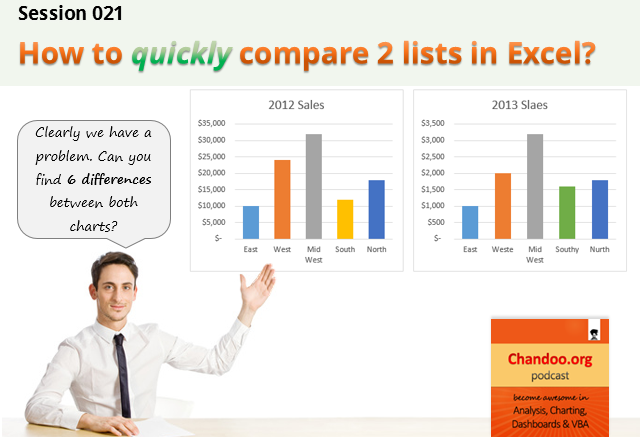
    In the 21st session of Chandoo.org podcast, lets compare lists. Quickly

    How to quickly compare 2 lists in Excel - CP021 - Become awesome in Excel, data analytics, charting, dashboards & VBA  - Chandoo.org Podcast.

    What is in this session?

    Comparing things is a favorite pastime for analysts all over the world. Sadly, it is also an area where we waste hours. So in this episode, I share my top secret comparison techniques to save you time.

    Note: This is a short format podcast. That means you spend less time listening to it, while becoming more awesome.

    In this podcast, you will learn,

    • Why I sound like I am on a secret mission at a mafia hideout.
    • 5 ways to compare 2 lists
      • Manual method
      • Conditional Formatting
      • Row Differences
      • LOOKUP formulas
      • COUNTIF formulas
    • Bonus tip: Removing duplicates
    • Conclusions

    Listen to this session

    Links & Resources mentioned in this session:

    Please go thru below links for example workbooks on each type of comparison.

    1. Comparing 2 lists in Excel using conditional formatting
    2. Comparing 2 lists using row differences
    3. Comparing 2 lists using various formula techniques
    4. Special case: Comparing 2 lists with conditions
    5. Special case: Comparing 2 lists of first & last names
    6. Special case: Compare 2 files side by side
    7. Removing duplicates in Excel

    Transcript of this session:

    Download this podcast transcript [PDF].

    How do you compare? Tell us quickly

    So how do you compare? My favorite methods are conditional formatting & COUNTIFS formulas. What about you? Please share your tips using comments.

    The post CP021: How to quickly compare 2 lists in Excel appeared first on Chandoo.org - Learn Excel, Power BI & Charting Online.


    CP020: Top 10 time saving strategies for business analysts Sep 18, 2014
    Show notes

    In the 20th session of Chandoo.org podcast, lets save some time.

    CP020: Top 10 time saving strategies for business analysts - Chandoo.org Podcast

    What is in this session?

    We all want to save time and stay productive. The obvious answer seems like using keyboard shortcuts. But they can only get you so far. So what about the real productive strategies? That is what we address in this podcast.

    In this podcast, you will learn,

    • Announcements
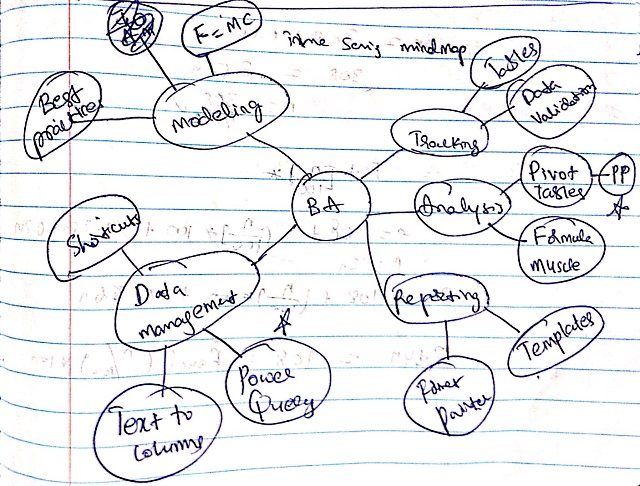
    • 5 key areas of business analyst work – tracking, analysis, reporting, data management & modeling
    • Time saving strategies for tracking
    • for analysis
    • for reporting
    • for data management
    • for modeling
    • Conclusions

    Here is a mind-map of this podcast.

    CP020 - Top 10 time saving strategies for business analysts - mindmap

    Listen to this session

    Links & Resources mentioned in this session:

    1. Tables: Use them to structure data & track easily
    2. Data validation: Use it to ensure that your input data is clean
    3. Pivot tables: help you quickly summarize data and get results (check out podcast session 18)
    4. Formulas: learn them to analyze better (also check out the podcast sessions 2 & 7)
    5. Format Painter: copy formatting from one range (or chart, object) to another easily
    6. Keyboard shortcuts: use them to save time (my favorite shortcuts podcast)
    7. Modeling best practices: Follow them to save time & create better models

    Transcript of this session:

    Download this podcast transcript [PDF].

    How do you save time? Tell us quickly

    So how do you save time when working with Excel? Please share your tips, suggestions and stories with us in the comments area. But be quick. I don’t want to waste time waiting for your comments 😉

    The post CP020: Top 10 time saving strategies for business analysts appeared first on Chandoo.org - Learn Excel, Power BI & Charting Online.


    CP019: 6 Tips for Best Practice Modeling – Interview with Danielle from Plum Solutions Sep 04, 2014
    Show notes

    In the 19th session of Chandoo.org podcast, lets talk about modeling best practices.

    CP019 - 6 tips for best practice modeling - Interview with Danielle from Plum Solutions - Chandoo.org Podcast - Become Awesome in Excel

    What is in this session?

    I am very happy to interview my good friend, blogger, author, excel trainer & business-women – Danielle Stein Fairhurst for this session. I first met Danielle when I went to Sydney, Australia in April 2012. Our friendship & collaboration grew a lot in the last 2.5 years. She is a great speaker & trainer. This episode is loaded with her trademark style commentary, explanation & tips for better modeling. I hope you will enjoy it.

    In this podcast, you will learn,

    • Introduction to Danielle & her work
    • 6 Tips for Best Practice Modeling
      • Write consistent formulas
      • Avoid hard-coding
      • Smart referencing
      • Ditch the bad habits
      • Document assumptions
      • Format & label things
    • Resources for learning more

    Go ahead and listen to the show

    Links & Resources mentioned in this session:

    Download Example Workbook

    Please download the example workbook Danielle created to understand these tips.

    About Danielle

    • Visit Plum Solutions: her website for more tips, tutorials & articles on modeling, data analysis & Excel
    • Get Danielle’s book: its great for both aspiring & working analysts (read my review)
    • Join Danielle’s linked group: and network with fellow financial modelers & professionals

    Learn how to create financial models in Excel

    • Here is a 6 part tutorial explaining the process of financial modeling using Excel

    On Modeling Best Practices

    • 5 tips on modeling best practices
    • BASE rule for keeping your models simple
    • 12 rules for making better Excel models
    • 10 tips for better workbooks
    • Introduction to Spreadsheet Risk Management

    Other topics relevant to the podcast:

    • Introduction to Excel Tables
    • Introduction to data validation

    Transcript of this session:

    Download this podcast transcript [PDF].

    What keeps your models sane & sexy?

    I use all the tips recommended by Danielle. Apart from these, I also use ideas like named ranges, structural references, separation of input & output to keep my models user friendly.

    What about you? Do you apply the tips suggested by Danielle? What else do you use to make your models awesome? Please share your tips & ideas using comments.

    The post CP019: 6 Tips for Best Practice Modeling – Interview with Danielle from Plum Solutions appeared first on Chandoo.org - Learn Excel, Power BI & Charting Online.


    CP018: Dont be a Pivot Table Virgin! Aug 21, 2014
    Show notes

    In the 18th session of Chandoo.org podcast, lets loose your Pivot table virginity.

    Note: This is a short format episode. Less time to listen, but just as much awesome.

    CP018: Don't be a Pivot Table Virgin! - Introduction to Excel Pivot Tables - Chandoo.org Podcast

    First some good news!

    Our podcast crossed 100k downloads. Yay!!!

    That is right. It took us 6 months & 17 episodes to reach this milestone.

    Thanks for loving Chandoo.org podcast. You are awesome.

    PS: If you have not already subscribed, get it here from iTunes (other ways to subscribe).

    What is in this session?

    Pivot tables are a very powerful & quick way to analyze data and get reports from Excel. But surprisingly, not many use them. Today, lets bust your pivot table virginity and understand the concepts like pivoting, values, labels, filters, groups and more.

    In this podcast, you will learn,

    • Announcements
    • What is a Pivot Table?
    • Example of business data & reporting needs
    • Terms to understand
      • Labels
      • Values
      • Groups
      • Filters
        • Report filters
        • Slicers
        • Label & Value filters
    • Creating your first pivot table
    • Learning more about pivot tables

    Go ahead and listen to the show

    Links & Resources mentioned in this session:

    Excel Pivot Tables – Introduction, Examples, Tutorials & Tips

    • Introduction & Pivot Table tutorial
    • Examples, Tips, Tutorials & more

    Advanced Pivot Table concepts

    • Introduction to Excel 2013 data model & relationship features
    • Grouping Data in Pivot Tables
    • Report Filters – what are they and how to use them?
    • Slicers – What are they and how to use [example dashboard]
    • Value filters – showing top 10 values

    Pivot Table uses & case studies

    • Show monthly values & % change in one pivot table
    • Matching transactions using pivot tables
    • Calculating conversion ratio using pivot tables
    • Selecting a random sample of data with pivot tables
    • More on Pivot tables

    Books & Courses on Pivot Tables

    • Recommended book: Excel 2013 pivot table data crunching by Mike Alexander & Bill Jelen
    • Recommended course: Excel School online training program

    Transcript of this session:

    Download this podcast transcript [PDF].

    You & Pivot tables… tell me all the racy stories

    I lost my pivot table virginity in 2005. But I quickly regained it as I did not use them much for next 3 years. Then I lost it for good and I am glad for that. Now a days, I use pivot tables almost every week. And they give me quick and easy solutions to many analytical problems I face.

    What about you? When did you loose your pivot table virginity? How do you use them every day? Please share your tips, stories & experiences in the comments area.

    The post CP018: Dont be a Pivot Table Virgin! appeared first on Chandoo.org - Learn Excel, Power BI & Charting Online.


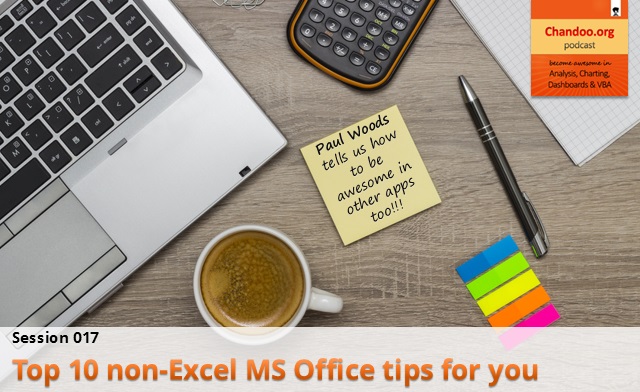
    CP017: Top 10 non-Excel MS Office tips for you – Interview with Paul Woods – Office MVP & Blogger Aug 14, 2014
    Show notes

    In the 17th session of Chandoo.org podcast, lets leave Excel aside and talk about other MS Office apps.

    Thats right. We will be learning 10 tips on how to use Word, Power Point, Outlook etc. Ready?

    CP017: Top 10 non-Excel MS Office tips for you - an interview with Paul Woods - Office 365 MVP

    What is in this session?

    A while ago, I got an email from Paul Woods. Paul is an Office 365 MVP, fellow blogger, father of twins and intrepreneur. Since we have several coincidences in our lives (both of us are MVPs since 2009, dads to twins, bloggers & started businesses), I wanted to know more about him. I invited him to a podcast interview so that he can tell us his story and teach us how to use MS Office better.

    In this podcast, you will learn,

    • About Paul
    • Ten tips for MS Office
    • 1. Use Excel to communicate instead of just calculations
    • 2. Paste Special
    • 3. Double click trick!
    • 4. Inserting screenshots
    • 5. Turning off notifications
    • 6. Reply with a meeting
    • Bonus tip: Type plain English notation of dates in meeting requests
    • 7. Outline view in Word
    • 8. Styles
    • 9. Presenting slides online
    • 10. Use One Note
    • Conclusions

    Go ahead and listen to the show

    Links & Resources mentioned in this session:

    Paul Woods websites

    Many thanks to Paul Woods for sharing beautiful tips with all of us in this podcast. Please visit his websites to know more about his work & life.

    • The New Paper Clip
    • Paul-Woods.com

    Follow up tricks

    • Format Painter (and 7 more formatting tips)
    • Format Painter for charts
    • Double click tricks in Excel
    • Using Paste Special in Excel

    Transcript of this session:

    Download this podcast transcript [PDF].

    What are your favorite non-Excel office tips?

    I like the tips about outline view & presenting online from this podcast. Apart from these 10, I also like alignment tools, slide transitions in Power Point, mail merge in Word.

    What about you? What are your favorite non-Excel Office tips? Please share using comments.

    Subscribe to Chandoo.org Podcast

    Other options to subscribe

    The post CP017: Top 10 non-Excel MS Office tips for you – Interview with Paul Woods – Office MVP & Blogger appeared first on Chandoo.org - Learn Excel, Power BI & Charting Online.


    CP016: 3 Must have books for aspiring analysts Aug 07, 2014
    Show notes

    In the 16th session of Chandoo.org podcast, lets review 3 very useful books for aspiring analysts.
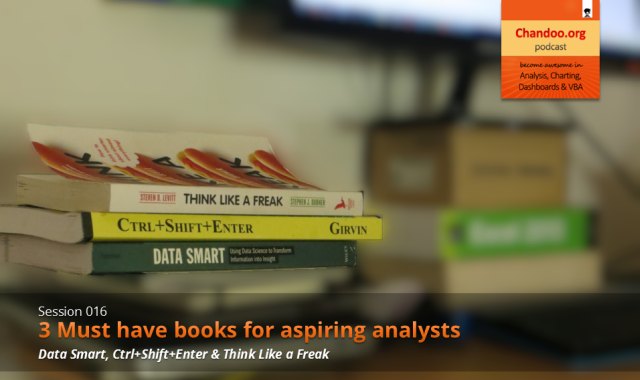
    CP016: 3 Must have books for aspiring analysts - Chandoo.org podcast - become awesome in data analysis, charting, dashboards & VBA using Excel

    What is in this session?

    Analytics is an increasingly popular area now. Every day, scores of fresh graduates are reporting to their first day of work as analysts. But to succeed as an analyst?

    By learning & practicing of course.

    And books play a vital role in opening new pathways for us. They can alter the way we think, shape our behavior and make us awesome, all in a few page turns.

    So in this episode, let me share 3 must have books for (aspiring) analysts.

    Note: these are not only 3 books you should read. But these 3 are the ones I am reading now and I think they will certainly help you.

    Participate in our Analyst Book Giveaway & win:

    • You could win a copy of any of these 3 books.
    • Last date: 15-AUG-2014 – Friday.

    Listen to the podcast to know how to participate.

    This podcast is essentially a review of the 3 books – Data Smart by John Foreman, Ctrl+Shift+Enter by Mike Girvin & Think Like a Freak by Steven Levitt & Stephen Dubner.

    Data Smart by John Foreman

    • Why this book?
    • About John Foreman
    • Writing style
    • Example chapter

    Ctrl+Shift+Enter – Mastering Array Formulas by Mike Girvin

    • Why this book?
    • About Mike Girvin
    • Writing style
    • Example Array Formulas

    Think Like a Freak by Steven Levitt & Stephen Dubner

    • Why a non-Excel book?
    • About authors
    • Writing style
    • Example Chapter on Takeru Kobayashi

    Note about the book links: These are affiliate links. It means, when you click on them and purchase a copy of the book, Chandoo.org receives a small commission. I recommend these books because I really enjoy them and I genuinely think they will benefit you. I would have recommended them even when there is no commission involved.

    Go ahead and listen to the show

    Links & Resources mentioned in this session:

    About the bicycle ride

    • Story of the ride
    • Snap-shot of the ride stats dashboard
    • Download dashboard workbook

    Excelapalooza Excel conference:

    • Know about this conference
    • Sign-up with 10% discount

    Advanced Excel, Dashboards & Power Pivot Masterclass:

    • Download masterclass brochure
    • Sign-up for the masterclass

    More on Array Formulas:

    • Formula Forensics – Array & complex formulas analyzed for you
    • Array Formulas page on Chandoo.org

    Transcript of this session:

    Download this podcast transcript [PDF].

    Which is your favorite book for analysts?

    I read quite a few books every year. Apart from these three, I also enjoy and recommend these books.

    What about you? What is your favorite book for analysts? Please share your thoughts in comments.

    Participate in our Analyst Book Giveaway & win:

    • You could win a copy of any of these 3 books.
    • Last date: 15-AUG-2014 – Friday.

    Listen to the podcast to know how to participate.

    Also on Analytics:

    • 6 rules to become a better analyst
    • Top 10 formulas for analysts
    • How do business analysts use Excel – a case study

    The post CP016: 3 Must have books for aspiring analysts appeared first on Chandoo.org - Learn Excel, Power BI & Charting Online.


    CP015: Handling big data, Controlling model railroad sets, Overcoming Excel obsession & more – ASK CHANDOO Jul 24, 2014
    Show notes

    In the 15th session of Chandoo.org podcast, lets answer some of your burning Excel questions.

    Handling big data, Controlling model railroad sets, Overcoming Excel obsession & More - ASK CHANDOO

    What is in this session?

    Around last week, I invited you to ask me anything. More than 150 people responded to this call and sent in their questions. Since answering all the questions is not possible, I handpicked roughly 10 questions to answer in this episode of Chandoo.org podcast.

    In this podcast, you will learn,

    1. How to fill blank cells with data from above
    2. How to work with Big data in Excel
    3. How to combine data from multiple sources & analyze it in Excel
    4. How I am managing my life after starting Chandoo.org
    5. How to create and distribute stand-alone Excel products
    6. How to control a model railroad set using Excel VBA (not fully answered)
    7. How to control a pivot report with a form control or data validation drop-down
    8. How to overcome Excel obsession
    9. How to calculate average of 4 successive numbers

    Go ahead and listen to the show

    Links & Resources mentioned in this session:

    Filling blank cells with values from above:

    Fill blank cells with values from above - quick excel tip

    Here is an article that explains the process in detail.

    Controlling pivot tables with form controls + VBA

    Here is a detailed tutorial explaining the process.

    Calculating average of 4 successive numbers

    Here is an example file with solution for this problem.

    Formulas & Tricks mentioned in this podcast:

    • OFFSET formula
    • AVERAGEIF formula – Examples
    • Go to special – a short guide

    Resources for working with big data / multiple data sets:

    • undefined

    • Download Power Pivot
    • Download Power Query

    Transcript of this session:

    Download this podcast transcript [PDF].

    So who gets the free 25 Excel tips e-Book?

    Every one. Thats right. Since I got many more questions than I could answer, the least I can do is make you awesome in a small way. So here we go.

    Click here to download your copy of 25 tips eBook.

    Read it, use the tips and become awesome.

    Subscribe to Chandoo.org Podcast

    Other options to subscribe

    The post CP015: Handling big data, Controlling model railroad sets, Overcoming Excel obsession & more – ASK CHANDOO appeared first on Chandoo.org - Learn Excel, Power BI & Charting Online.


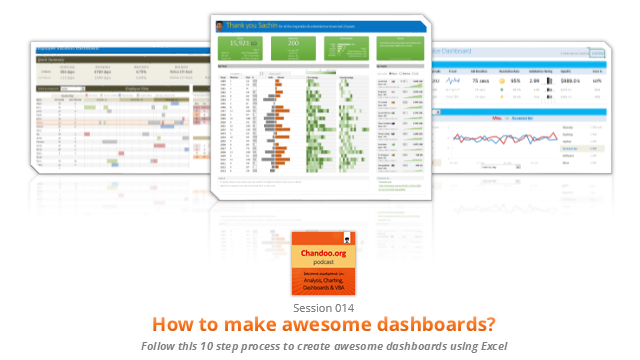
    CP014: How to create awesome dashboards – 10 step process for you Jul 10, 2014
    Show notes

    In the 14th session of Chandoo.org podcast, lets figure out how to make awesome dashboards.

    CP014: How to create awesome dashboards - 10 step process for you

    What is in this session?

    Excel dashboards are much in demand these days, thanks to advancements in Excel & growing pressure on costs. Now a days, analysts & managers are expected to quickly put together a dashboard using Excel. But how do you make a dashboard? What process you should follow?These are the questions we address in this podcast.

    In this podcast, you will learn,

    • Announcements about upcoming dashboard classes
    • Ten step process for creating awesome dashboards
    • 1. Talk to your end users
    • 2. Make a sketch of the dashboard
    • 3. Validate your understanding
    • 4. Collect data
    • 5. Structure the data
    • …

    Go ahead and listen to the show

    Links & Resources mentioned in this session:

    Excelapalooza Excel conference:

    • Know about this conference
    • Sign-up with 10% discount

    Advanced Excel, Dashboards & Power Pivot Masterclass:

    • Download masterclass brochure
    • Sign-up for the masterclass

    Creating Dashboards – complete tutorials:

    • Creating a KPI Dashboard – 6 part tutorial
    • Customer service dashboard using Excel
    • Employee vacation tracker dashboard
    • More tutorials, examples & information about dashboards

    Dashboard Examples & Inspiration:

    • 49 dashboards on State to state migration in USA
    • 66 dashboards visualizing salaries of Excel professionals
    • 32 sales dashboards
    • 78 Sales analytic charts & dashboards
    • More dashboard examples & case studies

    Creating Dynamic Charts:

    • Examples of dynamic charts
    • Introduction to Form controls – article, podcast

    Transcript of this session:

    Download this podcast transcript [PDF].

    What process do you follow to create dashboards?

    I have been following this 10 step process for the last 8 years with great success. Not only this process is easy to follow, but also it reduces the scope of errors significantly.

    So what about you?What process do you follow when creating dashboards? Please share your thoughts & experiences using comments.

    Subscribe to Chandoo.org Podcast

    Other options to subscribe

    The post CP014: How to create awesome dashboards – 10 step process for you appeared first on Chandoo.org - Learn Excel, Power BI & Charting Online.


    CP013: Is this a FIFA worldcup of late goals, lets ask Excel [How to analyze data to answer questions like these…] Jul 03, 2014
    Show notes

    In the 13th session of Chandoo.org podcast, lets turn our attention to on-going FIFA worldcup and ask an important question.

    CP013 - Has it been a late goal worldcup? How to analyze data to answer questions like these...

    What is in this session?

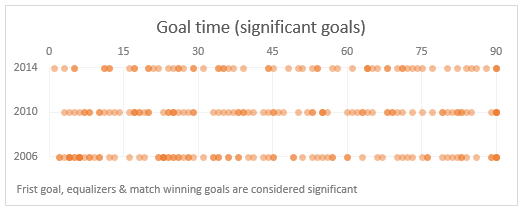
    Goal distribution (significant goals only) in FIFA worldcups - 2006, 2010 & 2014A week ago, we discussed “Has it been a late goal FIFA worldcup?” and used various charts & analysis techniques to answer the question. In podcast, lets tackle the same problem, understand various approaches to answer questions like these & shares some lessons for all the analysts.

    In this podcast, you will learn,

    • A familiar problem in many situations (including sports)
    • First rule of analysis – Define context
    • Various attempts to understand goal timing data of FIFA worldcups
    • Lessons for analysts
    • Bonus tip: Friday the 13th calculations using Excel

    Go ahead and listen to the show

    Links & Resources mentioned in this session:

    About data analysis & charting:

    • Has it been a late goal FIFA worldcup – analysis & charts
    • How to select right type of charts for your analysis needs
    • GOOOOOOOAL – Goal timing analysis by Economist [Recommended reading]
    • Messi is impossible by FiveThrityEight [Recommended reading]
    • Understanding & visualizing Roger Federer’s 7th Wimbledon win [Recommended reading]

    Friday the 13th:

    • Calculating next Friday the 13th using Excel

    Transcript of this session:

    Download this podcast transcript [PDF].

    What kind of questions do you face in business analysis? How do you try to answer them?

    While our example is on football, the same kind of questions are asked everywhere. Many businesses, non-profits, institutions & individuals ask these questions every day and struggle to find right answers.

    So what about you? What kind of interesting questions do you face in business analysis? And how do you answer them? Please share your experiences in comments area.

    Subscribe to Chandoo.org Podcast

    Other options to subscribe

    The post CP013: Is this a FIFA worldcup of late goals, lets ask Excel [How to analyze data to answer questions like these…] appeared first on Chandoo.org - Learn Excel, Power BI & Charting Online.


    Previous 1 3 4 5 6 7 Next

    Related Podcasts

    Reply All

    1

    Reply All Games & Hobbies
    Inside VR & AR

    2

    Inside VR & AR Gadgets
    Note to Self

    3

    Note to Self News
    BrainStuff

    4

    BrainStuff Natural Sciences
    This Week in Tech (Audio)

    5

    This Week in Tech (Audio) News
    Hands-On Tech (Audio)

    6

    Hands-On Tech (Audio) Technology
    footer-logo

    Contact Us

    Toll Free: 844-670-7747

    Links

    • Home
    • Top Charts
    • Networks
    • Apps
    • Independents Podcasts
    • Podcast Advertising
    • Podcast News
    • Contact Us
    • About Us
    • Analytics & Insights

    Stay Connected

      Privacy, Terms of Use & Our Code of Ethics Protecting Content Creators Copyrights